How It Works#
The Live Video Alert Agent is a multi-layered application that ingests RTSP video streams, applies VLM-based scene understanding, and delegates configurable action dispatch to the external alert-agent-service over HTTP.
Architecture Overview#
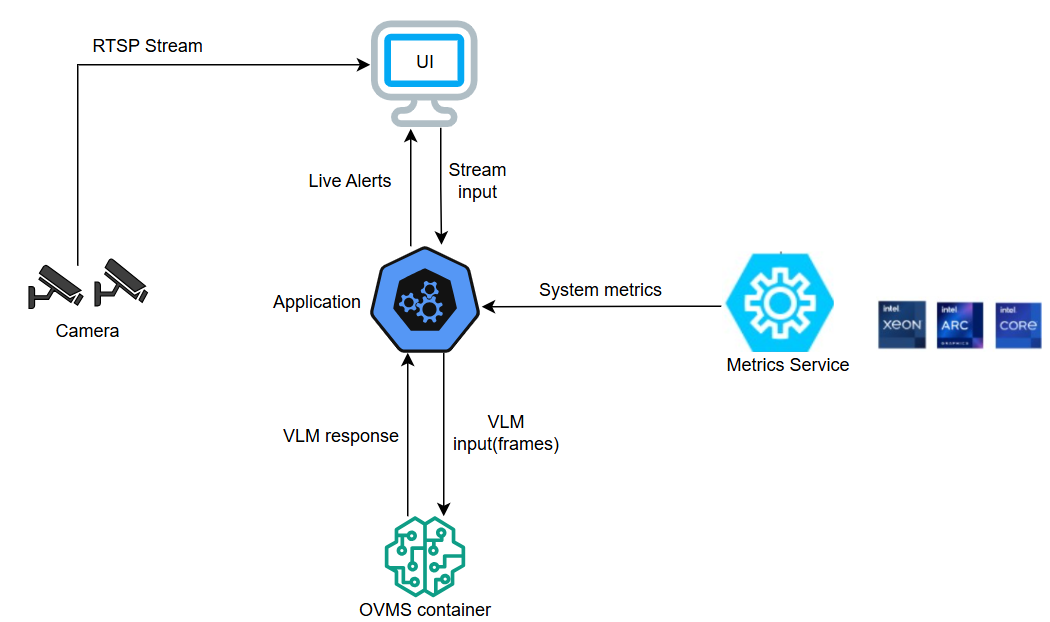
Data Flow#
RTSP Sources (N cameras)
     │
     ▼
LiveStreamManager × N          grab()/retrieve() throttled decode
     │                         exponential-backoff reconnection
     │  frame (latest)
     ▼
AgentManager                   one asyncio.Task per stream (concurrent)
  ├─ VlmClient ──────────────► OVMS / OpenAI-compatible VLM
  │   └─ retry + backoff       Phi-3.5-Vision | InternVL2-2B ...
  │
  ├─ AlertStateManager         per-stream × per-alert runtime state
  │   ├─ cooldown gate         suppresses repeat firings
  │   ├─ consecutive counter   detects persistent conditions
  │   └─ escalation trigger    promotes alert tier after N consecutives
  │
  ├─ AlertServiceClient ─────► alert-agent-service (HTTP POST)
  │                             dispatches tools via ADK or rule-based mode
  │                             tools: log_alert, capture_snapshot,
  │                                    trigger_webhook, publish_mqtt, MCP tools
  │
  ├─ MCP Client (optional)     Model Context Protocol integration
  │   └─ External MCP servers  discover tools for status/monitoring
     │
     ▼
EventManager (SSE pub/sub)     alerts fan-out to all connected browsers
     │
     ▼
Dashboard UI                   real-time stream tiles, alert feed
Key Components#
LiveStreamManager#
Each registered camera has its own LiveStreamManager running in a daemon thread.
Uses
cv2.VideoCapture.grab()followed byretrieve()to skip deep-decode on unused frames, reducing CPU usage proportionally to the gap between capture FPS and analysis FPS.Frame interval is controlled by
CAPTURE_FPS(default: auto-derived fromANALYSIS_INTERVAL).Reconnects on drop-out with exponential back-off (2 s → 30 s).
Exposes a
get_health()method returning connection status, actual FPS, resolution, and buffer fill level.
AgentManager#
The central orchestrator. Instead of a single serial loop across all cameras, each
stream gets an independent asyncio.Task:
add_stream("cam1", ...) → _launch_stream_task("cam1")
add_stream("cam2", ...) → _launch_stream_task("cam2")

cam1-task: _stream_analysis_loop() running every ANALYSIS_INTERVAL seconds
cam2-task: _stream_analysis_loop() running every ANALYSIS_INTERVAL seconds
Failed or cancelled tasks are automatically restarted via an add_done_callback.
VlmClient#
Thin async wrapper around openai.AsyncOpenAI, targeting OVMS (OpenVINO Model
Server) via its OpenAI-compatible REST API.
Sends a
systemrole message (VLM system instruction) plus ausermessage containing the base64-encoded frame and the structured alert prompt.Retries failed calls up to
VLM_MAX_RETRIEStimes with exponential back-off.Alert prompts are serialised with
json.dumps— not f-strings — to prevent prompt-injection from user-supplied alert names or text.
AlertStateManager#
Maintains per-stream × per-alert runtime state without any database dependency:
State field |
Purpose |
|---|---|
|
Timestamp of last tool execution |
|
Counts unbroken YES detections; triggers escalation |
|
Detects state transitions (NO→YES, YES→NO) |
process() returns (should_act, is_escalation, is_transition) so the manager
can decide whether to invoke tools and which tier of tools to use.
AlertServiceClient#
AlertServiceClient is the live-video-alert-agent’s async HTTP integration point for action dispatch.
Reads
ALERT_AGENT_SERVICE_URL(default:http://alert-agent-service:8000/api/v1) andALERT_AGENT_SERVICE_TIMEOUT(default: 30 s).Sends alert context, selected tool names, per-tool arguments, metadata, and an optional JPEG-encoded frame to the alert-agent-service via HTTP POST.
Keeps the video analysis service decoupled from Google ADK, local tool registries, webhook/MQTT implementations, and LLM endpoint management.
Receives normalized execution results such as
actions_taken,duration_ms, andsnapshot_path, which are then published to the UI as alert events.
The alert-agent-service owns the ADK-powered and rule-based execution modes, so the live-video-alert-agent no longer embeds an action agent locally.
Action Tools#
Action tools are no longer implemented inside the live-video-alert-agent process. Instead, they are registered and executed by the external alert-agent-service.
Typical tools provided by that service include:
log_alertcapture_snapshottrigger_webhookpublish_mqttMCP-backed tools exposed by the alert-agent-service
Tools are still referenced per alert through AlertConfig.tools and
AlertConfig.escalation.additional_tools, but the /tools,
/tools/{name}/invoke, and /tools/reload endpoints in the live-video-alert-agent
now proxy requests to the alert-agent-service.
Alert Configuration Schema#
Each alert is described by an AlertConfig Pydantic model:
{
  "name": "Fire Detection",
  "prompt": "Is there fire or smoke visible?",
  "enabled": true,
  "tools": ["log_alert", "capture_snapshot"],
  "tool_arguments": {
    "trigger_webhook": {"stream_id": "{{stream_id}}", "severity": "{{severity}}"}
  },
  "escalation": {
    "threshold_consecutive": 3,
    "additional_tools": ["trigger_webhook", "publish_mqtt"]
  }
}
Field |
Values |
Description |
|---|---|---|
|
list of tool names |
Tools invoked when alert fires |
|
object |
Per-tool keyword argument overrides; supports |
|
integer ≥ 2 |
Consecutive YES count before escalation |
|
list of tool names |
Extra tools added on escalation |
Event Types#
The SSE stream (GET /events) emits four event types:
Event |
When |
|---|---|
|
On SSE connect — current streams + latest results |
|
Each VLM analysis cycle completes |
|
Alert fired and tools were invoked |
|
Every 15 s to prevent proxy timeouts |
MCP Integration#
The agent still supports connecting to external Model Context Protocol (MCP) servers for status visibility and monitoring-oriented tool discovery.
MCPClient#
The MCPClient module manages lifecycle for one or more MCP servers configured in
resources/mcp_servers.json. Supported transports:
Transport |
When to use |
|---|---|
|
Remote HTTP MCP server (MCP Streamable HTTP protocol) |
|
Remote SSE-based MCP server |
|
Local subprocess MCP server |
At startup, if MCP_ENABLED=true, the agent:
Reads
resources/mcp_servers.jsonConnects to each enabled server and performs the MCP
initializehandshakeCalls
tools/listto discover available toolsExposes the discovered tool inventory through local MCP status/inspection endpoints, while action-dispatch tool registration is handled by the alert-agent-service
Leaves ADK tool-calling and alert-time MCP dispatch to the alert-agent-service rather than reinitialising a local action agent