Migrate to the OpenVINO Runtime#
OpenVINO is an Intel-optimized inference engine. Implementing it into your pipeline does not require a massive redesign, you can do it with just a few lines of code and the model you already use - OpenVINO works with most mainstream model frameworks.
Many models will work with OpenVINO directly, no additional effort required. For the best performance results, the toolkit enables you to easily convert your model to OpenVINO IR.
You can also get pre-converted models from OpenVINO in Hugging Face.
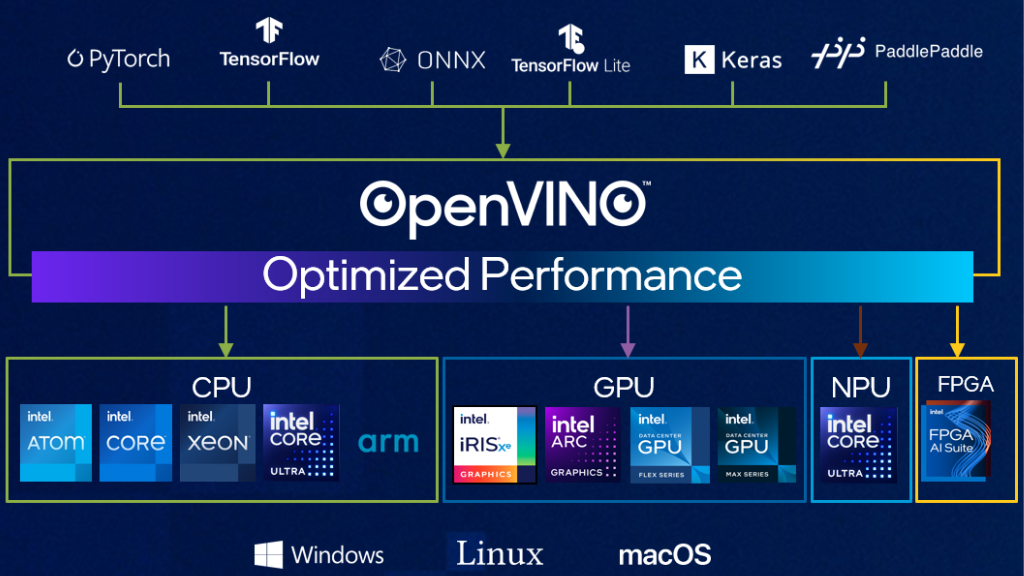
Implement OpenVINO#
For the full description of how to deploy the OpenVINO runtime, as well as other components of the toolkit, check out the OpenVINO documentation.
There are several API paths you can take:
OpenVINO Runtime (standard API)
Best performance, custom pipelines, and full control.
Leverage per IP/core tuning and load balancing.
Design AI pipelines using conventional AI workflows & OpenVINO Gen AI.
Access Python, C++, and JavaScript APIs.
OpenVINO GenAI
Create GenAI pipelines with 2-3 lines of code in Python and C++.
Support GenAI use cases: Text Generation, Image Generation, Speech Transcription, Image Processing, Text-to-Speech, and Text Embeddings pipelines.
Integrated Tokenization & LoRA Support.
OpenVINO Model Server
Integrate OpenVINO runtime without code changes.
Scale use cases with fast, large bandwidth networks & multiple processing units.
Works seamlessly across conventional and GenAI workflows.
Your current API
Stay in preferred APIs.
Support easy cross-platform migration.
Enable Intel hardware optimizations with just a few lines of code.
Running the standard API#
You can run your model with just a few lines of code:
import openvino as ov
img = load_img()
core = ov.Core()
model = core.read_model(model="model.xml")
compiled_model = core.compile_model(model=model, device_name="CPU")
output_layer = compiled_model.outputs[0]
result = compiled_model(img)[output_layer]
Running the GenAI pipeline#
Delivers production-grade abstraction layer that eliminates complexity while preserving advanced gen AI performance techniques with automatic optimizations:
import openvino_genai as ov_genai

pipe = ov_genai.LLMPipeline(model_path, "GPU")
print(pipe.generate("What is OpenVINO?", max_length=200))
Enabling Intel acceleration:#
OpenVINO may be easily integrated with multiple popular inferencing libraries and frameworks. By using it as a backend, you can keep your existing setup and still benefit from Intel® accelleration.
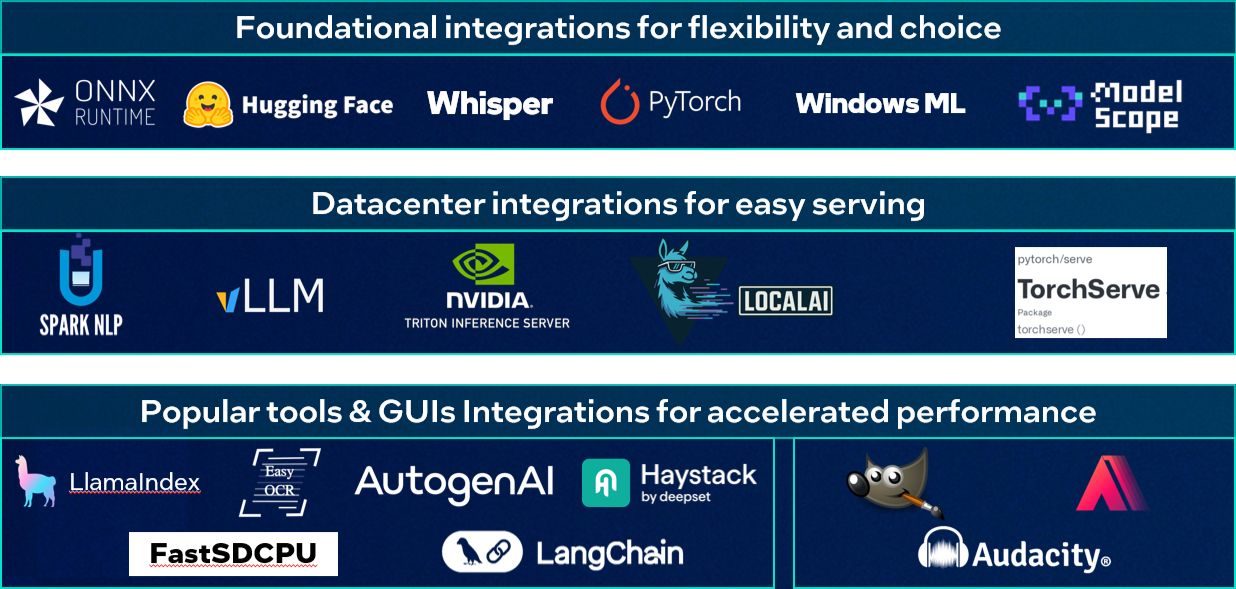
Here is how easy it is to implement OpenVINO:
import openvino.torch
#compile PyTorch model as usual with PyTorch
compiled_model = torch.compile(model, backend="openvino", options = {"device" : "CPU"})
from optimum.intel import OVModelForCausalLM
#define model_id, use transformers tokenizer & pipeline
model = OVModelForCausalLM.from_pretrained(model_id)
pipe = pipeline("text-generation", model=model, tokenizer=tokenizer)
onnx_model = onnx.load("model.onnx")
onnx.save_model(onnx_model, ‘saved_model.onnx’)
sess.set_providers([‘OpenVINOExecutionProvider’])
$ docker run --rm -p 8000:8000 -p 8001:8001 -p 8002:8002 -v /path/to/model_repository:/models nvcr.io/nvidia/tritonserver:<xx.yy>
py3 tritonserver --model-repository=/models
Config File
name: “model_a”
backend: “openvino”
You can find more information on this topic in OpenVINO Porting Guide (downloadable pptx playbook).