gvagenai#
Performs inference with Vision Language Models using OpenVINO™ GenAI. Accepts video and text prompts as input, and outputs text description. It can be used to generate text summarizations from video.
Visual Language Models supported by OpenVINO™ GenAI
Prerequisites steps for Ubuntu
Overview#
The gvagenai element runs a Vision Language Model over a video stream using the
OpenVINO™ GenAI VLMPipeline. It samples frames, groups them into fixed-size chunks, runs
one text-generation pass per chunk against a text prompt, and attaches the generated text
(plus optional performance metrics) as metadata. Pixel data is not modified.
Key operations:
Frame sampling:
frame-rateselects how many frames per second are forwarded to the model (0= all frames).Chunking:
chunk-sizeframes are accumulated, then submitted together as one inference. Frames are presented either as independent images or as a single video clip (see Vision Mode).Text generation: the prompt (
promptorprompt-path) and the accumulated frames are passed to the VLM. Decoding is controlled bygeneration-config; batching/KV-cache behavior byscheduler-config; device tuning bypipeline-config.Metadata attachment: the result is attached as JSON and classification metadata (see Metadata).
Properties#
Property |
Type |
Description |
Default |
|---|---|---|---|
backend |
String |
Inference backend: |
openvino-genai |
model-path |
String |
Path to the local OpenVINO™ GenAI VLM model directory ( |
null |
device |
String |
Inference device: |
CPU |
prompt |
String |
Text prompt for the model. Exactly one of |
null |
prompt-path |
String |
Path to a text file containing the prompt. Alternative to |
null |
generation-config |
String |
Text-generation parameters as |
null |
scheduler-config |
String |
Continuous-batching scheduler parameters as |
null |
pipeline-config |
String |
OpenVINO™ device properties as |
null |
vision-mode |
Enum |
How accumulated frames are presented to the model: |
image |
frame-rate |
Double |
Frames sampled per second for inference. |
0 |
chunk-size |
Unsigned Integer |
Number of frames accumulated per inference call. |
1 |
model-cache-path |
String |
Directory for caching compiled models (GPU/NPU only). Used by the |
ov_cache |
metrics |
Boolean |
Include performance metrics in the JSON output. |
false |
http-server-url |
String |
Base URL of the OpenAI-compatible server (e.g. |
null |
http-api-key |
String |
Optional Bearer token / API key for the HTTP server. |
null |
http-timeout |
String |
Optional request timeout in milliseconds. |
null |
Configuration#
Backend#
The backend property selects the inference backend:
Value |
Behavior |
|---|---|
|
(default) Runs the model locally via the OpenVINO™ GenAI |
|
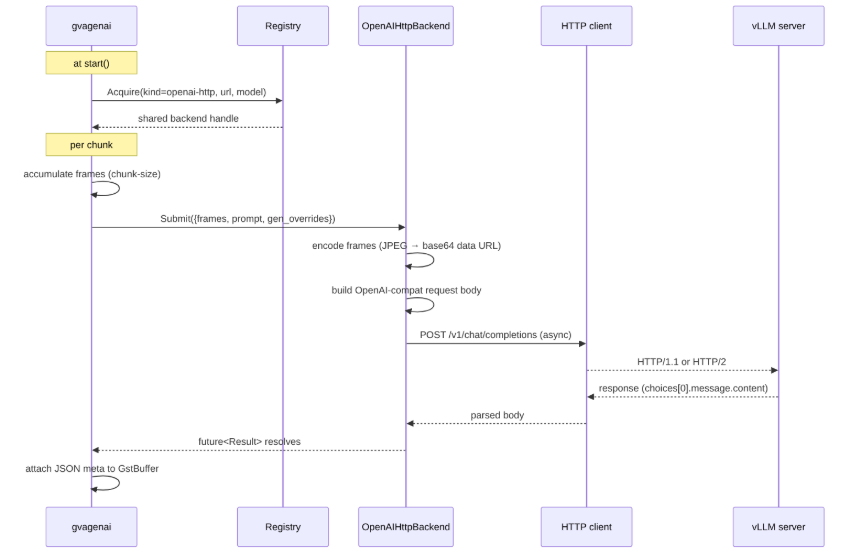
Sends frames and the prompt to a remote OpenAI-compatible Chat Completions server (vLLM, OVMS, Ollama, LM Studio, OpenAI, Azure OpenAI, …). Uses |
With openai-http, frames are always sent as independent images (base64-encoded JPEG
data URLs) regardless of vision-mode, since the Chat Completions API has no video content
type. scheduler-config, pipeline-config, device, and model-cache-path are ignored by
this backend.
The diagram below shows the high-level architecture (HLD) of how a chunk of frames flows
from gvagenai through the openai-http backend to the remote server:
Generation Config#
The generation-config property accepts config parameters in
the KEY=VALUE,KEY=VALUE format. For detailed information about these
parameters, refer to the OpenVINO™ GenAI GenerationConfig
documentation
and Optimization Techniques.
Available generation-config keys:
Key |
Type |
Comment |
|---|---|---|
max_new_tokens |
Integer |
Default: 100 |
max_length |
Integer |
|
ignore_eos |
Boolean |
|
min_new_tokens |
Integer |
|
eos_token_id |
Integer |
|
stop_strings |
String |
Semicolon-separated, e.g. |
include_stop_str_in_output |
Boolean |
|
stop_token_ids |
Integer |
Semicolon-separated, e.g. |
repetition_penalty |
Float |
|
presence_penalty |
Float |
|
frequency_penalty |
Float |
|
num_beams |
Integer |
|
num_beam_groups |
Integer |
|
diversity_penalty |
Float |
|
length_penalty |
Float |
|
num_return_sequences |
Integer |
|
no_repeat_ngram_size |
Integer |
|
stop_criteria |
Enum |
|
do_sample |
Boolean |
|
temperature |
Float |
|
top_p |
Float |
|
top_k |
Integer |
|
min_p |
Float |
|
rng_seed |
Integer |
|
pruning_ratio |
Integer |
CDPruner; |
relevance_weight |
Float |
CDPruner |
assistant_confidence_threshold |
Float |
|
num_assistant_tokens |
Integer |
|
max_ngram_size |
Integer |
|
apply_chat_template |
Boolean |
Boolean values are case-insensitive and accept true/false, 1/0, yes/no,
or on/off. The same accepted forms apply to booleans in scheduler-config
and pipeline-config.
pruning_ratio and relevance_weight configure CDPruner visual-token pruning.
pruning_ratio=0 (default) disables pruning.
For more information, see Visual Token Pruning.
Note
Structured output (json_schema, regex, grammar, backend), is currently not
supported. Those values contain special characters (commas, spaces and =)
which cannot fit the KEY=VALUE,KEY=VALUE grammar.
Example:
generation-config="max_new_tokens=100,temperature=0.7,do_sample=true"
Scheduler Config#
The scheduler-config property accepts config parameters in the
KEY=VALUE,KEY=VALUE format. For detailed information about these
parameters, refer to the OpenVINO™ GenAI SchedulerConfig
documentation
and Optimization Techniques.
Available scheduler-config keys:
Key |
Type |
Comment |
|---|---|---|
max_num_batched_tokens |
Integer |
|
num_kv_blocks |
Integer |
|
cache_size |
Integer |
|
num_linear_attention_blocks |
Integer |
|
cache_interval_multiplier |
Integer |
|
dynamic_split_fuse |
Boolean |
|
use_cache_eviction |
Boolean |
Enables the |
max_num_seqs |
Integer |
|
enable_prefix_caching |
Boolean |
|
use_sparse_attention |
Boolean |
Enables the |
cache_eviction_start_size |
Integer |
|
cache_eviction_recent_size |
Integer |
|
cache_eviction_max_cache_size |
Integer |
|
cache_eviction_aggregation_mode |
Enum |
|
cache_eviction_apply_rotation |
Boolean |
|
cache_eviction_snapkv_window_size |
Integer |
|
cache_eviction_kvcrush_budget |
Integer |
KVCrush blocks; |
cache_eviction_kvcrush_rng_seed |
Integer |
|
cache_eviction_kvcrush_anchor_point_mode |
Enum |
|
cache_eviction_adaptive_rkv_attention_mass |
Float |
Used with |
cache_eviction_adaptive_rkv_window_size |
Integer |
Used with |
sparse_attention_mode |
Enum |
|
sparse_attention_num_last_dense_tokens_in_prefill |
Integer |
|
sparse_attention_num_retained_start_tokens_in_cache |
Integer |
TRISHAPE mode |
sparse_attention_num_retained_recent_tokens_in_cache |
Integer |
TRISHAPE mode |
sparse_attention_xattention_threshold |
Float |
XATTENTION mode |
sparse_attention_xattention_block_size |
Integer |
XATTENTION mode |
sparse_attention_xattention_stride |
Integer |
XATTENTION mode |
cache_eviction_* keys take effect only when use_cache_eviction=true, and
sparse_attention_* keys only when use_sparse_attention=true. The KVCrush
algorithm (cache_eviction_kvcrush_*) cannot be combined with the ADAPTIVE_RKV
aggregation mode.
Example:
scheduler-config="max_num_batched_tokens=256,cache_size=10,use_cache_eviction=true"
Pipeline Config#
The pipeline-config property accepts OpenVINO™ device properties in the
KEY=VALUE,KEY=VALUE format. These are passed to the pipeline at construction and
coerced to the expected type by the plugin. Refer to the OpenVINO™ Query Device Properties - Configuration
for overview on setting and getting device properties.
Example:
pipeline-config="CACHE_MODE=OPTIMIZE_SPEED"
This sets CACHE_MODE (OPTIMIZE_SPEED or OPTIMIZE_SIZE), controls model-cache behaviour.
Per-device properties#
A key of the form DEVICE.PROPERTY nests PROPERTY under that device’s property block
({"DEVICE_PROPERTIES": {"DEVICE": {...}}}), while un-dotted keys remain top-level.
This is required for NPU KV-cache sizing on many VLMs, where the language-model
sub-graph is compiled for NPU and needs MAX_PROMPT_LEN / MIN_RESPONSE_LEN set on the
NPU device block specifically. See the Inference with OpenVINO™ GenAI on NPU guide
for NPU-specific keys such as GENERATE_HINT and PREFILL_HINT.
Example:
pipeline-config="NPU.MAX_PROMPT_LEN=2048,NPU.MIN_RESPONSE_LEN=512"
This sets MAX_PROMPT_LEN and MIN_RESPONSE_LEN on the NPU device block.
Vision Mode#
The vision-mode property controls how the frames accumulated for one inference
(chunk-size frames) are presented to the model:
Value |
Behavior |
|---|---|
|
(default) Frames are sent as independent images. Works with any VLM. |
|
Frames are sent as a single video clip. Requires a video-capable model. |
In video mode the frames are stacked into one clip and tagged with the model’s native
video tag, so the model receives temporal context (frame ordering and, when available,
playback rate) rather than a set of unrelated stills. This is the correct mode for tasks
like action recognition or “describe what happens over time”.
Video mode requires a model that supports video input, for example Qwen2-VL,
Qwen2.5-VL, Qwen3-VL or LLaVA-NeXT-Video. Image-only models (e.g. Phi-3.5-vision,
MiniCPM-V) must use image mode. For more information, see Use Image or Video Tags in Prompt.
The clip’s frame rate is derived automatically from the input stream and the frame-rate
sampling property. For a single frame (chunk-size=1), image mode is preferred.
Example:
vision-mode=video chunk-size=16 frame-rate=2
Input/Output#
Input:
video/x-rawinRGB,RGBA,RGBx,BGR,BGRA,BGRx,NV12, orI420; alsovideo/x-raw(memory:DMABuf)(DMA_DRM) andvideo/x-raw(memory:VAMemory)(NV12) on Linux, andvideo/x-raw(memory:D3D11Memory)(NV12) on Windows. The element converts the frame to RGB internally; an explicitvideoconvertis not required.Output: identical to input. The element operates in-place, pixel data is passed through unchanged and only metadata is added.
Metadata#
gvagenai attaches the generated text as metadata rather than modifying the frame:
GstAnalyticsClsMtd: the classification metadata, added on every frame once a result exists (the latest result persists across frames until the next inference). It carries the result as label + confidence on the buffer’sGstAnalyticsRelationMeta.GstGVAJSONMeta: added on inference frames only (when a chunk completes). Itsmessageis a JSON string with the generatedresult, aconfidencescore (when available), the frametimestamp/timestamp_seconds, and optionally ametricsblock (load time, token counts, and latency/throughput statistics in milliseconds). Consume it withgvametapublish. Avoid placing agvametaconvertaftergvagenai, it will produce a second JSON message from the classification metadata, which is distinct from (and lacks the metrics/timestamp of) the onegvagenaialready wrote.
Confidence semantics: for beam search or sampling, confidence is the per-token geometric-mean probability in [0, 1]. For greedy decoding the pipeline does not compute per-token scores, so confidence is unavailable and omitted from the JSON and reported as 0 in the classification metadata.
Pipeline Examples#
A script with source selection, scaling, and all options is provided in samples/gstreamer/gst_launch/gvagenai.
Video summarization to JSON#
gst-launch-1.0 filesrc location=video.mp4 ! decodebin3 ! \
  gvagenai model-path=${GENAI_MODEL_PATH} device=CPU \
    prompt="Describe what you see in this video." \
    generation-config="max_new_tokens=100" \
    frame-rate=1 chunk-size=10 ! \
  gvametapublish file-path=genai_output.json ! \
  fakesink async=false
Overlay the result on the video#
gst-launch-1.0 filesrc location=video.mp4 ! decodebin3 ! \
  gvagenai model-path=${GENAI_MODEL_PATH} prompt="Describe the scene." chunk-size=10 ! \
  gvawatermark ! autovideosink
Processing Pipeline#
On
start, validatesmodel-pathand the prompt, then constructs the OpenVINO™ GenAIVLMPipelinewith the parsedgeneration-config,scheduler-config, andpipeline-config.For each frame, applies
frame-ratesampling (frames are skipped to approximate the requested rate;0keeps all frames).Converts each sampled frame to an RGB tensor and appends it to the current chunk.
When the chunk reaches
chunk-size, runs one inference over the accumulated frames (as images or as a single video clip pervision-mode) with the prompt, and attachesGstGVAJSONMetato that frame.Attaches
GstAnalyticsClsMtdcarrying the latest result to every frame so downstream elements can render it persistently.
Element Details (gst-inspect-1.0)#
Pad Templates:
  SINK template: 'sink'
    Availability: Always
    Capabilities:
      video/x-raw
                 format: { (string)RGB, (string)RGBA, (string)RGBx, (string)BGR, (string)BGRA, (string)BGRx, (string)NV12, (string)I420 }
                  width: [ 1, 2147483647 ]
                 height: [ 1, 2147483647 ]
              framerate: [ 0/1, 2147483647/1 ]
      video/x-raw(memory:DMABuf)
                 format: { (string)DMA_DRM }
                  width: [ 1, 2147483647 ]
                 height: [ 1, 2147483647 ]
              framerate: [ 0/1, 2147483647/1 ]
      video/x-raw(memory:VAMemory)
                 format: { (string)NV12 }
                  width: [ 1, 2147483647 ]
                 height: [ 1, 2147483647 ]
              framerate: [ 0/1, 2147483647/1 ]
      video/x-raw(memory:D3D11Memory)
                 format: { (string)NV12 }
                  width: [ 1, 2147483647 ]
                 height: [ 1, 2147483647 ]
              framerate: [ 0/1, 2147483647/1 ]

  SRC template: 'src'
    Availability: Always
    Capabilities:
      video/x-raw
                 format: { (string)RGB, (string)RGBA, (string)RGBx, (string)BGR, (string)BGRA, (string)BGRx, (string)NV12, (string)I420 }
                  width: [ 1, 2147483647 ]
                 height: [ 1, 2147483647 ]
              framerate: [ 0/1, 2147483647/1 ]
      video/x-raw(memory:DMABuf)
                 format: { (string)DMA_DRM }
                  width: [ 1, 2147483647 ]
                 height: [ 1, 2147483647 ]
              framerate: [ 0/1, 2147483647/1 ]
      video/x-raw(memory:VAMemory)
                 format: { (string)NV12 }
                  width: [ 1, 2147483647 ]
                 height: [ 1, 2147483647 ]
              framerate: [ 0/1, 2147483647/1 ]

Element has no clocking capabilities.
Element has no URI handling capabilities.

Pads:
  SINK: 'sink'
    Pad Template: 'sink'
  SRC: 'src'
    Pad Template: 'src'

Element Properties:
  backend             : Inference backend: 'openvino-genai' (local) or 'openai-http' (remote OpenAI-compatible server)
                        flags: readable, writable
                        String. Default: "openvino-genai"
  chunk-size          : Number of frames in one inference
                        flags: readable, writable
                        Unsigned Integer. Range: 1 - 4294967295 Default: 1
  device              : Device to use (CPU, GPU, NPU, etc.)
                        flags: readable, writable
                        String. Default: "CPU"
  frame-rate          : Number of frames sampled per second for inference (0 = process all frames)
                        flags: readable, writable
                        Double. Range:               0 -   1.797693e+308 Default:               0
  generation-config   : Generation configuration as KEY=VALUE,KEY=VALUE format
                        flags: readable, writable
                        String. Default: null
  http-api-key        : Optional Bearer token / API key for the HTTP server
                        flags: readable, writable
                        String. Default: null
  http-server-url     : Base URL of the OpenAI-compatible server (e.g. http://localhost:8000/v1)
                        flags: readable, writable
                        String. Default: null
  http-timeout        : Optional request timeout in milliseconds
                        flags: readable, writable
                        String. Default: null
  metrics             : Include performance metrics in JSON output
                        flags: readable, writable
                        Boolean. Default: false
  model-cache-path    : Path for caching compiled models (GPU/NPU only)
                        flags: readable, writable
                        String. Default: "ov_cache"
  model-path          : Path to the local GenAI model ('openvino-genai' backend), or the model name to request from the server ('openai-http' backend)
                        flags: readable, writable
                        String. Default: null
  name                : The name of the object
                        flags: readable, writable
                        String. Default: "gvagenai0"
  parent              : The parent of the object
                        flags: readable, writable
                        Object of type "GstObject"
  pipeline-config     : OpenVINO device properties passed to the pipeline at construction, as KEY=VALUE,KEY=VALUE format
                        flags: readable, writable
                        String. Default: null
  prompt              : Text prompt for the GenAI model
                        flags: readable, writable
                        String. Default: null
  prompt-path         : Path to text prompt file for the GenAI model
                        flags: readable, writable
                        String. Default: null
  qos                 : Handle Quality-of-Service events
                        flags: readable, writable
                        Boolean. Default: false
  scheduler-config    : Scheduler configuration as KEY=VALUE,KEY=VALUE format
                        flags: readable, writable
                        String. Default: null
  vision-mode         : How accumulated frames are presented to the model: as independent images, or as one video clip. Video mode requires a video-capable model
                        flags: readable, writable
                        Enum "GstGvaGenAIVisionMode" Default: 0, "image"
                           (0): image            - Present accumulated frames as independent images
                           (1): video            - Present accumulated frames as one video clip