Heterogeneous AI Inference on Intel Core Ultra processors#
Overview#
Modern Intel Core Ultra processors integrate CPU, GPU and NPU on a single SoC die,
sharing a common power budget. Intel DL Streamer lets you assign individual GStreamer
pipeline sub-streams to specific devices using the device= property on inference
elements — enabling you to distribute workloads across all available compute engines
simultaneously.
This page demonstrates one practical configuration: a heavily loaded GPU running multi-stream video analytics, while an additional stream is dispatched to the NPU. The goal is to explain the principles behind workload distribution and show how to build heterogeneous pipelines in DL Streamer. Actual throughput gains depend on your own combination of models, resolutions, and pipeline structure — the results shown here reflect one specific scenario and should not be generalized as universal rules.
Platform#
The Intel Core Ultra SoCs integrate CPU, GPU and NPU on a single die. All three compute engines share a common SoC power budget (TDP envelope).
The Intel integrated GPU on this platform is split into two tiles:
GT0 — render/compute tile: executes OpenVINO inference (OpenCL/SYCL)
GT1 — media tile: handles H.264/H.265 hardware video decode (VA-API) and post-processing
This separation is important: GT0 is busy with inference while GT1 independently handles video decode, leaving the CPU largely free for pipeline orchestration.
Workload Distribution Strategy#
Assigning workloads to the right compute engine is the key design decision. The principles below guided the configuration in this demo and can be applied to your own pipelines.
Route heavy workloads to GPU, lighter workloads to NPU#
The GPU typically offers more raw compute power and is best suited for large, complex models. The NPU is designed for sustained inference at lower power and excels at workloads that are lighter in compute but run continuously. In this demo the Large Vision Model occupies the GPU, while a detection model runs on the NPU.
There is no universal rule that maps model types to devices. The right split
depends on how compute-heavy each workload is, how much capacity is available
on each device, and how the SoC power budget is shared. Profile your own
pipelines and adjust device= assignments accordingly.
Use NPU to relieve GPU contention#
When the GPU is already heavily loaded, adding more inference tasks to it causes competition for compute resources — existing workloads lose throughput, global frequencies may throttle, and the whole pipeline degrades. Offloading a suitable workload to the NPU adds compute capacity without competing with the GPU. The NPU runs in parallel and independently.
This demo demonstrates the effect concretely: with LVM and detection pipelines already occupying GT0, adding face detection on the GPU degrades license plate throughput. Moving face detection to the NPU fully recovers that loss while sustaining the extra stream.
Split independent tasks into separate sub-pipelines#
When multiple models process the same video source, avoid chaining them inline if their processing rates differ significantly. A slow model placed inline stalls faster downstream elements — for example, a large vision model would throttle a downstream detector capable of hundreds of fps.
Instead, use separate filesrc ! decodebin3 paths (or a tee element) for each
task. In this demo, the LVM alert pipeline and the license plate pipeline each
have their own decode path from the same source file, so the LVM’s low cadence
does not limit the license plate detector.
Hardware video decode via decodebin3#
decodebin3 automatically selects the best available decoder. On platforms with
an Intel iGPU using the xe driver, it resolves to VA-API hardware decode running
on GT1 (the GPU media tile). Each active sub-pipeline opens its own decode
context; with three parallel sub-pipelines, three concurrent decode sessions run
on GT1.
HW decode on GT1 is fast and leaves GT0 free for inference. At high stream counts or high resolutions, GT1 can become a bottleneck — monitor GT1 utilization to detect this condition.
Optimize sub-pipelines with the DL Streamer Optimizer#
The DL Streamer Optimizer
can automatically tune inference parameters such as nireq, batch-size for each
sub-pipeline and target device. A standalone NPU workload that runs independently
is a particularly good candidate: its parameters can be tuned in isolation without
being constrained by adjacent GPU tasks.
Example Scenario#
This demo uses two video files representing different camera feeds in a city surveillance scenario:
Role |
Video |
Resolution |
Frame Rate |
|---|---|---|---|
Main |
Police highway scene |
1280×720 |
60 fps |
Extra |
Metro crowd scene |
1280×720 |
30 fps |
Main video: Pexels #2103099
Extra video: Pexels #18553046
Pipeline Design#
The full pipeline is composed of three independently running sub-pipelines
launched in a single gst-launch-1.0 command. Sub-pipelines A and B process
the same source video via separate decode paths; sub-pipeline C processes a
different video feed.
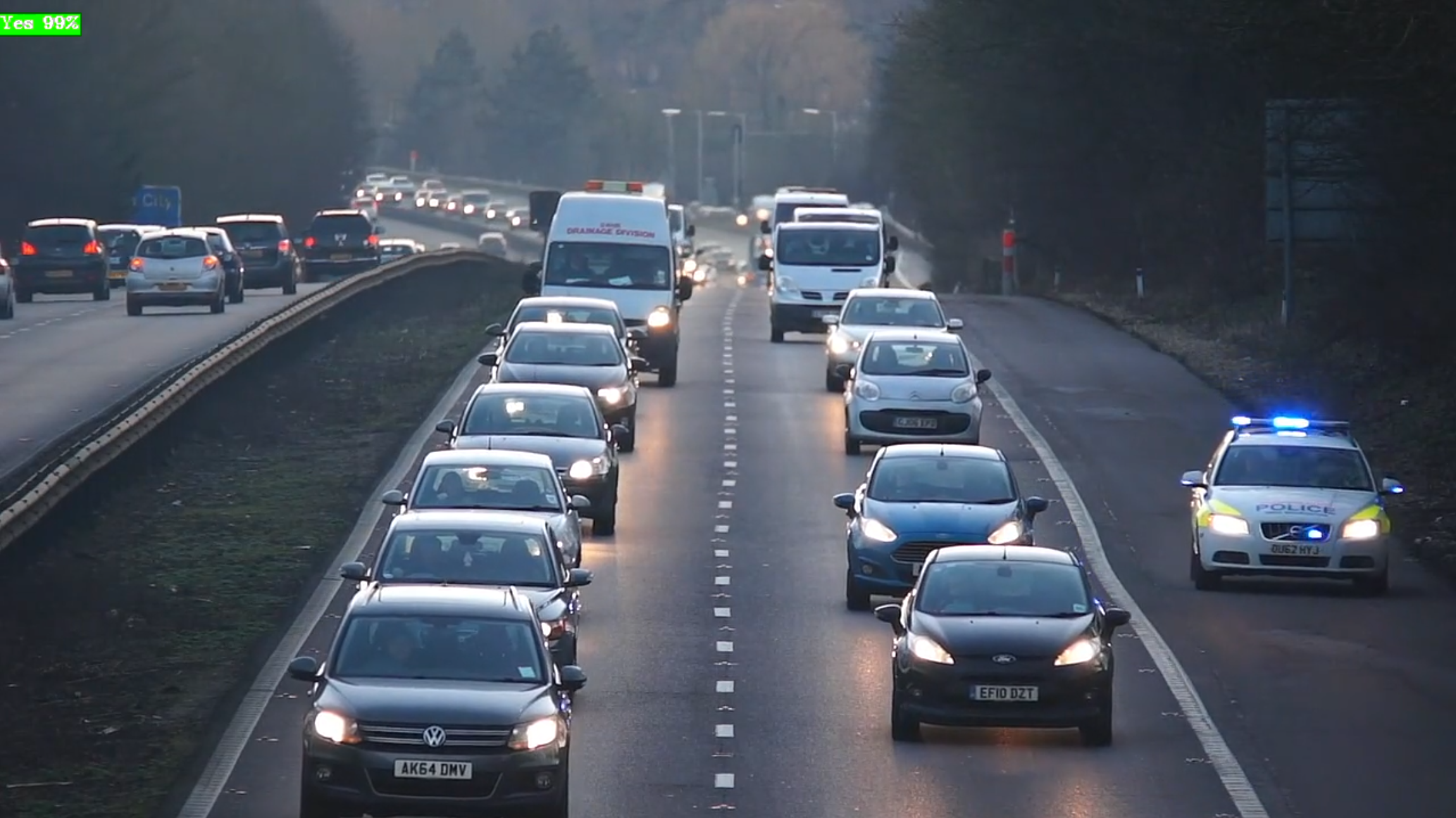
Sub-pipeline A — Large Vision Model (LVM) alert detection#
Runs a large vision model at a low frame rate (0.5 fps) to answer a natural-language question about the video content. This is the heaviest inference task and the primary driver of GT0 utilization.
Based on the DL Streamer VLM alerts sample.
filesrc location=Videos/police_highway_1280_720_60fps_loop10.mp4 ! decodebin3
  ! gvagenai model-path=models/InternVL3_5-2B device=GPU
      prompt="Is there a police car? Answer yes or no."
      generation-config=max_new_tokens=1,num_beams=4
      chunk-size=1 frame-rate=0.5 metrics=true
  ! queue ! gvafpscounter ! fakesink sync=false
Example output:
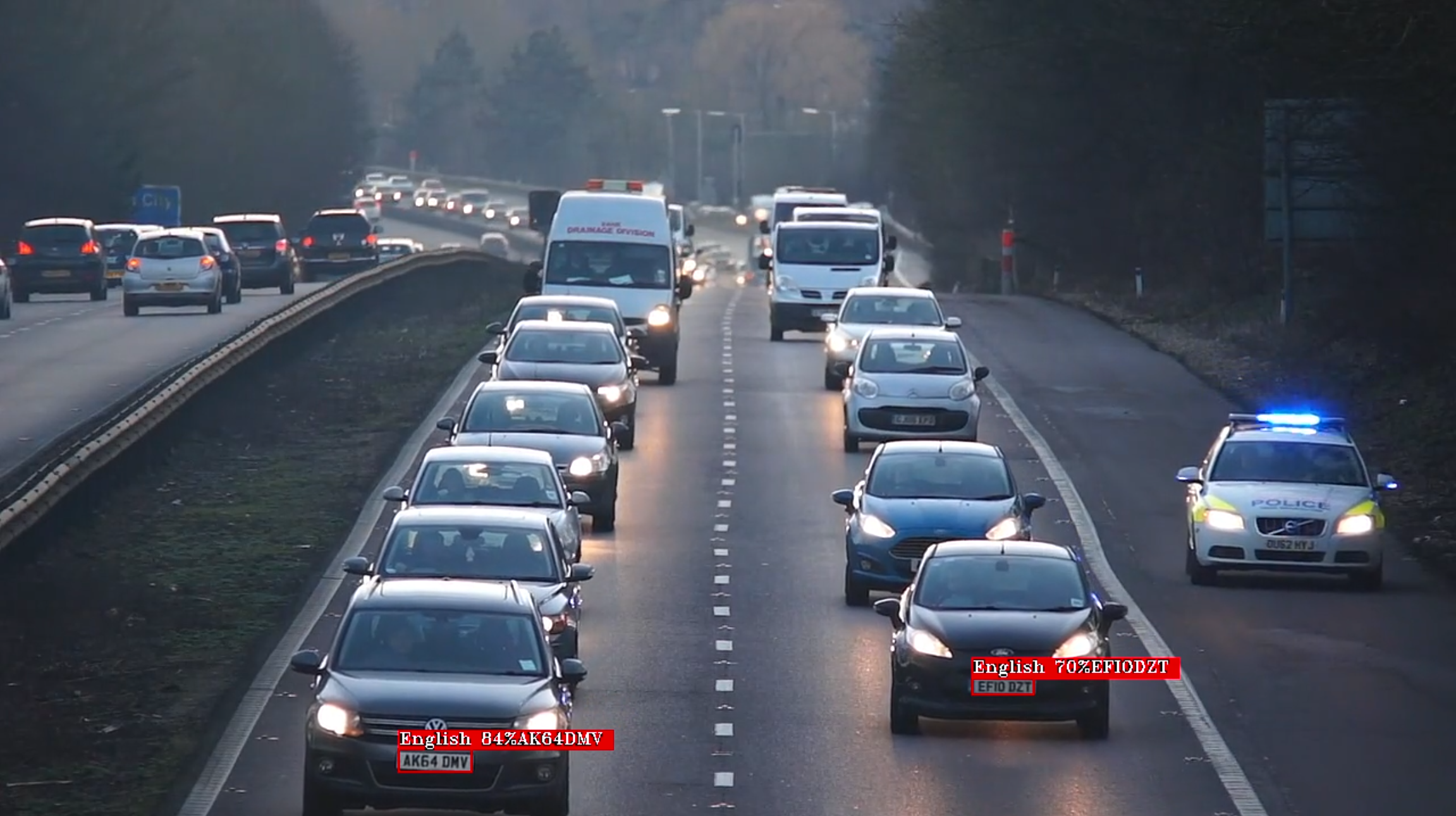
Sub-pipeline B — License plate detection + OCR#
Runs at full video frame rate: object detection followed by OCR on cropped plate regions. Runs in parallel with sub-pipeline A on its own decode path — the LVM’s low cadence does not limit its throughput.
filesrc location=Videos/police_highway_1280_720_60fps_loop10.mp4 ! decodebin3
  ! gvadetect model=models/yolov8_license_plate_detector/FP32/yolov8_license_plate_detector.xml
      device=GPU batch-size=2 model-instance-id=inf1
  ! queue
  ! gvaclassify model=models/ch_PP-OCRv4_rec_infer/FP32/ch_PP-OCRv4_rec_infer.xml
      device=GPU model-instance-id=inf2
  ! queue ! gvafpscounter ! fakesink sync=false
Example output:
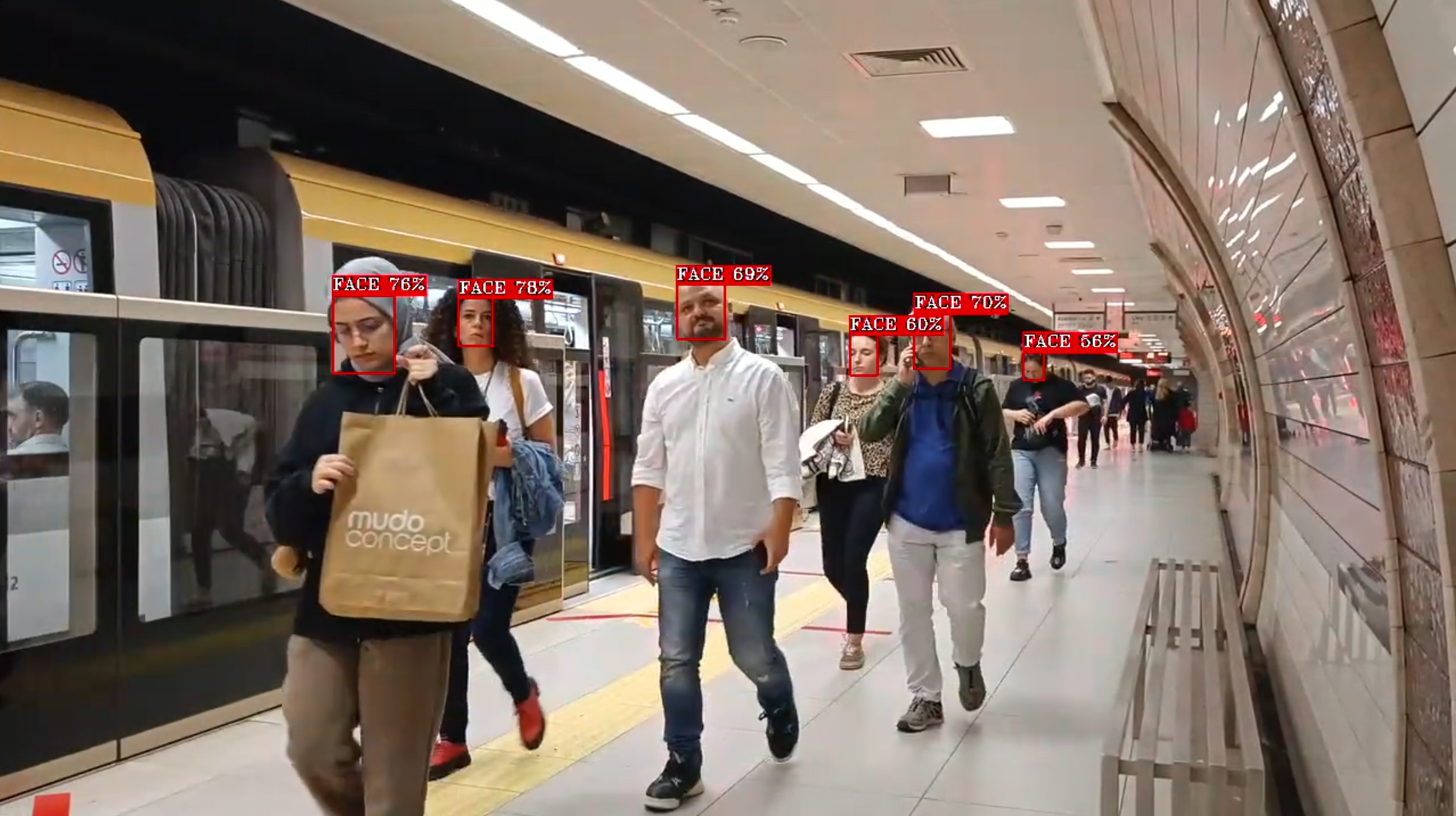
Sub-pipeline C — Face detection (extra workload)#
Processes a separate video feed. This sub-pipeline demonstrates GPU vs NPU
dispatch: changing only the device= (and optionally other parameters) routes the same
model to a different compute engine.
Based on the DL Streamer face detection and classification sample.
GPU variant (Case 2):
filesrc location=Videos/metro_1280_720_30fps_loop10.mp4 ! decodebin3
  ! gvadetect model=models/YOLOv8-Face-Detection/INT8/YOLOv8-Face-Detection.xml
      device=GPU batch-size=2 model-instance-id=inf3
  ! queue ! gvafpscounter ! fakesink sync=false
NPU variant (Case 3):
filesrc location=Videos/metro_1280_720_30fps_loop10.mp4 ! decodebin3
  ! gvadetect model=models/YOLOv8-Face-Detection/INT8/YOLOv8-Face-Detection.xml
      device=NPU nireq=2 batch-size=2 model-instance-id=inf3
  ! queue ! gvafpscounter ! fakesink sync=false
Example output (NPU):
Test Cases#
Three configurations are compared by changing only which device runs sub-pipeline C.
Case 1 — Main workload only (GPU baseline)#
Sub-pipelines A and B run on GPU. No extra workload.
Compute allocation:
Workload |
Device |
|---|---|
LVM (gvagenai) |
GPU GT0 |
License plate detection + OCR |
GPU GT0 |
Video decode (2 streams) |
GPU GT1 |
Pipeline architecture:
        flowchart LR
    Video1["Police Highway Video"]

    Video1 -.-> V1A[filesrc]
    Video1 -.-> V1B[filesrc]

    V1A --> D1
    V1B --> D2

    subgraph GT1["GPU GT1 Media Tile (Shared HW Decode)"]
        D1[decodebin3]
        D2[decodebin3]
    end

    subgraph SubA["Sub-pipeline A: LVM Alerts"]
        D1 --> LVM["gvagenai<br/>device=GPU<br/>InternVL3_5-2B"] --> Q1[queue] --> F1[fakesink]
    end

    subgraph SubB["Sub-pipeline B: License Plate Detection + OCR"]
        D2 --> DET["gvadetect<br/>device=GPU<br/>YOLOv8 LP"] --> Q2[queue] --> OCR["gvaclassify<br/>device=GPU<br/>PP-OCRv4"] --> Q3[queue] --> F2[fakesink]
    end

    style GT1 fill:#fff4e6,stroke:#ff9800,stroke-width:3px
Observed behavior:
GPU compute tile (GT0) is heavily utilized by the combined LVM and detection workloads
LVM dominates GT0 time; license plate detection runs alongside it, sharing GPU resources
GPU operates at high frequency for this workload configuration
CPU involvement is low — mostly GStreamer pipeline management
NPU is idle
Case 2 — Main + face detection, all on GPU#
Sub-pipelines A, B and C (GPU variant) run together.
Compute allocation:
Workload |
Device |
|---|---|
LVM (gvagenai) |
GPU GT0 |
License plate detection + OCR |
GPU GT0 |
Face detection (metro video) |
GPU GT0 |
Video decode (3 streams) |
GPU GT1 |
Pipeline architecture:
        flowchart LR
    Video1["Police Highway Video"]
    Video2["Metro Crowd Video"]

    Video1 -.-> V1A[filesrc]
    Video1 -.-> V1B[filesrc]
    Video2 -.-> V2[filesrc]

    V1A --> D1
    V1B --> D2
    V2 --> D3

    subgraph GT1["GPU GT1 Media Tile (Shared HW Decode)"]
        D1[decodebin3]
        D2[decodebin3]
        D3[decodebin3]
    end

    subgraph SubA["Sub-pipeline A: LVM Alerts"]
        D1 --> LVM["gvagenai<br/>device=GPU<br/>InternVL3_5-2B"] --> Q1[queue] --> F1[fakesink]
    end

    subgraph SubB["Sub-pipeline B: License Plate Detection + OCR"]
        D2 --> DET["gvadetect<br/>device=GPU<br/>YOLOv8 LP"] --> Q2[queue] --> OCR["gvaclassify<br/>device=GPU<br/>PP-OCRv4"] --> Q3[queue] --> F2[fakesink]
    end

    subgraph SubC["Sub-pipeline C: Face Detection"]
        D3 --> FACE["gvadetect<br/>device=GPU<br/>YOLOv8 Face"] --> Q4[queue] --> F3[fakesink]
    end

    style GT1 fill:#fff4e6,stroke:#ff9800,stroke-width:3px
Observed behavior:
GT0 must now share resources among three competing inference tasks
The license plate sub-pipeline loses throughput to the added face detection workload; the degradation is significant
GPU frequency may throttle as the combined compute demand pushes the shared SoC power budget
NPU remains idle
Case 3 — Main on GPU, face detection on NPU (heterogeneous)#
Sub-pipelines A and B remain on GPU. Sub-pipeline C uses the NPU variant.
Compute allocation:
Workload |
Device |
|---|---|
LVM (gvagenai) |
GPU GT0 |
License plate detection + OCR |
GPU GT0 |
Face detection (metro video) |
NPU |
Video decode (3 streams) |
GPU GT1 |
Pipeline architecture:
        flowchart LR
    Video1["Police Highway Video"]
    Video2["Metro Crowd Video"]

    Video1 -.-> V1A[filesrc]
    Video1 -.-> V1B[filesrc]
    Video2 -.-> V2[filesrc]

    V1A --> D1
    V1B --> D2
    V2 --> D3

    subgraph GT1["GPU GT1 Media Tile (Shared HW Decode)"]
        D1[decodebin3]
        D2[decodebin3]
        D3[decodebin3]
    end

    subgraph SubA["Sub-pipeline A: LVM Alerts"]
        D1 --> LVM["gvagenai<br/>device=GPU<br/>InternVL3_5-2B"] --> Q1[queue] --> F1[fakesink]
    end

    subgraph SubB["Sub-pipeline B: License Plate Detection + OCR"]
        D2 --> DET["gvadetect<br/>device=GPU<br/>YOLOv8 LP"] --> Q2[queue] --> OCR["gvaclassify<br/>device=GPU<br/>PP-OCRv4"] --> Q3[queue] --> F2[fakesink]
    end

    subgraph SubC["Sub-pipeline C: Face Detection"]
        D3 --> FACE["gvadetect<br/>device=NPU<br/>YOLOv8 Face"] --> Q4[queue] --> F3[fakesink]
    end

    style GT1 fill:#fff4e6,stroke:#ff9800,stroke-width:3px
Observed behavior:
GT0 is no longer shared with face detection — license plate throughput recovers to Case 1 levels
NPU handles face detection independently, in parallel with GPU inference, adding capacity without affecting the GPU workloads
GPU frequency is slightly lower than Case 1: the active NPU draws part of the shared SoC power budget — this is expected and does not negate the throughput advantage
GT1 utilization increases noticeably compared to Case 2: with the NPU processing frames quickly there is no backpressure on the decoder, which now sustains higher decode throughput
Total throughput across all three streams is the highest of all cases; package power is the lowest
Results Summary#
Case 1: MAIN/GPU |
Case 2: MAIN+EXTRA/GPU |
Case 3: MAIN+EXTRA/GPU+NPU |
|
|---|---|---|---|
Extra workload |
— |
GPU |
NPU |
Total throughput |
baseline |
moderate gain |
highest |
LP detection throughput |
baseline |
significantly lower |
fully recovered |
Package power |
highest |
lower than Case 1 |
lowest |
GT0 utilization |
high |
high |
high |
GT0 frequency |
highest |
lower |
slightly lower than Case 1 |
GT1 utilization |
low |
moderate |
high |
NPU utilization |
idle |
idle |
active |
CPU utilization |
low |
higher |
moderate |
Key Takeaways#
The following observations from the test cases reflect the design principles described in the Workload Distribution Strategy section.
1. NPU enables extra compute capacity when GPU is loaded#
When the GPU is carrying a heavy workload, offloading a suitable task to the NPU adds throughput without competing with GPU inference. This demo shows the effect directly: face detection moved from GPU to NPU preserves the license plate pipeline at full speed while sustaining the additional stream. How much benefit you gain depends on how loaded the GPU already is and how well the offloaded workload fits the NPU.
2. GPU handles heavier workloads; NPU handles lighter continuous workloads#
In this demo the GPU runs a large vision model and a detect+classify chain (heavier compute), while the NPU runs a single detection model (lighter compute). This split works for this particular scenario. For different models or resolutions, the balance point shifts — measure your own workloads before deciding on a device assignment.
3. Parallel sub-pipelines decouple tasks with different processing rates#
By running the LVM alert pipeline and the license plate pipeline as separate sub-pipelines (each with its own decode path), the slow LVM cadence does not throttle the faster detection pipeline. This pattern applies whenever you have models with very different processing rates sharing the same video source.
5. Hardware video decode scales with stream count; monitor GT1#
decodebin3 resolves to VA-API hardware decode on GT1, which is efficient and
leaves GT0 free for inference. As stream count grows, GT1 utilization rises.
High GT1 utilization can indicate a fully utilized, well-balanced system — or
a decode bottleneck limiting downstream inference. Observing GT1 alongside GT0
helps distinguish these cases.
6. Optimize individual sub-pipelines with the DL Streamer Optimizer#
Each sub-pipeline can be tuned independently using the
DL Streamer Optimizer.
A standalone NPU sub-pipeline is a good starting point: its nireq and
batch-size can be tuned to maximize NPU throughput without affecting the
adjacent GPU workloads.
Notes and Caveats#
GPU tile utilization (GT0/GT1) is measured via
gtidle/idle_residency_mssysfs counters (xe driver). These counters reflect periods when the entire tile is clock-gated idle. Short scheduling gaps between independent pipelines appear as idle time, so reported utilization may be slightly lower than actual compute activity.NPU frequency is read from sysfs immediately after pipeline completion, before the NPU returns to idle.