Ctrl+K

Open Edge Platform

    • Open Edge Platform
    • Metro
    • Manufacturing
    • Retail
    • Robotics
    • Education
    • Health and Life Sciences
    • Federal and Aerospace
    • Libraries, Tools, Services
    • Edge Microvisor Toolkit
    • Edge Manageability Framework
    • Image Composer Tool
  • Open Edge Platform
  • Metro
  • Manufacturing
  • Retail
  • Robotics
  • Education
  • Health and Life Sciences
  • Federal and Aerospace
  • Libraries, Tools, Services
  • Edge Microvisor Toolkit
  • Edge Manageability Framework
  • Image Composer Tool

Section Navigation

  • Metro SDK Manager
  • Metro Analytics Catalog

Samples

  • Smart Intersection Agent
    • Get Started
      • System Requirements
      • Build from Source
      • How to Deploy with Helm
    • API Reference
    • Release Notes
  • Smart Route Planning Agent
    • Get Started
      • System Requirements
      • How to Build from Source
      • Environment Variables
      • How to Deploy with Helm
    • Release Notes
  • Smart Parking
    • Get Started
      • System Requirements
      • Deploy with Helm
    • How-to Guides
      • Customize the Application
      • Generate and Deploy Offline Package
      • Use GPU for Inference
      • Use NPU for Inference
      • View Open Telemetry Data
      • View System Performance Dashboard
      • Benchmark Performance
    • Troubleshooting
    • Release Notes
  • Smart Intersection
    • Get Started
      • System Requirements
      • Deploy with Helm
    • How It Works
    • How to use GPU for inference
    • How to use NPU for inference
    • Export and Optimize Geti Model
    • Troubleshooting
    • Release Notes
  • Loitering Detection
    • Get Started
      • System Requirements
      • Deploy with Helm
    • How-to Guides
      • Customize the Application
      • Use GPU for Inference
      • Use NPU for Inference
      • View Open Telemetry Data
      • View System Performance Dashboard
      • Benchmark Performance
    • Troubleshooting
    • Release Notes
  • Smart Tolling
    • Get Started
      • System Requirements
      • Server File Download Checklist
    • How It Works
      • The Perception Layer
      • Optimization
      • Analytics Pipeline (Downstream)
    • API Reference
    • Troubleshooting
  • Image-based Video Search
    • Get Started
      • System Requirements
      • Deploy with Helm
    • How It Works
    • How to use GPU for inference
    • How to use NPU for inference
    • Troubleshooting
    • Release Notes
  • Interactive Digital Avatar
  • Visual Search and Q&A
    • Get Started Guide
      • System Requirements
      • Deploy with Helm
    • Tutorials
    • Troubleshooting
    • Release Notes
  • Sensor Fusion for Traffic Management
    • Get Started
      • Prerequisites
      • System Requirements
    • How it Works
    • Advanced user guide
    • APIs
    • Troubleshooting
    • Release Notes
  • Smart NVR
    • Get Started
      • System Requirements
      • Build from Source
      • Deploy with Helm
    • How to Use Smart NVR
    • Integrate Intel® SceneScape with Smart NVR
    • API Reference
    • Troubleshooting
    • Release Notes
  • Video Processing for NVR
  • Live Video Search
    • Get Started
      • System Requirements
      • Build from Source
      • How to deploy with Helm* Chart
    • How It Works
    • API Reference
    • Release Notes
  • Live Video Alert Agent
    • Get Started
      • System Requirements
      • Build from Source
      • Deploy with Helm
    • How It Works
    • API Reference
    • Known Issues
    • Release Notes
  • Live Video Captioning
    • Get Started
      • System Requirements
      • Model Preparation
      • Build from Source
      • Deploy with Helm Chart
    • How-to Guides
      • Configure Embedding Creation with RAG
      • Enable Alert Mode
      • Configure Object Detection Pipeline
    • How it Works
    • API Reference
    • Known Issues
    • Release Notes
  • Live Video Captioning RAG
    • Get Started
      • System Requirements
      • Build from Source
    • How It Works
    • API Reference
    • Known Issues
    • Release Notes
  • Video Search and Summarization
    • Get Started
      • System Requirements
    • How It Works
      • Video Search
      • Video Summarization
      • Video Search and Summarization
    • How to Build from Source
    • How to deploy with Helm* Chart
    • Deploy VSS with vLLM
    • Directory Watcher Service Guide
    • API Reference
    • MCP Server for VSS
    • Troubleshooting
    • Release Notes

Tools and Libraries

  • OpenVINO Toolkit
  • OpenVINO Model Server
  • DL Streamer
  • DL Streamer Pipeline Server

Tools

  • Intel® Edge System Qualification
  • Geti™ Software
  • Visual Pipeline and Platform Evaluation Tool
  • Intel® Scenescape

Guides and Tutorials

  • Blueprint: Agentic Maintenance
  • Blueprint: Smart Buildings
  • Intel® Edge System Qualification
  • Migrate from Nvidia
  • Application Security
  • Visual AI Kit Customization

---------------

  • Get Help or Contribute
  • Metro AI Suite
  • Image-Based Video Search

Image-Based Video Search#

GitHub Readme

Image-based Video Search sample application performs near real-time analysis and image-based search to detect and retrieve objects of interest in large video datasets.

Overview#

This sample application lets users search live or recorded camera feeds by providing an image and view matching objects with location, timestamp, and confidence score details.

This sample provides a working example of how to combine edge AI microservices for video ingestion, object detection, feature extraction, and vector-based search.

You can use this foundation to build solutions for diverse use cases, including city infrastructure monitoring and security applications, helping operators quickly locate objects of interest across large video datasets.

How it Works#

The application workflow consists of three stages: inputs, processing, and outputs.

architectural diagram Figure 1: Detailed Architecture of the Image-Based Video Search Application.

Inputs#

  • Video files or live camera streams (simulated or real time)

  • User-provided images or images captured from video for search

The application includes a demonstration video for testing. The video loops continuously and appears in the UI as soon as the application starts.

Processing#

  • Nginx reverse proxy server: All interactions with user happens via Nginx server. It protects the IBVS app by handling SSL/TLS encryption, filtering and validating requests, offering centralized access control and making the app directly inaccessible from external access.

  • Video analysis with Deep Learning Streamer Pipeline Server and MediaMTX: Select Analyze Stream to start the DL Streamer Pipeline Server pipeline. The Pipeline Server processes video through MediaMTX, which simulates remote video cameras and publishes live streams. The Pipeline Server extracts frames from RTSP streams and detects objects in each frame, publishing predictions through MQTT.

  • Feature extraction with Feature Matching: DL Streamer Pipeline Server sends metadata and images through MQTT to the Feature Matching microservice. Feature Matching generates feature vectors. If predictions exceed the threshold, the system stores vector embeddings in MilvusDB and saves frames in the Docker file system.

  • Storage and retrieval in MilvusDB: MilvusDB stores feature vectors. You can review them in MilvusUI.

  • Video search with ImageIngestor: To search, first analyze the stream by selecting Analyze Stream. Then upload an image or capture an object from the video using Upload Image or Capture Frame. You can adjust the frame to capture a specific object. The system ingests images via ImageIngestor, processes them with DL Streamer Pipeline Server, and matches them against stored feature vectors in MilvusDB.

Outputs#

  • Matched search results, including metadata, timestamps, confidence scores, and frames
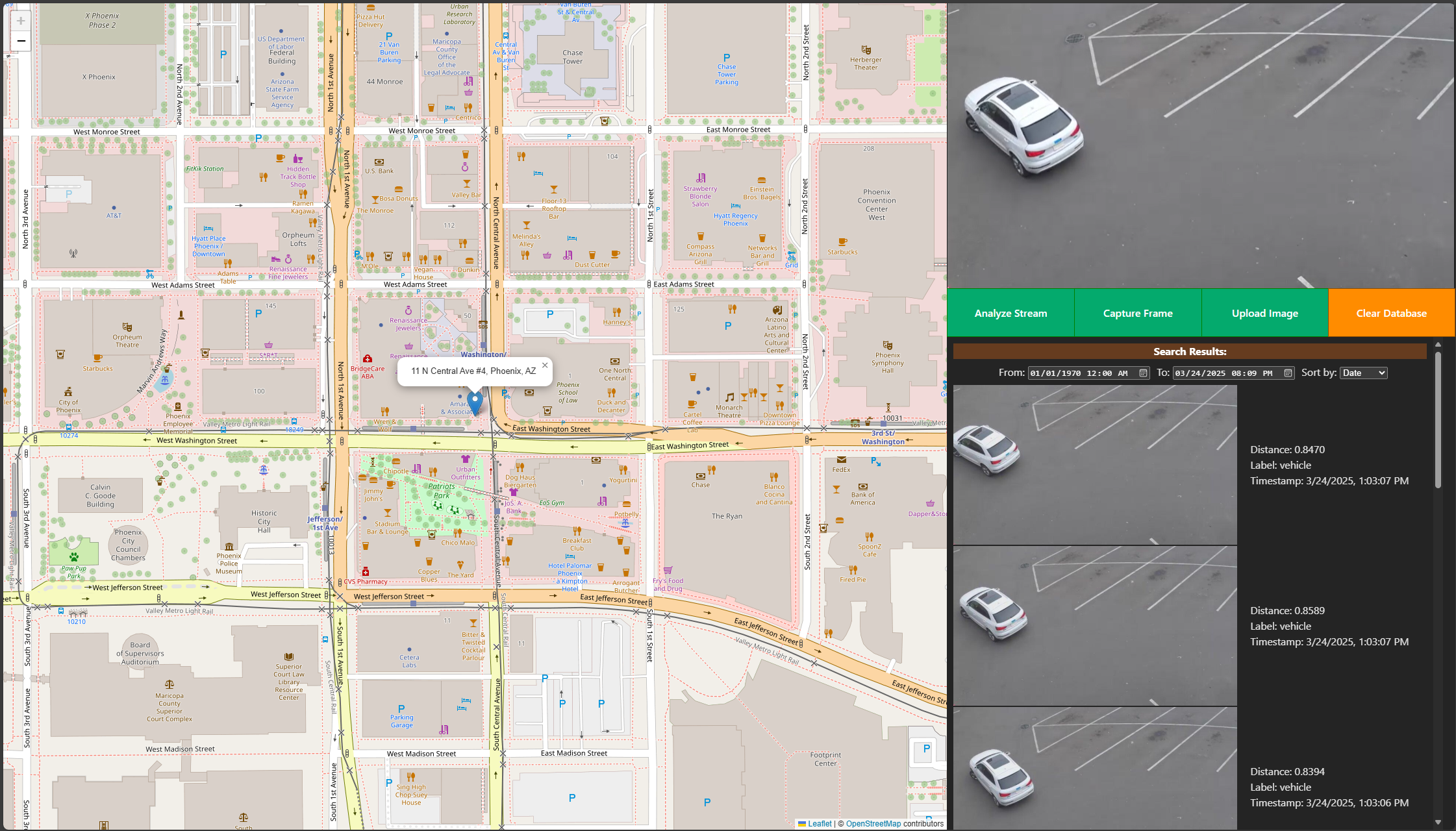
application interface screenshot Screenshot of the Image-Based Video Search sample application interface displaying search input and matched results

Learn More#

  • Get Started

  • System Requirements

  • Release Notes

  • DL Streamer Pipeline Server

On this page
  • Overview
  • How it Works
    • Inputs
    • Processing
    • Outputs
  • Learn More

This Page

  • Show Source