Ctrl+K

Open Edge Platform

    • Open Edge Platform
    • Metro
    • Manufacturing
    • Retail
    • Robotics
    • Education
    • Health and Life Sciences
    • Federal and Aerospace
    • Libraries, Tools, Services
    • Edge Microvisor Toolkit
    • Edge Manageability Framework
    • Image Composer Tool
  • Open Edge Platform
  • Metro
  • Manufacturing
  • Retail
  • Robotics
  • Education
  • Health and Life Sciences
  • Federal and Aerospace
  • Libraries, Tools, Services
  • Edge Microvisor Toolkit
  • Edge Manageability Framework
  • Image Composer Tool

Section Navigation

  • Autonomous Mobile Robot
    • Get Started
      • System Requirements
    • How It Works
      • AMR Tools
      • AMR Applications
      • AMR Algorithms
      • AMR Middleware
    • Tutorials
      • Robot Kits
        • Create Your Own Robot Kit
        • Clearpath Robotics Jackal Robot
          • Install the Autonomous Mobile Robot on Jackal Robot’s Onboard Computer
          • Control the Jackal Motors Using a Keyboard
          • Execute the Wandering Application on the Jackal Robot
          • Follow-me with ADBSCAN on Clearpath Robotics Jackal Robot
          • Follow-me with ADBSCAN and Gesture-based Control on Clearpath Robotics Jackal Robot
        • iRobot Create 3
          • iRobot Create 3 Wandering tutorial
          • Follow-me with ADBSCAN on iRobot Create 3
        • AAEON Robotic Kits
          • Wandering Application on AAEON robot with Intel® RealSense™ Camera and RTAB-Map SLAM
          • ADBSCAN on AAEON Robot Kit
          • Follow-me with ADBSCAN on Aaeon Robot
          • Follow-me with ADBSCAN and Gesture-based Control on Aaeon Robot
        • Robot Teleop Using a Keyboard
      • Perception
        • Intel® RealSense™ Camera with ROS 2 Sample Application
        • 3D Pointcloud Groundfloor Segmentation for RealSense™ Camera and 3D LiDAR
        • GPU ORB Extractor
          • Overview and Deb packages
          • Use GPU ORB Extractor
          • Use GPU ORB Extractor with OpenCV-free Library
          • GPU ORB Extractor Limitation
        • OpenVINO™
          • OpenVINO™ Tutorial with Segmentation
          • OpenVINO™ Object Detection Tutorial
          • OpenVINO™ Tutorial on Multi-camera Object Detection using RealSense™ Depth Camera D457 and D3CMCXXX-115-084 Camera
          • OpenVINO™ Yolov8 Tutorial
      • Navigation
        • Collaborative Visual SLAM
        • FastMapping Algorithm
        • ADBSCAN Algorithm
          • ADBSCAN Algorithm with 2D RPLIDAR Input Demo
          • ADBSCAN Algorithm with Intel® RealSense™ Camera Input Demo
          • ADBSCAN on AAEON Robot Kit
          • Intel-optimized ADBSCAN Algorithm
        • Follow-me Algorithm
          • Simulation Demos
            • Follow-me with ADBSCAN and Gesture Control
            • Follow-me with ADBSCAN, Gesture and Audio Control
          • Tutorials
            • Follow-me with ADBSCAN on Aaeon Robot
            • Follow-me with ADBSCAN and Gesture-based Control on Aaeon Robot
            • Follow-me with ADBSCAN on iRobot Create 3
            • Follow-me with ADBSCAN on Clearpath Robotics Jackal Robot
            • Follow-me with ADBSCAN and Gesture-based Control on Clearpath Robotics Jackal Robot
        • ITS Path Planner ROS 2 Navigation Plugin
        • Robot Re-localization Package for ROS 2 Navigation
        • Wandering App
          • Wandering Application on AAEON robot with Intel® RealSense™ Camera and RTAB-Map SLAM
          • iRobot Create 3 Wandering tutorial
          • Execute the Wandering Application on the Jackal Robot
      • Simulation
        • Turtlesim ROS 2 Sample Application
        • Wandering Application in TurtleBot3 Waffle robot through Gazebo Simulation
        • Gazebo Pick & Place Demo
      • ROS2 KPI Monitoring
        • ROS2 KPI Monitoring Overview
        • Installation Guide
        • Quick Start Guide
        • Command Reference
        • Grafana Dashboard
        • Wandering AMR Pipeline Benchmark
        • Pick & Place Pipeline Benchmark
        • Practical Examples
      • Troubleshooting for Autonomous Mobile Robot Tutorials
    • System Integrators
      • Benchmarking and Profiling
        • OpenVINO™ Benchmarking Tool
        • VTune™ Profiler for CPU and GPU profiling
        • Benchtool
      • Optimize Performance
      • Security
    • GMSL Guide
      • GMSL Add-in-Card Overview
      • Configure GMSL SerDes ACPI Devices
    • Release Notes
  • Humanoid Imitation Learning
    • Get Started
      • System Requirements
      • OS Setup
      • Real-Time Linux
      • Install Intel® GPU firmware (Optional)
      • Install Intel® NPU firmware
      • Install Client GPUs driver
      • Install RealSense™ SDK
    • Model Tutorials
      • Action Chunking with Transformers - ACT
      • Visual Servoing - CNS
      • Diffusion Policy
      • Improved 3D Diffusion Policy (iDP3)
      • Feature Extraction Model: SuperPoint
      • Feature Tracking Model: LightGlue
      • Bird’s Eye View Perception: Fast-BEV
      • Monocular Depth Estimation: Depth Anything V2
      • Robotics Diffusion Transformer (RDT-1B)
    • Developer Tools
      • OpenVINO™
      • Intel® Extension for PyTorch
      • Intel® LLM Library for PyTorch
      • Intel® oneAPI Toolkit
      • Intel® Extension for OpenXLA
    • Packages List
      • Linux BSP
      • Industrial Motion-Control ROS2 Gateway
      • Packages
    • Sample Pipelines
      • Imitation Learning - ACT
      • Model Predictive Control Demo
      • Diffusion Policy
      • VSLAM: ORB-SLAM3
      • LLM Robotics Demo
      • Robotics Diffusion Transformer (RDT)
      • Pi0.5 with Real-Time Chunking
    • Heterogeneous Computing
    • OpenVINO Model Optimization
    • Release Notes
      • Release Notes 2025
  • Stationary Robot Vision & Control
    • Get Started
      • RVC Requirements
      • Supported Peripherals
      • Camera Setup
      • Prepare the Target System
      • Install RVC
    • Components and Features of RVC
      • Vision
        • Dynamic Vision
          • Realsense node
          • Object Detection
          • Pose Detector
          • RVC Profiler
        • 2.5D Vision
        • RVC Vision Messages
      • Control
        • Example Configuration
        • Motion Controller Plugin
        • Grasp Plugin
      • API messages
    • Exemplary Use Cases
      • Dynamic Vision Use Case
        • Preliminary System Configuration
        • RVC Visualization
        • State Machine Main Node
        • Vision Component Container
      • Static Vision Use Case
    • Developer Resources
      • Main Application
      • API Development
      • RVC Vision API
      • RVC Control API
        • RVC Control Plugin Interface APIs
        • Grasp Interface Plugin
        • MotionController Plugins
          • RVC Control Plugin Interface APIs
      • Modify Hardware Setup
    • Release Notes

---------------

  • Troubleshooting
  • Glossary
  • Get Help or Contribute
  • Robotics AI Suite
  • Autonomous Mobile Robot
  • Gigabit Multimedia Serial Link Sensor Guide

Gigabit Multimedia Serial Link Sensor Guide#

  • Prerequisite: Follow the instructions in Getting Started Guide.

GMSL (Gigabit Multimedia Serial Link) is a high-speed serial interface designed for transmitting uncompressed video, audio, and control data over long distances. It is commonly used in automotive applications for connecting cameras and other multimedia devices to the central processing unit.

GMSL supports data rates of up to 6 Gbps, allowing for high-resolution video transmission with low latency. It uses a differential signaling method to ensure signal integrity and reduce electromagnetic interference (EMI). GMSL also includes features such as error correction and power management to enhance reliability and efficiency.

In the context of robotics and autonomous mobile robots, GMSL sensors are often used for vision-based applications, such as object detection, lane keeping, and obstacle avoidance. These sensors can provide high-quality video feeds that are essential for the perception systems of autonomous vehicles.

When integrating GMSL sensors into a robotics system, it is important to consider factors such as compatibility with the processing unit, power requirements, and the physical layout of the system. Proper configuration and calibration of GMSL sensors are also crucial to ensure optimal performance and accurate data capture.

Intel® GMSL cameras use the Image Processor Unit (IPU) to process the video data captured by the camera. The IPU is responsible for tasks such as image enhancement, noise reduction, and color correction, which are essential for improving the quality of the video feed before it is used for further processing in the autonomous mobile robot’s perception system.

It is crucial to understand the SerDes I2C connectivity specific to each ODM/OEM motherboard, Add-in-Card (AIC), and GMSL2 camera module. Illustrated below are the details a user needs to learn about I2C communication between a BDF (Bit-Definition File) Linux I2C adapter and GMSL2 I2C devices for Intel® Core™ Ultra Series 1 and 2 (Arrow Lake-U/H) and 12th/13th/14th Gen Intel® Core™ platforms to detect and configure GMSL capability. See SerDes I2C mapping for more details.
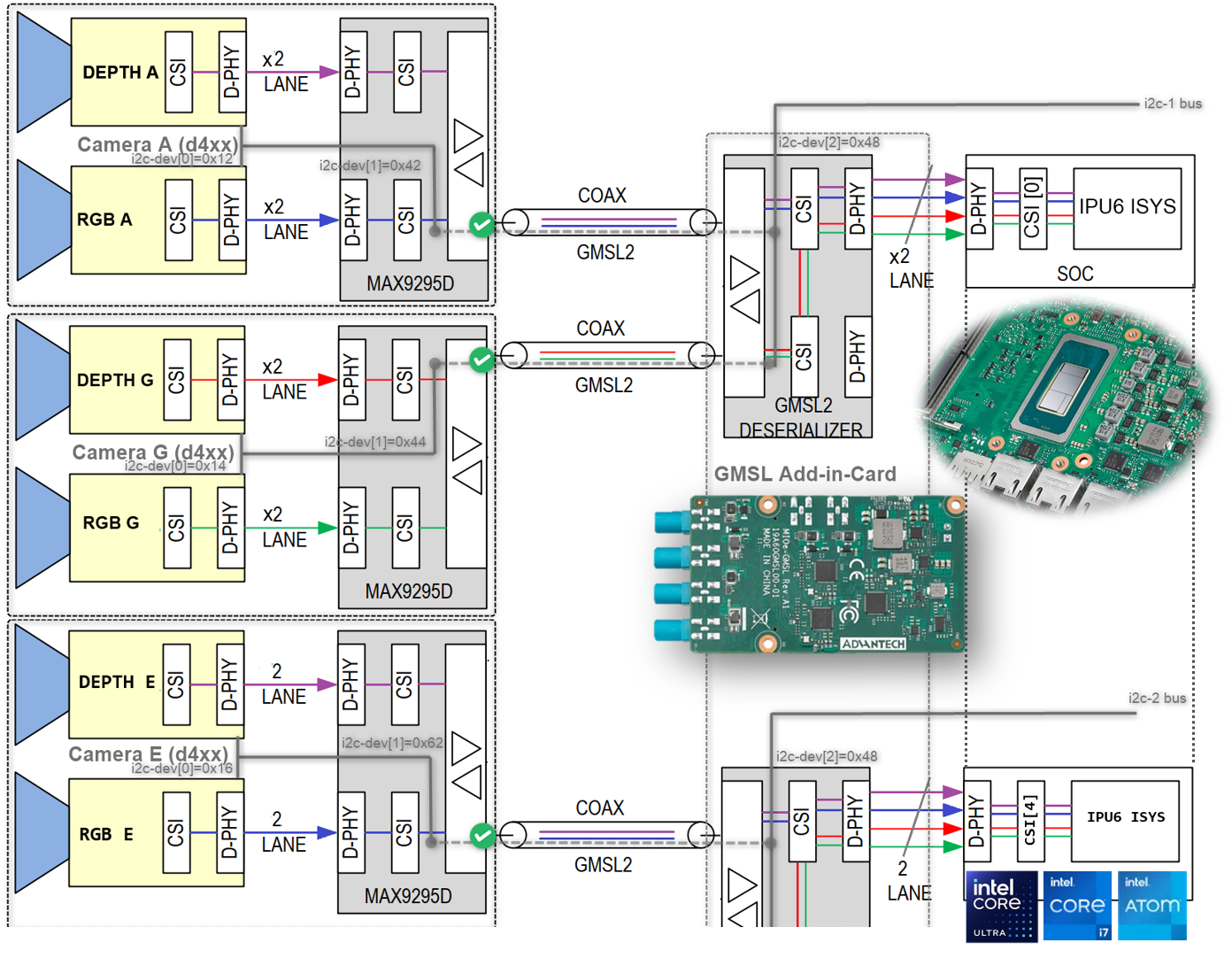
GMSL overview

Next Steps#

  • GMSL Add-in-Card Design Overview

  • Configure Intel® GMSL SerDes ACPI Devices

On this page
  • Next Steps

This Page

  • Show Source