Pi0.5 with Real-Time Chunking#
π₀.₅ (Pi0.5) is a Vision-Language-Action (VLA) model architecture designed by Physical Intelligence. It is built upon the PaliGemma VLM backbone, integrating a SigLIP vision encoder (So400m) with a Gemma language model base (e.g., 2.6B parameters) to process multimodal inputs.
Architecturally, π₀.₅ distinguishes itself through a specialized “Action Expert” head — a smaller parameter model (e.g., Gemma 300M) — that generates continuous actions using Flow Matching. Unlike traditional policy heads, this design solves an Ordinary Differential Equation (ODE) from noise to actions, enabling high-precision control.
Key structural features of π₀.₅ include:
AdaRMSNorm Conditioning: The flow timestep t is injected directly into the normalization layers of the Action Expert via Adaptive RMS Normalization, providing more effective conditioning than standard concatenation.
Discretized State Tokenization: Robot proprioceptive state is discretized and treated as text tokens within the input prefix, allowing the model to “read” its physical state using the same attention mechanisms as natural language.
Unified Prefix Processing: Visual patch tokens from SigLIP and text tokens are concatenated into a single sequence, which the transformer processes holistically before passing context to the Action Expert.
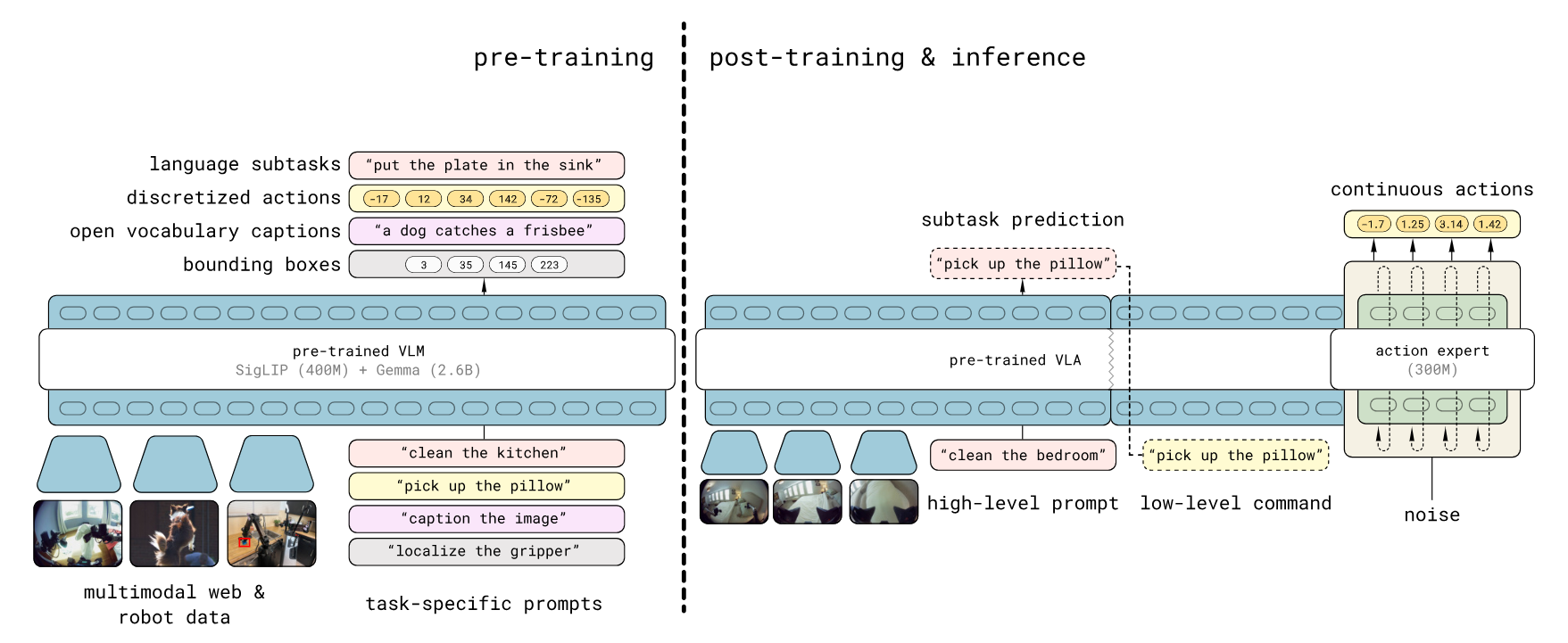
(Figure source: Pi0.5 Paper π₀.₅: a Vision-Language-Action Model with Open-World Generalization)
Real-Time Chunking (RTC) is an inference strategy designed to enable high-frequency robotic control with high-latency flow-matching policies (e.g., Pi0, Pi0.5). Based on the application of asynchronous inference execution, RTC employs a unique Prefix Guidance mechanism during inference. Instead of blending overlapping chunks after generation (temporal ensembling), RTC uses the unexecuted portion of the previous chunk as a constraint during the flow-matching process. By treating the transition as an inpainting problem, the model is guided to generate new trajectories that seamlessly extend the current motion, ensuring continuous control.
The synergy between Pi0.5 and RTC enables sophisticated generalist control on standard hardware by addressing two critical problems of standard VLA models: Action Waiting and Action Jumping.
Eliminating Action Waiting: RTC runs inference asynchronously in the background while the robot executes buffered actions. This ensures the robot never pauses to “think,” maintaining high-frequency control (e.g., 50Hz) despite the model’s lower inference speed.
Preventing Action Jumping: Through Prefix Guidance, RTC treats trajectory generation as an inpainting task. It constrains the start of the new plan to align perfectly with the unexecuted tail of the previous plan, enforcing continuity at the generation level rather than relying on post-hoc smoothing.
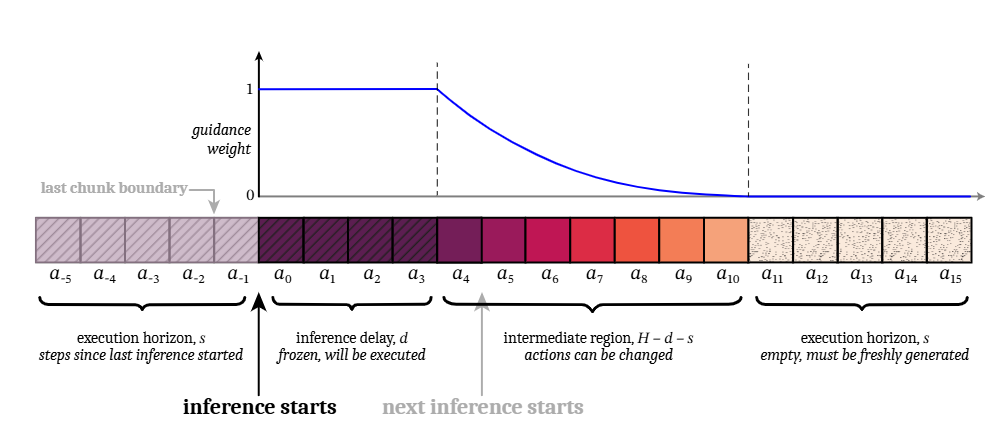
(Figure source: RTC Paper Real-Time Execution of Action Chunking Flow Policies)
This project demonstrates an implementation of Pi0.5 + RTC using the OpenVINO™ toolkit, specifically accelerating inference on Intel platforms. It provides a comprehensive end-to-end pipeline, covering both MuJoCo simulation for policy validation and a modular workflow for deployment on real ALOHA robots.
Installation#
This project extends the open-source project LeRobot to provide OpenVINO™ acceleration and Real-Time Chunking (RTC) features on Intel compute platforms. Please get the source code from the Open Edge Platform repo here. To set up the environment, you need to initialize and patch the submodule:
git submodule update --init lerobot
cd lerobot
Apply the patches:
git am --whitespace=fix ../patches/*.patch
Setup Python Environment#
Install the packages as prerequisites:
sudo apt install -y ffmpeg libavcodec-dev libavformat-dev libavutil-dev libavdevice-dev
If you would like to use uv, you can set up the environment and install dependencies by running:
uv sync --extra pi-ov
Note: Usage: You can run a Python file by using:
uv run --extra pi-ov <your_python_file>. Follow the guide to install uv.
Alternatively, you can create a Python environment:
python3 -m venv pi_env
source pi_env/bin/activate
pip install -e .[pi-ov] --extra-index https://download.pytorch.org/whl/cpu
Model Preparation#
Running model inference with the OpenVINO™ toolkit requires converting the model to the OpenVINO™ IR format. You can use the checkpoint finetuned on a simulation task for convenience. Alternatively, you can convert your own checkpoints trained using the LeRobot framework.
cd examples/pi05_with_openvino
Convert Pi0.5 model without RTC#
To convert the standard Pi05 model to OpenVINO™ IR (without RTC support), use the convert_ov.py script.
Arguments:
--torch_dir: Path to the pretrained PyTorch model checkpoint or the Hugging Face repo. Default: “lerobot/pi05_base”--ov_output_dir: Directory for saving the OpenVINO™ IR model.--dataset_path: (Optional) Path to a local LeRobotDataset directory. If provided, the converter uses dataset stats and the first sample to build real preprocessed inputs (instead of random dummy inputs).--compress_int8: (Optional) Compress weights to INT8.nncfis required.--save_fp32: (Optional) Save an OpenVINO™ model in FP32 format (FP16 by default).--override: (Optional) Overwrite existing files.--camera_num,-c: (Optional) Number of cameras (batch size for image input). Default: 4.
Notice: Using the Pi0.5 model in LeRobot will automatically download the google/paligemma-3b-pt-224 from Hugging Face. Due to author restrictions, downloading the model requires logging into your Hugging Face account. If you encounter download errors, follow the instructions on how to log in and authorize your account.
Examples (uv):
uv run --extra pi-ov scripts/convert_ov.py \
    --torch_dir <path_to_pytorch_checkpoint> \
    --ov_output_dir pi05_lerobot_ov_ir \
    --override
For using --compress_int8, nncf is required.
uv run --extra pi-ov --with nncf scripts/convert_ov.py \
    --torch_dir <path_to_pytorch_checkpoint> \
    --ov_output_dir pi05_lerobot_ov_ir \
    --compress_int8 \
    --override
Use a sample from a local LeRobotDataset to generate representative inputs during the export/conversion process:
uv run --extra pi-ov --with nncf scripts/convert_ov.py \
    --torch_dir <path_to_pytorch_checkpoint> \
    --dataset_path <path_to_local_dataset> \
    --ov_output_dir pi05_lerobot_ov_ir \
    --compress_int8 \
    --override
Convert Pi0.5 model with RTC#
To convert the Pi05 model to OpenVINO™ IR with RTC support, use the convert_ov_rtc.py script. The arguments are the same as above.
Examples (uv):
uv run --extra pi-ov --with nncf scripts/convert_ov_rtc.py \
    --torch_dir <path_to_pytorch_checkpoint> \
    --dataset_path <path_to_local_dataset> \
    --ov_output_dir pi05_rtc_lerobot_ov_ir \
    --compress_int8 \
    --override
Exported OpenVINO™ models with RTC require two extra inputs: prev_chunk_left_over and prefix_weights during inference.
Note: When the RTC function is unnecessary (e.g., the first inference step that does not have a previous chunk to follow), you can disable RTC by passing zero-tensors to these extra inputs.
Run Pipeline#
Environment Configuration#
Bind the xe driver to the iGPU, as it provides better performance than i915 in this scenario.
Check the kernel driver in use for the iGPU:
lspci -s 00:02.0 -vvv
If it does not show “Kernel driver in use: xe”, run the following script to bind the
xedriver:#!/bin/bash set -e sudo systemctl stop gdm3 # unbind i915 if "Kernel driver in use: i915" from igpu echo 0000:00:02.0 > /sys/bus/pci/drivers/i915/unbind # unbind i915 from other devices if have # unbind xe from all other devices if have # e.g. echo 0000:03:00.0 > /sys/bus/pci/drivers/xe/unbind for dgpu # remove i915 module and probe xe module rmmod i915 modprobe -r xe echo 0 > /sys/bus/pci/drivers_autoprobe # xe driver uses the same firmware with i915 modprobe xe force_probe=7d51 enable_rc6=0 guc_firmware_path=i915/experimental/mtl_guc_70.bin dmc_firmware_path=i915/experimental/mtl_dmc.bin gsc_firmware_path=i915/experimental/mtl_gsc_1.bin # bind igpu to xe echo 0000:00:02.0 > /sys/bus/pci/drivers/xe/bind # bind other devices to xe if need
Inference Benchmarking#
Run the benchmark_pi05_ov_rtc.py script to benchmark the policy inference pipeline, which includes preprocessing, model inference, and postprocessing. You can find usage examples of the PI05Policy with OpenVINO™ support in the script.
uv run --extra pi-ov scripts/benchmark_pi05_ov_rtc.py \
    --model_dir <ov_model_dir> \
    --device GPU \
    --chunk_size 75 \
    -n 10
Arguments:
--model_dir: Directory containing an OpenVINO™ model (.xml and .bin files).--device: Target device for inference (e.g., “CPU”, “GPU”). Default: “CPU”.-n,--num_runs: Number of inference runs to average for benchmarking. Default: 10.--camera_num,-c: Number of cameras used in the model. This should be the same as the setting used during model conversion. Default: 4.--chunk_size: Override the model’s chunk_size (and n_action_steps). This should be the same as the setting of the pretrained checkpoint. Default: 50.--run_torch: (Optional) Run the original PyTorch model for output comparison.--torch_dir: (Optional) Path to the PyTorch model directory for comparison if--run_torchis set. Default: “lerobot/pi05_base”.--disable_rtc: (Optional) Disable the RTC functionality when loading a model with RTC. It is invalid when loading a model without the RTC support.
Note: If you see
WARNING - No accelerated backend detected. Using default cpu, this will be slow., this is a log message from PyTorch and does not indicate that the model is running on CPU. Our model inference is powered by OpenVINO™, which handles hardware acceleration independently of PyTorch backends.
Evaluation Script Overview#
eval_aloha.py provides an evaluation script for the ALOHA pipeline that can run:
MuJoCo simulation (
--robot_type mujoco_aloha) for tasks likesim_transfer_cube.Real ALOHA robot (
--robot_type real_aloha) for tasks liketransfer_cube.
Arguments#
--pretrained_model_path: Path to the pretrained model checkpoint or the Hugging Face repo ID. Default:lerobot/pi05_base.--dataset_path: (Optional) Local dataset directory used to load metadata (e.g. task language) and, if needed, dataset statistics.--stats_path: (Optional) Path tostats.jsonused for normalization. If omitted, the script attempts to load<pretrained_model_path>/stats.json, falling back to--dataset_pathif available.--robot_type:mujoco_alohaorreal_aloha.--task: Task name, e.g.sim_transfer_cube,sim_insertion,transfer_cube.--num_episodes: Number of trajectories/episodes to run. Default:1.--max_steps: Max steps per episode. Default:400.--fps: Control Frequency (Hz). Default:50.0.
OpenVINO™:
--use_ov: Use an OpenVINO™ model for inference.--ov_model_path: Path to the OpenVINO™ IR model directory (containingmodel.xmlandmodel.bin). Default:pi05_lerobot_ov_ir_INT8.--ov_device: String with an OpenVINO™ device name (e.g.CPU,GPU,GPU.0). Default:GPU.0.
Note: OpenVINO™ inference still requires
--pretrained_model_path. It is used to construct the model inputs (preprocessing/tokenization), and determine model/config dimensions (e.g. action space) alongside the OpenVINO™ model.Since dataset statistics are required for normalization, you need to provide them via
--stats_path(recommended) or--dataset_path. If neither is provided, the script will try to loadstats.jsonfrom--pretrained_model_path.
RTC (Real-Time Chunking):
--rtc_enabled: Enable the RTC algorithm.--rtc_horizon: Execution horizon for RTC. Default:45.
Visualization/Logging:
--plot: Enable visualization (MuJoCo only). Renders the simulation in a separate subprocess using OpenCV shared memory.--save_traj: Save trajectory data and plots.--save_traj_path: Output directory for saved trajectories/plots. Default:trajectory_plots.
Keyboard controls (during evaluation):
Key |
Action |
|---|---|
|
Pause / resume execution |
|
Toggle RTC on/off at runtime |
Simulation Pipeline#
Note: If you see
WARNING - No accelerated backend detected. Using default cpu, this will be slow., this is a log message from PyTorch and does not indicate that the model is running on CPU. Our model inference is powered by OpenVINO™, which handles hardware acceleration independently of PyTorch backends.
Note: If you encounter MESA warnings, try
sudo apt install mesa-utils libgl1-mesa-dri libglx-mesa0.
Run sim_transfer_cube in MuJoCo using an OpenVINO™ model#
uv run --extra pi-ov examples/aloha/eval_aloha.py \
    --robot_type mujoco_aloha \
    --task sim_transfer_cube \
    --pretrained_model_path <path_to_pretrained_model> \
    --use_ov \
    --ov_model_path <path_to_ov_model>
Note:
MUJOCO_GL=eglis set automatically inside the script for headless EGL rendering on Intel iGPU. You do not need to set it manually.
Run sim_transfer_cube in MuJoCo using an OpenVINO™ model with RTC#
uv run --extra pi-ov examples/aloha/eval_aloha.py \
    --robot_type mujoco_aloha \
    --task sim_transfer_cube \
    --pretrained_model_path <path_to_pretrained_model> \
    --use_ov \
    --ov_model_path <path_to_ov_model> \
    --rtc_enabled \
    --rtc_horizon 45
Real-robot Pipeline#
The real-robot pipeline focuses on running inference on the physical ALOHA hardware.
Run transfer_cube on a real ALOHA robot using an OpenVINO™ model#
uv run --extra pi-ov examples/aloha/eval_aloha.py \
    --robot_type real_aloha \
    --task transfer_cube \
    --max_steps 600 \
    --pretrained_model_path <path_to_pretrained_model> \
    --use_ov \
    --ov_model_path <path_to_ov_model>
Run transfer_cube on a real ALOHA robot using an OpenVINO™ model with RTC#
uv run --extra pi-ov examples/aloha/eval_aloha.py \
    --robot_type real_aloha \
    --task transfer_cube \
    --max_steps 600 \
    --pretrained_model_path <path_to_pretrained_model> \
    --use_ov \
    --ov_model_path <path_to_ov_model> \
    --rtc_enabled \
    --rtc_horizon 45
Tip: When running OpenVINO™ inference on Intel platforms, pinning the process to P-cores can help achieve more stable inference performance. For example, prefix your command with taskset:
taskset -c 0-5 uv run --extra pi-ov examples/aloha/eval_aloha.py ...