OpenClaw + AgenticROS Deployment#
This pipeline demonstrates the integration of OpenClaw and AgenticROS AI agent frameworks on Intel PTL (Panther Lake) platform, with LLM/VLM inference served by OpenVINO™ Model Server (OVMS) for controlling JAKA Kargo robot in a Gazebo simulation environment.
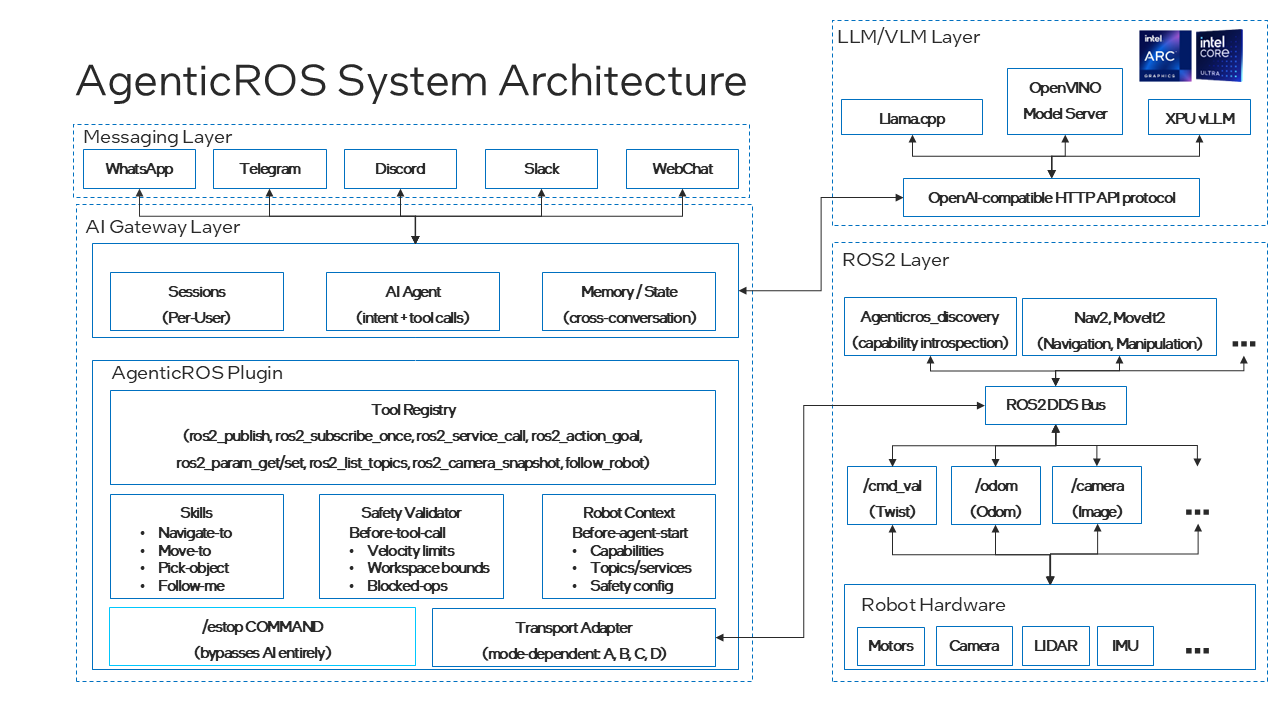 AgenticROS Architecture: OpenClaw UI → OpenClaw Gateway → AgenticROS Bridge → ROS2 Robot Control
Overview#
This demo showcases:
OpenClaw: AI agent framework providing natural language interface and tool execution
AgenticROS: AI agent framework that bridges LLM/VLM capabilities with ROS2 robot control
OpenVINO™ Model Server (OVMS): Serving Qwen3-VL-8B-Instruct multimodal LLM/VLM on Intel PTL GPU
Intel PTL (Panther Lake): Hardware platform providing XPU acceleration for AI inference
JAKA Kargo Robot: 6-DOF collaborative robot arm simulation
AWS Small Warehouse: Gazebo simulation environment
The system enables natural language control of the robot, including:
Camera snapshot capture and analysis
Linear movement commands with closed-loop odometry control
Real-time visual feedback in OpenClaw UI
Prerequisites#
System Requirements#
Ubuntu 24.04 LTS (tested on Ubuntu 24.04 LTS)
Intel GPU with OpenVINO™ support (Intel PTL iGPU, Intel Arc dGPU)
Docker installed and running
At least 32GB RAM
100GB free disk space for models and environments
Software Requirements#
ROS2 Jazzy
Python 3.12+
Intel oneAPI Base Toolkit (for XPU support)
Gazebo simulation environment
Node.js 22.19.0+ (for OpenClaw)
Installation#
Note: This guide uses
~/edge-ai-suites/...as an example checkout root. If you cloned the repository elsewhere, replace those paths with your local repository root.
0. Clone Deployment Repository#
First, clone this deployment folder with all submodules:
# Clone the edge-ai-suites repository (if not already done)
cd ~
git clone https://github.com/open-edge-platform/edge-ai-suites.git -b main

# Navigate to the deployment folder
cd ~/edge-ai-suites/robotics-ai-suite/pipelines/openclaw-agenticros-demo

# Initialize all submodules
git submodule update --init --recursive

# Verify submodules are checked out
ls -la agenticros openclaw JAKA_KARGO aws-robomaker-small-warehouse-world
Submodules included:
agenticros- Pinned to commit675f108(base commit before patches)openclaw- Pinned to commit637b073(latest stable release)JAKA_KARGO- Pinned to commitf2f34f2(Update Isaac Sim package)aws-robomaker-small-warehouse-world- Pinned to commitee0af73(Fix launch files for using gazebo_ros)
1. OpenVINO™ Model Server Setup#
Download Qwen3-VL Model#
# Create Hugging Face environment
python3 -m venv ~/env_hf
source ~/env_hf/bin/activate
pip install -U "huggingface_hub[cli]"

# Download Qwen3-VL-8B-Instruct model
# Login is not required for the public download used in this setup
export HF_ENDPOINT="https://hf-mirror.com"
mkdir -p ~/models
cd ~/models
hf download Qwen/Qwen3-VL-8B-Instruct --local-dir qwen3-vl-8b-instruct

# Deactivate Hugging Face environment
deactivate
Convert Model to OpenVINO™ Format#
# Create Python virtual environment for OpenVINO™ conversion
python3 -m venv ~/env_openvino
source ~/env_openvino/bin/activate

# Install OpenVINO™ conversion tools from requirements file
# Use the included requirements file (or download from robot-claw repo)
pip install -r ~/edge-ai-suites/robotics-ai-suite/pipelines/openclaw-agenticros-demo/requirements/qwen3_vl_openvino_requirements.txt --extra-index-url https://download.pytorch.org/whl/cpu

# Convert the model
optimum-cli export openvino \
  --model ~/models/qwen3-vl-8b-instruct \
  --task image-text-to-text \
  --weight-format int4 \
  --group-size 128 \
  --ratio 0.8 \
  --trust-remote-code \
  ~/models/qwen3-vl-8b-ov-int4

# Verify conversion
ls ~/models/qwen3-vl-8b-ov-int4/
# Expected: openvino_model.xml, openvino_model.bin, config.json, etc.

# Deactivate virtual environment after conversion
deactivate
Requirements File Contents:
The qwen3_vl_openvino_requirements.txt includes:
openvino==2025.4.0- OpenVINO™ toolkitoptimumandoptimum-intel- Hugging Face model conversion toolsnncf==3.1.0- Neural Network Compression Frameworktransformers==5.0.0- Hugging Face transformers
Validated on this host: the public model download worked without Hugging Face login. If your environment enforces model access control, authenticate before downloading.
qwen-vl-utils==0.0.14- Qwen VL utilitiesAdditional dependencies for model conversion and quantization
Start OpenVINO™ Model Server#
# Set target device for your platform
# Arc A770 example: GPU.1
# PTL example: GPU.0
export TARGET_DEVICE=GPU.0

# Navigate to models directory
cd ~/models

# Pull OVMS Docker image (OVMS 2026.1 or later required for Qwen3-VL)
docker pull openvino/model_server:latest-gpu

> Note: if the image pull times out behind a corporate proxy, configure the Docker daemon proxy before retrying.

# Start OVMS container
docker run -d --rm \
  --name ovms-qwen3-vl \
  -u 0 \
  --device /dev/dri \
  -v $(pwd):/models:rw \
  -p 8000:8000 \
  openvino/model_server:latest-gpu \
  --model_path /models/qwen3-vl-8b-ov-int4 \
  --model_name qwen3-vl-8b-ov-int4 \
  --rest_port 8000 \
  --target_device "$TARGET_DEVICE" \
  --task text_generation \
  --tool_parser hermes3

# Verify OVMS is running
docker logs ovms-qwen3-vl 2>&1 | grep -E "Started|Loaded"

# Quick functional test (set NO_PROXY to bypass proxy for localhost)
export NO_PROXY="localhost,127.0.0.0/8"

curl -s http://localhost:8000/v3/chat/completions \
  -H "Content-Type: application/json" \
  -d '{
    "model": "qwen3-vl-8b-ov-int4",
    "max_tokens": 30,
    "temperature": 0,
    "stream": false,
    "messages": [
      { "role": "system", "content": "You are a helpful assistant." },
      { "role": "user", "content": "What are the 3 main tourist attractions in Paris?" }
    ]
  }' | jq .

# The output should be like:
{
  "choices": [
    {
      "finish_reason": "length",
      "index": 0,
      "logprobs": null,
      "message": {
        "content": "While Paris has countless iconic sights, three of the **most famous and must-see tourist attractions** are:\n\n1. **The Eiffel Tower",
        "role": "assistant",
        "tool_calls": []
      }
    }
  ],
  "created": 1780986249,
  "model": "qwen3-vl-8b-ov-int4",
  "object": "chat.completion",
  "usage": {
    "prompt_tokens": 30,
    "completion_tokens": 30,
    "total_tokens": 60
  }
}

# Tool-calling validation (OpenAI-compatible)
# Step 1: Request a tool call and confirm finish_reason is "tool_calls"
curl -sS http://localhost:8000/v3/chat/completions \
  -H "Content-Type: application/json" \
  -d '{
    "model": "qwen3-vl-8b-ov-int4",
    "stream": false,
    "temperature": 0,
    "max_tokens": 128,
    "messages": [
      { "role": "system", "content": "You are a helpful assistant. If tools are provided and relevant, call one." },
      { "role": "user", "content": "What is the weather in Boston? Use the weather tool." }
    ],
    "tools": [
      {
        "type": "function",
        "function": {
          "name": "get_weather",
          "description": "Get current weather by city",
          "parameters": {
            "type": "object",
            "properties": {
              "city": { "type": "string" }
            },
            "required": ["city"]
          }
        }
      }
    ],
    "tool_choice": "auto"
  }' | jq .

# Step 2: Send a tool result and confirm the assistant returns a final text response
curl -sS http://localhost:8000/v3/chat/completions \
  -H "Content-Type: application/json" \
  -d '{
    "model": "qwen3-vl-8b-ov-int4",
    "stream": false,
    "temperature": 0,
    "max_tokens": 128,
    "messages": [
      { "role": "system", "content": "You are a helpful assistant." },
      { "role": "user", "content": "What is the weather in Boston? Use the weather tool." },
      {
        "role": "assistant",
        "content": "",
        "tool_calls": [
          {
            "id": "call_1",
            "type": "function",
            "function": {
              "name": "get_weather",
              "arguments": "{\"city\":\"Boston\"}"
            }
          }
        ]
      },
      {
        "role": "tool",
        "tool_call_id": "call_1",
        "content": "{\"city\":\"Boston\",\"temp_c\":9,\"condition\":\"Cloudy\"}"
      }
    ]
  }' | jq .
OVMS Configuration Notes:
Version: Use
openvino/model_server:latest-gpu(OVMS 2026.1+) for Qwen3-VL supportPort 8000: REST endpoint for OpenAI-compatible API (v3/chat/completions)
-u 0: Run as root user to avoid permission issues--target_device: Specify GPU device (GPU.0, GPU.1, etc.)--task text_generation: Required parameter for text generation models--tool_parser hermes3: Enable tool calling support for OpenClaw integrationModel repository: OVMS loads models from the mounted
/modelsdirectoryRead-write mount: Use
:rwto allow OVMS to write cache files
2. OpenClaw Setup#
Install OpenClaw#
# Ensure Node.js 22.19.0+ is installed
node --version  # Should be >= v22.19.0

# If Node.js version is too old, install/upgrade using one of these methods:

# Method 1: Using NodeSource repository (recommended)
curl -fsSL https://deb.nodesource.com/setup_22.x | sudo -E bash -
sudo apt-get install -y nodejs

# Method 2: Using nvm (Node Version Manager)
# curl -o- https://raw.githubusercontent.com/nvm-sh/nvm/v0.40.0/install.sh | bash
# source ~/.bashrc
# nvm install 22
# nvm use 22

# Initialize and checkout OpenClaw submodule
cd ~/edge-ai-suites/robotics-ai-suite/pipelines/openclaw-agenticros-demo
git submodule update --init openclaw

# Install dependencies and build (requires Node.js 22.19.0+)
cd openclaw

# Install pnpm if not already installed
npm install -g pnpm

# Install dependencies and build OpenClaw
pnpm install
pnpm build

# Install OpenClaw CLI globally (allows 'openclaw' command from any terminal)
npm install -g .

# Run OpenClaw onboarding (initial setup - creates ~/.openclaw/openclaw.json)
# This interactive wizard guides you through:
# - Gateway setup (authentication, port configuration)
# - Workspace directory configuration
# - Channel and skill setup
openclaw onboard

# After onboarding completes, configure OpenClaw for Intel OVMS backend
# OpenClaw creates ~/.openclaw/openclaw.json by default during installation
# Update the configuration to add OVMS provider

# Backup existing config
cp ~/.openclaw/openclaw.json ~/.openclaw/openclaw.json.backup

# Update the configuration (merge with existing content)
cat > ~/.openclaw/openclaw.json << 'EOF'
{
  "models": {
    "providers": {
      "ovms": {
        "baseUrl": "http://127.0.0.1:8000/v3",
        "apiKey": "",
        "api": "openai-completions",
        "models": [
          {
            "id": "qwen3-vl-8b-ov-int4",
            "name": "qwen3-vl-8b-ov-int4",
            "reasoning": false,
            "input": ["text", "image"],
            "cost": { "input": 0, "output": 0, "cacheRead": 0, "cacheWrite": 0 },
            "contextWindow": 32768,
            "maxTokens": 4096
          }
        ]
      }
    }
  },
  "agents": {
    "defaults": {
      "workspace": "~/openclaw-workspace",
      "model": { "primary": "ovms/qwen3-vl-8b-ov-int4" }
    }
  }
}
EOF

# Set no_proxy for OpenClaw gateway to bypass proxy for localhost
mkdir -p ~/.config/systemd/user/openclaw-gateway.service.d

cat > ~/.config/systemd/user/openclaw-gateway.service.d/no_proxy.conf << 'EOF'
[Service]
Environment="NO_PROXY=localhost,127.0.0.1,::1,172.16.0.0/12,192.168.0.0/16,host.docker.internal"
Environment="no_proxy=localhost,127.0.0.1,::1,172.16.0.0/12,192.168.0.0/16,host.docker.internal"
EOF

# Apply gateway configuration
systemctl --user daemon-reload
systemctl --user restart openclaw-gateway
systemctl --user status openclaw-gateway

# Verify OpenClaw gateway is running
# Check that the service is active and no_proxy is applied
systemctl --user show openclaw-gateway | grep -E "NO_PROXY|no_proxy"

# Verify gateway is accessible (should return gateway info or 404, not connection refused)
curl -s http://127.0.0.1:18789/ | head -5
Verification Checklist:
OVMS serving endpoint responds on
http://127.0.0.1:8000OpenClaw gateway service is active and running
no_proxy override is active for OpenClaw gateway (check systemctl show output)
Gateway is accessible on
http://127.0.0.1:18789(curl returns response, not connection refused)
Important Configuration Notes:
The above configuration shows only the OVMS-related sections
no_proxy setting: Required for OpenClaw to connect to OVMS (localhost:8000) and rosbridge (localhost:9090) without proxy interference
OpenClaw creates a default config during installation - always backup before modifying
baseUrl: Points to OVMS v3 API endpoint (http://127.0.0.1:8000/v3)api: Set toopenai-completionsfor OpenAI-compatible APIinput: Must include["text", "image"]for multimodal support (critical for camera snapshots)model.primary: Usesovms/provider prefix to reference the OVMS providerKeep existing
gateway,auth, and other fields when merging with default configurationIf you have an existing config with other providers, add the
ovmssection undermodels.providers
3. ROS2 Jazzy Setup#
Follow the official ROS2 Jazzy installation to install ROS2 base system.
After base ROS2 installation, install simulation dependencies:
# Install required ROS2 packages for AgenticROS with Gazebo simulation
sudo apt update
sudo apt install -y \
  python3-colcon-common-extensions \
  ros-jazzy-ros-gz \
  ros-jazzy-ros-gz-sim \
  ros-jazzy-rosbridge-suite \
  ros-jazzy-control-msgs \
  ros-jazzy-moveit-msgs \
  ros-jazzy-moveit-ros-planning-interface \
  ros-jazzy-moveit-visual-tools \
  ros-jazzy-rviz2

> Note: the launch files in this demo use Gazebo Sim through `ros_gz_sim`, so `ros-jazzy-ros-gz-sim` and `ros-jazzy-rosbridge-suite` must be installed on the validation host.

# Verify ROS2 installation
source /opt/ros/jazzy/setup.bash
ros2 pkg list | grep -E "gz|rosbridge"
4. AgenticROS Setup#
Initialize and build the AgenticROS workspace:
# Initialize and checkout AgenticROS submodule (pinned to commit 675f108)
cd ~/edge-ai-suites/robotics-ai-suite/pipelines/openclaw-agenticros-demo
git submodule update --init agenticros

# Apply patches for JAKA Kargo and warehouse features (4 patches in sequence)
cd agenticros

# Method 1: Apply with git am (preserves commit history)
git am ../patches/agenticros/*.patch

# Method 2: Apply without committing (if git am fails due to shallow clone)
# for patch in ../patches/agenticros/*.patch; do
#   echo "Applying $(basename $patch)..."
#   git apply "$patch"
# done

# Initialize and setup JAKA_KARGO submodule
cd ~/edge-ai-suites/robotics-ai-suite/pipelines/openclaw-agenticros-demo
git submodule update --init JAKA_KARGO

# Apply JAKA_KARGO patches (1 patch for Gazebo integration)
cd JAKA_KARGO
git am ../patches/jaka_kargo/*.patch

# Initialize and setup aws-robomaker-small-warehouse-world submodule
cd ~/edge-ai-suites/robotics-ai-suite/pipelines/openclaw-agenticros-demo
git submodule update --init aws-robomaker-small-warehouse-world

# Apply aws-robomaker-small-warehouse-world patches (1 patch for model URI updates)
cd aws-robomaker-small-warehouse-world
git am ../patches/aws_warehouse_world/*.patch

# Link both JAKA_KARGO and aws-robomaker-small-warehouse-world to AgenticROS ROS2 workspace
cd ~/edge-ai-suites/robotics-ai-suite/pipelines/openclaw-agenticros-demo/agenticros/ros2_ws/src
ln -sf ~/edge-ai-suites/robotics-ai-suite/pipelines/openclaw-agenticros-demo/JAKA_KARGO/jaka_kargo_ros2/src/jaka_kargo_description .
ln -sf ~/edge-ai-suites/robotics-ai-suite/pipelines/openclaw-agenticros-demo/aws-robomaker-small-warehouse-world .

# Install Node.js dependencies and build TypeScript packages
cd ~/edge-ai-suites/robotics-ai-suite/pipelines/openclaw-agenticros-demo/agenticros
pnpm install

# Build the packages for OpenClaw plugin integration
pnpm --filter @agenticros/core build
pnpm --filter @agenticros/ros-camera build

# Run TypeScript type checking to verify the build
pnpm typecheck

# Build ROS2 workspace (including JAKA_KARGO and warehouse world)
cd ros2_ws
source /opt/ros/jazzy/setup.bash
colcon build --packages-select agenticros_msgs agenticros_bringup agenticros_discovery agenticros_agent agenticros_follow_me jaka_kargo_description aws_robomaker_small_warehouse_world
source install/setup.bash

# Source the workspace in bashrc for future sessions
echo "source ~/edge-ai-suites/robotics-ai-suite/pipelines/openclaw-agenticros-demo/agenticros/ros2_ws/install/setup.bash" >> ~/.bashrc
Key packages in the AgenticROS workspace:
agenticros_agent: Core agent logic for AI-ROS bridgingagenticros_bringup: Launch files for bringing up robot simulationsagenticros_msgs: Custom ROS2 message definitionsagenticros_discovery: ROS service/topic discovery for AI agentsjaka_kargo_description: JAKA Kargo robot URDF, meshes, and Gazebo launch files (from JAKA_KARGO submodule)aws_robomaker_small_warehouse_world: AWS Small Warehouse Gazebo environment (from aws-robomaker-small-warehouse-world submodule)
Configure OpenClaw System Service with ROS2 Environment#
OpenClaw gateway must load ROS2 environment to access AgenticROS plugin tools. Create a wrapper script and systemd override:
# Create wrapper script that sources ROS2 environment
mkdir -p ~/.local/bin

cat > ~/.local/bin/openclaw-gateway-with-ros.sh << 'EOF'
#!/usr/bin/env bash
set -eo pipefail

source /opt/ros/jazzy/setup.bash
source ~/edge-ai-suites/robotics-ai-suite/pipelines/openclaw-agenticros-demo/agenticros/ros2_ws/install/setup.bash

exec openclaw gateway
EOF

chmod +x ~/.local/bin/openclaw-gateway-with-ros.sh

# Create systemd override to use the wrapper and set ROS environment
mkdir -p ~/.config/systemd/user/openclaw-gateway.service.d

cat > ~/.config/systemd/user/openclaw-gateway.service.d/ros-env.conf << 'EOF'
[Service]
Environment="ROS_DISTRO=jazzy"
Environment="RMW_IMPLEMENTATION=rmw_fastrtps_cpp"
ExecStart=
ExecStart=%h/.local/bin/openclaw-gateway-with-ros.sh
EOF

# Reload and restart gateway
systemctl --user daemon-reload
systemctl --user restart openclaw-gateway.service
systemctl --user is-active openclaw-gateway.service
# Expected: active

# Verify ROS environment is loaded
systemctl --user show openclaw-gateway.service --property=Environment | grep ROS_DISTRO
# Expected: ROS_DISTRO=jazzy
Configure OpenClaw Plugin for AgenticROS#
Run the helper script to configure AgenticROS plugin:
cd ~/edge-ai-suites/robotics-ai-suite/pipelines/openclaw-agenticros-demo/agenticros
./scripts/setup_gateway_plugin.sh

# Restart gateway to load plugin configuration
systemctl --user daemon-reload
systemctl --user restart openclaw-gateway.service
Required Plugin Configuration in ~/.openclaw/openclaw.json:
The helper script adds this configuration (or add manually if needed):
{
  "plugins": {
    "entries": {
      "agenticros": {
        "enabled": true,
        "config": {
          "transport": {
            "mode": "rosbridge"
          },
          "rosbridge": {
            "url": "ws://localhost:9090",
            "reconnect": true,
            "reconnectInterval": 3000
          },
          "robot": {
            "name": "Robot",
            "namespace": "",
            "cameraTopic": "/camera/image_raw"
          },
          "teleop": {
            "cameraTopic": "/camera/image_raw",
            "cmdVelTopic": "/cmd_vel_unstamped",
            "speedDefault": 0.3,
            "cameraPollMs": 150
          },
          "safety": {
            "maxLinearVelocity": 1,
            "maxAngularVelocity": 1.5
          }
        }
      }
    },
    "allow": ["agenticros", "memory-core", "vllm"],
    "load": {
      "paths": [
        "~/edge-ai-suites/robotics-ai-suite/pipelines/openclaw-agenticros-demo/agenticros/packages/agenticros"
      ]
    }
  }
}
Important Notes:
Do NOT set
"tools": {"profile": "coding"}- this hides plugin tools from the modelKeep
transport.modeas"rosbridge"for this deploymentKeep
rosbridge.urlas"ws://localhost:9090"For JAKA simulation, use
cmdVelTopic: "/cmd_vel_unstamped"
Verify OpenClaw ROS2 Tool Calling#
Test that OpenClaw can call ROS2 tools through the AgenticROS plugin:
# Verify ROS2 tools are available (start rosbridge first - see Running the Demo section)
openclaw agent --local --session-id ros-tool-test-$(date +%s) \
  --message "Call ros2_list_topics once." --json

# Check gateway logs for ROS2 transport connection
journalctl --user -u openclaw-gateway.service -n 60 --no-pager | grep -E 'ROS2 transport status|ROS2 transport connected'
# Expected: Should show "ROS2 transport connected" or similar success message
Running the Demo#
Step 1: Start Gazebo Simulation with rosbridge#
Launch the JAKA Kargo robot in AWS Small Warehouse environment with integrated rosbridge WebSocket server:
# Terminal 1: Start ROS2, Gazebo, and rosbridge
source ~/edge-ai-suites/robotics-ai-suite/pipelines/openclaw-agenticros-demo/agenticros/ros2_ws/install/setup.bash

# Launch JAKA Kargo with AWS Warehouse and rosbridge
ros2 launch agenticros_bringup rosbridge_gazebo.launch.py \
    gazebo_launch:=gazebo_small_warehouse.launch.py \
    use_gazebo_gui:=true

# Note: `use_gazebo_gui:=true` requires a graphical desktop session with a valid
# display. In pure tty sessions, use `use_gazebo_gui:=false` (or the xvfb path
# in Troubleshooting).

# Wait for Gazebo to fully load (you should see the warehouse and robot)
What this command does:
Starts rosbridge WebSocket server on port 9090
Launches Gazebo with JAKA Kargo robot in AWS Small Warehouse
Enables Gazebo GUI for visualization (
use_gazebo_gui:=true)
Expected result:
Gazebo window opens with AWS Small Warehouse environment
JAKA Kargo robot is spawned in the warehouse
rosbridge WebSocket server running on port 9090
ROS2 topics are available:
/camera/image_raw,/cmd_vel,/odom
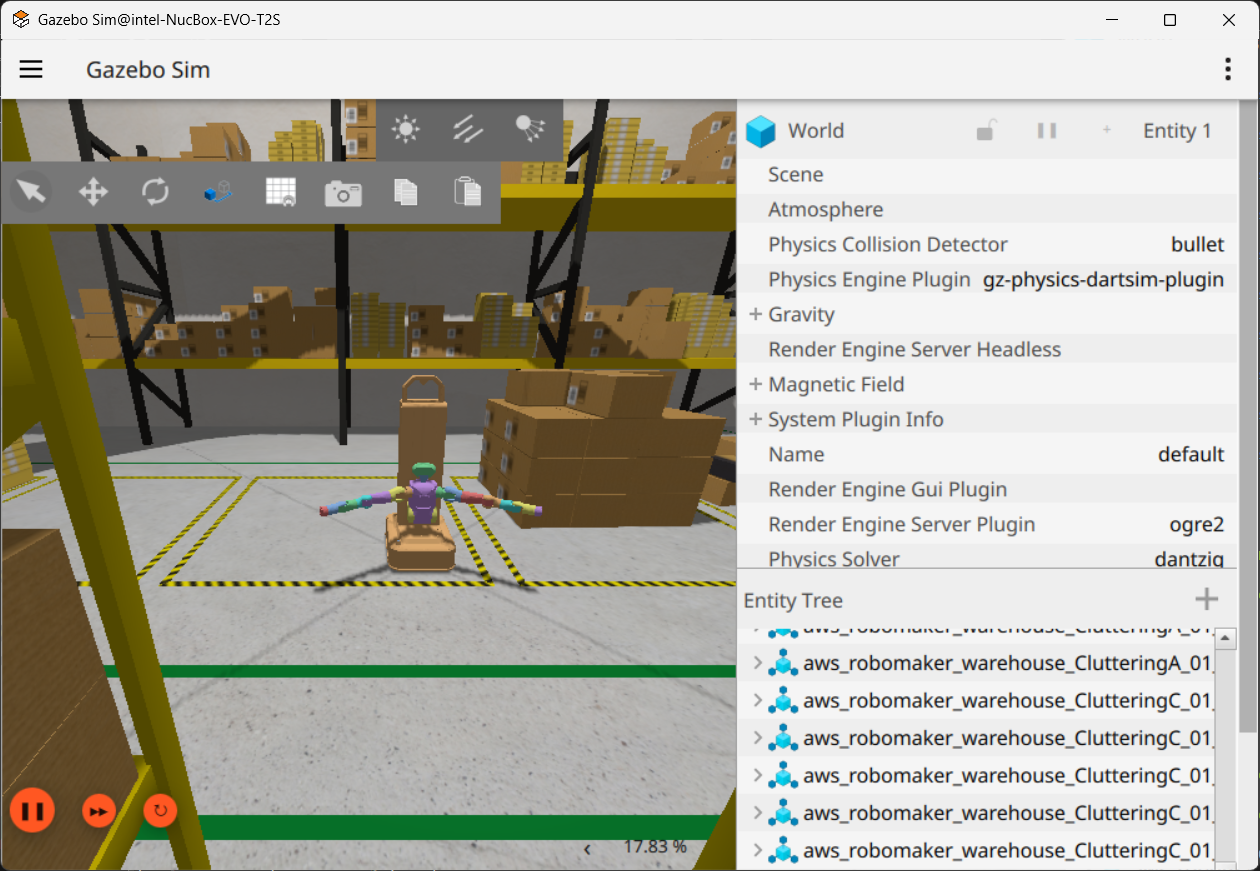 Gazebo simulation with JAKA Kargo robot in AWS Small Warehouse environment
Verification:
# Terminal 2: Check running topics
ros2 topic list | grep -E "(camera|cmd_vel|odom)"

# Expected output:
# /camera/image_raw
# /camera/image_raw/compressed
# /cmd_vel
# /odom

# Verify rosbridge is running
ss -ltn '( sport = :9090 )'
# Expected: port 9090 is LISTEN
Alternative launch options:
# AWS Small Warehouse without GUI (headless mode)
# Use Ogre renderer if Ogre2 render came across crash error.
ros2 launch agenticros_bringup rosbridge_gazebo.launch.py \
    gazebo_launch:=gazebo_small_warehouse.launch.py \
    gazebo_render_engine:=ogre \
    use_gazebo_gui:=false

# AWS Small Warehouse no-roof variant
ros2 launch agenticros_bringup rosbridge_gazebo.launch.py \
    gazebo_launch:=gazebo_small_warehouse.launch.py \
    warehouse_world:=$HOME/edge-ai-suites/robotics-ai-suite/pipelines/openclaw-agenticros-demo/agenticros/ros2_ws/src/aws-robomaker-small-warehouse-world/worlds/no_roof_small_warehouse/no_roof_small_warehouse.world \
    use_gazebo_gui:=true

# If `gz sim` is missing, ensure the Gazebo tools registry path is present.
export GZ_CONFIG_PATH="/opt/ros/jazzy/opt/gz_tools_vendor/share/gz:${GZ_CONFIG_PATH:-}"
Step 2: Start OpenClaw Dashboard#
OpenClaw gateway is already running as a systemd service (started during setup). Now start the dashboard UI:
# Terminal 2: Start OpenClaw dashboard
cd ~/edge-ai-suites/robotics-ai-suite/pipelines/openclaw-agenticros-demo/openclaw
openclaw dashboard

# Expected output will show a URL like:
# OpenClaw dashboard running at: http://localhost:3000
# or http://localhost:XXXX (port may vary)
Open the displayed URL in your web browser (e.g., http://localhost:3000)
Verify OpenClaw gateway status (optional):
systemctl --user status openclaw-gateway

# Expected: Active: active (running)
Chat with Qwen3-VL in OpenClaw UI
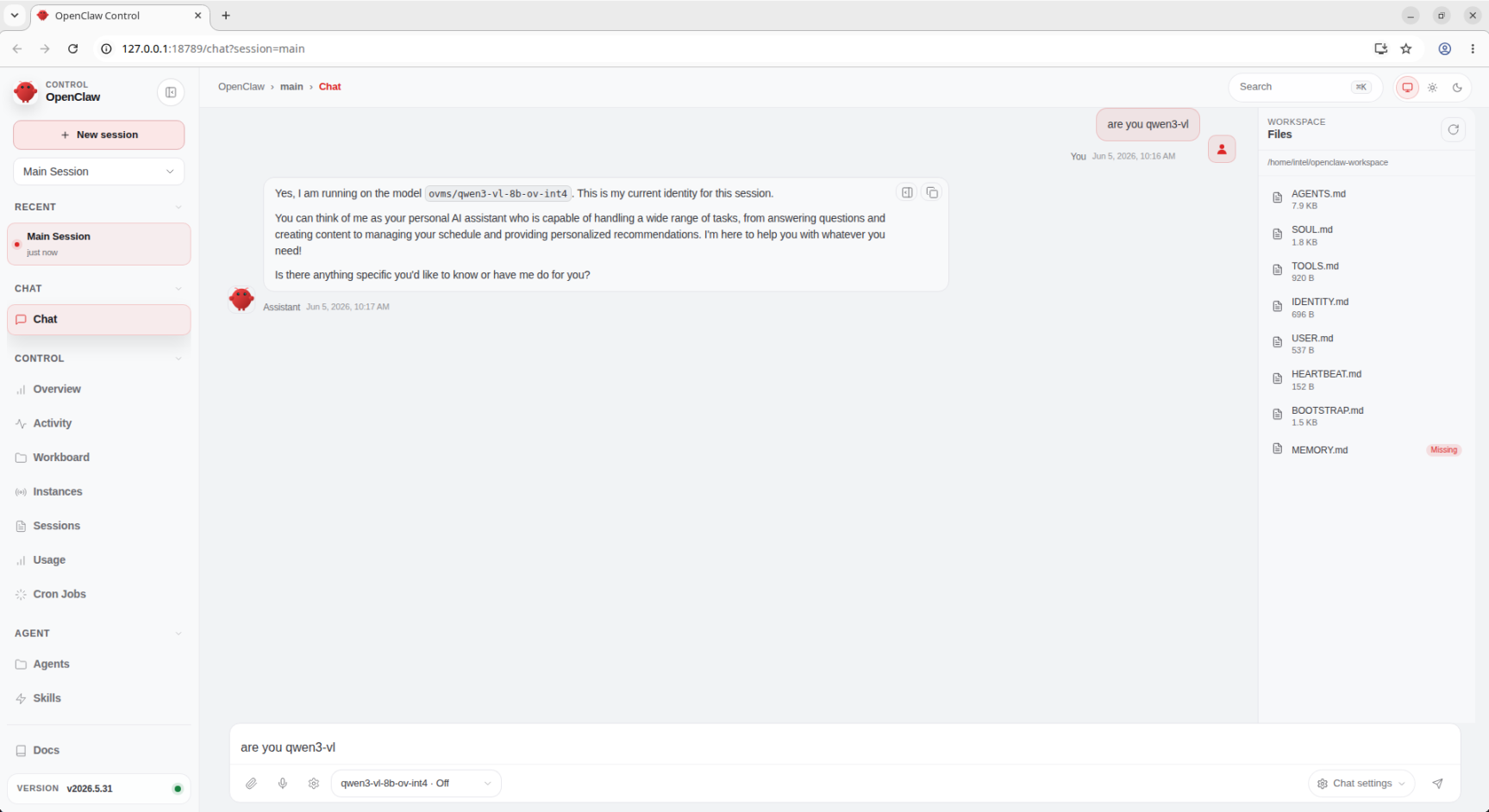 Validate the OpenClaw and OVMS setup through the OpenClaw UI chat
Step 3: Interact with the Robot#
Open the OpenClaw web UI in your browser using the URL shown by the dashboard command.
Try these commands in the OpenClaw interface:
Camera Snapshot#
What does the robot see
Expected behavior:
OpenClaw calls AgenticROS
camera_snapshottoolAgenticROS subscribes to
/camera/image_raw/compressedImage is captured and displayed in OpenClaw UI
Qwen3-VL model analyzes the image and responds with description
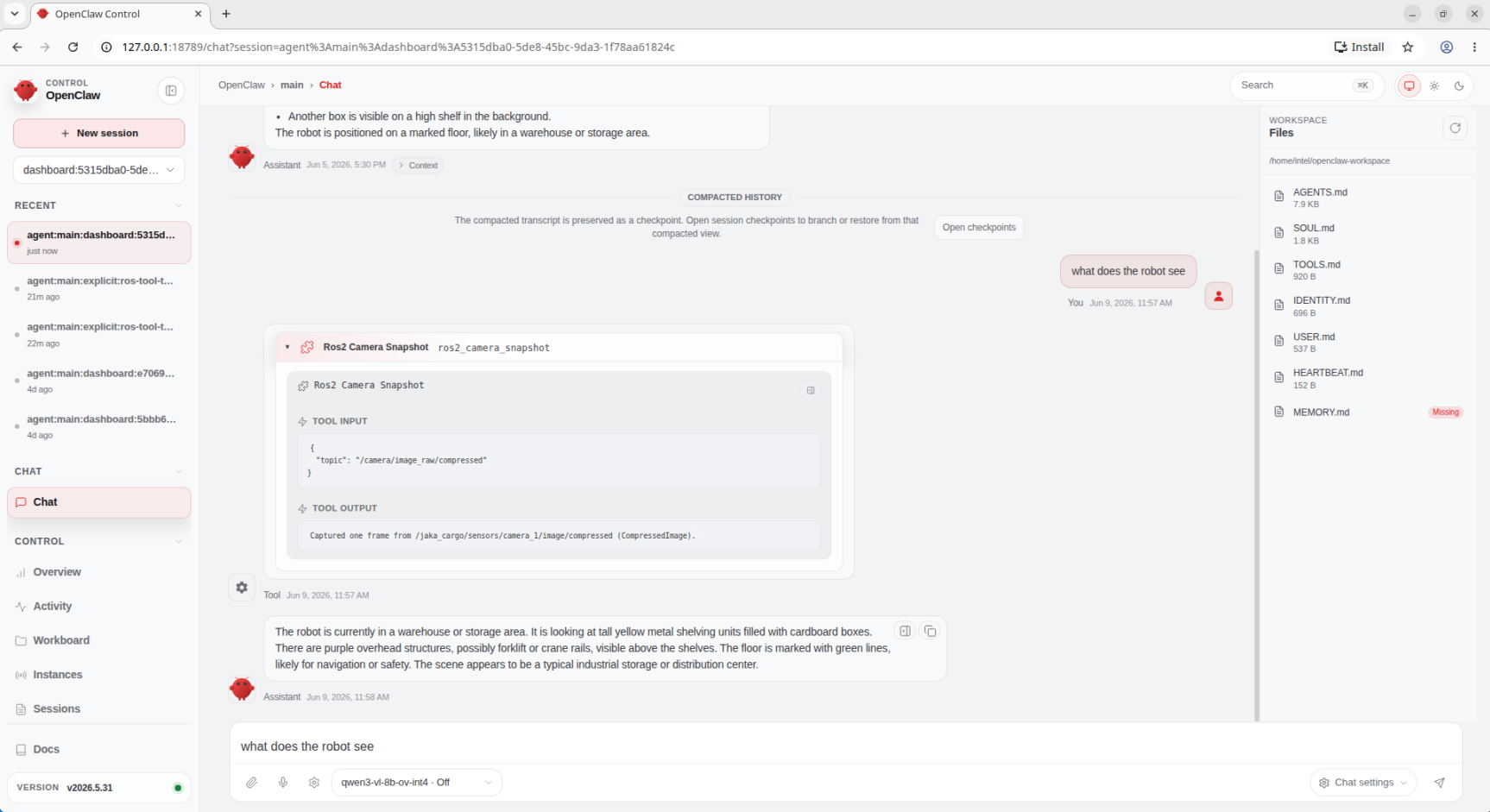 Validate the camera snapshot feature: OpenClaw captures and analyzes the robot’s camera view
Movement Commands#
Move the robot forward 1 meter
Expected behavior:
OpenClaw calls AgenticROS
cmd_vel_movetool withlinear: 1.0, distance: 1.0AgenticROS publishes to
/cmd_veltopicRobot moves forward in Gazebo
AgenticROS monitors
/odomfor closed-loop controlRobot stops after traveling ~1 meter
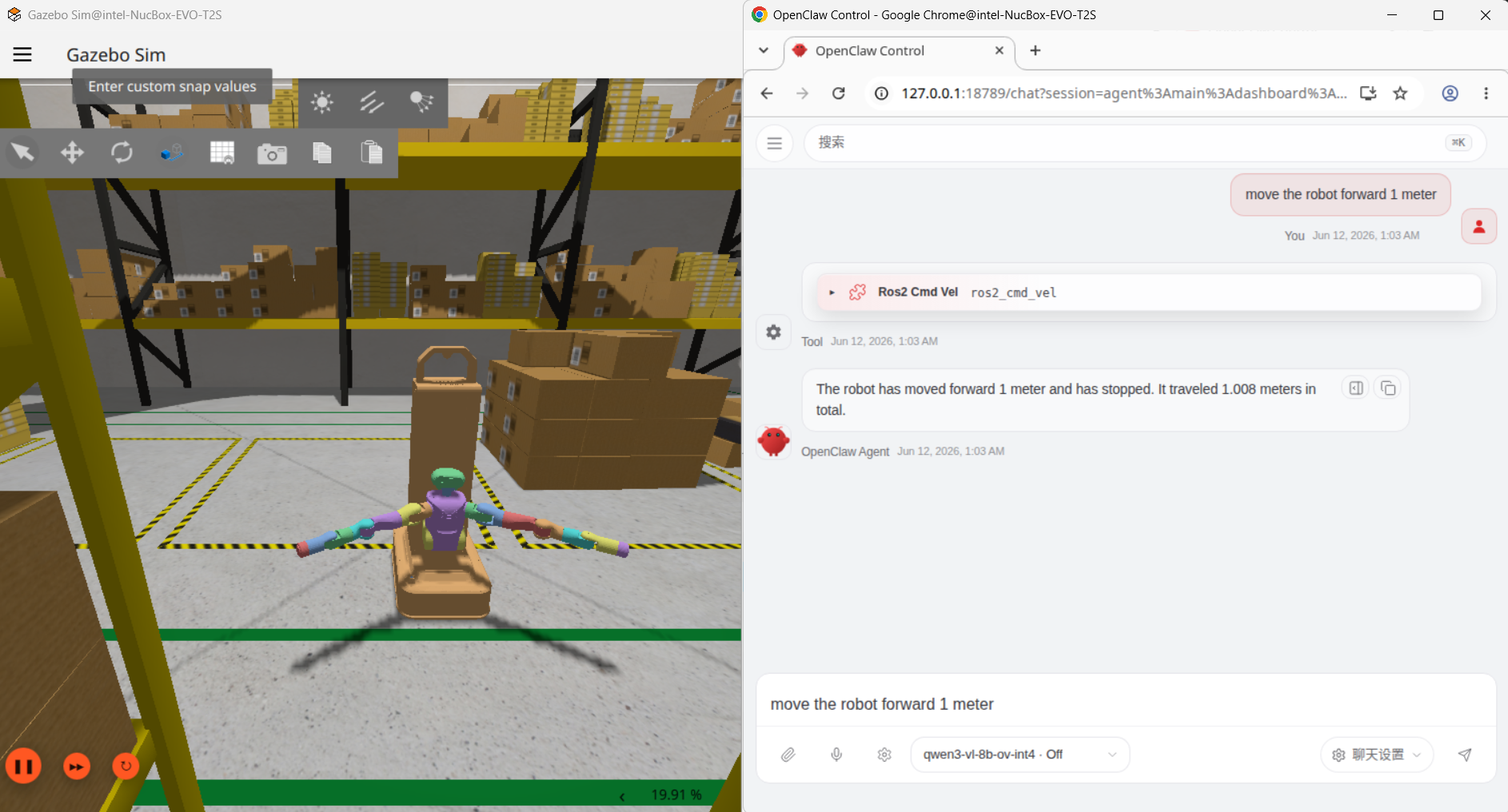 JAKA Kargo robot executing 1-meter forward movement with closed-loop odometry feedback
Rotate the robot 90 degrees clockwise
Expected behavior:
OpenClaw calls
cmd_vel_movewithangular: -1.57(radians)Robot rotates in place in Gazebo
AgenticROS stops robot after 90-degree rotation
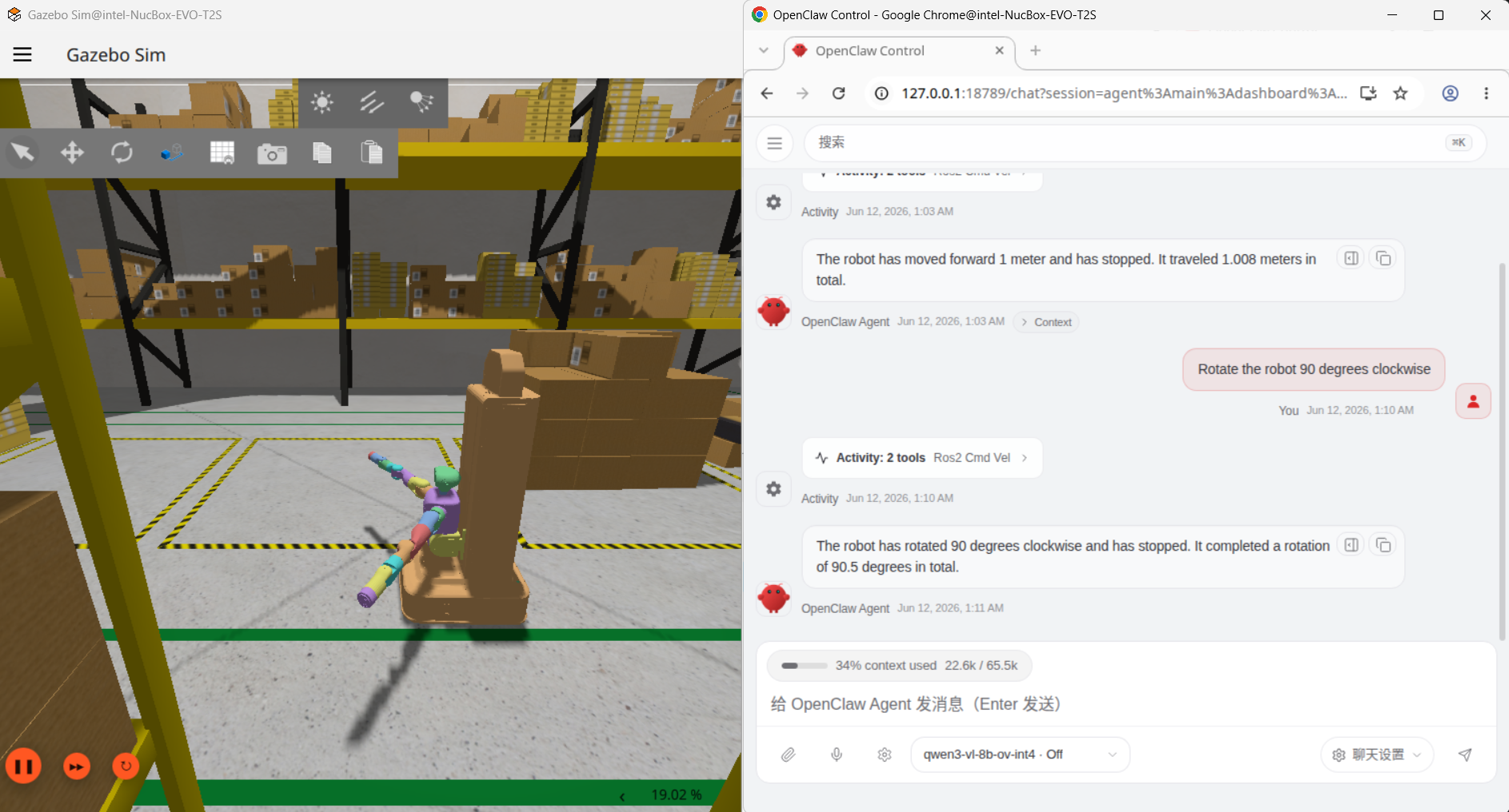 JAKA Kargo robot executing 90-degree clockwise rotation with angular velocity control
Troubleshooting#
Gazebo Not Starting#
Issue: Gazebo fails to start or crashes immediately
Solution:
# Check Gazebo installation
gazebo --version

# Reset Gazebo configuration
rm -rf ~/.gazebo/
mkdir -p ~/.gazebo/models

# Restore the Gazebo tools registry path if `gz` is missing commands
export GZ_CONFIG_PATH="/opt/ros/jazzy/opt/gz_tools_vendor/share/gz:${GZ_CONFIG_PATH:-}"
source /opt/ros/jazzy/setup.bash
source ~/edge-ai-suites/robotics-ai-suite/pipelines/openclaw-agenticros-demo/agenticros/ros2_ws/install/setup.bash

# Try launching with verbose output
ros2 launch agenticros_bringup rosbridge_gazebo.launch.py \
  gazebo_launch:=gazebo_small_warehouse.launch.py \
  gazebo_render_engine:=ogre \
  use_gazebo_gui:=false \
  --ros-args --log-level debug
OVMS Connection Failed#
Issue: OpenClaw cannot connect to OVMS at http://localhost:8000
Solution:
# Check OVMS container status
docker ps | grep ovms-qwen3-vl

# Check OVMS logs
docker logs ovms-qwen3-vl

# Verify model is loaded
curl http://localhost:8000/v1/models

# Restart OVMS container
docker restart ovms-qwen3-vl
rosbridge Not Responding#
Issue: OpenClaw shows “Disconnected from AgenticROS”
Solution:
# Check rosbridge is running
ps aux | grep rosbridge

# Verify WebSocket port is open
netstat -tuln | grep 9090

# If launch reports "Address already in use", find and stop the existing listener first
ss -ltnp '( sport = :9090 )'

# Restart rosbridge
ros2 launch rosbridge_server rosbridge_websocket_launch.xml
Camera Image Not Displaying#
Issue: camera_snapshot tool returns error or image does not show in the UI
Solution:
# Check camera topic is publishing
ros2 topic hz /camera/image_raw/compressed

# Manually test camera
ros2 run image_view image_view --ros-args --remap image:=/camera/image_raw

# Check AgenticROS image serving
curl http://localhost:8080/images/latest.jpg
Robot Not Moving#
Issue: cmd_vel commands do not move the robot in Gazebo
Solution:
# Check cmd_vel topic is subscribed
ros2 topic info /cmd_vel

# Manually test movement
ros2 topic pub /cmd_vel geometry_msgs/msg/Twist "{linear: {x: 0.5}, angular: {z: 0.0}}" --once

# Check robot controller is running
ros2 node list | grep controller

# Verify Gazebo physics engine is running
gz physics list
Model Inference Too Slow#
Issue: Qwen3-VL takes more than 10 seconds per response
Solution:
# Check GPU utilization
intel_gpu_top

# Verify OVMS is using GPU
docker logs ovms-qwen3-vl | grep "Device: GPU"