How It Works#
Video Search#
You can search through videos using natural language, where the search is done in the background. When the Video Search pipeline finds a match, it raises events or notifications. The Video Search mode uses multimodal embedding and agentic reasoning, which improves accuracy and efficiency. Example use cases are video forensics, media analysis, content management, and personalized recommendations.
The Video Search mode uses a foundational retrieval-augmented generation (RAG) pipeline for video data. The Video Search mode provides a rich response by using Intel’s AI systems and Intel’s Edge AI microservices catalog.
You can develop, customize, and deploy Video Summarization solutions in diverse deployment scenarios with out-of-the-box support for on-premise and edge environments.
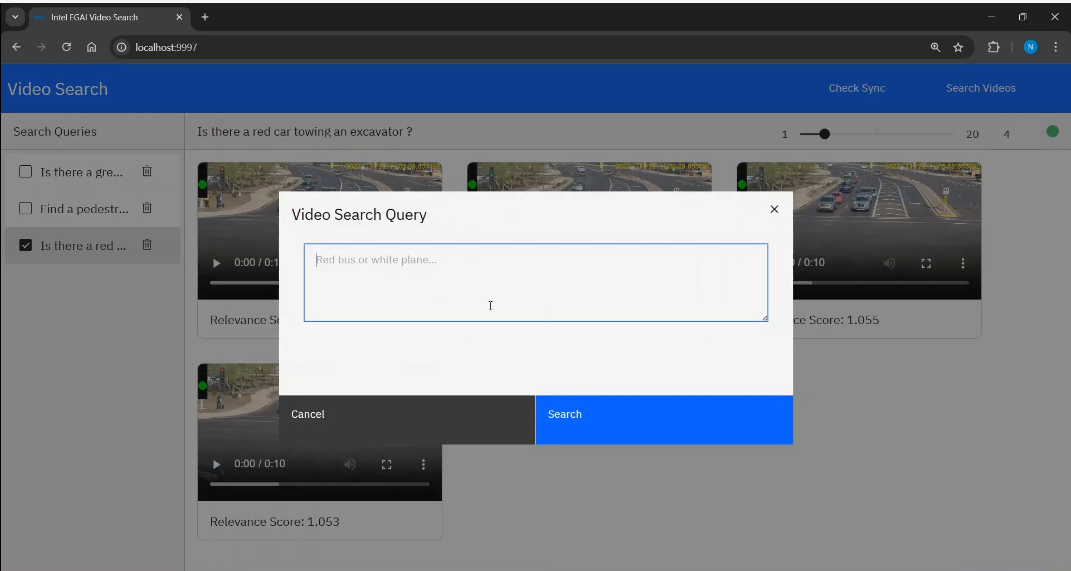
The following is the Video Search mode UI:
Purpose of Video Search#
The Video Search mode:
Allows you to build the video search pipeline quickly through Intel’s Edge AI catalog of inference microservices. The inference microservices are optimized for Intel’s Edge AI systems.
Serves as a blueprint for building similar scalable and modular solutions that can be deployed on Intel’s Edge AI systems.
Showcases the competitiveness of Intel’s Edge AI systems to address varied deployment scenarios, from the edge to the cloud.
Provide reference sample microservices for capabilities like video ingestion and UI frontend, which reduces the effort to customize the application.
Showcase how popular frameworks like the LangChain framework can be used to implement or customize the Video Search pipeline quickly and deploy the pipeline on Intel’s Edge AI systems.
Key Features of Video Search#
User-Friendly and Intuitive: You can use natural language through the easy-to-use interface to search.
Richer contextual and perceptual understanding: The Video Search mode provides a richer contextual and perceptual understanding of the video through multimodal embedding.
Optimized systems: The pipeline runs on Intel’s Edge AI systems, ensuring high performance, reliability, and low cost of ownership. See system requirements for the list of hardware on which the pipeline is validated and optimized.
Flexible Deployment Options: You can choose the deployment environment, for example, deploying using the Docker Compose tool and Helm charts.
Support for open-source Models:You can use the desired generative AI models, for example, VLM and embeddings. The Video Search pipeline supports various open-source models, for example the Hugging Face Hub models that integrate with OpenVINO™ toolkit, allowing developers to select the best models for their use cases.
Self-Hosting:You can perform the inference locally or on-premises, ensuring data privacy and reducing latency.
Observability and monitoring: The application provides observability and monitoring capabilities using OpenTelemetry* APIs, SDKs, and tools & OpenLIT platform, enabling developers to monitor the application’s performance and health in real-time.
Agentic Reasoning and Event Generation: The Video Search pipeline decomposes user queries, plans and executes multi-stage retrievals, and generates or tracks events based on query results. When a match is found, the application raises events or notifications.
Customizable: You can customize components of the pipeline, for example, video ingestion, model selection, and deployment options. You can also customize Intel’s Edge AI inference microservices.
How to Use Video Search Effectively#
The Video Search mode consists of two main functionalities:
The Video Ingestion functionality uses the Video Ingestion microservice that supports common video formats, to add videos to the application. The ingestion uses the Embedding microservice to create video embeddings, and stores the video embeddings in the preferred vector database. The modular architecture allows you to customize the vector database.
Generation (Search Results): The Generation functionality allows you to query the video database and generate responses. The VLM inference microservice, embedding inference microservice, and reranking microservice work together to provide accurate and efficient answers to user queries.
When you submit a question, the embedding model transforms it into an embedding, enabling semantic comparison with stored document embeddings. The vector database searches for relevant embeddings, returning a ranked list of documents based on semantic similarity. The VLM inference microservice generates a context-aware response from the final set of ranked videos.
To use the application:
Upload the videos using the ingestion block or the ingestion APIs exposed by the application.
Query the video for specific events using natural language. The application returns a set of videos that match the query.
For more information, refer to Video Search.
Video Summarization#
The Video Summarization mode enables concise and informative summaries of long-form videos. It uses Generative AI Vision Language Models (VLMs), which leverages advanced AI techniques to combine visual, audio, and textual data to understand and extract relevant content from videos, thereby, enabling efficient content review and improved searchability.
The Video Summarization mode provides a rich response by using Intel’s AI systems and Intel’s Edge AI microservices catalog.
You can develop, customize, and deploy Video Summarization solutions in diverse deployment scenarios with out-of-the-box support for on-premise and edge environments.
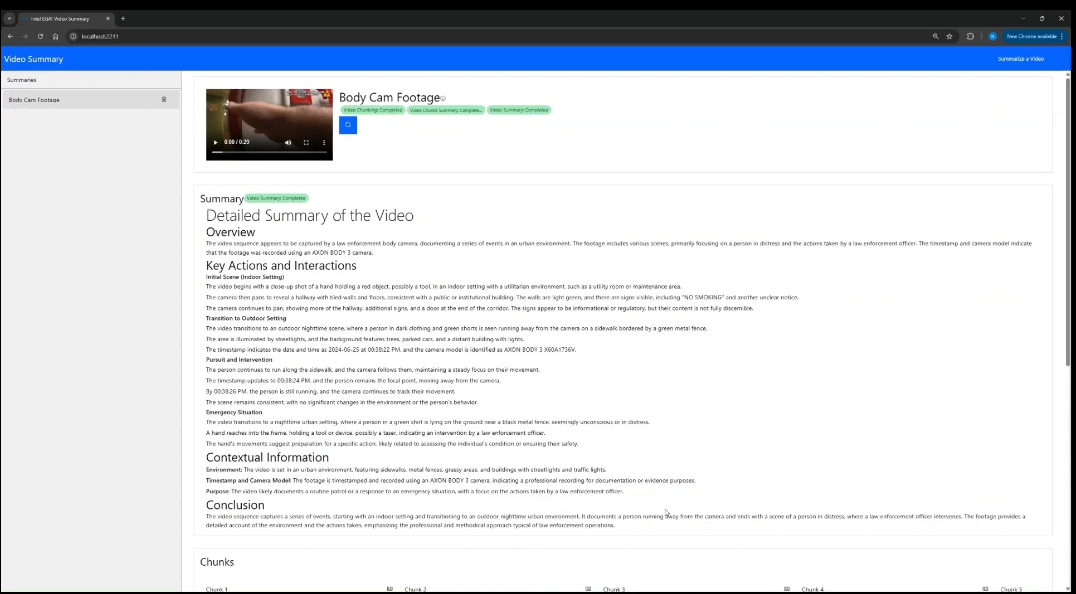
The following is the Video Summarization mode UI:
Purpose of Video Summarization#
The Video Summarization mode allows you to customize the accuracy-performance trade-off. The following figure shows an example of pipeline configurations with different compute requirements.
The following figure shows sample Video Summarization pipeline configurations:
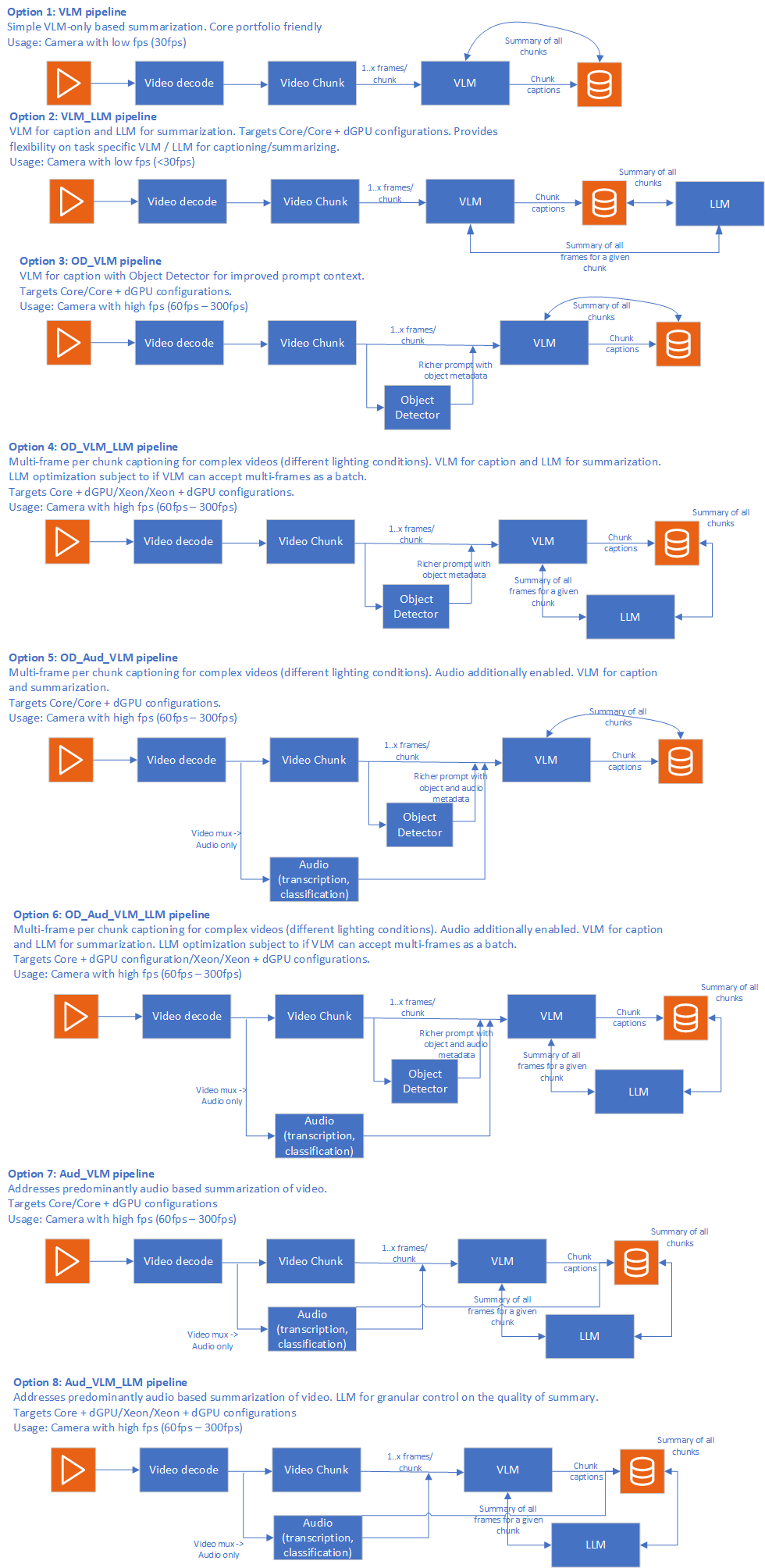
*Sample Video Summarization pipeline configurations
To create a summary with the best possible accuracy for a given compute, the Video Summarization mode:
Allows you to build the video summarization pipeline quickly through Intel’s Edge AI catalog of inference microservices. The inference microservices are optimized for Intel’s Edge AI systems.
Serves as a blueprint for building similar scalable and modular solutions that can be deployed on Intel’s Edge AI systems.
Showcases the competitiveness of Intel’s Edge AI systems to address varied deployment scenarios, from the edge to the cloud.
Provides reference sample microservices for capabilities like video ingestion and UI frontend, which reduces the effort to customize the application.
Key Features of Video Summarization#
User-Friendly and Intuitive: You can use natural language through the easy-to-use interface to search.
Richer contextual and perceptual understanding: The Video Summarization mode provides a richer contextual and perceptual understanding of the video through multimodal embedding. For example, you can use an object detector to enrich the quality of input to Vision-Language Model (VLM) captioning. See the architecture.
Optimized systems: The pipeline runs on Intel’s Edge AI systems, ensuring high performance, reliability, and low cost of ownership.
Flexible Deployment Options: You can choose the deployment environment, for example, deploying using the Docker Compose tool and Helm charts.
Support for open-source Models: You can use the desired generative AI models, for example, VLM and embeddings. The Video Summarization mode supports various open-source models, for example, the Hugging Face Hub models that integrate with OpenVINO™ toolkit, allowing you to select the best models for their use cases.
Self-Hosting: You can perform the inference locally or on-premises, ensuring data privacy and reducing latency.
Observability and monitoring: The Video Summarization mode provides observability and monitoring capabilities using OpenTelemetry telemetry & OpenLIT platform, enabling you to monitor the application’s performance and health in real-time.
Scalability: The pipeline can handle large volumes of video data, making it suitable for various applications, including media analysis, content management, and personalized recommendations.
Natural Language Querying: The captions generated by the application allow you to search for video content using natural language, making the search process intuitive and user-friendly. This capability combines the Video Summarization pipeline with the Video Search pipeline.
Audio capability: For certain videos, the audio provides a richer context, which can improve the accuracy of the summary. The audio pipeline will transcribe the audio channel and use the same as additional context information for the VLM.
Efficient Summarization: You can generate summaries of videos and highlight key moments.
Customizable: You can customize the pipeline, for example, to focus on particular topics or themes within the video, or to enable context extraction from audio, before embedding and indexing.
How to Use Video Summarization Effectively#
The Video Summarization pipeline offers features to improve accuracy for complex, long-form videos. Choosing which features to use involves balancing accuracy and performance. You can configure the pipeline based on answers to the following key questions, to determine the trade-off between accuracy and compute:
How complex is the video?
What is the pipeline’s accuracy target, as measured by key qualitative metrics like the BERT score and by manual inspection?
What are the available compute resources for running the pipeline?
What are the key performance metrics, for example, throughput and latency, that the pipeline needs to achieve?
After configuring the pipeline, you can deploy the application, upload the video to be summarized, set parameters like chunk duration and frame count, and then submit the request. The application updates you on the progress and provides the final summary. The API specification outlines how to access the application’s features.
For more information, refer to Video Summarization.
Video Search and Summarization#
The Video Search and Summarization mode summarizes long-form videos and searches the generated summary. The mode combines the generative AI Vision Language Models (VLMs) and multimodal embedding models to understand and extract requested content from videos.
You can develop, customize, and deploy Video Summarization solutions in diverse deployment scenarios with out-of-the-box support for on-premise and edge environments.
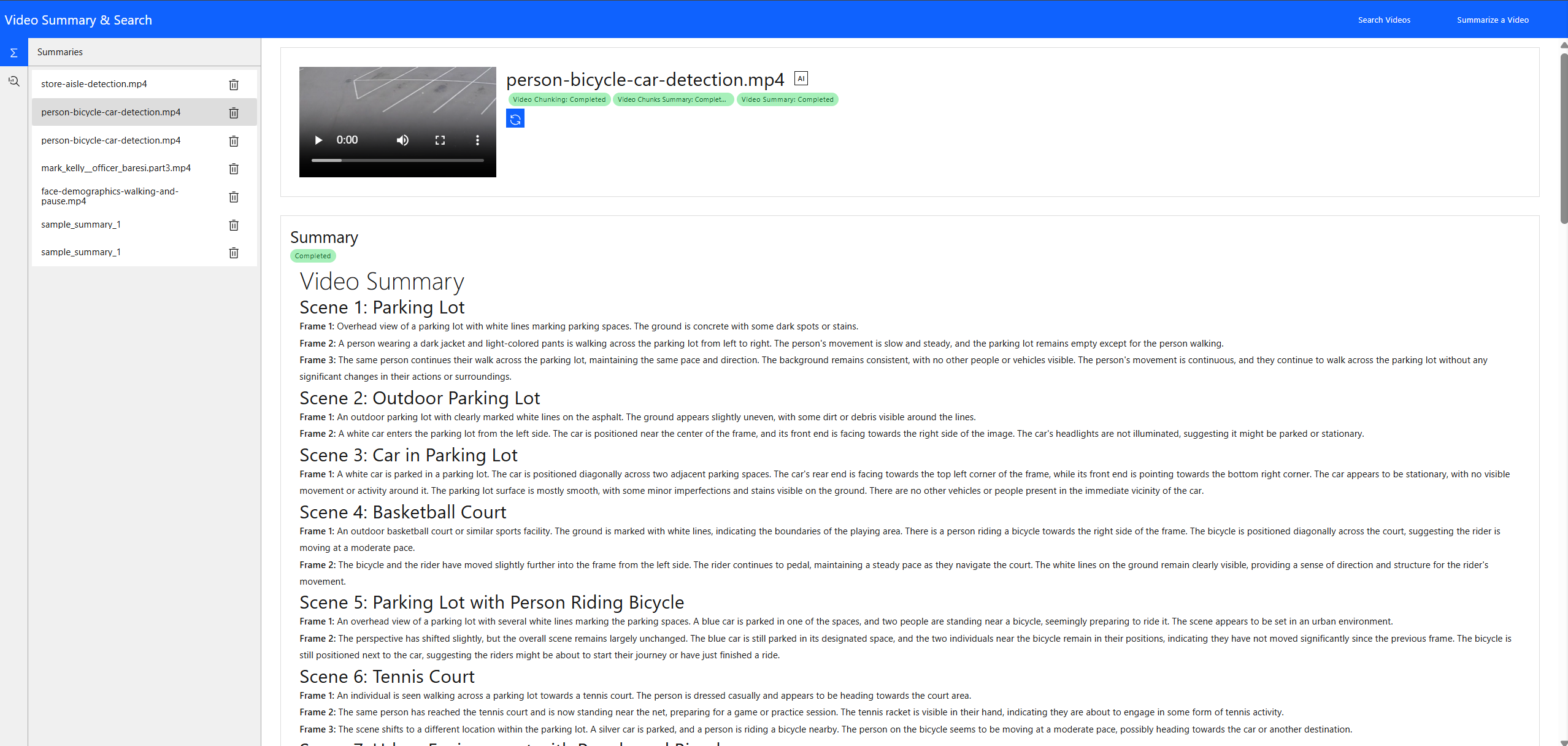
The following is the Video Search and Summarization mode UI:
Purpose of Video Search and Summarization#
The combined Video Search and Summarization mode is useful for rapid access to relevant video content and complex use cases. The following are several examples:
Security and surveillance teams benefit from semantic search capabilities to identify incidents, suspicious activities, or patterns across hours of footage efficiently, improving response times and situational awareness.
In education and training, instructors and learners can retrieve key moments or topics from recorded lectures and tutorials, enhancing knowledge discovery and personalized learning.
Legal and compliance professionals can use search to pinpoint evidence or verify claims within video records, supporting investigations and audits.
In media and entertainment, editors and analysts can quickly locate and review specific scenes or events within large archives, streamlining content production and compliance checks.
Marketing, Customer Support, and Product Documentation teams can organize, index, and retrieve valuable content, driving productivity and informed decision-making.
To create a summary with the best possible accuracy for a given compute, the Video Search and Summarization mode:
Allows you to build the Video Search and Summarization pipeline quickly through Intel’s Edge AI catalog of inference microservices. The inference microservices are optimized for Intel’s Edge AI systems.
Serves as a blueprint for building similar scalable and modular solutions that can be deployed on Intel’s Edge AI systems.
Showcases the competitiveness of Intel’s Edge AI systems to address varied deployment scenarios, from the edge to the cloud.
Provides reference sample microservices for capabilities like video ingestion, embedding generation, vector search, and UI frontend, which reduces the effort to customize the application.
The combined mode shows that the Intel’s Edge AI systems portfolio can run complex use cases. The sample application runs in its fullest configuration in the combined mode, thereby showcasing a resource intensive usage. You can customize the application on multiple levels including model configuration, and use it to size the application. The sizing runs allows you to select the right hardware configuration to run the combined mode.
Key Features of Video Search and Summarization#
The following are the key features, see the combined Video Search and Summarization mode documentation for a baseline view of each:
User-friendly and intuitive: You can use natural language through the easy-to-use interface to search.
Optimized systems: The pipeline runs on Intel’s Edge AI systems, ensuring high performance, reliability, and low cost of ownership.
Scalability: The pipeline can handle large volumes of video data, making it suitable for various applications, including media analysis, content management, and personalized recommendations.
Enhanced user experience: You can find relevant content quickly and precisely through the summaries of important information.
Reuse of building-block microservices: The pipeline manager microservice and inference microservices are reused between the different modes of Video Search and Summarization application.
Efficient indexing and retrieval: Reduces the computational and storage overhead by indexing summary embeddings instead of full-length video or frame-level embeddings, resulting in a faster search and lower resource usage.
Contextual Relevance: Improves search quality by leveraging summaries that capture the core context and key events of each video, minimizing irrelevant results and reducing hallucinations.
Unified pipeline orchestration: Seamlessly integrates search and summarization microservices, automating the workflow from video ingestion to summary generation, embedding creation, and semantic search.
Enhanced searchability: You can search within indexed summaries of important information.
Efficient Summarization: You can generate summaries of videos and highlight key moments.
Customizable: You can customize the pipeline, for example, to focus on particular topics or themes within the video, or to enable context extraction from audio, before embedding and indexing.
How to Use the Video Search and Summarization Effectively#
The Video Search and Summarization pipeline offers features to improve accuracy for complex, long-form videos. Choosing which features to use involves balancing accuracy and performance. You can configure the pipeline based on answers to the following key questions, to determine the trade-off between accuracy and compute:
How complex is the video?
What is the pipeline’s accuracy target, as measured by key qualitative metrics like the BERT score?
What are the available compute resources for running the pipeline?
What are the key performance metrics, for example, throughput, latency, and search response that the pipeline needs to achieve?
What is the expected volume of the video collection and search query?
After configuring the pipeline, you can deploy the application, upload the video to be searched and summarized, set parameters like chunk duration and frame count, and then submit the request. The application updates you on the progress, provides the final summary, and adds the video to the searchable collection. The API specification outlines how to access the application’s features.
For more information, refer to Video Search and Summarization.