IgH EtherCAT Master Stack#
The EtherCAT master stack by IgH* is used for open source projects for automation of systems such as Robot Operating System (ROS) and Linux* CNC. Applications of an open source–based EtherCAT master system reduce cost and make application program development flexible. Based on the native stack, Intel® made the following optimizations:
Support Linux* Kernel 5.x/6.x
Support Xenomai* 3 and Preempt RT
Migrate latest IGB/IGC/mGBE driver to stack
Installation#
Setup ECI Package Repository#
Open a terminal prompt which will be used to execute the remaining steps.
Download the ECI APT key to the system keyring:
sudo -E wget -O- https://eci.intel.com/repos/gpg-keys/GPG-PUB-KEY-INTEL-ECI.gpg | sudo tee /usr/share/keyrings/eci-archive-keyring.gpg > /dev/null
Add the signed entry to APT sources and configure the APT client to use the ECI APT repository:
echo "deb [signed-by=/usr/share/keyrings/eci-archive-keyring.gpg] https://eci.intel.com/repos/$(source /etc/os-release && echo $VERSION_CODENAME) isar main" | sudo tee /etc/apt/sources.list.d/eci.list
echo "deb-src [signed-by=/usr/share/keyrings/eci-archive-keyring.gpg] https://eci.intel.com/repos/$(source /etc/os-release && echo $VERSION_CODENAME) isar main" | sudo tee -a /etc/apt/sources.list.d/eci.list
Configure the ECI APT repository to have higher priority over other repositories and pin the version of the
libflannpackages:sudo bash -c 'echo -e "Package: *\nPin: origin eci.intel.com\nPin-Priority: 1000" > /etc/apt/preferences.d/isar' sudo bash -c 'echo -e "\nPackage: libflann*\nPin: version 1.19.*\nPin-Priority: -1\n\nPackage: flann*\nPin: version 1.19.*\nPin-Priority: -1" >> /etc/apt/preferences.d/isar'
Update the packages list:
sudo apt update
Install IgH EtherCAT Master Stack#
Perform either of the following commands to install this component:
Install from meta-package
sudo apt install eci-softplc-fieldbus
Install from individual Deb packages
# For non-Xenomai kernels
sudo apt install ighethercat ighethercat-dkms ighethercat-examples
Set up EtherCAT Master#
This section describes the procedure to run IgH EtherCAT Master Stack on ECI.
Dependencies#
Native EtherCAT Device Driver - IGB/IGC (High performance)
Only supports IGB, IGC devices (Intel® Ethernet Controller I210, Intel® Ethernet Controller I211, Intel® Ethernet Controller I225/I226) and mGBE devices
One networking driver for EtherCAT and non-EtherCAT devices
The driver gets more complicated, as it must handle EtherCAT and non-EtherCAT devices.
Generic EtherCAT Device Driver - Generic (Low performance)
Any Ethernet hardware that is covered by a Linux Ethernet driver can be used for EtherCAT
Performance is low compared to the native approach, because the frame data have to traverse the lower layers of the network stack
Note
If the target system does not support the IGB device driver, select the generic EtherCAT device driver.
System Integration#
EtherCAT Initialization Script#
The EtherCAT master init script is installed in /etc/init.d/ethercat.
EtherCAT Sysconfig File#
The init script uses a mandatory sysconfig file installed in
/etc/sysconfig/ethercat. The sysconfig file contains the configuration
variables needed to operate one or more masters. The documentation is within
the file and also included here.
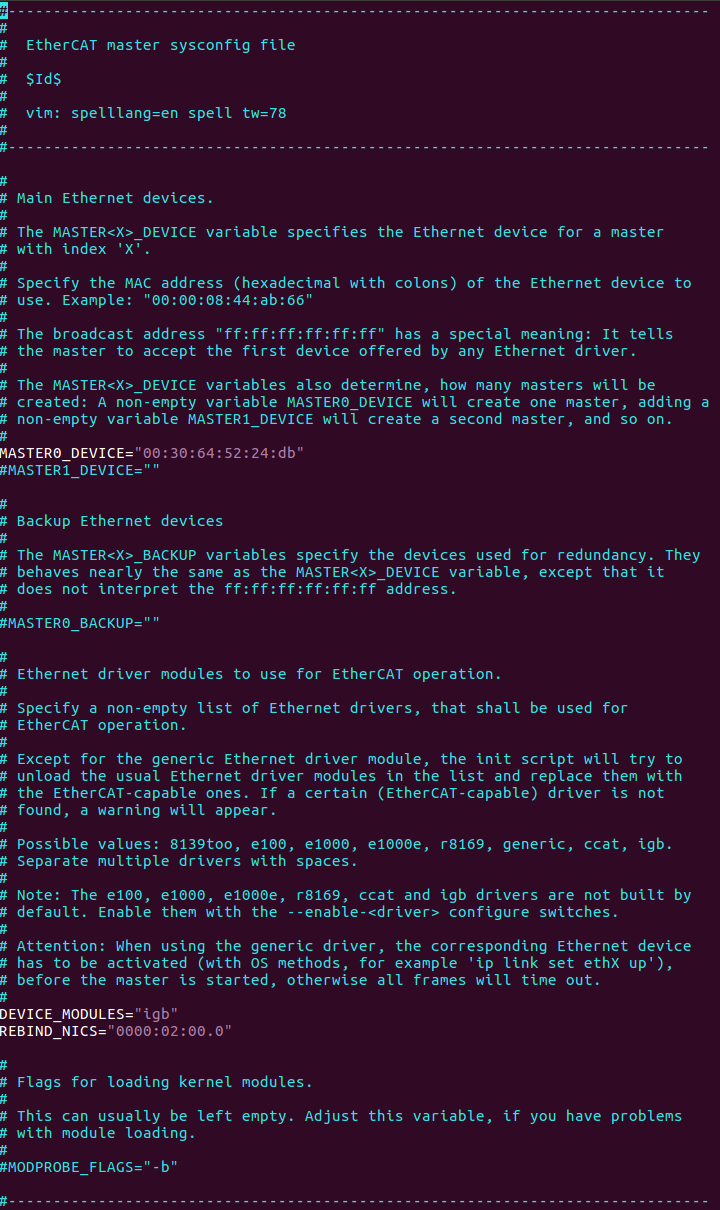
Do the following:
Set REBIND_NICS. Use
lspcito query net devices. One of the devices might be specified as an EtherCAT network interface.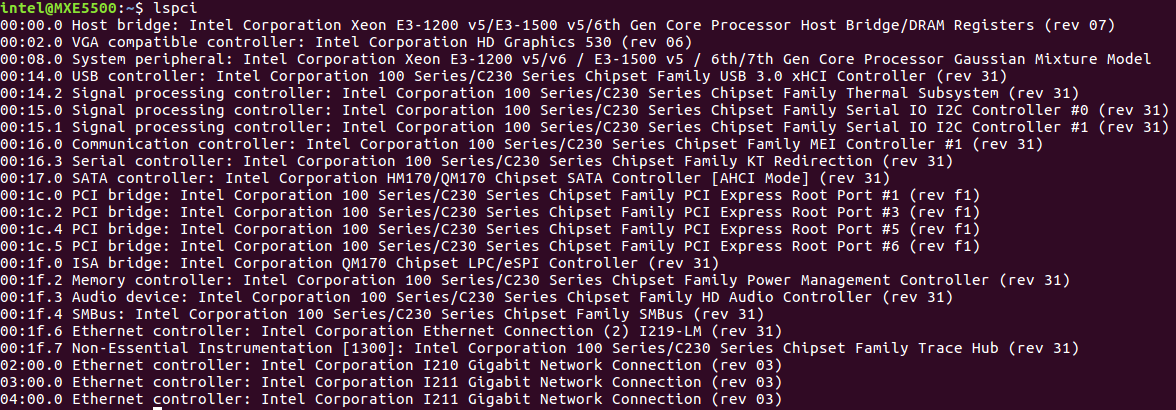
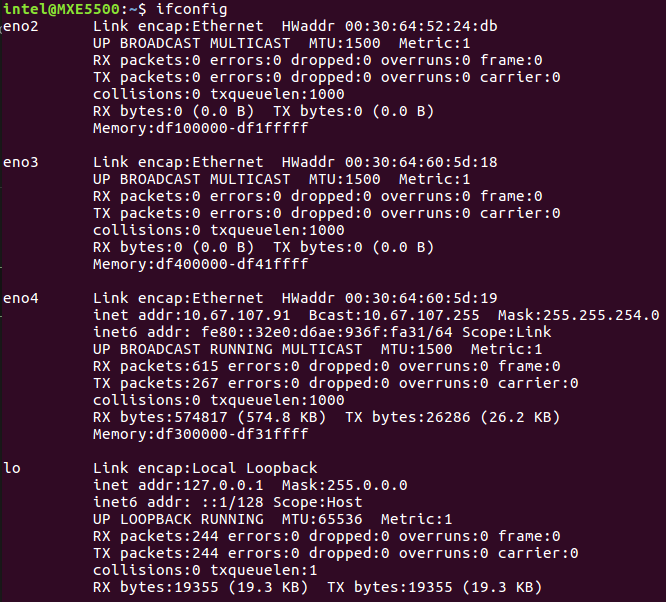
Fill the MAC address for MASTER0_DEVICE. Get the MAC address of the Network Interface Controllers (NICs) selected for EtherCAT.
Note
EtherCAT Master Stack supports dual master configuration. To configure a second master, fill the MAC address for MASTER1_DEVICE and add the PCI address in REBIND_NICS.
Modify DEVICE_MODULES:
Option 1: Intel Corporation I210 GbE controller EtherCAT driver (High performance)
DEVICE_MODULES="igb"
Option 2: Intel Corporation I225 GbE controller EtherCAT driver (High performance)
DEVICE_MODULES="igc"
Option 3: Intel® Core™ 12th S-Series [Alder Lake] and 11th Gen P-Series and U-Series [Tiger Lake] Intel® Atom™ x6000 Series [Elkhart Lake] GbE controller EtherCAT driver (High performance)
DEVICE_MODULES="dwmac_intel"
Fallback: Generic driver as EtherCAT driver (Low performance)
DEVICE_MODULES="generic"
Start Master as Service#
After the init script and the sysconfig file are ready to configure, and
are placed in the right location, the EtherCAT master can be inserted as a
service. You can use the init script to manually start and stop the EtherCAT
master. Execute the init script with one of the following parameters:
Action |
Command |
|---|---|
Start EtherCAT Master |
|
Stop EtherCAT Master |
|
Restart EtherCAT Master |
|
Status of EtherCAT Master |
|
EtherCAT Configuration & Compilation#
By default, ECI provides a generic configuration to enable EtherCAT. EtherCAT stack supports DKMS to build kernel modules whose sources generally reside outside the kernel source tree.
The source code of the EtherCAT stack can be found at:
/var/lib/dkms/ighethercat-dkms/1.6/source
The default configuration of EtherCAT stack is located in a file named
dkms.conf. The configuration can be modified as needed.
Compiling EtherCAT#
Change directory to the EtherCAT source:
cd /var/lib/dkms/ighethercat-dkms/1.6/source
Modify the default configuration of EtherCAT stack located in
dkms.confas needed.Rebuild the EtherCAT stack using the following commands:
dkms uninstall ighethercat-dkms -v 1.6
dkms unbuild ighethercat-dkms -v 1.6
dkms build ighethercat-dkms -v 1.6
dkms install ighethercat-dkms -v 1.6
Makefile Template for EtherCAT application#
Provided below are some Makefile templates for EtherCAT applications. These
templates are provided to build EtherCAT applications without Makefile.am.
Makefile template for PREEMPT-RT kernel
CC     = gcc
CFLAGS = -Wall -O3 -g -D_GNU_SOURCE -D_REENTRANT -fasynchronous-unwind-tables
LIBS   = -lm -lrt -lpthread -lethercat -Wl,--no-as-needed -L/usr/lib

TARGET = test
SRCS   = $(wildcard *.c)

OBJS   = $(SRCS:.c=.o)

$(TARGET):$(OBJS)
        $(CC) -o $@ $^ $(LIBS)

clean:
        rm -rf $(TARGET) $(OBJS)

%.o:%.c
        $(CC) $(CFLAGS) -o $@ -c $<
Makefile template for Dovetail kernel
CC     = gcc
CFLAGS = -Wall -O3 -g -I/usr/include/xenomai/cobalt -I/usr/include/xenomai -D_GNU_SOURCE -D_REENTRANT -fasynchronous-unwind-tables -D__COBALT__ -D__COBALT_WRAP__
LIBS   = -lm -lrt -lpthread -lethercat_rtdm -Wl,--no-as-needed -Wl,@/usr/lib/cobalt.wrappers -Wl,@/usr/lib/modechk.wrappers  /usr/lib/xenomai/bootstrap.o -Wl,--wrap=main -Wl,--dynamic-list=/usr/lib/dynlist.ld -L/usr/lib -lcobalt -lmodechk

TARGET = test
SRCS   = $(wildcard *.c)

OBJS   = $(SRCS:.c=.o)

$(TARGET):$(OBJS)
        $(CC) -o $@ $^ $(LIBS)

clean:
        rm -rf $(TARGET) $(OBJS)

%.o:%.c
        $(CC) $(CFLAGS) -o $@ -c $<
Multi-Axis Synchronization System (MASS)#
The following figure shows the setup of Multi-Axis Synchronization System (MASS).
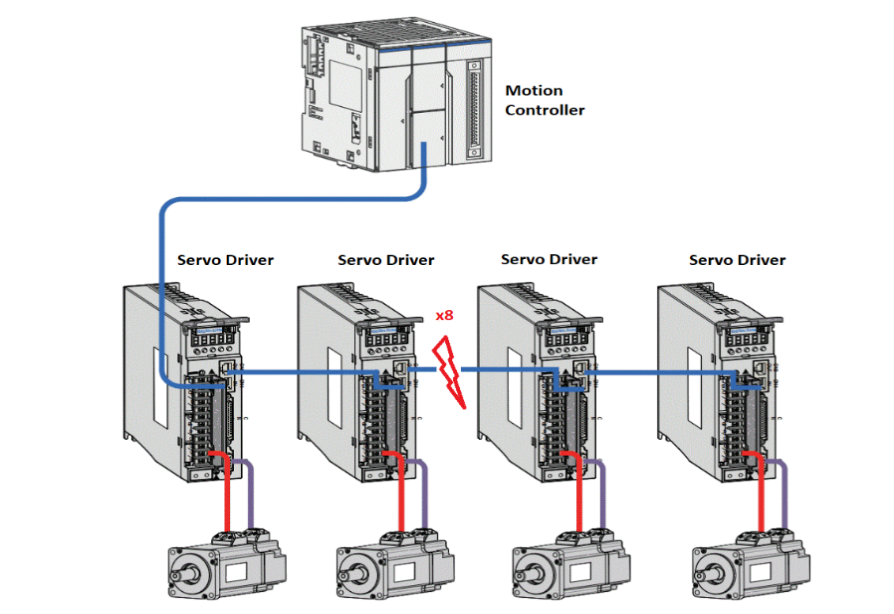
This system setup includes motion controller, servo driver, motors, and software. The Motion Controller is an Intel-based system with ECI enabled. The Motion Controller connects eight servo drivers. The system runs a program to control six servo motors (three pairs) simultaneously through EtherCAT to control pencil leads to rotate and move horizontally and vertically.
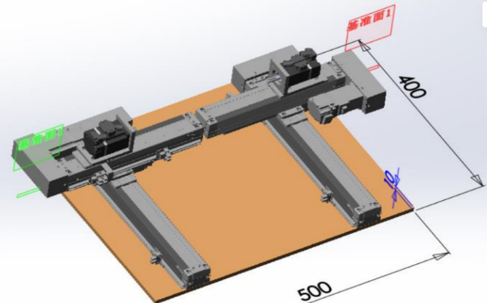
Two other servo motors are controlled simultaneously through EtherCAT to draw a circle.
Test binary will be released in
/opt/ighethercat/examples/ec_multi_axis_example.
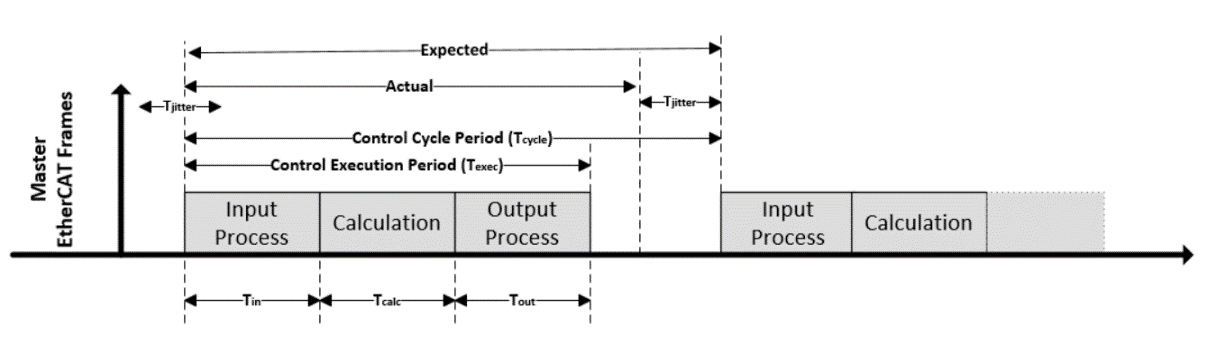
EtherCAT Control Loop and Time Measurement#
EtherCAT Sanity Checks#
Sanity Check #1: EtherCAT Master Start#
Start EtherCAT Master:
/etc/init.d/ethercat start
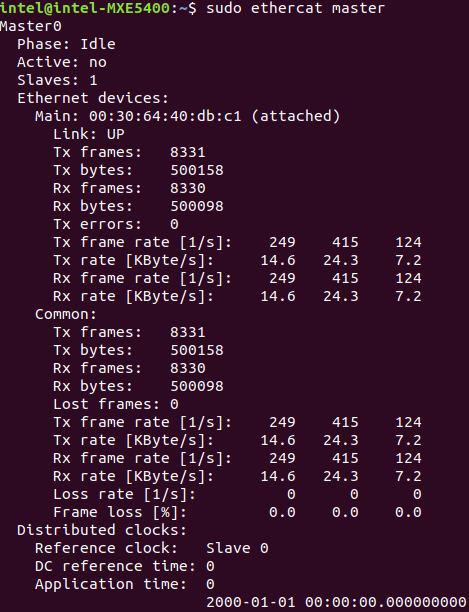
Check Master information:
ethercat masterExpected output
Sanity Check #2: EtherCAT Master Scan#
Start EtherCAT Master:
/etc/init.d/ethercat startScan EtherCAT Slave:
ethercat rescanCheck slaves on the bus:
ethercat slavesExpected output

Sanity Check #3: MASS Platform Performance Collection#
Use an EtherCAT network cable to connect the MASS platform and the Controller, in specific the EtherCAT network interface. Power up the MASS platform.
Start EtherCAT Master:
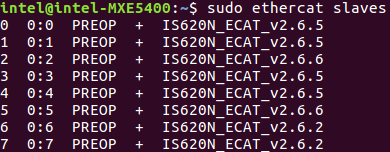
/etc/init.d/ethercat startCheck the EtherCAT bus to make sure that eight EtherCAT slaves are scanned and stay on PREOP status.
ethercat slavesExpected output
Start
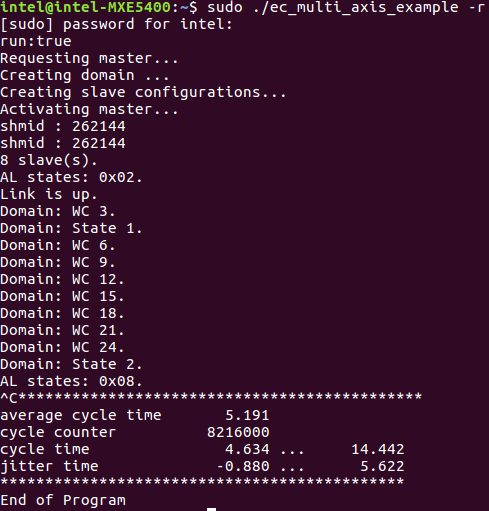
/opt/ighethercat/examples/ec_multi_axis_example -rto collect real-time performance:/opt/ighethercat/examples/ec_multi_axis_example -rExpected output
Tip
Useful command parameters:
-r      Motor start running
-t      Set measure time for minutes, default is no time limitation
EtherCAT over DPDK#
EtherCAT over DPDK Overview#
EtherCAT over DPDK optimizes the IgH EtherCAT Master Stack running in user space on Preempt RT. It keeps all APIs from the original IgH EtherCAT Master stack to seamlessly support EtherCAT application programs. Furthermore, it is easy to containerize the EtherCAT stack for Virtual PLC applications.
EtherCAT over DPDK Features#
The following features are verified:
Support on Preempt-RT
Support PDO/SDO upload/download
Support COE/SOE profiles
Support DC
Support multiple masters
EtherCAT over DPDK Installation#
Install from meta-package
sudo apt install eci-softplc-fieldbus
Install from individual Deb packages
# For preempt-rt kernel
sudo apt install ighethercat-dpdk ighethercat-dpdk-examples ecat-enablekit-dpdk
EtherCAT over DPDK Configuration#
Binding VFIO driver
EtherCAT over DPDK provides the dpdk-driver-bind.sh script, which is
installed in /usr/sbin to bind the vfio driver for the EtherCAT port.
Command to bind the vfio driver:
dpdk-driver-bind.sh start <PCIe BDF address>
Command to unbind the vfio driver:
dpdk-driver-bind.sh stop <PCIe BDF address>
EtherCAT Sysconfig File
EtherCAT over DPDK provides an ecrt.conf configuration file, which is
installed at /etc/sysconfig. Users shall configure the file for one or more
masters per request. Configuration details are as below:
master_id: It is the identification to match a group of configurations for a specific EtherCAT application.master_mac: It is used to specify the Ethernet MAC address of the EtherCAT port for the EtherCAT application.debug_level: It is used to configure the debug level, and its valid value is 0-2.drv_argv: It supports adding extra EAL parameters for the DPDK framework, please refer to EAL parameters.
EtherCAT Tool
As EtherCAT over DPDK supports single-core mode, the EtherCAT master stack
starts with the EtherCAT application by the direct lib call. That is, the
EtherCAT tool cannot run independently but starts with the EtherCAT
application as well. Here, EtherCAT over DPDK provides the ec_debug_example
application for debugging purposes. This application only starts the EtherCAT
stack without any other workload. Then users can use the EtherCAT tool to
debug the stack as in the steps below:
/opt/ighethercat/examples/ec_debug_example -m <master id>
ethercat master
Real-Time Vision with EtherCAT#
Real-time vision provides a deterministic way to complete synchronization between motion control and image capture even when the object is moving at a high speed. The stopping time can be saved, thus improving efficiency and productivity.
The key to achieving the synchronization is the time-aware IO. An EtherCAT IO with timestamping can be utilized to trigger a deterministic capture for an accurate image. You can also apply Time-aware GPIO by following the guidelines for TCC TGPIO. Then, machine vision can process the accurate image to provide a precise position offset and angle offset for the next-step motion control.
Usage Case#
The following figure shows an example of a SMT production line.
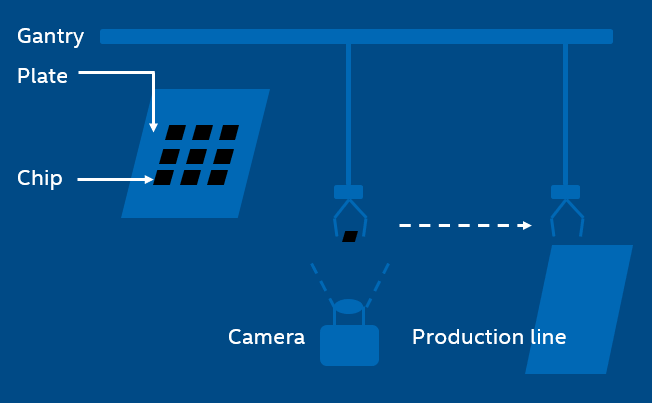
In the SMT production line, the gantry with a sucker sucks a chip from the plate and then mounts it on the PCB. However, it is not always able to hit the expected point and the expected angle of the chip during the suction.
Even a little shift can lead to deviation, making it impossible to mount the chip in the right place later. After image capturing, machine vision helps to compute the position/angle offset value of the chip for perfect mounting.
In the traditional way, the gantry will stop above the camera and wait for a while for image capturing. This is not necessary when applying real-time vision, thus improving efficiency significantly.
Work Flow#
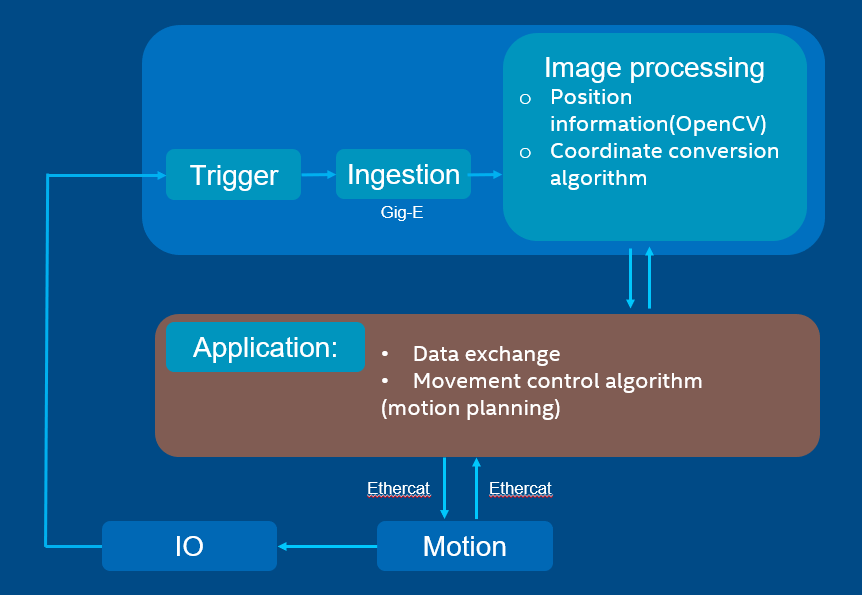
The application controls the motion by EtherCAT and synchronizes with IO. When reaching the target timing, IO will trigger the camera to capture an image. The image is then processed with machine vision to provide the position value and the angle value. By data exchange, the application continues the motion control with position information.
Solution Principle#
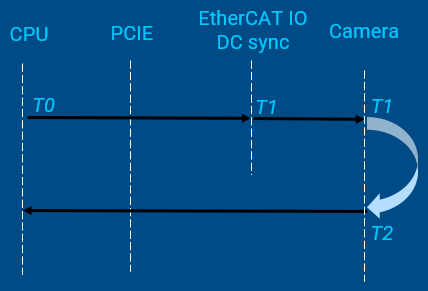
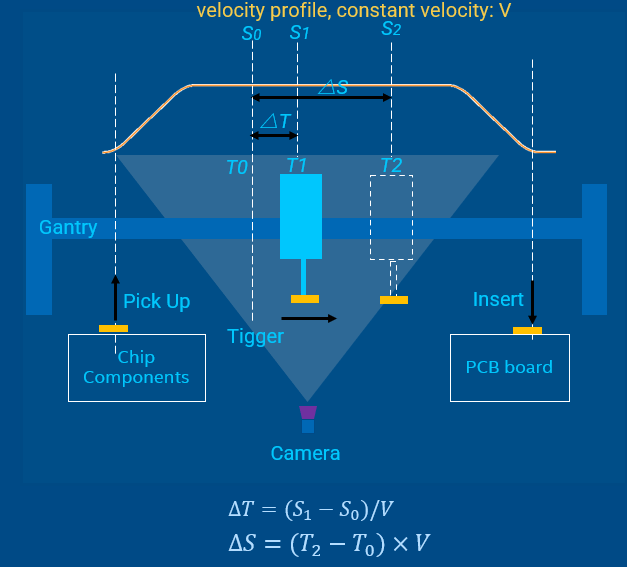
T0is the time when the CPU sends the shooting commandS0is the position to prepare trigger shooting, which can be read in a cyclic task. It corresponds toT0T1is the time to trigger the picture shootingS1is the expected fixed position to trigger shooting△Tcan be calculated with∆𝑇=(𝑆_1−𝑆_0)/𝑉T2is the time when the image is captured on CMOSS2reflects the real position where the image is capturedThe time between
T2andT1is used for camera exposure and image generatingReal-time vision should make the time intervals
(T2 - T1)and(T1 – T0)deterministic
Example Demonstration#
The demo code is integrated into the IgH EtherCAT stack components as an
example and is in
/usr/src/ighethercat-dkms-1.6/examples/fly_trigger_poc.