Get Started#
This guide provides a streamlined path to setting up and running the Deterministic Threat Detection demonstration. It covers the essential prerequisites and the main steps to see the system in action.
Hardware Details#
AXIS RTSP Cameras: Cameras that support RTSP streaming.
MOXA TSN Switch: A switch that supports IEEE 802.1AS (PTP) and IEEE 802.1Qbv (Time-Aware Shaper).
Arrow Lake Machines: Linux-based systems equipped with Intel i226 TSN-capable network cards.
Network Topology#

The experimental setup consists of:
5 × Arrow Lake Linux Machines with
Intel i226TSN network cards
Logical Roles#
Machine |
Role |
|---|---|
Machine 1 |
Camera 1 RTSP Capture + AI Inference |
Machine 2 |
Camera 2 RTSP Capture + AI Inference |
Machine 3 |
Sensor Data Producer (MQTT) |
Machine 4 |
MQTT Aggregator + Visualization |
Machine 5 |
Traffic Injector ( |
All machines are connected to a MOXA switch and synchronized using PTP.
Steps to Test the Use Case#
Configure PTP on all machines.
Synchronize the system clocks of all machines to a common time reference using Precision Time Protocol (PTP). This is essential for accurate latency measurement.
sudo apt-get update
sudo apt-get install -y linuxptp git
git clone https://git.code.sf.net/p/linuxptp/code linuxptp
cd linuxptp
# Terminal 1: Run ptp4l to synchronize the PTP clock
sudo ptp4l -i enp1s0 -f configs/gPTP.cfg --step_threshold=1 -m -s
# Terminal 2: Run phc2sys to synchronize the system clock to the PTP clock
sudo phc2sys -s enp1s0 -c CLOCK_REALTIME --step_threshold=1 --transportSpecific=1 -w -m
Note: Make sure to replace
enp1s0with the actual network interface name associated with thei226network card.For detailed instructions on configuring PTP, refer to the PTP Configuration Guide.
Create VLAN on all machines.
Set up Virtual LANs (VLANs) to segregate network traffic, isolating critical data from best-effort traffic.
Note: Configure the VLAN on the MOXA as mentioned in the MOXA VLAN Configuration Guide to assign VLAN ID on TSN switch.
On the Arrow Lake machines, create VLAN interfaces corresponding to the VLAN IDs configured on the MOXA switch.
sudo ip link add link enp1s0 name enp1s0.1 type vlan id 1
sudo ip link set enp1s0.1 type vlan egress-qos-map 0:1
sudo ifconfig enp1s0.1 192.168.127.31 up

sudo ip link add link enp1s0 name enp1s0.3 type vlan id 3
sudo ip link set enp1s0.3 type vlan egress-qos-map 0:3
sudo ifconfig enp1s0.3 192.168.3.31 up

sudo ip link add link enp1s0 name enp1s0.5 type vlan id 5
sudo ip link set enp1s0.5 type vlan egress-qos-map 0:5
sudo ifconfig enp1s0.5 192.168.5.31 up
Note:
Make sure to replace
enp1s0with the actual network interface name associated with thei226network card.
For detailed instructions on creating VLANs on HOST machines, refer to the HOST VLAN Configuration Guide.
Run RTSP Camera Capture and AI Inference.
Start the video pipeline on Machines 1 and 2. This involves capturing the RTSP stream, timestamping frames using the PTP-synchronized clock, and running AI inference on the video and publish the results over MQTT.
For detailed instructions on running RTSP camera capture and AI inference, refer to the RTSP Camera and AI Inference Guide.
Run Sensor Data Producer.
On Machine 3, start the Python script that simulates a sensor generating and publishing timestamped data over MQTT.
For detailed instructions on running the sensor data producer, refer to the Sensor Data Producer Guide.
Run MQTT Aggregator and Visualization.
On Machine 4, launch the application that subscribes to the MQTT topics, calculates end-to-end latency, and displays it on a live dashboard.

For detailed instructions on running the MQTT aggregator and visualization, refer to the MQTT Aggregator and Visualization Guide.
Run Traffic Injector.
On Machine 5, use iPerf3 to generate high-volume background traffic to simulate network congestion.
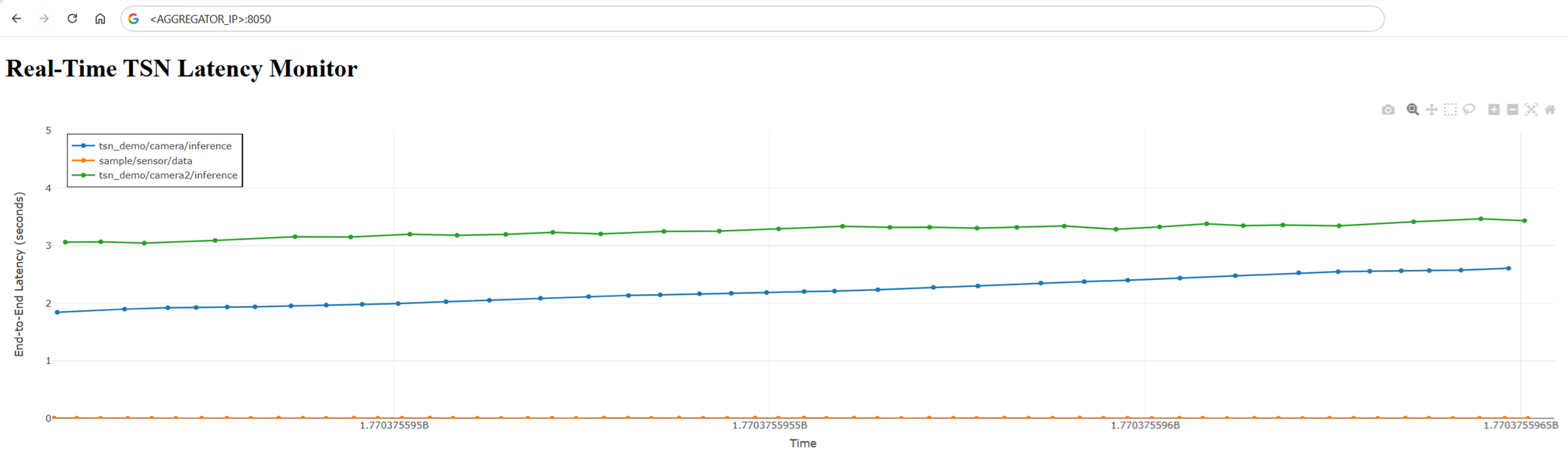
For detailed instructions on running the traffic injector, refer to the Traffic Injector Guide.
Enable TSN Traffic Shaping.
Configure the Time-Aware Shaper (IEEE 802.1Qbv) on the MOXA switch to prioritize the critical traffic from cameras and sensors, protecting it from the background traffic.
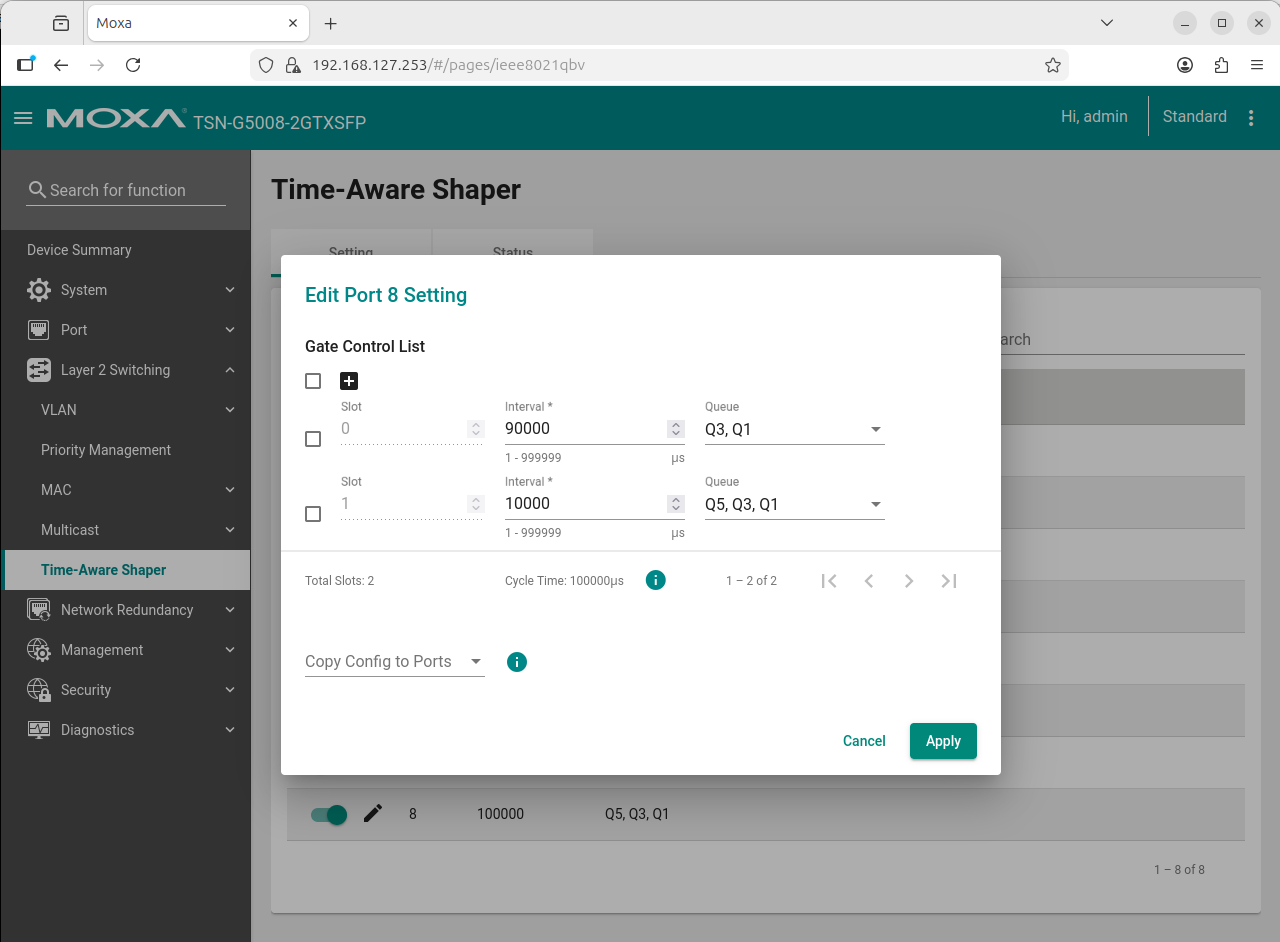
For detailed instructions on enabling TSN traffic shaping, refer to the TSN Traffic Shaping Guide.
Analyze Results and Visualize Latency.
Observe the latency graphs on the MQTT Aggregator dashboard. With TSN enabled, the latency for critical traffic should remain low and deterministic, even with the iPerf3 traffic running.