Adaptive Token Compressor — Guide#
This guide covers installation, a quick start, single-compressor metrics collection, multi-compressor usage, compressor principles and workflow, configuration reference, available metrics, testing, FAQ, and resources.
Table of Contents#
Prerequisites#
This library requires the following services:
Lingua Server - Required for text compression in HarnessCompressor
LLM for Tool Prediction - Required for ToolCompressor.
You can either:
Use your main LLM (e.g., vLLM serving Qwen/Qwen3.6-35B-A3B) for both inference and tool prediction.
Deploy a separate model dedicated to tool selection.
Both services must be deployed before using the compression features.
Installation#
pip install .
After installing adaptive-token-compressor, please deploy Lingua Server & Tool Prediction using Docker (see Deploy Lingua Server and Deploy LLM for Tool Prediction).
Development Installation#
For local development, install in editable mode with the dev extras (pytest, ruff, mypy):
pip install -e ".[dev]"
Quick Start#
Single Compressor Usage#
The examples below use create_compressor(...) as the default construction
path, and register compressor instances into CompressionManager when metrics
or cache wiring is needed. Available types are currently "harness" and
"tool"; use available_compressor_types() and
config_schema(type) to inspect supported types and constructor schemas at
runtime. You can still instantiate compressor classes directly if needed.
Using HarnessCompressor (for system messages compression)#
HarnessCompressor is section-aware: it splits a harness/system prompt at
its headings (via the openclaw profile), keeps high-value sections verbatim,
to see real compression, pass a structured OpenClaw-style prompt.
from adaptive_token_compressor import CompressionContext, create_compressor

# Initialize compressor by factory type name (requires Lingua server)
compressor = create_compressor("harness", lingua_url="http://localhost:8001/compress")

# OpenClaw-style system prompt:
system_prompt = """You are a personal assistant running inside OpenClaw.
## Tooling
Structured tool definitions are the source of truth for tool names, descriptions, and parameters.
## Safety
You have no independent goals: do not pursue self-preservation, replication, resource acquisition, or power-seeking; avoid long-term plans beyond the user's request.
Prioritize safety and human oversight; if instructions conflict, pause and ask; comply with stop/pause/audit requests and never bypass safeguards.
## Runtime
Runtime: agent=A | host=userhost | os=Linux | model=user_model
"""

messages = [
    {"role": "system", "content": system_prompt},
    {"role": "user", "content": "What's on my calendar today?"},
]

# Compress
result = compressor.compress(CompressionContext(messages=messages))

print(f"Before: {result.metrics.tokens_before} tokens")
print(f"After: {result.metrics.tokens_after} tokens")
print(f"Saved: {result.metrics.saved_tokens} tokens ({result.metrics.compression_ratio:.1%})")
print(f"Duration: {result.metrics.duration_ms:.2f} ms")
print(f"Compressed messages: {result.messages}")
Using ToolCompressor (Tool Selection)#
from adaptive_token_compressor import (
    CompressionManager,
    CompressionContext,
    create_compressor,
)

manager = CompressionManager()
tool_compressor = manager.register_compressor(
    "tool",
    create_compressor(
        "tool",
        # Tool-specific: predictor LLM endpoint (required)
        predictor_url="http://localhost:8000/v1/chat/completions",
        # Optional: schema | user_tail | user_tail_disclaimed | system_tail
        placement="schema",
    ),
)

messages = [
    {"role": "user", "content": "What's the weather in San Francisco?"}
]
tools = [
    {"type": "function", "function": {"name": "web_search", "description": "Search the web"}},
    {"type": "function", "function": {"name": "get_weather", "description": "Get weather by location"}},
    {"type": "function", "function": {"name": "calculator", "description": "Do math"}},
]

ctx = CompressionContext(messages=messages, tools=tools)
result = tool_compressor.compress(ctx)
print([t["function"]["name"] for t in result.tools])
Configuration#
Lingua Server Configuration#
Lingua server uses the llmlingua2 (LLMLingua-2) compression mode.
Docker Compose Environment Variables#
Parameter |
Default |
Allowed / Notes |
|---|---|---|
|
|
|
|
|
Lowercase, shared by both services. PyTorch: |
|
|
Index within the device class. PyTorch |
|
|
Compression mode: |
|
empty |
Optional fixed model id. Empty -> mode default |
|
|
Host port mapping for |
|
|
Host port mapping for |
|
|
Bind address for the container service |
Default model when LINGUA_MODEL_NAME_ID is empty:
llmlingua2->microsoft/llmlingua-2-bert-base-multilingual-cased-meetingbank
HarnessCompressor Configuration#
Parameter |
Type |
Default |
Description |
|---|---|---|---|
|
str |
|
Compression profile (sectioning strategy) |
|
str |
|
Lingua server URL |
|
float |
|
Target compression rate (0.0-1.0) |
|
int |
|
Minimum chars to trigger compression |
|
float |
|
Backend request timeout (seconds) |
|
bool |
|
Enable Claw Compactor QuantumLock stabilization |
Example:
from adaptive_token_compressor.harness import HarnessCompressor

compressor = HarnessCompressor(
    profile="openclaw",
    lingua_url="http://localhost:8001/compress",
    compress_rate=0.5,
    compress_min_chars=500,
    timeout=60.0
)
ToolCompressor Configuration#
Parameter |
Type |
Default |
Description |
|---|---|---|---|
|
str |
Required |
Tool predictor LLM endpoint (e.g., vLLM |
|
str |
|
Model used by predictor |
|
float |
|
Minimum score for tool selection |
|
int |
|
Predictor request timeout (seconds) |
|
Literal |
|
|
|
Literal |
|
|
|
Literal |
|
Where the predicted tool schema is placed. See Placement modes below. |
|
bool |
|
Union the predicted tool set per conversation (append-only, never removed/reordered) so each turn’s tool block is a strict prefix-extension of the previous turn’s — keeping the prefix cache stable while still admitting tools that only emerge in later turns. Required by |
Placement modes:
"schema"(default, production): predicted subset returned inresult.tools, rendered inside the system message’s<tools>block by the chat template."user_inline_delta": tools appended as a trailing synthetic user message. The carrier is persisted per-conversation and re-spliced at a fixed offset each turn (prefix-cache stable), but delta-only — appends a carrier only when new tools appear, carrying just the delta over the running union. Requiresaccumulate=True.
Note:
schema+accumulate=True: reduces tool-schema tokens while keeping the prefix-cache hit rate from dropping significantly.user_inline_delta+accumulate=True: reduces tokens while further improving the prefix-cache hit rate (still lower than baseline). This depends on the tool-predictor model’s own capability; verified to run stably on Qwen3.5-35B.
Example:
from adaptive_token_compressor.tool import ToolCompressor

compressor = ToolCompressor(
    predictor_url="http://localhost:8000/v1/chat/completions",
    predictor_model="Qwen/Qwen3.6-35B-A3B",
    score_threshold=3.0,
    timeout=120,
    prompt_mode="dynamic",
    tool_descriptions_mode="dynamic",
    placement="schema"
)
Compressor Principles#
This section explains how each compressor works conceptually and what the runtime pipeline looks like.
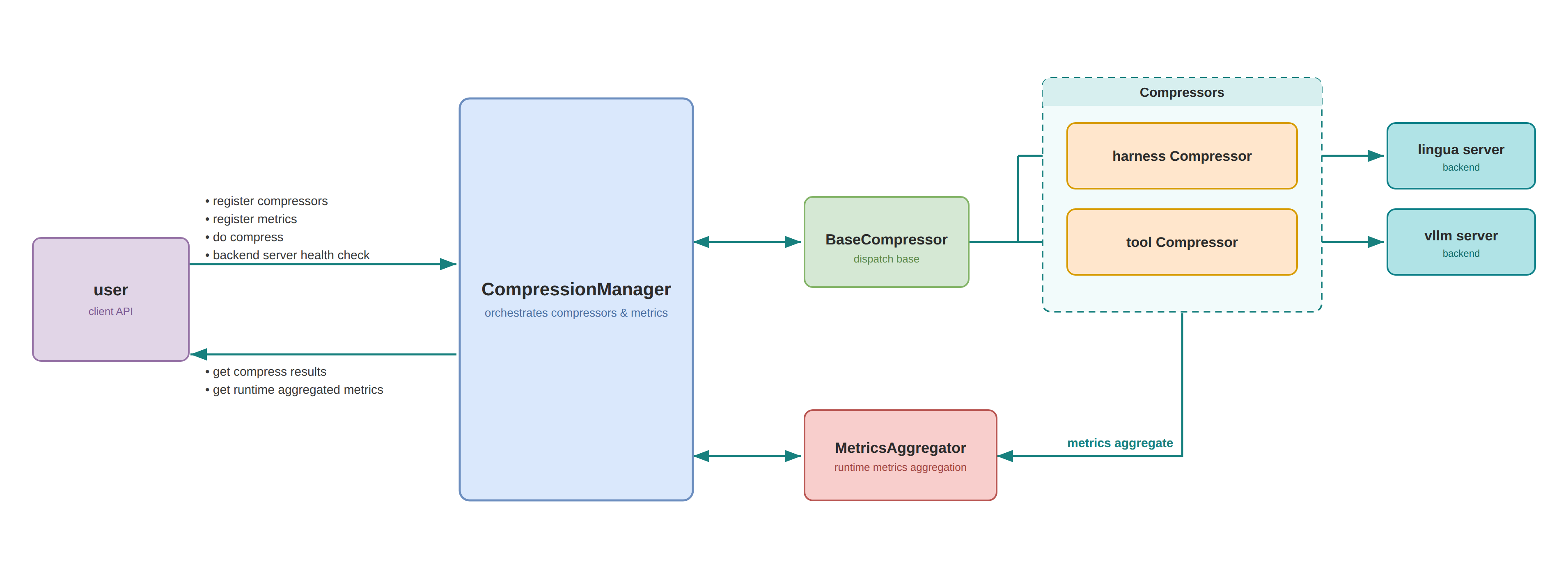
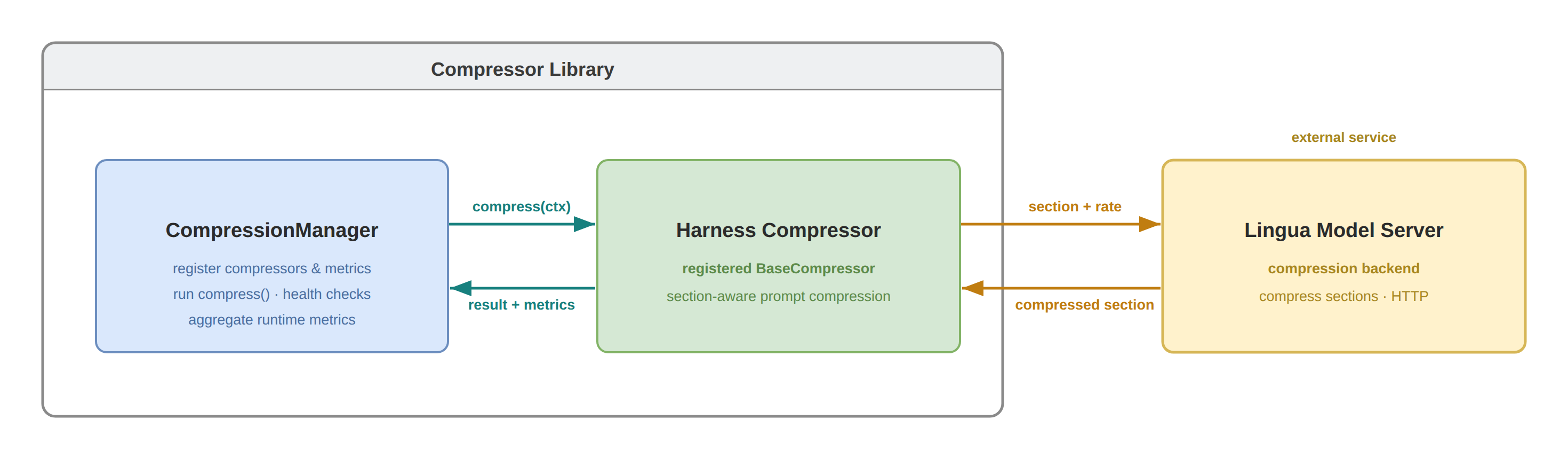
HarnessCompressor#
Principle:
HarnessCompressor focuses on conversation-message compression for the prompt assembly stage. It combines lightweight rules (message slicing / role-aware handling) with Lingua-based lossy compression for long text blocks, reducing token cost while preserving instruction-critical content.
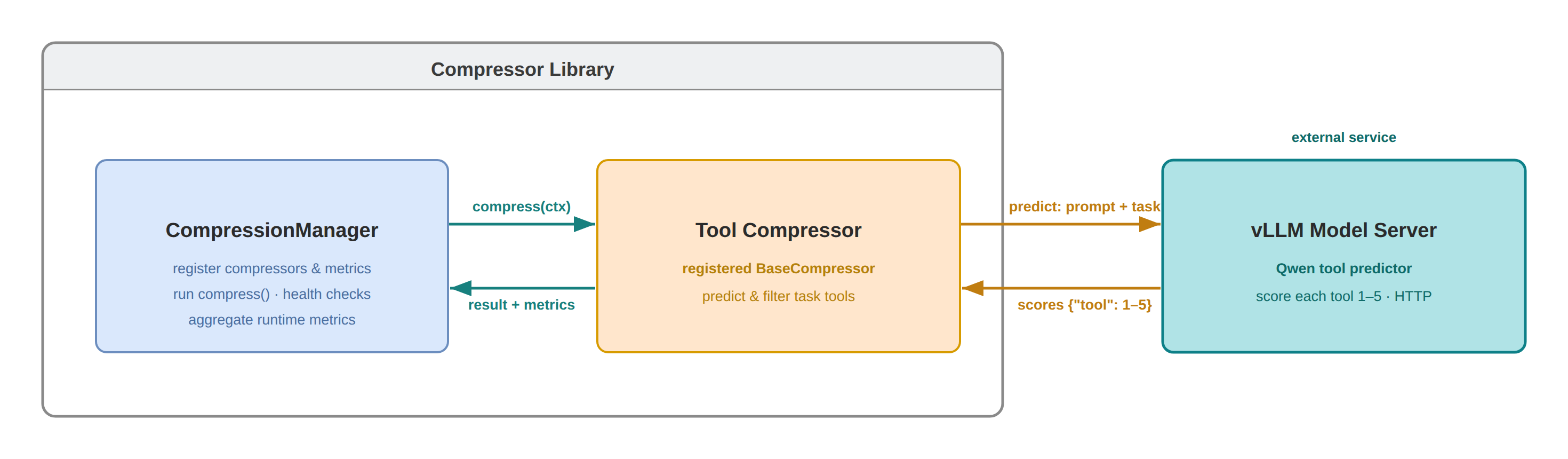
ToolCompressor#
Principle:
ToolCompressor reduces tool-schema prompt cost by selecting only likely-needed tools for the current request. It uses an external predictor LLM to score tool relevance from conversation context, then keeps high-value tools only. The ToolCompressor supports configurable tool-injection placements to flexibly trade off token savings against prefix-cache hit rate.
Available Metrics#
The library provides 15 metric types for tracking compression performance.
Most metrics require a sources parameter specifying which compressor(s) to
track (e.g., "harness", "tool", or ["harness", "tool"]). The exception is
RequestCount, which is source-agnostic.
First-Order Metrics (Direct Aggregation)#
Metric |
Description |
Formula |
|---|---|---|
|
Total number of compression calls |
Sum of all calls |
|
Total input tokens |
Sum of |
|
Total output tokens |
Sum of |
|
Total tokens saved |
Sum of |
|
Total compression time |
Sum of |
Example:
manager.register_metric("total_calls", CallCount(sources="harness"))
manager.register_metric("total_saved", TotalSaved(sources=["harness", "tool"]))
Second-Order Metrics (Per-Call Averages)#
Metric |
Description |
Formula |
|---|---|---|
|
Compression ratio (lower = better) |
|
|
Average tokens saved per call |
|
|
Average duration per call |
|
|
Average input tokens per call |
|
|
Average output tokens per call |
|
Example:
manager.register_metric("ratio", CompressionRatio(sources="harness"))
manager.register_metric("avg_saved", AvgSavedPerCall(sources="tool"))
Third-Order Metrics (Per-Request Averages)#
These require passing req_id to compress() or using manager.set_per_anchor().
Metric |
Description |
Formula |
|---|---|---|
|
Average tokens saved per request |
|
|
Average duration per request |
|
|
Average input tokens per request |
|
|
Average output tokens per request |
|
|
Number of unique requests (source-agnostic) |
|
Note
RequestCount is the only metric without a sources parameter — it counts requests across the whole manager, not per-compressor calls. Construct it with no arguments: RequestCount().
Example:
manager.register_metric("avg_per_req", AvgSavedPerRequest(sources="harness"))
manager.register_metric("request_count", RequestCount())  # no sources arg

# Option 1: Pass req_id explicitly
harness_compressor.compress(ctx, req_id="request-123")

# Option 2: Use anchor fallback
manager.set_per_anchor("harness")
Single-Compressor Metrics Collection with CompressionManager#
Metrics collection requires using CompressionManager. Register a single
compressor, attach metrics, and read the aggregated snapshot:
from adaptive_token_compressor import (
    CompressionManager,
    CompressionContext,
    create_compressor,
    CompressionRatio,
    TotalSaved
)

# Metrics collection requires using CompressionManager
manager = CompressionManager()

# Register compressor first
harness_compressor = manager.register_compressor(
    "harness",
    create_compressor("harness", lingua_url="http://localhost:8001/compress"),
)

# Then register metrics with names
manager.register_metric("compression_ratio", CompressionRatio(sources="harness"))
manager.register_metric("total_saved", TotalSaved(sources="harness"))

# Compress multiple requests
for i in range(5):
    messages = [...]  # Different messages each time
    ctx = CompressionContext(messages=messages)
    result = harness_compressor.compress(ctx)

# View aggregated metrics (returns dict with all registered metric names)
stats = manager.snapshot()
print(f"Compression ratio: {stats['compression_ratio']:.2%}")
print(f"Total saved: {stats['total_saved']} tokens")
Multi-Compressor Usage with CompressionManager#
Metrics support both per-source tracking (single source string) and cross-compressor aggregation (list of sources). Cross-compressor metrics let you track combined statistics — e.g. average duration per request across the harness and tool compressors together.
from adaptive_token_compressor import (
    CompressionManager,
    CompressionContext,
    create_compressor,
    TotalSaved,
    AvgDurationPerRequest,
)

# Initialize manager
manager = CompressionManager()

# Register compressors first
harness_compressor = manager.register_compressor(
    "harness",
    create_compressor("harness", lingua_url="http://localhost:8001/compress"),
)
tool_compressor = manager.register_compressor(
    "tool",
    create_compressor(
        "tool",
        predictor_url="http://localhost:8000/v1/chat/completions",
    ),
)

# Register one per-source metric plus two aggregate metrics
manager.register_metric(
    "harness_saved",
    TotalSaved(sources="harness")
)
manager.register_metric(
    "total_saved_all",
    TotalSaved(sources=["harness", "tool"])
)
manager.register_metric(
    "avg_dur_per_request_all",
    AvgDurationPerRequest(sources=["harness", "tool"])
)

# Process multiple requests
for i in range(10):
    messages = [...]  # Different messages each time
    tools = [...]     # Full tool list

    # IMPORTANT: use the SAME req_id for all compressors in one request so
    # request_count() counts unique requests, not per-compressor calls. This
    # makes avg_dur_per_request_all = total duration / number of requests.
    req_id = f"req-{i}"

    ctx = CompressionContext(messages=messages, tools=tools)

    # Compress tools
    result = tool_compressor.compress(ctx, req_id=req_id)
    ctx = CompressionContext(messages=result.messages, tools=result.tools)

    # Compress messages
    result = harness_compressor.compress(ctx, req_id=req_id)

    # Use result.messages and result.tools for LLM inference

# View aggregated metrics (snapshot returns all registered metrics)
stats = manager.snapshot()

print(f"  Harness saved: {stats['harness_saved']} tokens")
print(f"  Total saved (all): {stats['total_saved_all']} tokens")
print(f"  Avg duration per request (all): {stats['avg_dur_per_request_all']:.1f} ms")
Note
The PerRequest metrics (AvgDurationPerRequest, AvgSavedPerRequest,
etc.) divide by the number of unique requests. You must either pass req_id to
compressor.compress(ctx, req_id=...) (as above), or call
manager.set_per_anchor("<source>") to use one compressor’s call count as
the request denominator. Without either, manager.snapshot() raises a
RuntimeError (the denominator is checked at snapshot time, not at registration).
Testing#
# Run all tests
pytest

# Specific module
pytest tests/core/test_metrics.py

# With coverage
pytest --cov=adaptive_token_compressor