Converting NVIDIA DeepStream Pipelines to Deep Learning Streamer Pipeline Framework#
This article presents how to convert a pipeline from NVIDIA DeepStream to Deep Learning Streamer Pipeline Framework. For this purpose, a working example is described at each step, to help understand the applied modifications.
Note: The intermediate steps of the pipeline are not meant to run. They are simply there as a reference example of the changes being made in each section.
Contents#
Preparing Your Model#
Note: To use Deep Learning Streamer Pipeline Framework and OpenVINO™ Toolkit the model needs to be in Intermediate Representation (IR) format. To convert your model to this format, follow the steps in model preparation.
Conversion Examples#
Command Line Applications#
The following sections show how to convert a DeepStream pipeline to a DL Streamer one. The DeepStream pipeline is taken from one of the examples. It reads a video stream from the input file, decodes it, runs inference, overlays the inferences on the video, re-encodes and outputs a new .mp4 file.
filesrc location=input_file.mp4 ! decodebin ! \
nvstreammux batch-size=1 width=1920 height=1080 ! queue ! \
nvinfer config-file-path=./config.txt ! \
nvvideoconvert ! "video/x-raw(memory:NVMM), format=RGBA" ! \
nvdsosd ! queue ! \
nvvideoconvert ! "video/x-raw, format=I420" ! videoconvert ! avenc_mpeg4 bitrate=8000000 ! qtmux ! filesink location=output_file.mp4
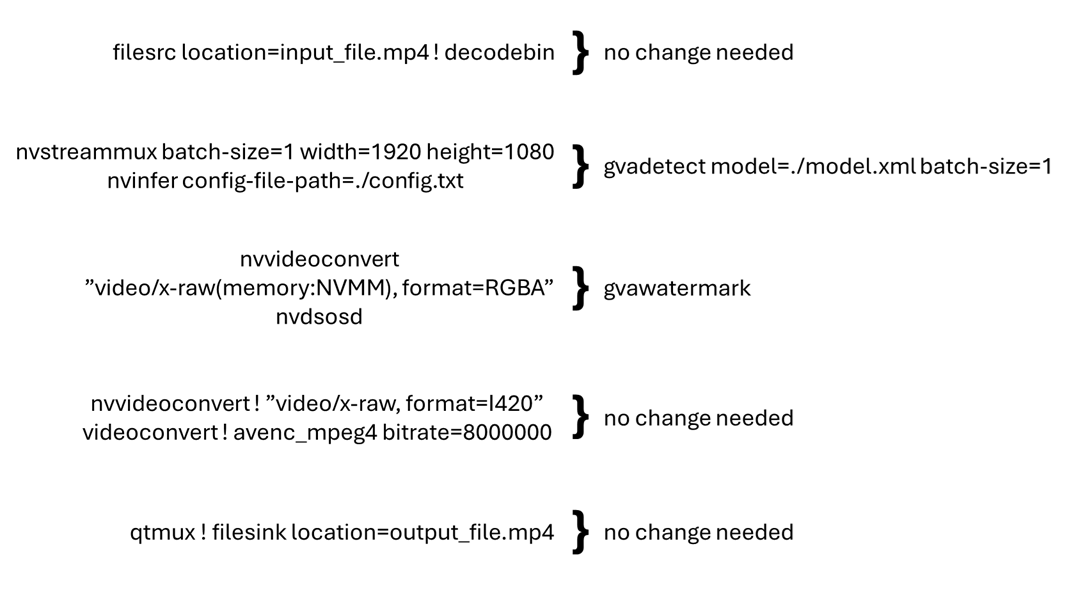
The mapping below represents the typical changes that need to be made to the pipeline to convert it to Deep Learning Streamer Pipeline Framework. The pipeline is broken down into sections based on the elements used in the pipeline.
Python Applications#
While GStreamer command line allows quick demonstration of a running pipeline, fine-grain control typically involves using a GStreamer pipeline object in a programmable way: either Python or C/C++ code.
This section illustrates how to convert a DeepStream Python example into a DL Streamer Python example. Both applications implement the same functionality, yet they use DeepStream or DLStreamer elements as illustrated in the table below. The elements in bold are vendor-specific, while others are regular GStreamer elements.
DeepStream Element |
DL Streamer Element |
Function |
|---|---|---|
filesrc |
filesrc |
Read video file |
h264parse ! nvv4l2decoder |
decodebin3 |
Decode video file |
nvstreammux ! nvinfer |
gvadetect ! queue |
Create batch buffer and run AI inference |
nvvideoconvert |
videoconvertscale |
Convert video format |
nvosd |
gvawatermark |
Overlay analytics results |
nv3dsink |
audiovideosink |
Render results in a window |
Such pipelines can be created programmatically in a Python application using a sequence of API Calls:
element = Gst.ElementFactory.make(...)
element.set_property(...)
pipeline.add(element)
element.link(next_element)
Please note DeepStream and DL Streamer applications use same set of regular GStreamer library functions to construct pipelines.
The difference is in what elements are created and linked. In addition, DL Streamer decodebin3 element uses late linking within a callback function.
| DeepStream Pipeline Creation in Python | DLStreamer Pipeline Creation in Python |
|---|---|
|
|
Once pipelines are created, both applications register a custom probe handler and attach it to the sink pad of the overlay element.
The probe registration code is (again) very similar, except different elements being used: nvosd and gvawatermark
| DeepStream Probe Registration | DLStreamer Probe Registration |
|---|---|
osdsinkpad = nvosd.get_static_pad("sink")
osdsinkpad.add_probe(Gst.PadProbeType.BUFFER, osd_sink_pad_buffer_probe, 0)
|
watermarksinkpad = watermark.get_static_pad("sink")
watermarksinkpad.add_probe(Gst.PadProbeType.BUFFER, watermark_sink_pad_buffer_probe, 0)
|
The probe function iterates over prediction metadata found by the AI model. Here, DeepStream and DL Streamer implementation differ significantly. DeepStream sample uses DeepStream-specific structures for batches of frames, frames and objects within a frame. In contrast, DL Streamer sample uses regular GStreamer data structures from GstAnalytics metadata library. Please also note DL Streamer handler runs on per-frame frequency while DeepStream sample runs on per-batch (of frames) frequency.
| DeepStream Probe Implementation | DLStreamer Probe Implementation |
|---|---|
|
|
The last table compares pipeline execution logic. Both applications set the pipeline state to PLAYING and run the main GStreamer event loop.
DeepStream sample invokes a predefined event loop from a DeepStream library, while DL Streamer application explicitly adds the message processing loop.
Both implementations keep running the pipeline until end-of-stream message is received.
| DeepStream Pipeline Execution | DLStreamer Pipeline Execution |
|---|---|
|
|
Conversion Rules for Pipeline Elements#
Mux and Demux Elements#
The following sections provide more details on how to replace each element.
Remove
nvstreammuxandnvstreamdemuxand all their properties.These elements combine multiple input streams into a single batched video stream (DeepStream-specific). Deep Learning Streamer takes a different approach: it employs a generic GStreamer syntax to define parallel streams. The cross-stream batching happens at the inferencing elements by setting the same
model-instance-idproperty.In this example, there is only one video stream, so it can be skipped for now. See the Multiple Input Streams section below for more information on how to construct multi-stream pipelines.
At this stage, you have removed nvstreammux and the queue that
followed it. Keep in mind, that the batch-size property is also removed. It will
be added in the next section as a property of the Pipeline Framework
inference elements.
filesrc location=input_file.mp4 ! decodebin3 ! \
nvinfer config-file-path=./config.txt ! \
nvvideoconvert ! "video/x-raw(memory:NVMM), format=RGBA" ! \
nvdsosd ! queue ! \
nvvideoconvert ! "video/x-raw, format=I420" ! videoconvert ! avenc_mpeg4 bitrate=8000000 ! qtmux ! filesink location=output_file.mp4
Inferencing Elements#
Remove
nvinferand replace it withgvainference,gvadetectorgvaclassifydepending on the following use cases:For detection of objects on full frames and outputting a region of interest, use gvadetect. This replaces
nvinferwhen it is used in primary mode.Replace the
config-file-pathproperty withmodelandmodel-proc.gvadetectgeneratesGstVideoRegionOfInterestMeta.
For classification of previously detected objects, use gvaclassify. This replaces
nvinferwhen it is used in secondary mode.Replace the
config-file-pathproperty withmodelandmodel-proc.gvaclassifyrequiresGstVideoRegionOfInterestMetaas input.
For generic full frame inference, use gvainference. This replaces
nvinferwhen used in primary mode.gvainferencegeneratesGstGVATensorMeta.
In this example, you will use gvadetect to infer on the full frame and
output the region of interests. batch-size is also added for consistency
with what was removed above (the default value is 1 so it is not
needed). The config-file-path property is replaced with model and
model-proc properties as described in
Preparing Your Model
above.
filesrc location=input_file.mp4 ! decodebin3 ! \
gvadetect model=./model.xml model-proc=./model_proc.json batch-size=1 ! queue ! \
nvvideoconvert ! "video/x-raw(memory:NVMM), format=RGBA" ! \
nvdsosd ! queue ! \
nvvideoconvert ! "video/x-raw, format=I420" ! videoconvert ! avenc_mpeg4 bitrate=8000000 ! qtmux ! filesink location=output_file.mp4
Video Processing Elements#
Replace NVIDIA-specific video processing elements with native GStreamer elements.
nvvideoconvertwithvapostproc(GPU) orvideoconvert(CPU).If the
nvvideoconvertis being used to convert to/frommemory:NVMMit can be removed.nvv4ldecodercan be replaced withva{CODEC}dec, for examplevah264decfor decoding only. Alternatively, the nativedecodebin3GStreamer element can be used to automatically choose an available decoder.
Some caps filters that follow an inferencing element may need to be adjusted or removed. Pipeline Framework inferencing elements do not support color space conversion in post-processing. You will need to have a
vapostprocorvideoconvertelement to handle this.
In example below, you remove a few caps filters and instances of nvvideoconvert
used for conversions from DeepStream’s NVMM because Pipeline Framework
uses standard GStreamer structures and memory types. You use the
standard videoconvert GStreamer element to do color space conversion
on CPU. However, if available, it is recommended to use vapostproc to run on
Intel Graphics. Also, you use the standard decodebin GStreamer element
to choose an appropriate demuxer and decoder depending on
the input stream as well as what is available on the system.
filesrc location=input_file.mp4 ! decodebin3 ! \
gvadetect model=./model.xml model-proc=./model_proc.json batch-size=1 ! queue ! \
nvdsosd ! queue ! \
videoconvert ! avenc_mpeg4 bitrate=8000000 ! qtmux ! filesink location=output_file.mp4
Metadata Elements#
Replace
nvtrackerwith gvatrack.Remove the
ll-lib-fileproperty. Optionally, replace it withtracking-typeif you want to specify the used algorithm. By default, it will use the ‘short-term’ tracker.Remove all other properties.
Replace
nvdsosdwith gvawatermark.Remove all properties.
Replace
nvmsgconvwith gvametaconvert.gvametaconvertcan be used to convert metadata from inferencing elements to JSON and to output metadata to the GST_DEBUG log.It has optional properties to configure what information goes into the JSON object including frame data for frames with no detections found, tensor data, the source of the inferences, and tags, a user defined JSON object that is attached to each output for additional custom data.
Replace
nvmsgbrokerwith gvametapublish.gvametapublishcan be used to output the JSON messages, generated bygvametaconvertto stdout, a file, MQTT or Kafka.
The only metadata processing done in this pipeline serves to overlay
the inferences on the video for which you use gvawatermark.
filesrc location=input_file.mp4 ! decodebin3 ! \
gvadetect model=./model.xml model-proc=./model_proc.json batch-size=1 ! queue ! \
gvawatermark ! queue ! \
videoconvert ! avenc_mpeg4 bitrate=8000000 ! qtmux ! filesink location=output_file.mp4
Multiple Input Streams#
Unlike DeepStream, where all sources need to be linked to the sink
pads of the nvstreammux element, Pipeline Framework uses existing
GStreamer mechanisms to define multiple parallel video processing
streams. This approach allows reusing native GStreamer elements within
the pipeline. The input streams can share the same Inference Engine if they
have the same model-instance-id property. This enables creating inference
batching across streams.
For DeepStream, the simple pipeline involving two streams is presented in the code snippet below.
The first line defines a common inference element for two (muxed and batched) streams.
The second line defines per-stream input operations prior to muxing.
The third line defines per-stream output operations after de-muxing.
nvstreammux ! nvinfer batch-size=2 config-file-path=./config.txt ! nvstreamdemux \
filesrc ! decode ! mux.sink_0 filesrc ! decode ! mux.sink_1 \
demux.src_0 ! encode ! filesink demux.src_1 ! encode ! filesink
The native GStreamer syntax below uses Pipeline Framework to define
operations for two parallel streams. When you set model-instance-id to the same value,
both streams will share the same instance of the gvadetect element. That means you can
define the shared inference parameters (the model, the batch size, …) only in the first
line:
filesrc ! decode ! gvadetect model-instance-id=model1 model=./model.xml batch-size=2 ! encode ! filesink \
filesrc ! decode ! gvadetect model-instance-id=model1 ! encode ! filesink
DeepStream to DL Streamer Mapping#
Element Mapping#
The table below provides quick reference for mapping typical DeepStream elements to Deep Learning Streamer elements or GStreamer.
DeepStream Element |
DL Streamer Element |
|---|---|
DeepStream Element |
GStreamer Element |
|---|---|
nvvideoconvert |
videoconvert |
nvv4l2decoder |
decodebin3 |
nvv4l2h264dec |
vah264dec |
nvv4l2h265dec |
vah265dec |
nvv4l2h264enc |
vah264enc |
nvv4l2h265enc |
vah265enc |
nvv4l2vp8dec |
vavp8dec |
nvv4l2vp9dec |
vavp9dec |
nvv4l2vp8enc |
vavp8enc |
nvv4l2vp9enc |
vavp9enc |
Property Mapping#
NVIDIA DeepStream uses a combination of model configuration files and DeepStream element properties to specify inference actions, as well as pre- and post-processing steps before/after running inference, as documented here: here.
Similarly, Deep Learning Streamer Pipeline Framework uses GStreamer element properties for inference settings and model proc files for pre- and post-processing steps.
The following table shows how to map commonly used NVIDIA DeepStream configuration properties to Deep Learning Streamer settings.
NVIDIA DeepStream config file |
NVIDIA DeepStream element property |
Deep Learning Streamer model proc file |
Deep Learning Streamer element property |
Description |
|---|---|---|---|---|
model-engine-file |
model-engine-file |
|
model |
The path to an inference model network file. |
labelfile-path |
|
|
labels-file |
The path to .txt file containing object classes. |
network-type <0..3> |
|
|
|
Type of inference operation. |
batch-size |
batch-size |
|
batch-size |
The number of frames batched together for a single inference. |
maintain-aspect-ratio |
|
resize: aspect-ratio |
|
The number of frames batched together for a single inference. |
num-detected-classes |
|
|
|
The number of classes detected by the model, inferred from a label file by Deep Learning Streamer. |
interval |
interval |
|
inference-interval <N+1> |
An inference action executed every Nth frame. Note that Deep Learning Streamer value is greater by 1. |
|
threshold |
|
threshold |
The threshold for detection results. |