Edge Manageability and Resiliency Blueprint#
Blueprint Series - out-of-band Manageability integrated with an enterprise management application: Intel® vPro® + Intel® Active Management Technology + Device Management Toolkit Enterprise Deployment.
Introduction#
An edge system depends on its operating system, firmware, network path, and physical device. When a remote endpoint stops responding, software-only management may no longer diagnose or recover it, making a site visit necessary.
The Edge Manageability and Resiliency Blueprint uses Intel® Active Management Technology (Intel® AMT) and the open-source Device Management Toolkit (DMT) to provide a hardware-assisted management path below the host operating system.
DMT supports Cloud and Enterprise deployment models. Cloud deployment uses DMT services for centralized provisioning and remote access. Enterprise deployment uses DMT Console for a direct, one-to-one connection to an activated Intel AMT device on an on-premises or private network. This blueprint uses the DMT Enterprise deployment model. For a brief comparison of the two models, see the DMT Get Started overview.
Enterprise deployment is well suited to edge AI solutions in cities, such as traffic management, public safety, and utilities, where cloud access is often undesirable because of data-sovereignty, privacy, security-policy, latency, or limited-backhaul requirements. Operators manage roadside and street-level systems directly from a city operations center over a private network. They can still diagnose and recover a device when its operating system or AI application is unresponsive, without adding a cloud dependency.
The Deployment Environment#
System |
Description |
|---|---|
Management Host |
Windows or Linux system running DMT Console, for example in a city operations center or on a private enterprise network. The host connects directly to an activated Intel AMT endpoint. |
Managed Edge Endpoint |
Supported Intel® vPro® or Intel Standard Manageability platform running Ubuntu 24.04, RPC Go (Remote Provisioning Client), and Intel Local Manageability Service (LMS). |
Software Components#
Component |
Version and Reference |
Installation Target |
Purpose |
|---|---|---|---|
DMT Console |
Management Host |
Enterprise-mode, one-to-one management interface |
|
RPC Go (Remote Provisioning Client) |
Managed Endpoint |
Detect Intel AMT, report version and status, and perform local activation or maintenance |
|
Intel LMS |
|
Managed Endpoint |
Local host communication with Intel AMT through the Intel Management Engine Interface (MEI) |
Ubuntu |
Managed Endpoint |
Reference operating system |
Use the component versions validated for the target platform, retain release evidence and hashes, and repeat validation before upgrading.
Note
The versions above are the ones referenced when this blueprint was written. Newer releases of DMT Console, RPC Go, and LMS are published regularly, and you can use them by replacing the version in the download links and commands. This blueprint does not validate newer releases. Review the release notes, validate them on a non-production endpoint first, and follow the DMT documentation for the release you choose. If you find a problem with a newer release, raise an issue in the relevant Device Management Toolkit GitHub repository, such as Console or RPC Go.
Platform Foundation: Intel AMT#
Intel AMT is embedded in supported Intel-based platforms and enhances an IT organization’s ability to manage enterprise computing systems. Intel AMT operates independently of the platform processor and operating system. A remote management application can securely access Intel AMT even when the platform is powered off, provided the platform remains connected to line power and a network. Software vendors can integrate Intel AMT features through management APIs. See the Intel AMT SDK Implementation and Reference Guide.
Feature availability depends on the platform, firmware, network controller, activation mode, power state, certificates, and organizational policy.
Management Interfaces#
This section lists the Intel AMT capabilities that an authorized administrator can use through DMT Console. The recovery workflow and use cases later in this document rely on them. Availability depends on platform generation, firmware, activation mode, and policy.
Interface |
Function |
Typical Use |
|---|---|---|
Hardware Inventory |
Reads processor, memory, network, and firmware information directly from Intel AMT |
Asset reconciliation, platform-readiness checks |
Power Control |
Queries power state and performs power-on, power-off, reset, or power-cycle |
Remote recovery without a site visit |
Keyboard-Video-Mouse (KVM) |
Remote graphical console, independent of the host operating system |
Visual diagnosis of boot, BIOS, or OS failures |
Serial-over-LAN (SOL) |
Remote text console redirected over the network |
Lightweight boot and console diagnosis |
IDE Redirection (IDE-R) |
Mounts an approved remote image as a local boot or data device |
Remote OS repair or reimaging. Requires Admin Control Mode (ACM) in DMT |
Alerts and Events |
Reports Intel AMT event-log entries |
Correlating recovery actions with platform history |
Each interface operates below the host operating system, so it remains available even when the managed endpoint’s OS or edge application is unresponsive, provided the platform has line power, network connectivity, and an activated Intel AMT.
Architecture: The Edge Manageability Stack#
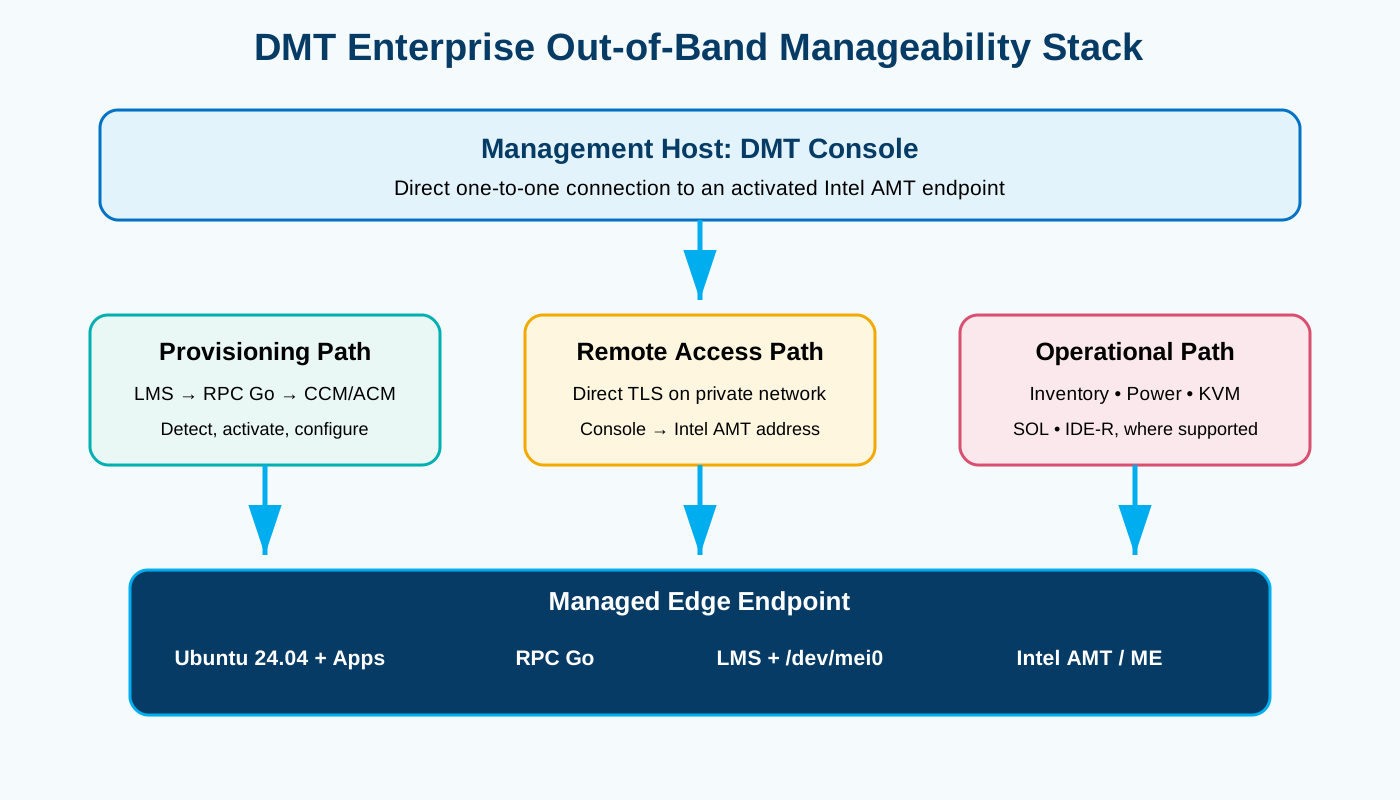
The architecture integrates the DMT Enterprise management application with the Intel AMT out-of-band manageability stack. The diagram shows the management host (DMT Console), the provisioning path, the remote-access path, the operational path, and the managed endpoint.
Applying the Architecture: Smart-City Traffic Systems#
The following diagram applies the same architecture to a smart-city traffic deployment. Intel® vPro® edge devices at intersection points run a traffic AI application on Ubuntu 24.04. Cameras, radar, and sensors feed the application, which reports to the city’s traffic management system over the private city network (Ethernet, fiber, or Wi-Fi). This is the normal in-band path.
DMT Console in the city operations center connects directly to the Intel AMT address of each edge device over the same private network. This is the out-of-band path. It works whether or not the device’s operating system or traffic application is running, and it does not require cloud access.
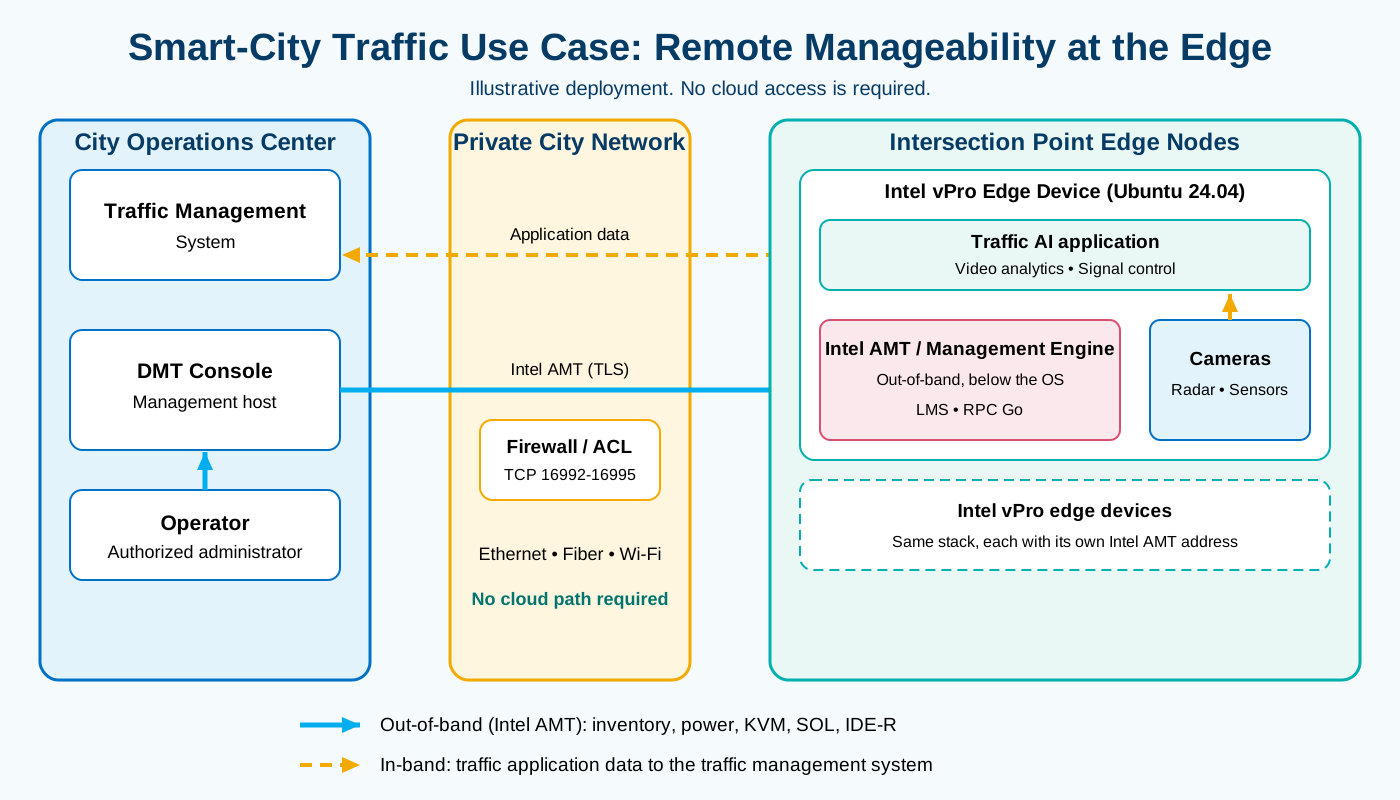
The diagram is illustrative. Device counts, network topology, and firewall rules depend on the city’s environment. Allow only the Intel AMT ports listed in Prerequisites between the operations center and the edge devices. Wi-Fi connectivity for Intel AMT depends on platform support and on a wireless profile in the Intel AMT configuration, so validate it before you rely on it.
Example flow when an intersection edge device stops responding:
The traffic management system stops receiving data from the device.
The operator opens DMT Console and checks the device’s power state and reachability.
The operator uses KVM or SOL to see whether the failure is in boot, the operating system, or the application.
The operator performs an approved restart or power-cycle. If the OS is unrecoverable and the device is in ACM, the operator mounts approved recovery media through IDE-R.
The device returns to service and the operator verifies it through the normal application path, without a site visit.
Management Host: DMT Console#
DMT Console is the Enterprise management application. It connects directly to an activated Intel AMT endpoint and exposes supported inventory, power, KVM, SOL, and IDE-R operations to an authorized administrator.
Provisioning Path#
LMS provides local communication to Intel AMT through Intel MEI.
RPC Go detects the Intel AMT version and provisioning state.
RPC Go can locally activate Intel AMT in Client Control Mode (CCM) when a provisioning certificate is unavailable.
Admin Control Mode (ACM) requires a provisioning certificate and the applicable certificate-based provisioning infrastructure.
Remote Access Path#
For this Enterprise blueprint, DMT Console connects directly to the Intel AMT hostname or IP address over a reachable on-premises or private network. Cloud components such as the Management Presence Server (MPS) and Client Initiated Remote Access (CIRA) are outside this direct Enterprise workflow.
Operational Path#
After onboarding, an authorized administrator can use supported Intel AMT operations such as hardware inventory, power-state control, KVM, SOL, and IDE-R. Availability and user-consent behavior depend on platform capability, control mode, and policy.
Managed Endpoint#
Ubuntu 24.04 and edge applications use the normal in-band management path.
RPC Go performs Intel AMT discovery, activation, status, and maintenance.
LMS communicates through
/dev/mei0to Intel AMT.Intel AMT / Management Engine provides the out-of-band management plane used by DMT Console.
Edge Manageability Lifecycle Flow#
The lifecycle contains six steps, matching the six stages shown below:
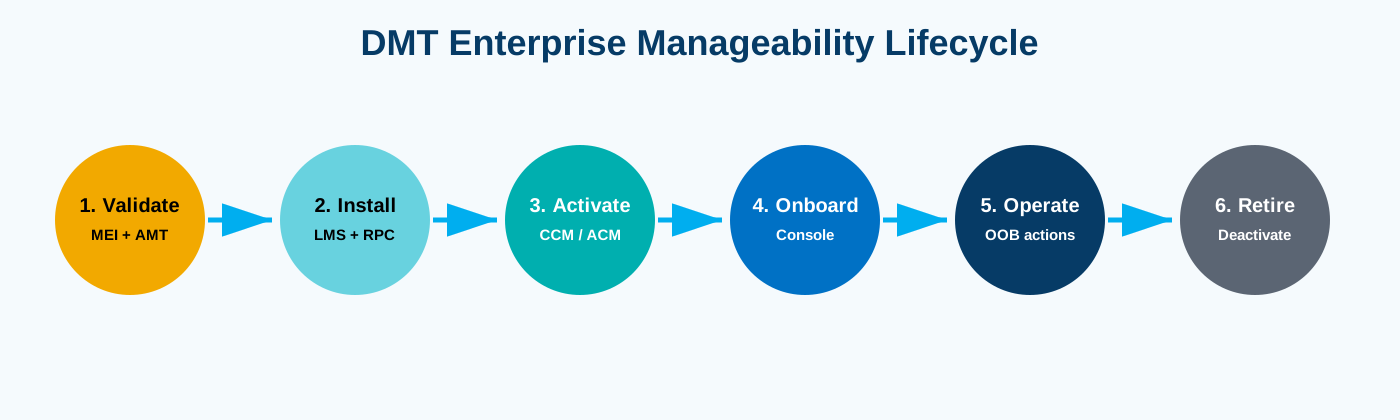
Validate - On the managed endpoint, install LMS and RPC Go, and confirm that
rpc_linux_x86 amtinfodetects Intel AMT. See Verify the Managed Endpoint.Install - On the management host, download and run DMT Console. See Install and Run DMT Console.
Activate - Create a CCM or ACM profile, then activate the device. Use CCM when you do not have a provisioning certificate from a public CA.
Onboard - Add the activated endpoint to DMT Console.
Operate - Validate inventory and the approved management features.
Retire - Deactivate Intel AMT, remove the endpoint, and retire credentials and certificates.
Steps 2 to 5 follow the DMT Enterprise setup flow: download and run Console, create a profile, export the profile, activate and configure the device, add the device to Console, and manage the device. See DMT Enterprise Setup: What You Need.
Install the Blueprint#
This procedure prepares the managed endpoint and confirms that Intel AMT is present. You then complete the deployment with the DMT Enterprise setup guide. A scale-out CIRA deployment requires additional provisioning and presence services and is outside this blueprint.
Prerequisites#
A supported Intel® vPro® or Intel Standard Manageability platform with Intel AMT enabled in BIOS/UEFI.
Ubuntu 24.04 on the managed endpoint, with
sudoaccess and internet access to the Snap Store and GitHub.A management host (Windows or Linux) on a network that can reach the endpoint. Allow TCP ports 16992 and 16993 (Intel AMT web services, 16993 uses TLS) and 16994 and 16995 (redirection for KVM, SOL, and IDE-R, 16995 uses TLS) between the management host and the endpoint.
Verify the Managed Endpoint#
1. Install Intel LMS from the Snap repository#
sudo snap install lms
Use the following commands to manage the service:
Procedure |
Command |
Expected Result |
|---|---|---|
Install |
|
Snap reports that |
Status of service |
|
|
Start the service |
|
|
Stop the service |
|
|
Logs of the service |
|
Shows the LMS service log. |
Confirm that the service is running before you continue:
sudo snap services lms
Expected output:
Service  Startup  Current  Notes
lms.lms  enabled  active   -
If the log shows an AppArmor denial or the service does not stop cleanly, see LMS Snap Reports an AppArmor Denial.
2. Install RPC Go and check Intel AMT#
Download RPC Go from the
v2.52.8 release,
extract it, and run amtinfo:
mkdir -p ~/dmt-install
cd ~/dmt-install
curl -fLO https://github.com/device-management-toolkit/rpc-go/releases/download/v2.52.8/rpc_linux_x86.tar.gz
tar xzf rpc_linux_x86.tar.gz   # extracts the rpc_linux_x86 executable
chmod 750 rpc_linux_x86
sudo ./rpc_linux_x86 amtinfo
Compare the downloaded file with the checksum published on the release page when one is available, and keep the result with your deployment evidence.
The output of amtinfo reports the Intel AMT version, activation state, and control mode.
If the platform does not support Intel AMT, or RPC Go cannot communicate with it, the command
returns an error message instead. In that case, see
RPC Cannot Read Intel AMT and do not continue.
3. Install and run DMT Console on the management host#
On the management host (Windows or Linux), download the Console v1.47.0 asset for your operating system and architecture:
Platform |
Asset |
|---|---|
Linux x64 |
|
Windows x64 |
|
Compare the download with the SHA256 value published on the release page and keep the result with your deployment evidence. Extract the archive on Linux, then run the executable. On first run:
Enter
Ywhen prompted to store the database encryption key in the operating system credential manager.Console generates
config/config.ymlrelative to where you run it. Open the file and noteadminUsernameandadminPassword, or set your own strong credentials, then restart Console.Open
http://localhost:8181(the default port) and log in.
The generated credentials are for initial access and testing only. For the full procedure, including OAuth configuration for production, see DMT Enterprise Setup: Download and Run.
4. Continue with the DMT Enterprise setup#
If amtinfo reports the Intel AMT version, continue with
DMT Enterprise Setup: What You’ll Need
to create a profile, activate the device, and add it to Console.
If you do not have a provisioning certificate from a public CA such as DigiCert or GoDaddy, proceed in Client Control Mode (CCM). Admin Control Mode (ACM) requires a provisioning certificate. In CCM, KVM and SOL are subject to user consent, so validate these before you rely on them. DMT does not currently support user consent for IDE-R, so IDE-R requires a device activated in ACM.
5. Validate the deployment#
After the device is added to Console, confirm the following on a designated validation endpoint:
Test |
Expected Result |
|---|---|
|
|
|
Intel AMT is activated in the expected mode |
Add device in Console |
Console connects to the endpoint |
Inventory |
Expected platform information is displayed |
Power-state query |
Current state is returned |
KVM or SOL, where supported |
Session starts under the documented consent conditions |
Planned restart |
LMS and management connectivity recover |
Do not perform disruptive power operations on a production workload without approval.
Recovery Workflow and Use Cases#
Recovery Workflow#
Trigger: The host operating system or edge application is unavailable.
Data used: Intel AMT reachability, power state, event information, KVM or SOL output, and approved recovery media.
Confirm the endpoint identity and management reachability.
Read the power state and available event information.
Use SOL or KVM to inspect boot and operating-system behavior.
If the operating system is recoverable, correct the configuration or perform an approved restart.
If the operating system is not recoverable, mount approved recovery media through IDE-R where supported. In DMT, IDE-R requires a device activated in ACM.
Restore the application service and verify workload health through the normal application path.
Capture the operator, action, result, root cause, and recovery evidence.
Use Cases#
All use cases rely on the same management principle: use the normal operating-system path for routine operations and use Intel AMT as the authorized recovery and hardware-management path when the normal path is unavailable.
1. Smart-city operations#
Deployment: Smart-city edge systems such as Intel® vPro® edge devices at traffic intersections. The same approach applies to retail branches, transportation sites, and industrial locations.
Data used: Reachability, platform state, recovery results, and site location.
Central operations can diagnose supported endpoints before dispatching personnel, including city traffic edge devices, as described in Applying the Architecture: Smart-City Traffic Systems. This reduces avoidable site visits while preserving a documented escalation path for network, hardware, or physical failures that cannot be resolved remotely. The remaining use cases describe the individual capabilities that support this one.
2. Remote power recovery#
Deployment: Distributed edge endpoint.
Data used: Device identity, current power state, approved action, and audit record.
An operations team can query the endpoint’s power state and perform an approved power-on, reset, or power-cycle action without dispatching a technician. The workflow must protect active workloads and record the operator and result.
DMT usage: Manage a device in Console (Power Actions) and AMT Power States (power action codes and restrictions).
3. OS-independent diagnosis#
Deployment: Endpoint with boot or operating-system failure.
Data used: KVM or SOL output, boot state, and platform information.
KVM or SOL can provide visibility when the host operating system and its software agent are unavailable. The operator can inspect supported pre-OS, BIOS, boot-loader, or console output and decide whether to repair, restart, or initiate recovery.
DMT usage: Manage a device in Console (KVM and Serial-Over-LAN from the device page).
4. Remote media recovery#
Deployment: Remote endpoint requiring repair media.
Data used: Approved recovery image, IDE-R status, and console output.
IDE-R can present approved recovery media to a supported endpoint. DMT does not currently support user consent for IDE-R, so this use case requires a device activated in Admin Control Mode (ACM), which in turn requires a provisioning certificate. Endpoints activated in CCM cannot use IDE-R. The recovery process must use controlled images, clear authorization, and post-recovery verification.
DMT usage: IDE-Redirection (IDER) and One Click Recovery.
5. Hardware and firmware inventory#
Deployment: Managed endpoint fleet.
Data used: Device identity, processor, memory, network, firmware, and Intel AMT information.
Hardware-assisted inventory supports asset reconciliation, platform-readiness checks, and operational triage. Inventory must be associated with a stable asset identity and refreshed after firmware or hardware changes.
DMT usage: Manage a device in Console (device information, hardware info, and logs).
Security and Operational Considerations#
Treat out-of-band management as a privileged control plane.
Use unique credentials, TLS, trusted certificates, role-based access control (RBAC), and least privilege.
Do not publish activation passwords or Console secrets.
Validate CCM consent and feature limitations before relying on KVM or SOL.
IDE-R requires ACM in DMT, because user consent is not supported for IDE-R. Use ACM only with an approved certificate and provisioning design.
Audit activation, power, remote-console, and deactivation operations.
Validate CIRA, DNS, proxy, firewall, and time dependencies before scaling beyond a direct Console connection.
Revalidate after BIOS, firmware, kernel, network, certificate, or policy changes.
Deactivate Intel AMT when the endpoint is retired or ownership changes.
Troubleshooting#
/dev/mei0 Is Missing#
lsmod | grep -E '^mei|mei_me'
sudo modprobe mei_me
sudo dmesg | grep -i mei | tail -n 80
ls -l /dev/mei0
If the device remains absent, verify platform support and BIOS/UEFI configuration before
continuing. Use lspci -k | grep -iE -B2 'mei_me|mei_txe' to check for the MEI driver.
Do not rely on the device name alone: on newer platforms, lspci may show only
Intel Corporation Device [8086:xxxx] because the local pci.ids file has no entry for
the MEI device.
LMS Does Not Start#
sudo snap services lms
sudo snap logs lms -n 80
sudo snap restart lms
Check that /dev/mei0 exists and review the log output.
LMS Snap Reports an AppArmor Denial#
On some systems the log shows a repeating AdapterListInfo Failed to get Devices property
error with An AppArmor policy prevents this sender from sending this message and
label="snap.lms.lms (enforce)". The Snap confinement blocks the D-Bus Get call that
LMS makes to NetworkManager. LMS then cannot read adapter information, and
sudo snap stop lms can time out on stop-sigterm and end with SIGKILL.
This was observed during validation of this blueprint. If this issue affects your system, the
install-lms.sh script in the blueprint package is an alternative.
Run it from the directory that contains the script. It builds LMS from the
Intel LMS source
and runs it under systemd without Snap confinement:
sudo snap stop lms --disable || true
sudo snap remove lms || true
sudo bash ./install-lms.sh
systemctl is-active lms
RPC Cannot Read Intel AMT#
sudo ./rpc_linux_x86 amtinfo
ls -l /dev/mei0
sudo snap services lms
file ./rpc_linux_x86
Run RPC with sudo, confirm the binary architecture, and verify that MEI is available.
If amtinfo reports Error 2: HECIDriverNotDetected after LMS is active and /dev/mei0
exists, confirm whether the platform’s Intel Management Engine (Intel ME) firmware exposes the
Intel AMT client:
sudo mount -t debugfs none /sys/kernel/debug 2>/dev/null
sudo cat /sys/kernel/debug/mei0/meclients
If the listed client UUIDs do not include the AMT/PTHI client
(6733a4db-0476-4e7b-b3af-bcfc29bee7a7), the platform’s ME firmware does not expose
Intel AMT. It is a BIOS/MEBx or SKU limitation and has been confirmed on one Arrow Lake-H
platform during validation, where LMS logged CLIENT_NOT_FOUND. It can only be changed
(if supported at all) from BIOS Setup or Intel MEBx (Ctrl+P at POST), not from the running
OS. Confirm that Intel AMT/vPro is enabled for the specific platform and SKU before continuing.
Release Binary Download Fails Behind a TLS-Inspecting Proxy#
A corporate proxy that terminates and re-signs TLS (for example, a Fortinet SSL-inspection
proxy) may trust github.com/api.github.com but not re-sign the certificate for the CDN
host that serves release binaries (release-assets.githubusercontent.com,
objects.githubusercontent.com), causing curl, gh release download, and browser downloads
of rpc_linux_x86.tar.gz or Console to fail with unable to get local issuer certificate.
Do not work around this with curl -k, --no-check-certificate, or by disabling TLS
verification — that removes the supply-chain integrity check. Instead, obtain the
organization’s proxy root CA certificate from IT and add it to the system trust store
(/usr/local/share/ca-certificates/, then update-ca-certificates), or download the release
on an unrestricted network and transfer it to the endpoint out of band.
DMT Console Cannot Connect#
Confirm that the entered address is the Intel AMT address.
Verify route and firewall policy between the management host and endpoint.
Recheck username, activation password, TLS, certificate trust, and system time.
Review Console logs before changing certificate validation.
Deactivate and Remove the Blueprint#
Review the RPC release-specific help before deactivation because accepted parameters can vary by version.
cd ~/dmt-install
sudo ./rpc_linux_x86 deactivate -local -v
sudo ./rpc_linux_x86 amtinfo | tee amtinfo-after-deactivation.txt
Remove the endpoint from DMT Console, retire associated certificates, remove access
assignments, and update the asset record. If the endpoint no longer needs local Intel AMT
access, remove LMS with sudo snap remove lms.
Deployment Evidence#
Retain the following without secrets:
Platform model and firmware version
DMT Console, RPC Go, and LMS versions or revisions
Binary hashes or signature-verification results
amtinfooutput before and after activationNetwork and certificate configuration summary
Console connection and inventory evidence
Power, KVM, SOL, and IDE-R test results where applicable
Restart-persistence result
Deviations, approvals, and waivers
Deactivation evidence at retirement
Known Limitations#
Feature availability varies by platform generation, firmware, chipset, network controller, activation mode, power state, and software version.
Wireless out-of-band behavior must be validated on the selected platform and host-state matrix.
CIRA (not used in this blueprint) requires correctly configured endpoint, network, certificate, and presence-service dependencies.
KVM, SOL, and IDE-R should be enabled only when required by the operational model. IDE-R is available only on devices activated in ACM.
Out-of-band management does not replace application, workload, and operating-system observability.
From Blueprint to Deployment#
This blueprint is a complete, end-to-end reference architecture. The key integration points for deployment practitioners are:
Integration Point |
Technology |
Notes |
|---|---|---|
Local Intel AMT Communication |
Intel LMS |
Snap package ( |
Intel AMT Detection and Activation |
RPC Go |
CCM activation needs no certificate; ACM requires a provisioning certificate |
Enterprise Management Console |
DMT Console |
Direct, one-to-one connection to an activated endpoint |
Out-of-Band Transport |
Intel AMT / Intel ME, over Intel MEI ( |
Independent of host OS and power state, given line power and network reachability |
Remote Console and Recovery |
KVM, SOL, IDE-R |
Availability depends on control mode (ACM required for IDE-R) and platform generation |
Conclusion#
The Edge Manageability and Resiliency Blueprint shows that a hardware-assisted management plane, anchored in Intel AMT and the open-source Device Management Toolkit, keeps a fleet of edge endpoints recoverable even when their operating system, edge application, or network-layer agent stops responding. By separating the normal in-band application path from an independent out-of-band control path, operators gain power control, visual and console-level diagnosis, approved remote recovery media, and hardware inventory — all below the host operating system, all under the same credential, certificate, and audit discipline as any other privileged control plane.
The same lifecycle — validate, install, activate, onboard, operate, and retire — scales from a single lab endpoint to a distributed fleet across branches, roadside systems, and industrial sites, and reduces avoidable dispatch of service personnel to the site, without weakening the organization’s security posture.
This blueprint is part of the Intel Open Edge Platform architecture blueprint series. For technical documentation, see the Device Management Toolkit documentation and the Device Management Toolkit repositories on GitHub.
Unless otherwise stated, the Open Edge Platform software is provided for demonstration and reference purposes. It is not intended for use in production environments. For more information, refer to Notes on Usage.
Intel, the Intel logo, and other Intel marks are trademarks of Intel Corporation or its subsidiaries. Other names and brands may be claimed as the property of others.