Enable Total Memory Encryption (TME)#
Intel TME encrypts the computer’s entire memory with a single transient key. All memory data passing to and from the CPU is encrypted, including sensitive Smart Intersection data such as traffic analysis algorithms, detection models, credentials, encryption keys, and other proprietary information.

Step 1: Check TME Support#
First, verify if TME is supported on the Intel platform. Read bits 35:32 of MSR 0x981. If this value is non-zero, TME is supported.

Step 2: Enable TME in BIOS#
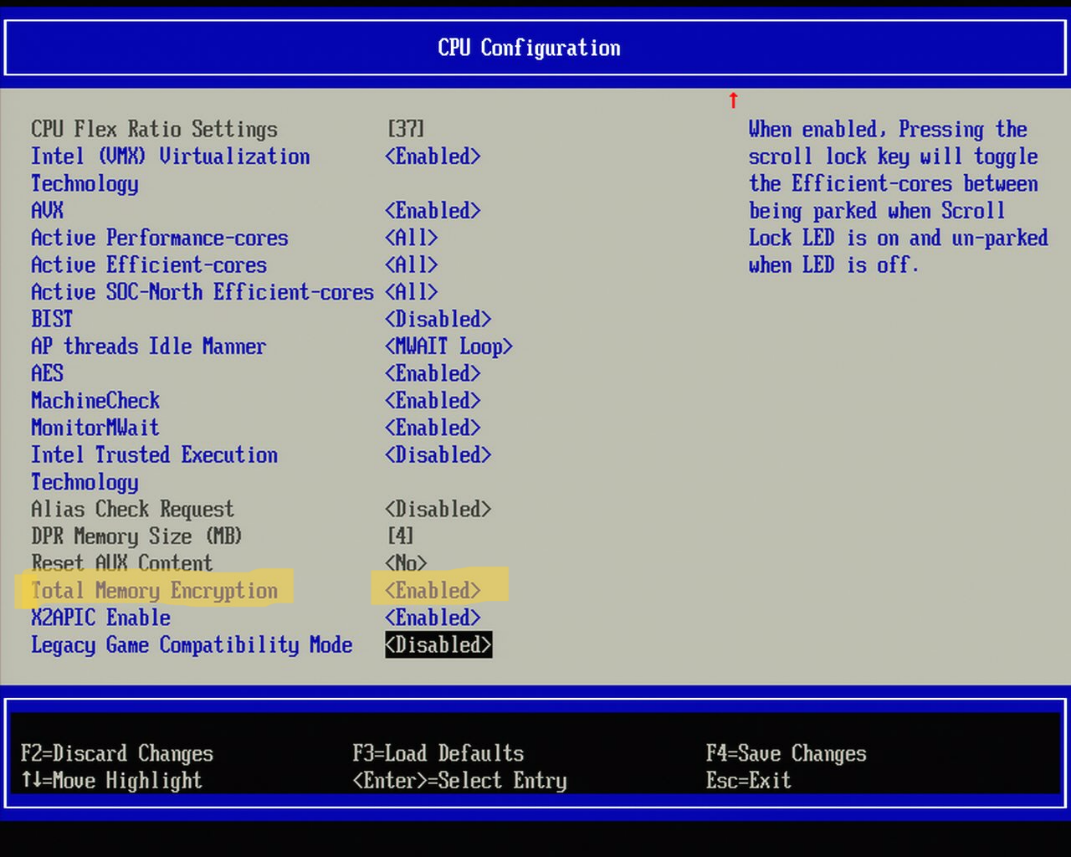
Enter BIOS menu by pressing ‘F2’ while booting the platform
Navigate to: Intel Advanced Menu → CPU Configuration → Total Memory Encryption
Set to Enabled
Save changes (F4) and reboot
Step 3: Verify TME Enablement#
Check if TME is enabled by reading bit 1 of MSR 0x982. If TME is enabled, the value returned will be 1 as shown.

Step 4: Alternative Verification Using Kernel Logs#
You can also use the dmesg kernel log to check TME enablement status:
dmesg | grep -i tme
