Deploy Multiple Instances with Helm#
Prerequisites#
Ensure you have the minimum system requirements for this application.
K8s installation on single or multi node must be done as pre-requisite to continue the following deployment. Note: The kubernetes cluster is set up with
kubeadm,kubectlandkubeletpackages on single and multi nodes withv1.30.2. Refer to tutorials online to setup kubernetes cluster on the web with host OS as ubuntu 22.04 and/or ubuntu 24.04.For helm installation, refer to helm website
Setup the application#
Note: The following instructions assume Kubernetes is already running in the host system with helm package manager installed.
Clone the edge-ai-suites repository and change into industrial-edge-insights-vision directory. The directory contains the utility scripts required in the instructions that follows.
git clone https://github.com/open-edge-platform/edge-ai-suites.git -b main
cd edge-ai-suites/manufacturing-ai-suite/industrial-edge-insights-vision/
Note: These steps demonstrate launching two worker-safety-gear-detection instances and one pallet-defect-detection instance. Modify the sample apps and instances as needed for your use case.
Create a
config.ymlfile to define your application instances and their unique port configurations. Add the following sample contents and save.Example:
worker-safety-gear-detection:
  wsg1:
    NGINX_HTTP_PORT: 30080
    NGINX_HTTPS_PORT: 30443
    COTURN_PORT: 30478
    S3_STORAGE_PORT: 30800
  wsg2:
    NGINX_HTTP_PORT: 30081
    NGINX_HTTPS_PORT: 30444
    COTURN_PORT: 30479
    S3_STORAGE_PORT: 30801

pallet-defect-detection:
  pdd1:
    NGINX_HTTP_PORT: 30082
    NGINX_HTTPS_PORT: 30445
    COTURN_PORT: 30480
    S3_STORAGE_PORT: 30802
NOTE: A sample configuration file
sample_config.ymlis provided to help users understand the multi-instance setup and get started. This configuration defines three example instances with identifiers: pdd1, pdd2, and weld1. The accompanying sample scripts utilize these identifiers to perform operations on individual application instances.Edit the below mentioned environment variables in all the
helm/values_<SAMPLE_APP>.yamlfiles:HOST_IP=<HOST_IP> # IP address of server where DL Streamer Pipeline Server is running. MINIO_ACCESS_KEY= # MinIO service & client access key e.g. intel1234 MINIO_SECRET_KEY= # MinIO service & client secret key e.g. intel1234 MTX_WEBRTCICESERVERS2_0_USERNAME=<username> # WebRTC credentials e.g. intel1234 MTX_WEBRTCICESERVERS2_0_PASSWORD=<password>
Note: For GPU/NPU based pipelines, set
privileged_access_required: truein thehelm/values_<SAMPLE_APP>.yamlfile to enable access to host hardware devices.Install pre-requisites for all instances
./setup.sh helmThis does the following:
Parses through the config.yml
Downloads resources for each instance
Creates a folder helm/temp_apps/<SAMPLE_APP>/<INSTANCE_NAME> that contains configs folder, .env file, payload.json, Chart.yaml, pipeline-server-config.json and values.yaml.
Updates and adds the ports mentioned in config.yml to the respective values.yaml file
Sets executable permissions for scripts
Deploy the application#
Install helm charts#
Install the helm chart for all instances
./run.sh helm_installAfter installation, check the status of the running pods for each instance:
kubectl get pods -n <INSTANCE_NAME>
To view logs of a specific pod, replace
<pod_name>with the actual pod name from the output above:kubectl logs -n <INSTANCE_NAME> -f <pod_name>
Copy the resources such as video and model from local directory to the to the
dlstreamer-pipeline-serverpod to make them available for application while launching pipelines.# Below is an example for Worker safety gear detection. Please adjust the source path of models and videos appropriately for other sample applications. POD_NAME=$(kubectl get pods -n <INSTANCE_NAME> -o jsonpath='{.items[*].metadata.name}' | tr ' ' '\n' | grep deployment-dlstreamer-pipeline-server | head -n 1) kubectl cp resources/worker-safety-gear-detection/videos/Safety_Full_Hat_and_Vest.avi $POD_NAME:/home/pipeline-server/resources/videos/ -c dlstreamer-pipeline-server -n <INSTANCE_NAME> kubectl cp resources/worker-safety-gear-detection/models/* $POD_NAME:/home/pipeline-server/resources/models/ -c dlstreamer-pipeline-server -n <INSTANCE_NAME>
Start AI pipelines#
Start pipeline for all instances#
Fetch the list of pipeline loaded available to launch for all instances
./sample_list.sh helmThis lists the pipeline loaded in DLStreamer Pipeline Server.
Output:
 -------------------------------------------
 Status of: wsg1 (SAMPLE_APP: worker-safety-gear-detection)
 -------------------------------------------
 Environment variables loaded from /home/intel/IRD/edge-ai-suites/manufacturing-ai-suite/industrial-edge-insights-vision/helm/temp_apps/worker-safety-gear-detection/wsg1/.env
 Running sample app: worker-safety-gear-detection
 Using Helm deployment - curl commands will use: <HOST_IP>:<NGINX_HTTPS_PORT>
 Checking status of dlstreamer-pipeline-server...
 Server reachable. HTTP Status Code: 200
 Getting list of loaded pipelines...
 Loaded pipelines:
 [
 {
     "description": "DL Streamer Pipeline Server pipeline",
     "name": "user_defined_pipelines",
     "parameters": {
     "properties": {
         "detection-properties": {
         "element": {
             "format": "element-properties",
             "name": "detection"
         }
         }

        ...
 -------------------------------------------
 Status of: wsg2 (SAMPLE_APP: worker-safety-gear-detection)
 -------------------------------------------
 Environment variables loaded from /home/intel/IRD/edge-ai-suites/manufacturing-ai-suite/industrial-edge-insights-vision/helm/temp_apps/worker-safety-gear-detection/wsg2/.env
 Running sample app: worker-safety-gear-detection
 Using Helm deployment - curl commands will use: <HOST_IP>:<NGINX_HTTPS_PORT>
 Checking status of dlstreamer-pipeline-server...
 Server reachable. HTTP Status Code: 200
 Getting list of loaded pipelines...
 Loaded pipelines:
 [
 {
     "description": "DL Streamer Pipeline Server pipeline",
     "name": "user_defined_pipelines",
     "parameters": {
     "properties": {
         "detection-properties": {
         "element": {
             "format": "element-properties",
             "name": "detection"
         }
         }
    ...

 -------------------------------------------
 Status of: pdd1 (SAMPLE_APP: pallet-defect-detection)
 -------------------------------------------
 Environment variables loaded from /home/intel/IRD/edge-ai-suites/manufacturing-ai-suite/industrial-edge-insights-vision/helm/temp_apps/pallet-defect-detection/pdd1/.env
 Running sample app: pallet-defect-detection
 Using Helm deployment - curl commands will use: <HOST_IP>:<NGINX_HTTPS_PORT>
 Checking status of dlstreamer-pipeline-server...
 Server reachable. HTTP Status Code: 200
 Getting list of loaded pipelines...
 Loaded pipelines:
 [
 {
     "description": "DL Streamer Pipeline Server pipeline",
     "name": "user_defined_pipelines",
     "parameters": {
     "properties": {
         "detection-properties": {
         "element": {
             "format": "element-properties",
             "name": "detection"
         }
         }
    ...
]
Start the pipeline for all instances in the config.yml file.
./sample_start.sh helmExample Output:
 No pipeline specified. Starting the first pipeline.

 ------------------------------------------
 Processing instance: wsg1 from SAMPLE_APP: worker-safety-gear-detection
 ------------------------------------------
 Environment variables loaded from /home/intel/IRD/edge-ai-suites/manufacturing-ai-suite/industrial-edge-insights-vision/helm/temp_apps/worker-safety-gear-detection/wsg1/.env
 Running sample app: worker-safety-gear-detection
 Using Helm deployment - curl commands will use: <HOST_IP>:<NGINX_HTTPS_PORT>
 Checking status of dlstreamer-pipeline-server...
 Server reachable. HTTP Status Code: 200
 Loading payload from /home/intel/IRD/edge-ai-suites/manufacturing-ai-suite/industrial-edge-insights-vision/helm/temp_apps/worker-safety-gear-detection/wsg1/payload.json
 Payload loaded successfully.
 Starting first pipeline: worker_safety_gear_detection
 Launching pipeline: worker_safety_gear_detection
 Extracting payload for pipeline: worker_safety_gear_detection
 Found 1 payload(s) for pipeline: worker_safety_gear_detection
 Payload for pipeline 'worker_safety_gear_detection'. Response: "926a37a308e611f1b6b9310ce1780aa9"

 ------------------------------------------
 Processing instance: wsg2 from SAMPLE_APP: worker-safety-gear-detection
 ------------------------------------------
 Environment variables loaded from /home/intel/IRD/edge-ai-suites/manufacturing-ai-suite/industrial-edge-insights-vision/helm/temp_apps/worker-safety-gear-detection/wsg2/.env
 Running sample app: worker-safety-gear-detection
 Using Helm deployment - curl commands will use: <HOST_IP>:<NGINX_HTTPS_PORT>
 Checking status of dlstreamer-pipeline-server...
 Server reachable. HTTP Status Code: 200
 Loading payload from /home/intel/IRD/edge-ai-suites/manufacturing-ai-suite/industrial-edge-insights-vision/helm/temp_apps/worker-safety-gear-detection/wsg2/payload.json
 Payload loaded successfully.
 Starting first pipeline: worker_safety_gear_detection
 Launching pipeline: worker_safety_gear_detection
 Extracting payload for pipeline: worker_safety_gear_detection
 Found 1 payload(s) for pipeline: worker_safety_gear_detection
 Payload for pipeline 'worker_safety_gear_detection. Response: "9278b2c008e611f1a44c39196e618bc4"

 ------------------------------------------
 Processing instance: pdd1 from SAMPLE_APP: pallet-defect-detection
 ------------------------------------------
 Environment variables loaded from /home/intel/IRD/edge-ai-suites/manufacturing-ai-suite/industrial-edge-insights-vision/helm/temp_apps/pallet-defect-detection/pdd1/.env
 Running sample app: pallet-defect-detection
 Using Helm deployment - curl commands will use: <HOST_IP>:<NGINX_HTTPS_PORT>
 Checking status of dlstreamer-pipeline-server...
 Server reachable. HTTP Status Code: 200
 Loading payload from /home/intel/IRD/edge-ai-suites/manufacturing-ai-suite/industrial-edge-insights-vision/helm/temp_apps/pallet-defect-detection/pdd1/payload.json
 Payload loaded successfully.
 Starting first pipeline: pallet_defect_detection
 Launching pipeline: pallet_defect_detection
 Extracting payload for pipeline: pallet_defect_detection
 Found 1 payload(s) for pipeline: pallet_defect_detection
 Payload for pipeline 'pallet_defect_detection'.Response: "92860d8b08e611f1ab254730a689a0bf"
Access the WebRTC stream
The inference stream can be viewed on WebRTC, in a browser, at the following url depending on the SAMPLE_APP:
Note: The
NGINX_HTTPS_PORTis different for each instance of the sample app. For example, for the sample config mentioned previously, the instance wsg1 has nginx port set to 30443, wsg2 set to 30444 & pdd1 set to 30445.https://<HOST_IP>:<NGINX_HTTPS_PORT>/mediamtx/pdd/ # Pallet Defect Detection https://<HOST_IP>:<NGINX_HTTPS_PORT>/mediamtx/worker_safety/ # Worker Safety Gear detection
Start pipeline for a particular instance only#
Fetch the list of pipeline for <INSTANCE_NAME>:
./sample_list.sh helm -i <INSTANCE_NAME>
Example Output:
 Instance name set to: wsg1
 Found SAMPLE_APP: worker-safety-gear-detection for INSTANCE_NAME: wsg1
 Environment variables loaded from /home/intel/IRD/edge-ai-suites/manufacturing-ai-suite/industrial-edge-insights-vision/helm/temp_apps/worker-safety-gear-detection/wsg1/.env
 Running sample app: worker-safety-gear-detection
 Using Helm deployment - curl commands will use: <HOST_IP>:<NGINX_HTTPS_PORT>
 Checking status of dlstreamer-pipeline-server...
 Server reachable. HTTP Status Code: 200
 Getting list of loaded pipelines...
 Loaded pipelines:
 [
 {
     "description": "DL Streamer Pipeline Server pipeline",
     "name": "user_defined_pipelines",
     "parameters": {
     "properties": {
         "detection-properties": {
         "element": {
             "format": "element-properties",
             "name": "detection"
         }
         }
        ...
]
Start the pipeline for <INSTANCE_NAME>:
./sample_start.sh helm -i <INSTANCE_NAME> -p <PIPELINE_NAME>
Output:
 Instance name set to: wsg1
 Starting specified pipeline(s)...
 Found SAMPLE_APP: worker-safety-gear-detection for INSTANCE_NAME: wsg1
 Environment variables loaded from /home/intel/IRD/edge-ai-suites/manufacturing-ai-suite/industrial-edge-insights-vision/helm/temp_apps/worker-safety-gear-detection/wsg1/.env
 Running sample app: worker-safety-gear-detection
 Using Helm deployment - curl commands will use: <HOST_IP>:<NGINX_HTTPS_PORT>
 Checking status of dlstreamer-pipeline-server...
 Server reachable. HTTP Status Code: 200
 Loading payload from /home/intel/IRD/edge-ai-suites/manufacturing-ai-suite/industrial-edge-insights-vision/helm/temp_apps/worker-safety-gear-detection/wsg1/payload.json
 Payload loaded successfully.
 Starting pipeline: worker_safety_gear_detection
 Launching pipeline: worker_safety_gear_detection
 Extracting payload for pipeline: worker_safety_gear_detection
 Found 1 payload(s) for pipeline: worker_safety_gear_detection
 Payload for pipeline 'worker_safety_gear_detection'. Response: "210e9e5408f611f18bb6d36c73d67904"
Access WebRTC stream:
Open a browser and navigate to
https://<HOST_IP>:<NGINX_HTTPS_PORT>/mediamtx/<peer-id of SAMPLE_APP>/
Start pipeline for a particular instance from a custom payload.json#
Fetch the list of pipeline for <INSTANCE_NAME>:
./sample_list.sh helm -i <INSTANCE_NAME>
Example Output:
./sample_list.sh helm -i <INSTANCE_NAME>
Example Output:
 Instance name set to: wsg1
 Found SAMPLE_APP: worker-safety-gear-detection for INSTANCE_NAME: wsg1
 Environment variables loaded from /home/intel/IRD/edge-ai-suites/manufacturing-ai-suite/industrial-edge-insights-vision/helm/temp_apps/worker-safety-gear-detection/wsg1/.env
 Running sample app: worker-safety-gear-detection
 Using Helm deployment - curl commands will use: <HOST_IP>:<NGINX_HTTPS_PORT>
 Checking status of dlstreamer-pipeline-server...
 Server reachable. HTTP Status Code: 200
 Getting list of loaded pipelines...
 Loaded pipelines:
 [
 {
     "description": "DL Streamer Pipeline Server pipeline",
     "name": "user_defined_pipelines",
     "parameters": {
     "properties": {
         "detection-properties": {
         "element": {
             "format": "element-properties",
             "name": "detection"
         }
         }
        ...
]
Start the pipeline for <INSTANCE_NAME> where pipeline is loaded from
: ./sample_start.sh helm -i <INSTANCE_NAME> --payload <file> -p <PIPELINE_NAME>
Output:
 Instance name set to: wsg1
 Custom payload file set to: custom_payload.json
 Starting specified pipeline(s)...
 Found SAMPLE_APP: worker-safety-gear-detection for INSTANCE_NAME: wsg1
 Environment variables loaded from /home/intel/IRD/edge-ai-suites/manufacturing-ai-suite/industrial-edge-insights-vision/helm/temp_apps/worker-safety-gear-detection/wsg1/.env
 Running sample app: worker-safety-gear-detection
 Using Helm deployment - curl commands will use: <HOST_IP>:<NGINX_HTTPS_PORT>
 Checking status of dlstreamer-pipeline-server...
 Server reachable. HTTP Status Code: 200
 Loading payload from custom_payload.json
 Payload loaded successfully.
 Starting pipeline: worker_safety_gear_detection
 Launching pipeline: worker_safety_gear_detection
 Extracting payload for pipeline: worker_safety_gear_detection
 Found 1 payload(s) for pipeline: worker_safety_gear_detection
 Payload for pipeline 'worker_safety_gear_detection'. Response: "1617692d08f811f1ba8dd36c73d67904"
Access WebRTC stream:
Open a browser and navigate to:
https://<HOST_IP>:<NGINX_HTTPS_PORT>/mediamtx/<peer-id of SAMPLE_APP>/
Monitor Applications#
Check Pipeline Status#
Get status of pipeline instance(s) of all instances.
./sample_status.sh helmThis command lists status of pipeline instances launched during the lifetime of sample application of all instances in the config file
Output:
 No arguments provided. Fetching status for all pipeline instances.
 Config file found. Fetching status for all instances defined in /home/intel/IRD/edge-ai-suites/manufacturing-ai-suite/industrial-edge-insights-vision/config.yml
 Processing instance: wsg1 from sample app: worker-safety-gear-detection
 Environment variables loaded from /home/intel/IRD/edge-ai-suites/manufacturing-ai-suite/industrial-edge-insights-vision/helm/temp_apps/worker-safety-gear-detection/wsg1/.env
 Running sample app: worker-safety-gear-detection
 Using Helm deployment - curl commands will use: <HOST_IP>:<NGINX_HTTPS_PORT>
 [
 {
     "avg_fps": 30.000824831263436,
     "elapsed_time": 65.06488275527954,
     "id": "f696aebd08f511f1b21fd36c73d67904",
     "message": "",
     "start_time": 1770998792.7199645,
     "state": "COMPLETED"
 },
 {
     "avg_fps": 29.28344816469428,
     "elapsed_time": 3.1075568199157715,
     "id": "59ba380e08f811f1b4bbd36c73d67904",
     "message": "",
     "start_time": 1770999817.647971,
     "state": "RUNNING"
 }
 ]
 Processing instance: wsg2 from sample app: worker-safety-gear-detection
 Environment variables loaded from /home/intel/IRD/edge-ai-suites/manufacturing-ai-suite/industrial-edge-insights-vision/helm/temp_apps/worker-safety-gear-detection/wsg2/.env
 Running sample app: worker-safety-gear-detection
 Using Helm deployment - curl commands will use: <HOST_IP>:<NGINX_HTTPS_PORT>
 [
 {
     "avg_fps": 30.00088826253301,
     "elapsed_time": 65.06474828720093,
     "id": "f6a36c3a08f511f19d7149d0c922206a",
     "message": "",
     "start_time": 1770998793.0347376,
     "state": "COMPLETED"
 },
 {
     "avg_fps": 26.094473414623586,
     "elapsed_time": 2.835848331451416,
     "id": "59cd526308f811f188f249d0c922206a",
     "message": "",
     "start_time": 1770999817.946755,
     "state": "RUNNING"
 }
 ]
 Processing instance: pdd1 from sample app: pallet-defect-detection
 Environment variables loaded from /home/intel/IRD/edge-ai-suites/manufacturing-ai-suite/industrial-edge-insights-vision/helm/temp_apps/pallet-defect-detection/pdd1/.env
 Running sample app: pallet-defect-detection
 Using Helm deployment - curl commands will use: <HOST_IP>:<NGINX_HTTPS_PORT>
 [
 {
     "avg_fps": 30.000927712435303,
     "elapsed_time": 97.19699597358704,
     "id": "f6ad8d1208f511f1b2d8053eed0a2908",
     "message": "",
     "start_time": 1770998793.1348522,
     "state": "COMPLETED"
 },
 {
     "avg_fps": 24.037134234690296,
     "elapsed_time": 2.8705577850341797,
     "id": "59db6d1508f811f1aac1053eed0a2908",
     "message": "",
     "start_time": 1770999817.942608,
     "state": "RUNNING"
 }
 ]
Check status of only a particular instance:
./sample_status.sh helm -i <INSTANCE_NAME>
Check status of a particular instance_id of an instance
./sample_status.sh helm -i <INSTANCE_NAME> --id <INSTANCE_ID>
Stop Applications#
Stop Pipeline Instances#
Stop all pipelines of all instances:
./sample_stop.sh helmOutput
 No pipelines specified. Stopping all pipeline instances

 -------------------------------------------
 Processing instance: wsg1 (SAMPLE_APP: worker-safety-gear-detection)
 -------------------------------------------
 Environment variables loaded from /home/intel/IRD/edge-ai-suites/manufacturing-ai-suite/industrial-edge-insights-vision/helm/temp_apps/worker-safety-gear-detection/wsg1/.env
 Running sample app: worker-safety-gear-detection
 Using Helm deployment - curl commands will use: <HOST_IP>:<NGINX_HTTPS_PORT>
 Checking status of dlstreamer-pipeline-server...
 Server reachable. HTTP Status Code: 200
 Instance list fetched successfully. HTTP Status Code: 200
 Found 1 running pipeline instances.
 Stopping pipeline instance with ID: 8ef8cbd108f811f1b089d36c73d67904
 Pipeline instance with ID '8ef8cbd108f811f1b089d36c73d67904' stopped successfully. Response: {
 "avg_fps": 30.029291306520363,
 "elapsed_time": 11.888385772705078,
 "id": "8ef8cbd108f811f1b089d36c73d67904",
 "message": "",
 "start_time": 1770999906.9997478,
 "state": "RUNNING"
 }

 -------------------------------------------
 Processing instance: wsg2 (SAMPLE_APP: worker-safety-gear-detection)
 -------------------------------------------
 Environment variables loaded from /home/intel/IRD/edge-ai-suites/manufacturing-ai-suite/industrial-edge-insights-vision/helm/temp_apps/worker-safety-gear-detection/wsg2/.env
 Running sample app: worker-safety-gear-detection
 Using Helm deployment - curl commands will use: <HOST_IP>:<NGINX_HTTPS_PORT>
 Checking status of dlstreamer-pipeline-server...
 Server reachable. HTTP Status Code: 200
 Instance list fetched successfully. HTTP Status Code: 200
 Found 1 running pipeline instances.
 Stopping pipeline instance with ID: 8f031ebd08f811f18f0049d0c922206a
 Pipeline instance with ID '8f031ebd08f811f18f0049d0c922206a' stopped successfully. Response: {
 "avg_fps": 30.02147503872863,
 "elapsed_time": 12.357815504074097,
 "id": "8f031ebd08f811f18f0049d0c922206a",
 "message": "",
 "start_time": 1770999907.0998116,
 "state": "RUNNING"
 }

 -------------------------------------------
 Processing instance: pdd1 (SAMPLE_APP: pallet-defect-detection)
 -------------------------------------------
 Environment variables loaded from /home/intel/IRD/edge-ai-suites/manufacturing-ai-suite/industrial-edge-insights-vision/helm/temp_apps/pallet-defect-detection/pdd1/.env
 Running sample app: pallet-defect-detection
 Using Helm deployment - curl commands will use: <HOST_IP>:<NGINX_HTTPS_PORT>
 Checking status of dlstreamer-pipeline-server...
 Server reachable. HTTP Status Code: 200
 Instance list fetched successfully. HTTP Status Code: 200
 Found 1 running pipeline instances.
 Stopping pipeline instance with ID: 8f11078b08f811f186eb053eed0a2908
 Pipeline instance with ID '8f11078b08f811f186eb053eed0a2908' stopped successfully. Response: {
 "avg_fps": 30.911617559169063,
 "elapsed_time": 10.740295171737671,
 "id": "8f11078b08f811f186eb053eed0a2908",
 "message": "",
 "start_time": 1770999908.8092756,
 "state": "RUNNING"
 }
Stop pipelines of given instance:
./sample_stop.sh helm -i <INSTANCE_NAME>
Output:
 Found SAMPLE_APP: worker-safety-gear-detection for INSTANCE_NAME: wsg1
 Environment variables loaded from /home/intel/IRD/edge-ai-suites/manufacturing-ai-suite/industrial-edge-insights-vision/helm/temp_apps/worker-safety-gear-detection/wsg1/.env
 Running sample app: worker-safety-gear-detection
 Using Helm deployment - curl commands will use: <HOST_IP>:<NGINX_HTTPS_PORT>
 Checking status of dlstreamer-pipeline-server...
 Server reachable. HTTP Status Code: 200
 Instance list fetched successfully. HTTP Status Code: 200
 Found 1 running pipeline instances.
 Stopping pipeline instance with ID: b4c694ff08f811f19830d36c73d67904
 Pipeline instance with ID 'b4c694ff08f811f19830d36c73d67904' stopped successfully. Response: {
 "avg_fps": 30.011416383904823,
 "elapsed_time": 7.896989107131958,
 "id": "b4c694ff08f811f19830d36c73d67904",
 "message": "",
 "start_time": 1770999970.4083257,
 "state": "RUNNING"
 }
Stop pipelines of an instance with a given instance_id:
./sample_stop.sh helm -i <INSTANCE_NAME> --id <INSTANCE_ID>
Output:
 Found SAMPLE_APP: worker-safety-gear-detection for INSTANCE_NAME: wsg1
 Environment variables loaded from /home/intel/IRD/edge-ai-suites/manufacturing-ai-suite/industrial-edge-insights-vision/helm/temp_apps/worker-safety-gear-detection/wsg1/.env
 Running sample app: worker-safety-gear-detection
 Using Helm deployment - curl commands will use: <HOST_IP>:<NGINX_HTTPS_PORT>
 Checking status of dlstreamer-pipeline-server...
 Server reachable. HTTP Status Code: 200
 Stopping pipeline instance with ID: d7b76aac08f811f1bfa8d36c73d67904
 Pipeline instance with ID 'd7b76aac08f811f1bfa8d36c73d67904' stopped successfully. Response: {
 "avg_fps": 25.478745594067558,
 "elapsed_time": 17.465531587600708,
 "id": "d7b76aac08f811f1bfa8d36c73d67904",
 "message": "",
 "start_time": 1771000028.9715352,
 "state": "RUNNING"
 }
Uninstall Helm Charts#
./run.sh helm_uninstall
Once application has been stopped, remove or rename the config.yml file if you do not wish to relaunch these multiple apps next time.
Storing frames to S3 storage#
Applications can take advantage of S3 publish feature from DL Streamer Pipeline Server and use it to save frames to an S3 compatible storage.
Run all the steps mentioned in above section to setup the application.
Install the helm chart.
./run.sh helm_installCopy the resources such as video and model from local directory to the
dlstreamer-pipeline-serverpod to make them available for application while launching pipelines.# Below is an example for Worker safety gear detection. Please adjust the source path of models and videos appropriately for other sample applications. POD_NAME=$(kubectl get pods -n <INSTANCE_NAME> -o jsonpath='{.items[*].metadata.name}' | tr ' ' '\n' | grep deployment-dlstreamer-pipeline-server | head -n 1) kubectl cp resources/worker-safety-gear-detection/videos/Safety_Full_Hat_and_Vest.avi $POD_NAME:/home/pipeline-server/resources/videos/ -c dlstreamer-pipeline-server -n <INSTANCE_NAME> kubectl cp resources/worker-safety-gear-detection/models/* $POD_NAME:/home/pipeline-server/resources/models/ -c dlstreamer-pipeline-server -n <INSTANCE_NAME>
Install the package
boto3in your python environment if not installed.It is recommended to create a virtual environment and install it there. You can run the following commands to add the necessary dependencies as well as create and activate the environment.
sudo apt update && \
sudo apt install -y python3 python3-pip python3-venv
python3 -m venv venv && \
source venv/bin/activate
Once the environment is ready, install
boto3with the following commandpip3 install --upgrade pip && \ pip3 install boto3==1.36.17
Note: DL Streamer Pipeline Server expects the bucket to be already present in the database. The next step will help you create one.
Create a S3 bucket using the following script.
Update the
HOST_IPandS3_STORAGE_PORTmentioned in config.yml for each instance and credentials with that of the running MinIO server. Name the file ascreate_bucket_<INSTANCE_NAME>.py.import boto3 url = "http://<HOST_IP>:<S3_STORAGE_PORT>" user = "<value of MINIO_ACCESS_KEY used in helm/temp_apps/SAMPLE_APP/INSTANCE_NAME/values.yaml>" password = "<value of MINIO_SECRET_KEY used in helm/temp_apps/SAMPLE_APP/INSTANCE_NAME/values.yaml>" bucket_name = "ecgdemo" client= boto3.client( "s3", endpoint_url=url, aws_access_key_id=user, aws_secret_access_key=password ) client.create_bucket(Bucket=bucket_name) buckets = client.list_buckets() print("Buckets:", [b["Name"] for b in buckets.get("Buckets", [])])
Run the above script to create the bucket.
python3 create_bucket_<INSTANCE_NAME>.pyStart the pipeline with the following cURL command with
<HOST_IP>set to system IP and the<NGINX_HTTPS_PORT>mentioned in the config.yml for each instance. Ensure to give the correct path to the model as seen below. This example starts an AI pipeline for worker-safety-gear-detection. Please adjust the source path of models and videos appropriately for other sample applications.curl -k https://<HOST_IP>:<NGINX_HTTPS_PORT>/api/pipelines/user_defined_pipelines/worker_safety_gear_detection_s3write -X POST -H 'Content-Type: application/json' -d '{ "source": { "uri": "file:///home/pipeline-server/resources/videos/Safety_Full_Hat_and_Vest.avi", "type": "uri" }, "destination": { "frame": { "type": "webrtc", "peer-id": "worker_safety_gear_detection_s3" } }, "parameters": { "detection-properties": { "model": "/home/pipeline-server/resources/models/worker-safety-gear-detection/deployment/Detection/model/model.xml", "device": "CPU" } } }'
Go to MinIO console on
https://<HOST_IP>:<NGINX_HTTPS_PORT>/minio/and login withMINIO_ACCESS_KEYandMINIO_SECRET_KEYprovided inhelm/temp_apps/SAMPLE_APP/INSTANCE_NAME/values.yamlfile. After logging into console, you can go toecgdemobucket and check the frames stored.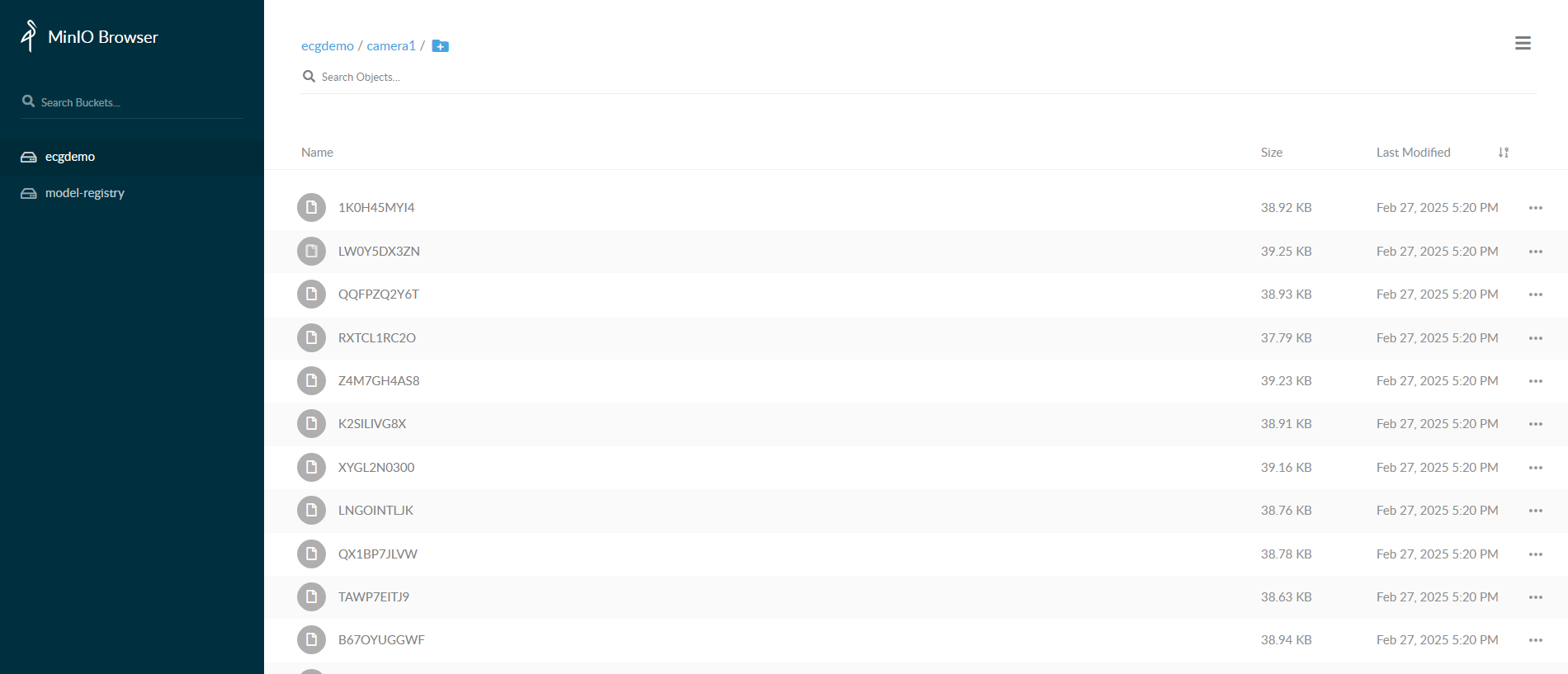
Uninstall the helm chart.
./run.sh helm_uninstallOnce application has been stopped, remove or rename the
config.ymlfile if you do not wish to relaunch these multiple apps next time.
MLOps using Model Download#
Run all the steps mentioned in above section to setup the application.
Install the helm chart
./run.sh helm_installCopy the resources such as video and model from local directory to the
dlstreamer-pipeline-serverpod to make them available for application while launching pipelines.# Below is an example for Worker safety gear detection. Please adjust the source path of models and videos appropriately for other sample applications. POD_NAME=$(kubectl get pods -n <INSTANCE_NAME> -o jsonpath='{.items[*].metadata.name}' | tr ' ' '\n' | grep deployment-dlstreamer-pipeline-server | head -n 1) kubectl cp resources/worker-safety-gear-detection/videos/Safety_Full_Hat_and_Vest.avi $POD_NAME:/home/pipeline-server/resources/videos/ -c dlstreamer-pipeline-server -n <INSTANCE_NAME> kubectl cp resources/worker-safety-gear-detection/models/* $POD_NAME:/home/pipeline-server/resources/models/ -c dlstreamer-pipeline-server -n <INSTANCE_NAME>
Modify the payload in
helm/temp_apps/<SAMPLE_APP>/<INSTANCE_NAME>/payload.jsonto launch an instance for the mlops pipeline.Below is an example for worker-safety-gear-detection. Please modify the payload for other sample applications.
 [
     {
         "pipeline": "worker_safety_gear_detection_mlops",
         "payload":{
             "source": {
                 "uri": "file:///home/pipeline-server/resources/videos/Safety_Full_Hat_and_Vest.avi",
                 "type": "uri"
             },
             "destination": {
             "frame": {
                 "type": "webrtc",
                 "peer-id": "worker_safety"
             }
             },
             "parameters": {
                 "detection-properties": {
                     "model": "/home/pipeline-server/resources/models/worker-safety-gear-detection/deployment/Detection/model/model.xml",
                     "device": "CPU"
                 }
             }
         }
     }
 ]
Start the pipeline with the above payload.
Below is an example for starting an instance for worker-safety-gear-detection:
./sample_start.sh helm -i <INSTANCE_NAME> -p worker_safety_gear_detection_mlops
Note the instance-id.
Download and prepare the model. Below is an example for downloading and preparing model for worker-safety-gear-detection. Please modify MODEL_URL for the other sample applications.
NOTE- For sake of simplicity, we assume that the new model has already been downloaded by Model Download microservice. The following curl command is only a simulation that just downloads the model. In production, however, they will be downloaded by the Model Download service.
 export MODEL_URL='https://github.com/open-edge-platform/edge-ai-resources/raw/06bb0d621cb14a1791672552a538beddddcc4066/models/INT8/worker-safety-gear-detection.zip'

 curl -L "$MODEL_URL" -o "$(basename $MODEL_URL)"

 unzip "$(basename $MODEL_URL)" -d new-model # downloaded model is now extracted to `new-model` directory.
Copy the new model to the
dlstreamer-pipeline-serverpod to make it available for application while launching pipeline.POD_NAME=$(kubectl get pods -n <INSTANCE_NAME> -o jsonpath='{.items[*].metadata.name}' | tr ' ' '\n' | grep deployment-dlstreamer-pipeline-server | head -n 1) kubectl cp new-model $POD_NAME:/home/pipeline-server/resources/models/ -c dlstreamer-pipeline-server -n <INSTANCE_NAME>
NOTE- If there are multiple sample_apps in config.yml, repeat steps 6 and 7 for each sample app and instance.
Stop the existing pipeline before restarting it with a new model. Use the instance-id generated from step 5.
curl -k --location -X DELETE https://<HOST_IP>:<NGINX_HTTPS_PORT>/api/pipelines/{instance_id}
Modify the payload in
helm/temp_apps/<SAMPLE_APP>/<INSTANCE_NAME>/payload.jsonto launch an instance for the mlops pipeline with this new model.Below is an example for worker-safety-gear-detection. Please modify the payload for other sample applications.
 [
     {
         "pipeline": "worker_safety_gear_detection_mlops",
         "payload":{
             "source": {
                 "uri": "file:///home/pipeline-server/resources/videos/Safety_Full_Hat_and_Vest.avi",
                 "type": "uri"
             },
             "destination": {
             "frame": {
                 "type": "webrtc",
                 "peer-id": "worker_safety"
             }
             },
             "parameters": {
                 "detection-properties": {
                     "model": "/home/pipeline-server/resources/models/new-model/deployment/Detection/model/model.xml",
                     "device": "CPU"
                 }
             }
         }
     }
 ]
View the WebRTC streaming on
https://<HOST_IP>:<NGINX_HTTPS_PORT>/mediamtx/<peer-str-id>/by replacing<peer-str-id>with the value used in the original cURL command to start the pipeline.