Wind Turbine Anomaly Detection#
This sample app demonstrates a time series use case by detecting anomalous power generation patterns in wind turbines, relative to wind speed. By identifying deviations, it helps optimize maintenance schedules and prevent potential turbine failures, enhancing operational efficiency.
In this article, you can learn about the architecture of the sample and its data flow.
If you want to start working with it, instead, check out the Get Started Guide or How-to Guides for Time-series applications.
How It Works#
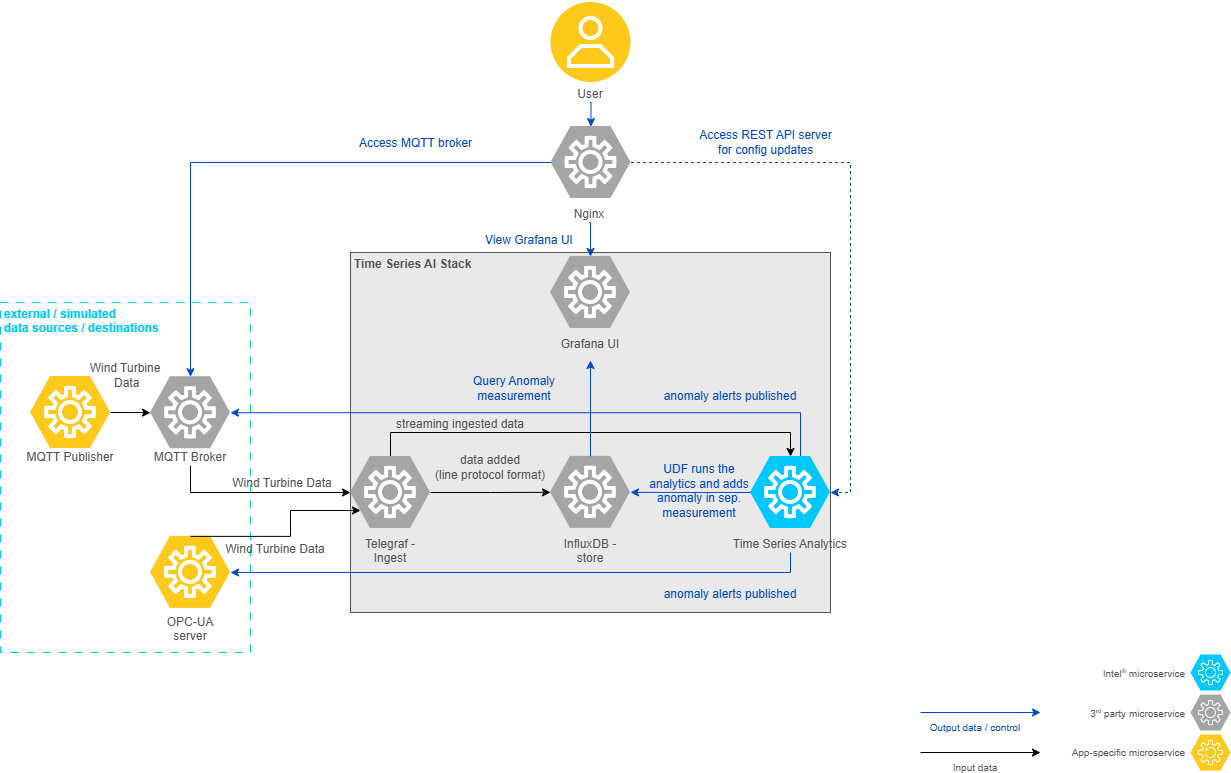
As seen in the following architecture diagram, the sample app at a high-level comprises data simulators (which can act as data destinations, if configured) - in the real world these would be the physical devices, the generic Time Series AI stack based on TICK Stack comprising of Telegraf, InfluxDB, and the Time Series Analytics microservice using Kapacitor and Grafana.
Data flow explanation#
Below is an explanation of how this architecture translates to data flow in the wind turbine anomaly detection use case, in which the data is ingested using the OPC-UA server/MQTT publisher simulators and anomaly alerts are published to an OPC-UA server/MQTT broker.
Data Sources#
The demonstration uses synthetic wind turbine data generated by this project.
The file wind-turbine-anomaly-detection.csv is a curated subset of the generated dataset
used by this sample for ingestion and anomaly detection workflows.
This data is ingested into Telegraf through the OPC-UA protocol using the OPC-UA data simulator OR MQTT protocol using the MQTT publisher data simulator.
Data Ingestion#
Telegraf through its input plugins (OPC-UA OR MQTT) gathers the data and sends this input data to both InfluxDB and Time Series Analytics Microservice.
Data Storage#
InfluxDB stores the incoming data from Telegraf.
Data Processing#
Time Series Analytics Microservice uses the User Defined Function (UDF) deployment package (TICK Scripts, UDFs, Models) from the sample apps. The UDF deployment package for the Wind Turbine Anomaly Detection sample app is available in this folder.
Directory details are as below:
config.json#
The task section defines the settings for the Kapacitor task and User-Defined Functions (UDFs).
Key |
Description |
Example Value |
|---|---|---|
|
Configuration for the User-Defined Functions (UDFs). |
See below for details. |
UDFs Configuration:
The udfs section specifies the details of the UDFs used in the task.
Key |
Description |
Example Value |
|---|---|---|
|
The name of the UDF script. |
|
|
The name of the model file used by the UDF. |
|
|
Specifies the hardware |
|
Note
The maximum allowed size for config.json is 5 KB.
Alerts Configuration:
The alerts section defines the settings for alert mechanisms, using the MQTT protocol by
default.
For publishing OPC-UA alerts in Docker, refer to Docker OPC-UA Alerts.
For OPC-UA Alerts in Helm, refer to Helm OPC-UA Alerts
Note
Enable only one type of alerts: either MQTT or OPC-UA.
MQTT Configuration:
The mqtt section specifies the MQTT broker details for sending alerts.
Key |
Description |
Example Value |
|---|---|---|
|
The hostname or IP address of the MQTT broker. |
|
|
The port number of the MQTT broker. |
|
|
The name of the MQTT broker configuration. |
|
udfs/#
Contains the Python script to process the incoming data. Uses Random Forest Regressor machine learning algorithm accelerated with Intel® Extension for Scikit-learn* to run on CPU/GPU to detect the anomalous power generation data points relative to wind speed.
tick_scripts/#
The TICKScript windturbine_anomaly_detector.tick determines processing of the input data
coming in. The file contains the details on execution of the UDF file, storage of processed data and publishing of alerts.
By default, it is configured to publish the alerts to MQTT.
models/#
The windturbine_anomaly_detector.pkl is a model built using the Random Forest Regressor
algorithm from the Scikit-learn library.
For more details on how it is built refer to the README.