How It Works#
The VMS Adapter Plugin (VAP) is a modular orchestration service that routes video streams from supported Video Management System (VMS) providers to AI Analytics Applications and relays results back to the provider dashboard or VMS.
For dls_vision (DL Streamer Vision) analytics, the provider dashboard is optional. You can
start and stop pipeline runs directly from the Nx Witness desktop client: VAP polls the Nx Witness
API for per-camera integration settings every 5 seconds and reconciles pipeline state automatically.
The dashboard remains available as an alternative control surface.
Architecture#
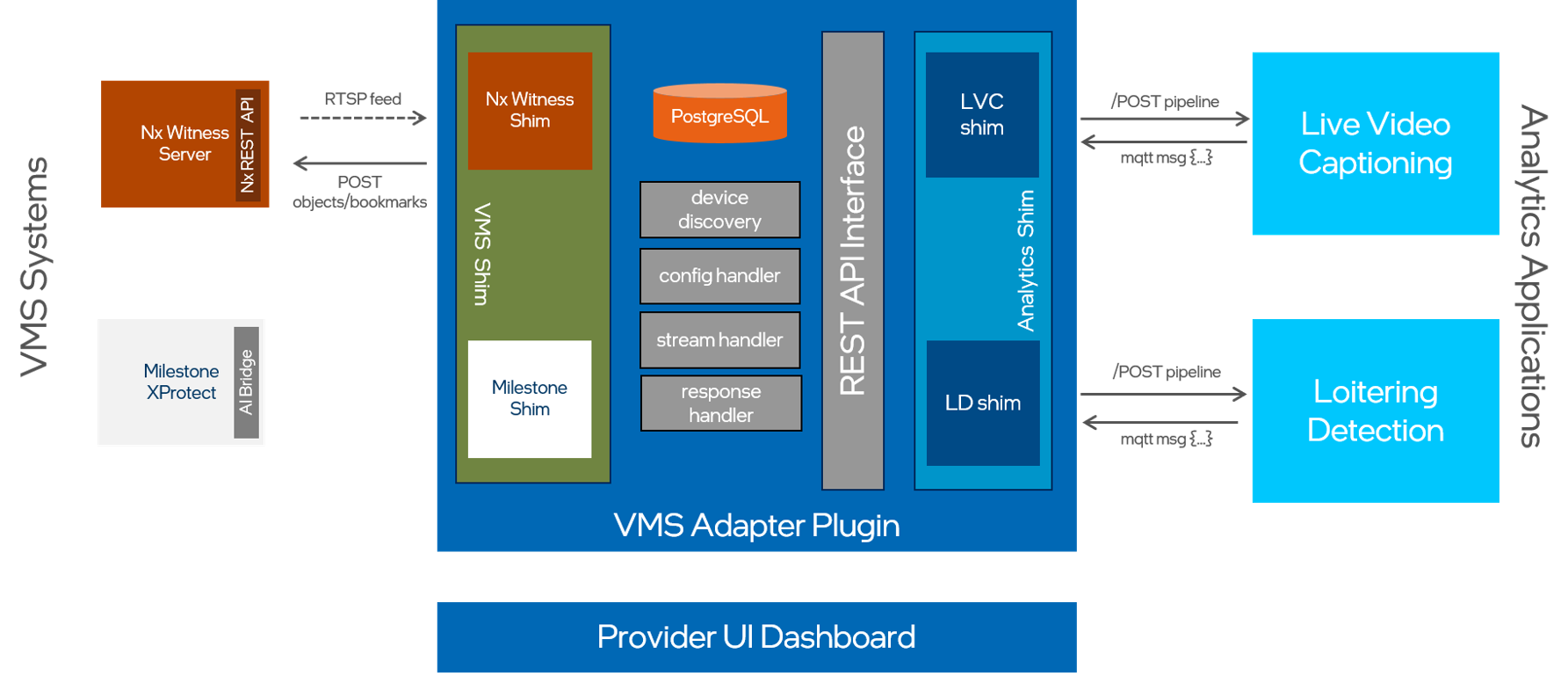
Data Flow#
Camera Discovery#
Operator triggers Discover Cameras from the dashboard or
POST /v1/cameras/discover.The Orchestrator calls each registered VMS shim:
NxWitnessVmsShim queries Nx Witness
GET /rest/v4/devicesfor all camera devices.
The system persists discovered cameras to PostgreSQL with vendor-prefixed identifiers (IDs), such as
nx:abc123-uuid.The dashboard displays the full camera list. Operators enable specific cameras for analytics.
Live Video Captioning (LVC) Flow#
An LVC run can be triggered from two entry points that converge on the same shim, and the captions are delivered differently depending on which surface you use:
Nx Witness desktop client (recommended, dashboard-free). An operator enables the pipeline and sets the inference device and prompt in Camera Settings → Integrations → VAP Analytics Integration. VAP’s
NxWitnessVmsShimpolls the Nx device-agent settings every 5 seconds and reconciles the pipeline. Captions are pushed back as bookmarks on the camera’s Nx timeline.Provider dashboard (optional). An operator posts a run explicitly to the generic Analytics App API, and captions are streamed to the dashboard as an SSE-proxied overlay on a WebRTC player.
Nx Witness desktop client                       Provider dashboard (optional)
    │  Camera Settings → Integrations               │  POST /v1/analytics-apps/live_captioning/runs
    │  → Enable Pipeline + Device + Prompt          │      { camera_id, prompt, model, … }
    ▼                                               ▼
NxWitnessVmsShim device-agent poll loop     FastAPI route (analytics_apps.py)
    │  (every 5s) reconciles pipeline state         │  IAnalyticsAppShim.start(params)
    └───────────────────────┬───────────────────────┘
                            ▼
LiveCaptioningAnalyticsAppShim
    │  resolves camera_id → RTSP URL via NxWitnessVmsShim
    │  POST /api/runs  →  LVC backend (FastAPI)
    ▼
LVC DL Streamer Pipeline Server
    │  processes RTSP stream at configured frame rate
    ├─► VLM inference → captions → MQTT broker
    └─► preview frames → MediaMTX (WebRTC)
    ▼
Caption delivery (depends on entry point):
    ├─► Nx Witness: LVC MQTT subscriber → POST /rest/v4/devices/{deviceId}/bookmarks
    │      → captions appear on the camera's Nx timeline
    └─► Dashboard (optional): GET /v1/analytics-apps/live_captioning/results/stream (SSE proxy)
           → caption overlay on WebRTC video player
DL Streamer Vision (e.g., Loitering Detection) Flow#
A dls_vision run can be triggered from two entry points that converge on the same shim:
Nx Witness desktop client (recommended, dashboard-free). An operator enables the pipeline and selects an inference device in Camera Settings → Integrations → VAP Analytics Integration. VAP’s
NxWitnessVmsShimpolls the Nx device-agent settings every 5 seconds and reconciles the pipeline (starts or stops the run) to match the per-camera settings.Provider dashboard (optional). An operator posts a run explicitly to the generic Analytics App API.
Nx Witness desktop client                       Provider dashboard (optional)
    │  Camera Settings → Integrations               │  POST /v1/analytics-apps/dls_vision/runs
    │  → Enable Pipeline + Device                   │      { camera_id, pipeline_name, pipeline_version }
    ▼                                               ▼
NxWitnessVmsShim device-agent poll loop     FastAPI route (analytics_apps.py)
    │  (every 5s) reconciles pipeline state         │  IAnalyticsAppShim.start(params)
    └───────────────────────┬───────────────────────┘
                            ▼
ObjectDetectionAnalyticsAppShim
    │  resolves camera_id → RTSP URL via NxWitnessVmsShim
    │  POST /pipelines/{name}/{version}  →  DL Streamer Pipeline Server
    ▼
DL Streamer Pipeline Server (dls_vision)
    │  processes RTSP stream
    └─► inference results → MQTT broker  topic: /{vms_name}/dls_vision/{camera_id}
    ▼
MqttSubscriber (VAP background task)
    │  translate_dls_metadata() — DLS JSON → Nx analytics object format
    ▼
NxWitnessVmsShim.push_analytics_objects()
    │  POST /rest/v4/analytics/engines/{engine_id}/deviceAgents/{device_id}/metadata/object
    ▼
Nx Witness VMS
    └─► bounding boxes + labels overlaid on camera feed in Nx client
Key Components#
VMS Shims (vms_shim/)#
A class implementing the IVmsShim interface represents each VMS vendor:
Shim |
Source |
Camera Discovery |
|---|---|---|
|
Nx Witness REST v4 |
Queries |
Camera IDs are vendor-prefixed strings (nx:abc123). The orchestrator uses the prefix to dispatch RTSP URL lookups and write-backs to the correct shim.
Analytics App Shims (analytics_app_shim/)#
A class implementing the IAnalyticsAppShim interface represents each AI analytics application:
Shim |
App ID |
Result Delivery |
|---|---|---|
|
|
SSE proxy to dashboard caption overlay |
|
|
MQTT → Nx Witness analytics objects |
Adding a new Analytics App requires only a new shim class registered in plugin/core/factory.py.
You do not need to change any routes.
FastAPI Backend (plugin/)#
The backend exposes a generic Analytics App API at /v1/analytics-apps/{app_id}/… for all
integrations, plus camera management, event timeline, and health endpoints. Dependency injection
via plugin/core/api/deps.py provides shim instances to all routes.
Orchestrator (plugin/core/pipeline/orchestrator.py)#
The orchestrator runs at startup to:
Construct and connect all VMS shims.
Register analytics manifests with Nx Witness.
Fetch Analytics App schemas (LVC OpenAPI,
dls_visionpipeline list).Start background tasks: camera sync loop, MQTT subscriber (for
dls_vision), and the Nx Witness device-agent settings poll loop.
Nx Witness Device-Agent Settings Polling (vms_shim/nxwitness/shim.py)#
This background loop is what makes the provider dashboard optional for dls_vision. After the
integration is registered, NxWitnessVmsShim._poll_device_agent_settings() runs as an asyncio task
that, every 5 seconds:
Discovers cameras and reads each camera’s device-agent settings from the Nx REST API.
Reconciles pipeline state for every analytics app that opts in to VMS UI control (by declaring non-empty
control_params()), starting or stopping the run to match the operator’s per-camera settings (for example, the Enable Pipeline checkbox and Device dropdown).
Because reconciliation is driven by Nx settings, enabling or disabling analytics from the Nx Witness client requires no dashboard interaction and no direct API calls.
Dynamic Schema (LVC)#
The LvcSchemaManager fetches the StartRunRequest JSON Schema from LVC’s /openapi.json at
startup, resolves all $ref references, adds UI annotations, and builds a live Pydantic model.
The dashboard renders analytics forms directly from this schema — the frontend does not need
changes when LVC parameters change.
MQTT Subscriber (dls_vision)#
MqttSubscriber runs as an asyncio background task. It subscribes to +/dls_vision/+ on the
MQTT broker and receives DL Streamer GStreamer Video Analytics (GVA) JSON metadata per frame.
The translate_dls_metadata() function converts normalized bounding boxes and labels to Nx
analytics object format, then NxWitnessVmsShim.push_analytics_objects() posts them to Nx
Witness.
React Analytics Provider Dashboard (ui/)#
The dashboard is an optional control surface. For dls_vision, all run control is also
available directly from the Nx Witness desktop client via device-agent settings polling. Use the
dashboard when you prefer a browser-based workflow or need the schema-driven forms (for example, LVC).
The nginx server serves the dashboard (React 19 with Vite and Tailwind CSS) and reverse-proxies:
/v1/*→ FastAPI backend/whep/*→ MediaMTX (WebRTC video relay)
Key panels:
Camera Discovery: discover, enable, and disable cameras.
Analytics Engine: select an Analytics App, fill the dynamically rendered schema form, and start or stop runs.
Live Stream: WebRTC video player with caption overlay (LVC).
Analysis Results: timeline of metadata events.
Extensibility#
VAP supports extension:
Add a new VMS: implement
IVmsShiminvms_shim/<vendor>/shim.py, register infactory.py.Add a new Analytics App: implement
IAnalyticsAppShiminanalytics_app_shim/<name>/shim.py, register infactory.py. You do not need to change any routes.