Demonstrating NPU Value: GPU and NPU Stream Density Benchmark#
This document describes a structured benchmark workflow to demonstrate the value of Neural Processing Unit (NPU) offloading in the Smart Parking application. The workflow has three parts:
Benchmark Reference#
All three parts use Benchmark Performance as the common source for environment preparation, script execution, and Key Performance Indicator (KPI) interpretation. Refer to that guide before running any part of this experiment.
CPU telemetry in this document is captured using the
htoputility.GPU telemetry tool used in this document: qmassa
NPU telemetry tool used in this document: npu-monitor-tool
Part 1: GPU Baseline - Peak Stream Density#
Before evaluating NPU offloading, establish the strongest GPU-only baseline and record the highest sustainable stream density.
Recommended GPU Pipeline Settings#
Use the yolov11s_gpu pipeline as defined in
smart-parking/benchmark_app_payload.json.
The pipeline uses the original configuration; note that metro pipelines are latency-focused by
default.
Run the GPU Stream Density Benchmark#
# Navigate to the metro-vision-ai-app-recipe directory
cd edge-ai-suites/metro-ai-suite/metro-vision-ai-app-recipe/

# Run GPU-only stream density benchmark: test 1–16 streams, target >= 28.5 FPS
./calc_stream_density.sh -p yolov11s_gpu -l 1 -u 16 -t 28.5
Example Results (GPU Only)#
Achieved Stream density (GPU only):
Stream Density(GPU) = 9streams at >= 28.5 frames per secondThroughput min at achieved stream density:
29.9427Throughput average at achieved stream density:
29.9868Throughput median at achieved stream density:
29.9977Throughput cumulative at achieved stream density:
269.882
For detailed metric definitions and KPI interpretation, refer to Benchmark Performance.
Hardware Behavior Notes (GPU Only)#
Observation at achieved stream density: At 9 streams, the benchmark remained stable above target FPS while GPU engines showed sustained high activity in the inference and media path.
Observed GPU telemetry from qmassa at achieved stream density:
CCS: 99.6%,VCS: 24.1%,VECS: 28.9%(see Fig. 1).Metric relevance for the GPU pipeline:
CCSreflects compute engine pressure and is most directly tied to inference-stage execution.VCSreflects media codec engine activity and maps to video decode stages feeding the pipeline.VECSreflects video enhancement/blit activity, typically associated with frame handling and preprocessing path operations.
CPU observation from
htop: CPU usage was distributed across cores. This is expected because the CPU handles host-side data-feeder work such as reading video streams, preparing frames, and passing data to GPU/NPU pipelines, while GPU/NPU devices perform most of the decode and inference compute (see Fig. 2).
Part 1 Section Summary#
Standalone GPU ceiling:
Stream Density(GPU)(9)at target FPS.Hardware takeaway: GPU engines carry primary inference/media load (see Fig. 1), while CPU is mainly utilized for host-side data-feeding tasks (see Fig. 2).
Supporting screenshots (cropped to include only benchmark-relevant telemetry):
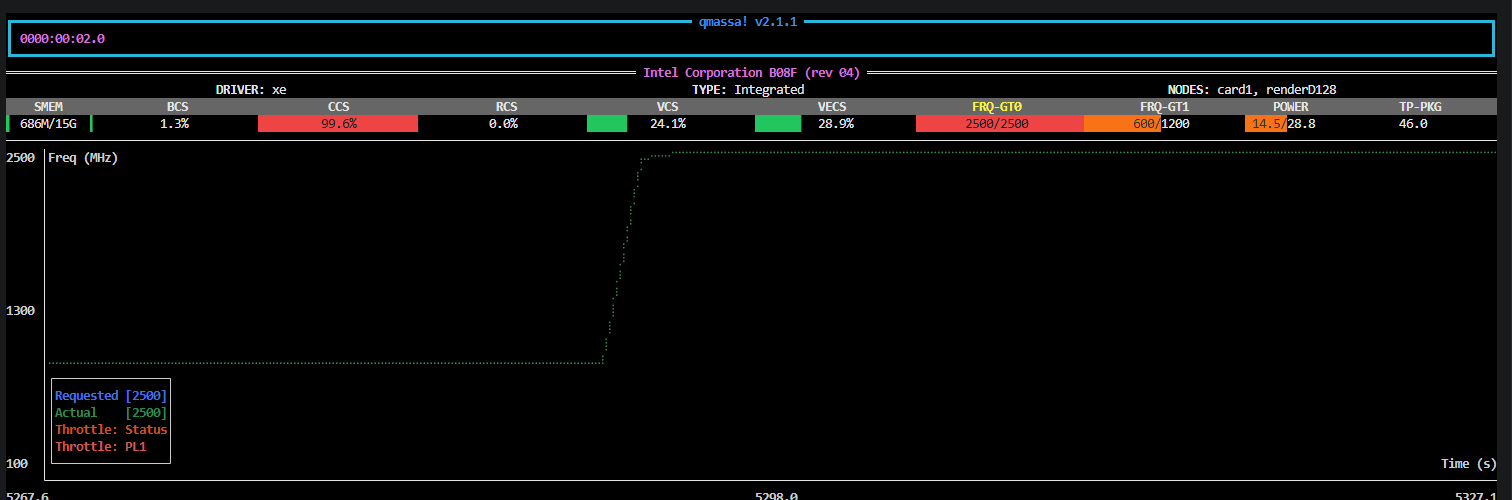
Fig. 1: GPU telemetry (qmassa) at 9 streams

Fig. 2: CPU telemetry (htop) during GPU baseline run
Part 2: NPU Baseline - Peak Stream Density#
This section follows the same structure as Part 1, but for the NPU pipeline.
Recommended NPU Pipeline Settings#
Use the yolov11s_npu pipeline as defined in
smart-parking/benchmark_app_payload.json.
The pipeline uses the original configuration; note that metro pipelines are latency-focused by
default.
Run the NPU Stream Density Benchmark#
# Navigate to the metro-vision-ai-app-recipe directory
cd edge-ai-suites/metro-ai-suite/metro-vision-ai-app-recipe/

# Run NPU-only stream density benchmark: test 1–16 streams, target >= 28.5 FPS
./calc_stream_density.sh -p yolov11s_npu -l 1 -u 16 -t 28.5
Example Results (NPU Only)#
Achieved Stream density (NPU only):
Stream Density(NPU) = 7streams at >= 28.5 FPSThroughput min at achieved stream density:
29.5329Throughput average at achieved stream density:
29.6269Throughput median at achieved stream density:
29.6374Throughput cumulative at achieved stream density:
207.388
For detailed metric definitions and KPI interpretation, refer to Benchmark Performance.
Hardware Behavior Notes (NPU Only)#
Observation at achieved stream density: At 7 streams, the NPU run remained stable above target FPS while the accelerator showed sustained activity.
Observed NPU telemetry from npu-monitor-tool at achieved stream density:
NPU Utilization: 86%(see Fig. 3).Observed GPU telemetry from qmassa during the NPU run:
VCS: 18.5%,VECS: 22.2%(see Fig. 4).Metric relevance for the NPU pipeline:
NPU Utilizationreflects how heavily the NPU execution path is loaded during inference.VCS: 18.5%andVECS: 22.2%are the GPU-side decode and frame-handling signals visible during the same run.
Part 2 Section Summary#
Standalone NPU ceiling:
Stream Density(NPU)(7)at target FPS.Hardware takeaway: NPU carries inference load (see Fig. 3), and GPU decode/frame-handling activity (
VCS/VECS) remains part of the end-to-end path (see Fig. 4).
Supporting screenshots (cropped to include only benchmark-relevant telemetry):
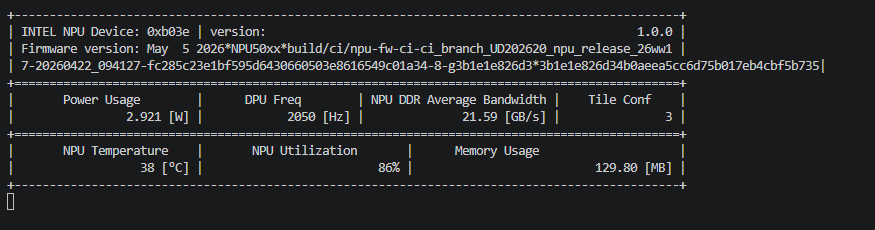
Fig. 3: NPU telemetry (npu-monitor-tool) at 7 streams
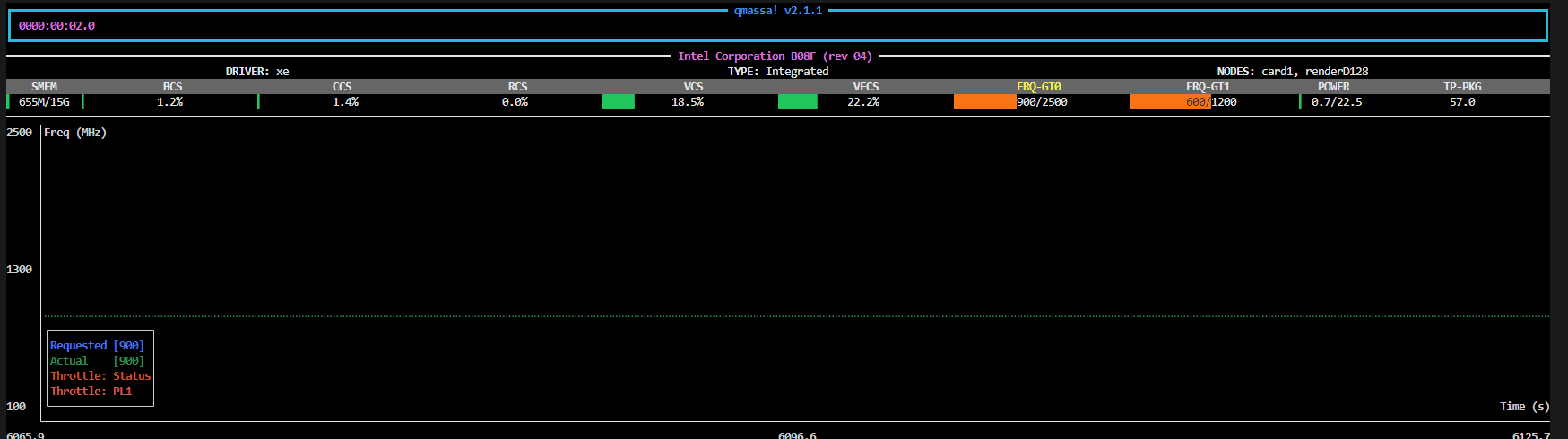
Fig. 4: GPU telemetry (qmassa) during NPU baseline run
Part 3: Combined Baseline - GPU and NPU Simultaneously (GPU!NPU)#
This section evaluates the best performance when GPU and NPU pipelines run simultaneously.
For the combined run, use a small backoff from each standalone stream limit (for example, reduce each by 2 streams, then tune for your platform). This gives the GPU extra room to handle the NPU pipeline’s decode and frame-handling work (
VCS/VECS) instead of running at full limit all the time. In short, backoff helps GPU and NPU run together more smoothly, keeps GPU power behavior in a safe range, and helps achieve higher overall stream density.Backoff application for this run:
Stream Density(GPU) = 9 - 2 = 7andStream Density(NPU) = 7 - 2 = 5, so the combined test uses 7 GPU streams and 5 NPU streams.
Note: In this document,
GPU!NPUis shorthand for the combined run (GPU and NPU together), not logical negation.
Run the Combined Stream Density Benchmark#
Run the combined workflow with 7 GPU streams and 5 NPU streams, using nstreams mode from Benchmark Performance:
# Navigate to the metro-vision-ai-app-recipe directory
cd edge-ai-suites/metro-ai-suite/metro-vision-ai-app-recipe/

# Run GPU and NPU pipelines simultaneously with fixed stream counts: 7 GPU streams and 5 NPU streams, target >= 28.5 FPS
./calc_stream_density.sh -p yolov11s_gpu yolov11s_npu -nstreams 7 5 -t 28.5
Example Results (GPU!NPU)#
Symbol |
Value |
Notes |
|---|---|---|
Stream Density(GPU) |
9 |
GPU-only peak stream density |
Stream Density(NPU) |
7 |
NPU-only peak stream density |
Stream Density(GPU!NPU) |
12 |
Combined run with 7 GPU streams and 5 NPU streams |
Throughput median |
29.8523 |
Combined run KPI |
Throughput average |
29.9193 |
Combined run KPI |
Throughput cumulative |
359.031 |
Combined run KPI |
Throughput min |
29.8098 |
Combined run KPI |
For detailed metric definitions and KPI interpretation, refer to Benchmark Performance.
Part 3 Section Summary#
Combined stream density:
Stream Density(GPU!NPU)(12)GPU stream share:
7NPU stream share:
5Final comparison:
Stream Density(GPU!NPU)(12) > Stream Density(GPU)(9) > Stream Density(NPU)(7)
Figure reference: Combined GPU telemetry is shown in Fig. 5 and combined NPU telemetry is shown in Fig. 6.
Supporting screenshots (cropped to include only benchmark-relevant telemetry):
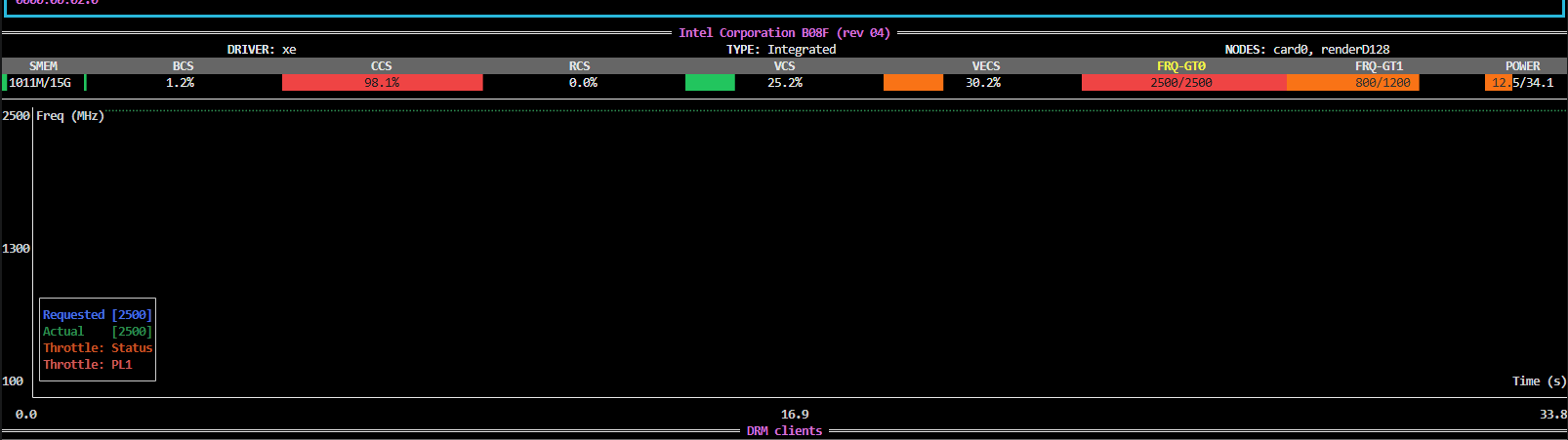
Fig. 5: Combined run, GPU telemetry (qmassa) at 7 GPU streams
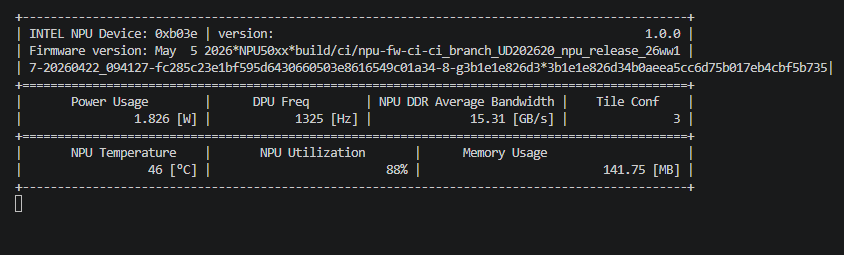
Fig. 6: Combined NPU telemetry (npu-monitor-tool) at 5 NPU streams
Conclusion#
Part 1 Section Summary establishes the standalone GPU baseline at
Stream Density(GPU)(9).Part 2 Section Summary establishes the standalone NPU baseline at
Stream Density(NPU)(7)and confirms continued GPU decode/frame-handling involvement (VCS/VECS).Part 3 Section Summary shows the combined result
Stream Density(GPU!NPU)(12)with 7 GPU streams and 5 NPU streams.
Overall, NPU offloading provides clear system-level value addition for Smart Parking. Applying a tuned backoff (for example, 2 streams per pipeline on this platform) creates GPU headroom for NPU-related media work, and enables higher total stream density than either standalone path while maintaining stable throughput.
Note: The values in this document are example reference results. Actual stream density and throughput can vary by platform setup, software stack, and runtime conditions. Re-run the benchmark in your target environment to validate expected behavior.