Linux Docker Compose Architecture#
On Linux, Smart Classroom runs as a set of containers managed by Docker Compose. This page shows which containers belong to the Compose flow, what each one does, how they depend on each other, and how data moves between them while a class is processed.
All paths in this page are relative to smart-classroom/Linux.
Compose Files#
setup.sh combines the following files into one Compose project named smart-classroom.
File |
Purpose |
When it is used |
|---|---|---|
|
Base file. Defines every service, volume, and the |
Always |
|
Override that passes the Intel GPU ( |
Always on Linux. |
|
Override that builds |
Only when |
By default (REGISTRY: true), audio-analyzer, model-downloader, and metrics-collector use the Docker Hub
images shown in the service table. For the manual commands, see
Manual Docker Startup.
The following images are always built locally:
Image |
Dockerfile |
|---|---|
|
|
|
|
|
|
|
|
Services in the Compose Flow#
A service either belongs to the always-on core or to a Compose profile. Profiles are derived from the
features: block in config.yaml by python3 -m utils.compose_profiles --write-env, which setup.sh
runs for you and stores in COMPOSE_PROFILES in .env.
Service |
Container |
Image |
Profile |
Type |
Role |
|---|---|---|---|---|---|
|
|
|
core |
Long-running |
The main backend. Serves the UI and the REST API, runs the audio pipeline, and hosts Content Search and Grading in-process. |
|
|
|
core |
One-shot |
Creates |
|
|
|
core |
Long-running |
Telemetry sidecar for CPU, GPU, NPU, memory, and power. Serves |
|
|
|
|
Long-running |
Speech-to-text (Whisper or FunASR) and optional speaker diarization. Requests its model snapshots from |
|
|
|
|
One-shot |
Prepares ownership and permissions on the shared |
|
|
|
|
Long-running |
Shared model service. For |
|
|
|
|
One-shot |
Waits for the downloader jobs to finish, then merges the exported models into |
|
|
|
|
Long-running |
OpenVINO™ Model Server. Serves the text generation (VLM) model through an OpenAI-compatible API. |
|
|
|
|
One-shot |
Exports the video analytics (YOLO pose and related) models to OpenVINO™ IR into the |
|
|
|
|
Long-running |
Media server. Receives annotated RTSP streams from video analytics and relays them to the browser over WebRTC or HLS. |
|
|
|
|
Long-running |
DL Streamer pipeline engine for the front, back, and content camera pipelines. Control API on port 8020. |
Note
Content Search (ChromaDB, file ingest, video preprocess, the search API) and Grading are not separate
containers. The app container starts them as child processes, and they listen on loopback only.
See Services Inside the app Container.
Features, Profiles, and Containers#
|
Profile(s) it activates |
Containers that start in addition to the core |
|---|---|---|
|
|
|
|
|
|
|
|
|
|
|
|
The resulting container set for each profile (verified with docker compose config --services):
|
Containers that run |
|---|---|
(empty) |
|
|
core + |
|
core + |
|
core + |
|
All 11 services |
model-downloader is a single shared container in every combination. Its OVMS startup exports are
controlled by STARTUP_MODELS_CONFIG in .env, which utils/compose_profiles.py writes only while
text-gen is active, so an ASR-only stack does not download the VLM.
Important
After you change features: in config.yaml, rerun ./setup.sh so that COMPOSE_PROFILES is regenerated.
A service whose profile is not active is not created at all.
Architecture Overview#
Services Inside the app Container#
The app container runs these processes. Content Search and Grading start only when the matching feature is
enabled. Except for the FastAPI backend on port 8000, they are not Compose services and are not published to the
host.
Process |
Port (loopback) |
Started by |
Purpose |
|---|---|---|---|
FastAPI backend |
8000 |
Image |
UI, session API, audio pipeline, reverse proxy. Published to the host. |
Content Search API |
9011 |
|
Search, ingest, and Q&A |
ChromaDB |
9090 |
|
Vector database |
File ingest and retrieve |
9990 |
|
Document and media embedding, reranking (reranker on GPU) |
Video preprocess |
8001 |
|
Video chunking and summarization with the VLM |
Grading API |
9012 |
|
Assignment grading |
The browser reaches Content Search and Grading through the app reverse proxy on port 8000
(/api/v1/object, /api/v1/task, /api/v1/system, and /grading-api).
Published Ports#
Only these ports are reachable from the host. Everything else stays on the internal Docker network.
Host port |
Container |
Purpose |
|---|---|---|
|
|
Web UI, REST API, and same-origin proxy to Content Search, Grading, and the audio-analyzer WebSocket |
|
|
Manual check of |
|
|
Model downloader API |
|
|
RTSP publish and read |
|
|
HLS playback in the browser |
|
|
WebRTC signaling and playback in the browser |
|
|
WebRTC ICE |
|
Host process |
Vite dev server for the UI, started by |
The MediaMTX ports can be changed with VA_MEDIAMTX_RTSP_PORT, VA_MEDIAMTX_HLS_PORT,
VA_MEDIAMTX_WEBRTC_PORT, and VA_MEDIAMTX_WEBRTC_ICE_PORT in .env.
Internal-Only Endpoints#
Service |
Address used by |
Environment variable |
|---|---|---|
|
|
|
|
|
|
|
|
|
|
|
|
Startup Order and Health#
Compose enforces the following dependencies. Solid arrows are hard dependencies. The dotted arrows are soft dependencies, which the application handles at runtime and Compose does not enforce.
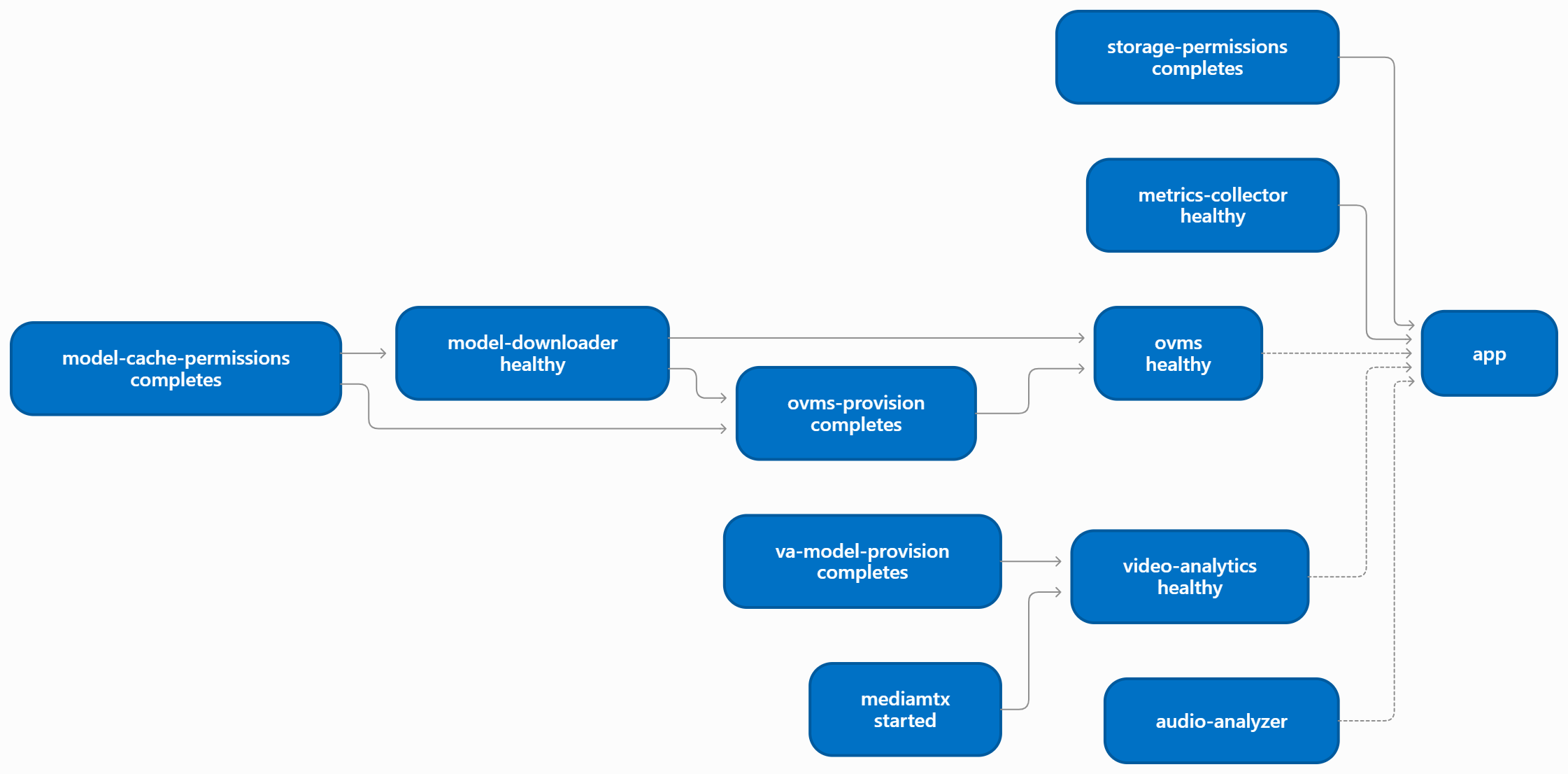
app waits only for storage-permissions and metrics-collector. It does not wait for ovms,
audio-analyzer, or video-analytics, because those belong to optional profiles. The app container calls
them only when the matching feature is used.
Service |
Health check |
Notes |
|---|---|---|
|
|
|
|
|
|
|
|
Starts after |
|
|
Healthy once the API is up; with |
|
|
Starts after the models and |
|
|
Note
The first run can take up to about 30 minutes while models download and export. Later runs reuse the cached volumes.
Runtime Flows#
Audio Pipeline#
        sequenceDiagram
    participant UI as Browser UI
    participant App as app
    participant AA as audio-analyzer
    participant OV as ovms
    participant CS as Content Search (in app)
    participant ST as storage volume

    UI->>App: Upload audio and start a session
    App->>ST: Save recording
    App->>App: FFmpeg pre-processing and chunking
    App->>AA: POST /v1/audio/transcriptions/stream
    AA-->>App: NDJSON events (transcription.chunk ... completed)
    App->>ST: Save transcript
    App->>OV: POST /v3/chat/completions (summary)
    OV-->>App: Summary
    App->>OV: POST /v3/chat/completions (mind map)
    OV-->>App: Mind map
    App->>OV: POST /v3/chat/completions (topic segmentation)
    OV-->>App: Topics
    App->>CS: Ingest topics (/api/v1/object/ingest-text)
    UI->>App: Search topics
    App->>CS: /api/v1/object/search
    App-->>UI: Transcript, summary, mind map, topics
Transcription runs out of process in
audio-analyzer. The provider (openvino,funasr, oropenai) comes frommodels.asr.providerinconfig.yaml.Summary, mind map, and topic segmentation use the VLM in
ovms(models.text_gen). Long transcripts are chunked to fit the prompt budget.Live microphone audio streams from the browser to
audio-analyzerthrough a WebSocket proxy inapp.
Video Analytics Pipeline#
        sequenceDiagram
    participant UI as Browser UI
    participant App as app
    participant VA as video-analytics
    participant MTX as mediamtx
    participant ST as storage volume

    UI->>App: Start video analytics (front, back, content)
    App->>VA: POST /pipelines/{name}/launch
    VA->>ST: Read uploaded clip or pull the RTSP source
    VA->>VA: DL Streamer: decode, pose, ReID, classify
    VA->>MTX: Publish annotated stream (rtsp://mediamtx:8554)
    App-->>UI: stream_url (WebRTC :8889 or HLS :8888)
    UI->>MTX: Play annotated stream
    VA->>ST: Write per-frame metadata (raw/va)
    App->>VA: GET /pipelines/status (NDJSON)
    VA-->>App: Student count, stand-up, hand-raise events
    App-->>UI: Classroom statistics
video-analyticsruns thefront,back, andcontentpipelines on the device set byVA_*_DEVICE(defaultNPU). RTSP sources are decoded on the GPU, so/dev/driis needed unless every source is a file.The browser plays the annotated stream directly from
mediamtx, which is why its ports are published. Inter-container RTSP bypasses any corporate proxy throughNO_PROXY.
Model Provisioning for text-gen#
        sequenceDiagram
    participant MCP as model-cache-permissions
    participant MD as model-downloader
    participant HF as Hugging Face
    participant MC as model-cache volume
    participant PR as ovms-provision
    participant OV as ovms
    participant App as app

    MCP->>MC: Create directories, fix ownership
    MD->>HF: Download VLM, embedding, reranker
    MD->>MC: Export OpenVINO IR (per device and precision)
    PR->>MD: Poll /jobs until finished
    PR->>MC: Merge bucket configs into ovms/config.json
    OV->>MC: Load models (read-only)
    App->>OV: Chat requests on :9000
The model list comes from components/vlm/config/startup-models.yaml (or startup-models.gpu.yaml with the GPU
override). setup.sh keeps both files in sync with models.text_gen, models.embedding, and the Content
Search reranker in config.yaml.
Model Provisioning for asr#
        sequenceDiagram
    participant MD as model-downloader
    participant Hub as Hugging Face / ModelScope
    participant MC as model-cache volume
    participant AA as audio-analyzer

    AA->>AA: Derive snapshots from audio-analyzer config.yaml
    AA->>MD: POST /models/download (hub, revision, download_path)
    MD->>Hub: Download snapshot
    MD->>MC: <download_path>/<hub>/<owner_model>/
    AA->>MD: Poll /jobs/{id} until completed
    AA->>MC: Write completion inventory, validate
    AA->>MC: Export Whisper to OpenVINO IR (openvino provider)
    AA->>AA: Preload models, open :8010
audio-analyzer never downloads hub models itself: the same model-downloader container used for
text-gen serves its requests (AUDIO_ANALYZER_MODEL_DOWNLOAD_URL=http://model-downloader:8000).
Whisper sources and pyannote diarization come from Hugging Face (HF_TOKEN is forwarded per request
for gated models); FunASR/Paraformer, VAD, and punctuation models come from ModelScope, which is why
ENABLED_PLUGINS includes modelscope. Valid snapshots already on model-cache are reused without
contacting the service. The openai ASR provider is the one exception and fetches its checkpoint
directly from OpenAI’s CDN.
Telemetry#
The app container polls metrics-collector for /metrics and /platform-info. The UI shows these as
live CPU, GPU, NPU, memory, and power utilization. The collector needs privileged: true and read-only access
to the host /sys to read hardware counters.
GPU and NPU Passthrough#
docker-compose.gpu.yml adds /dev/dri and the render group (RENDER_GID) to these services:
Service |
Devices |
Used for |
|---|---|---|
|
|
Content Search reranking |
|
|
VLM inference |
|
|
Model export and the GPU model list |
|
|
Whisper or diarization when the configured device is not |
|
|
VA-API decode and encode, and pose, ReID, and classification on GPU or NPU |
|
|
GPU and NPU utilization |
Environment Variables#
setup.sh creates .env from .env.example. The main variables are:
Variable |
Purpose |
|---|---|
|
Active profiles ( |
|
Compose project name ( |
|
Host |
|
Host path for the shared storage bind mount. Defaults to |
|
Hugging Face token for diarization and gated models. |
|
Tag for |
|
OVMS release the downloader uses. Keep it aligned with the |
|
Model downloader plugins. Defaults to |
|
Container path of the OVMS startup model list. Written by |
|
How long |
|
Proxy settings forwarded to builds and containers. |
|
Optional PEM file for TLS-inspecting corporate proxies. Used only at build time. |
|
Video analytics device, codec, pose-tuning, and MediaMTX port settings. |
Common Commands#
Run these from smart-classroom/Linux.
# List the services and their health
docker compose -f docker/docker-compose.yml -f docker/docker-compose.gpu.yml ps

# Show which services the current COMPOSE_PROFILES will start
docker compose --env-file .env -f docker/docker-compose.yml -f docker/docker-compose.gpu.yml config --services

# Follow logs for one or more services
docker compose -f docker/docker-compose.yml -f docker/docker-compose.gpu.yml logs -f app
docker compose -f docker/docker-compose.yml -f docker/docker-compose.gpu.yml logs -f model-downloader ovms

# Stop the stack (keeps volumes and images; ./uninstall.sh removes them)
docker compose --env-file .env -f docker/docker-compose.yml -f docker/docker-compose.gpu.yml down
Note
Include the same -f files that setup.sh uses. Otherwise Compose does not see the GPU override and
RENDER_GID is not applied consistently. When REGISTRY: false, also add
-f docker/docker-compose.local-build.yml.
Learn More#
Get Started on Linux: Run
setup.shand verify the stack.Manual Docker Startup (Optional): Run the Compose commands yourself instead of
setup.sh.Uninstall the Application: Remove the containers, volumes, images, and data with
uninstall.sh.Content Search Flow: The Content Search feature in the UI.