How It Works#
This section provides a high-level view of how the application processes audio and video input through two parallel pipelines integrated with a modular backend architecture.

Inputs#
You can upload audio recordings and video files, or provide RTSP video streams through the Web-based UI layer, which supports:
Audio and video upload
Viewing transcription, summaries, mind maps, and classroom statistics
Monitoring video analytics streams with real-time overlays
Localisation options (English/Chinese)
The uploaded media is passed to the Backend API, which acts as the gateway to the backend service layer and provides similar capabilities.
Audio Pipeline#
The audio pipeline handles speech-to-text conversion and content summarization:
Audio Pre-processing Cleans and formats audio data using FFmpeg, chunking input into segments for optimal processing.
ASR Component (Automatic Speech Recognition) Converts audio into text using integrated ASR providers:
FunASR (Paraformer)
OpenVINO™
OpenAI (Whisper)
Speaker Diarization Identifies and separates individual speakers using Pyannote Audio models. This could be enabled/disabled by modifying
config.yamlSummariser Component Generates concise summaries of transcribed text using the OpenVINO™ LLM provider.
Content Segmentation The LLM segments the transcript into 15–25 topic-based sections, each is encoded and indexed into vector store. Users can then search lecture content by natural-language queries, retrieving the most relevant topic segments.
Video Analytics Pipeline#
The Video Analytics (VA) pipeline performs real-time video analysis using DL Streamer and OpenVINO™, processing multiple concurrent video streams to extract classroom engagement data.
Pipeline Architecture#
The VA pipeline runs three independent processing streams simultaneously:
Front Video Pipeline — Student-facing camera stream for detailed person tracking, pose estimation, posture classification, hand-raise recognition, and person re-identification
Back Video Pipeline — Rear-view camera stream for broader classroom monitoring and basic pose analysis
Content Pipeline — Interactive flat panel display (IFPD) or board capture, processed at 1 FPS for content frame analysis
Each pipeline is built as a DL Streamer processing graph with the following stages:
Video Decode and Preprocessing — Input from RTSP stream or video file is decoded and preprocessed with hardware acceleration (D3D11)
Person Detection and Pose Estimation — YOLO models (YOLOv8m-pose for front, YOLOv8s-pose for back) detect persons and estimate 17-keypoint skeletons per frame
Posture Detection — A custom DL Streamer element analyzes keypoint geometry to classify posture (sit/stand) and detect hand-raises
Multi-branch Classification — Detected persons are routed through parallel classification branches:
ResNet-18 for activity/action classification
MobileNet-V2 for lightweight classification (front pipeline)
Person-ReID-retail-0288 for identity tracking across frames (front pipeline)
Output — Annotated video is streamed via RTSP through a MediaMTX media server; per-frame metadata is written as JSON for statistics aggregation
Classroom Statistics#
The VA pipeline aggregates per-frame metadata into classroom engagement statistics:
Student count — Average number of students detected (sampled periodically)
Stand-up events — Per-student stand-up detection with noise filtering
Hand-raise events — Per-student hand-raise tracking with configurable confirmation thresholds
Per-student tracking — Re-identified students are tracked across frames with unique IDs
Streaming and Distribution#
A Media Server (MediaMTX) receives processed video from all three pipelines and provides:
RTSP streaming for real-time playback
HLS/WebRTC streaming for browser-based viewing
Board Content OCR#
Extracts text from the IFPD or whiteboard captured by the content pipeline, enabling post-class review of all written or projected content.
Frame Extraction — FFmpeg (Intel QSV hardware decode) samples JPEG frames at a configurable rate (default: 1 fps every 3 seconds).
Deduplication — Frames with fewer than 0.1% of pixels changed by more than 25 intensity units are skipped.
OCR & Confidence Gating — PaddleOCR extracts text; frames with mean confidence below threshold are dropped.
Post-processing — Near-duplicate consecutive records are merged to reduce downstream LLM token usage.
Output — Results are written as JSON-lines to
board_ocr.txt({frame, source_frame, timestamp, text}).Summary integration — When Board OCR has captured text for a session, the audio summarization step folds it into the AI-generated class summary as an extra “Board / IFPD Content” section, alongside the sections derived from the transcript. If no board text is available, the summary is unchanged.
Content Search Pipeline#
The Content Search pipeline provides multimodal ingestion, semantic indexing, and retrieval across videos, documents, and images.
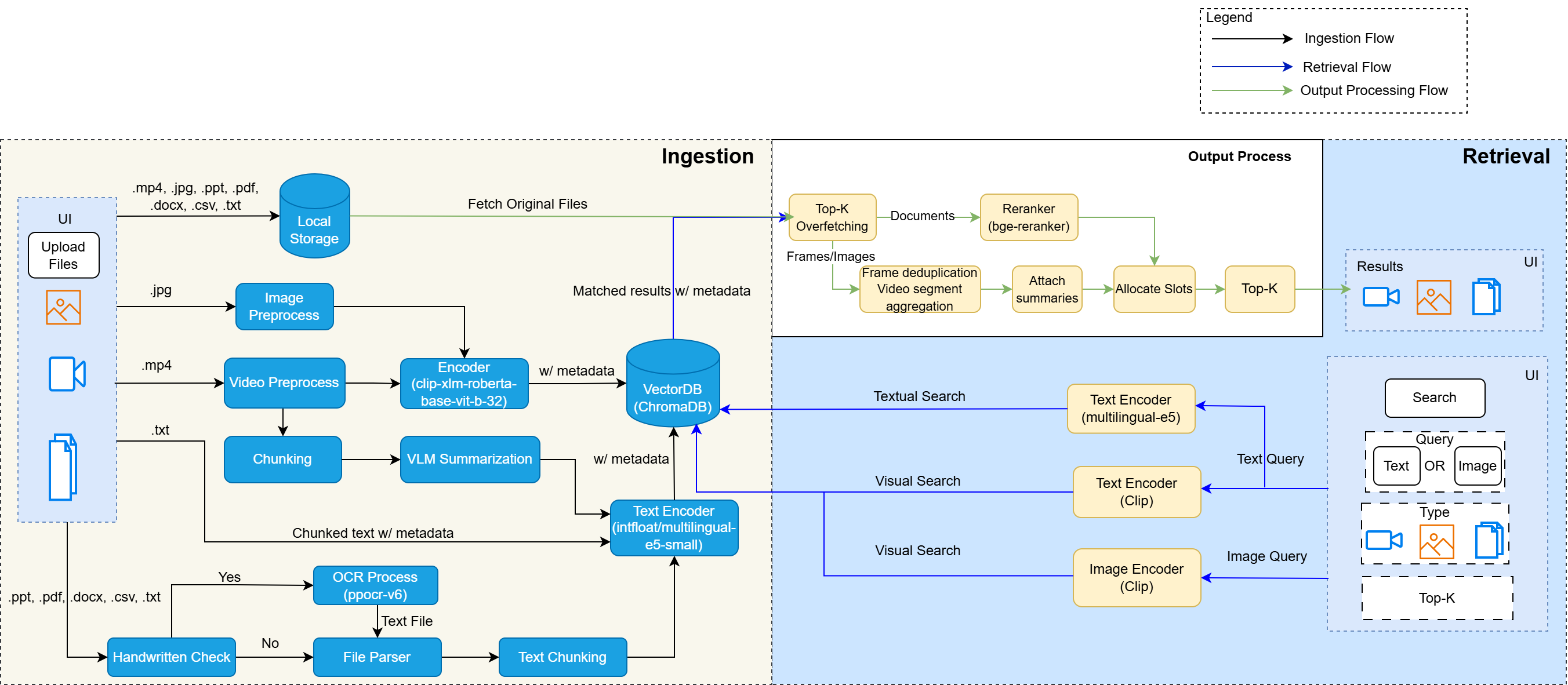

Ingestion#
Video: Split into time-based chunks (default 30s with 4s overlap), each chunk’s sampled frames are summarized by a Vision Language Model (Qwen2.5-VL via OpenVINO™). Summaries are indexed as text embeddings; frames are indexed as visual embeddings.
Document: Full-text extraction via
unstructuredwith image OCR via PaddleOCR service. Text is split using semantic chunking (embedding-based boundary detection) or fixed-size chunking, then embedded with BGE (bge-small-en-v1.5).Image: Embedded directly via CLIP (xlm-roberta-base-ViT-B-32) for visual similarity search.
All embeddings are stored in ChromaDB across two collections: a visual collection (CLIP embeddings for images/video frames) and a textual collection (BGE embeddings for document chunks/video summaries).
Retrieval & Search#
Text queries search both visual and textual collections. Textual results are reranked by a cross-encoder (BGE-reranker-large). Results from both modalities are merged using Reciprocal Rank Fusion (RRF) for balanced interleaving.
Image queries search the visual collection by CLIP similarity, with temporal deduplication for video frames.
Metadata filtering supports tags, content type, and custom fields.
Question & Answer (RAG)#
The Q&A endpoint retrieves top-k relevant chunks, assembles them as context within a token budget, and sends them together with the user’s question to the VLM to generate a grounded answer with source references.
Microservices#
Service |
Port |
Role |
|---|---|---|
Content Search API |
9011 |
Orchestrator and public API |
File Ingest & Retrieve |
9990 |
Embedding, indexing, and retrieval |
Video Preprocess |
8001 |
Video chunking and VLM summarization |
VLM OpenVINO™ Serving |
9900 |
Vision-language model inference |
ChromaDB |
9090 |
Vector database |
For API details, see the Content Search Dev Guide.
Metrics Collector#
Monitors and collects:
xPU utilisation for hardware performance
LLM metrics for summarisation efficiency
Outputs#
Transcriptions, summaries, mind maps, and topic segments can be accessed from the Web-based UI and file system. The path for file system is /<project-location>/<your-project-name>/. For example,
/storage/chapter-10/Semantic topic search results are returned via the API, with similarity scores and time-range references into the original recording.
Classroom statistics (student count, stand-up events, hand-raise events) are generated from the video analytics pipeline and displayed in the UI.
Video streams with real-time detection overlays are available via RTSP and HLS/WebRTC.
Performance metrics (e.g., utilisation, model efficiency) are displayed for monitoring.
Localisation ensures outputs are available in multiple languages (English/Chinese).
Learn More#
System Requirements: Hardware, software, supported models, and weight formats.
Get Started: Installation and setup instructions.
Application Flow: End-to-end application flow.
Content Search Flow: The flow of the content search functionality.