Scene Controller Service#
Scene Controller Microservice fuses multimodal sensor data to enable spatial analytics at the edge for multiple use cases.
Overview#
The Scene Controller Microservice answers the fundamental question of What, When and Where. It receives object detections from multimodal inputs (primarily multiple cameras), contextualizes them in a common reference frame, fuses them and tracks objects over time.
The Scene Controller’s output provides various insights for the tracked objects in a scene, including location, object visibility across cameras, velocity, rotation, center of mass. The Analytics microservice consumes this output to add region-of-interest, tripwire, and sensor-correlation analytics on top of it — see Analytics Service for details.
To deploy the scene controller service, refer to the Get Started guide. The service supports configuration through specific arguments and flags, which default to predefined values unless explicitly modified.
Configurable Arguments and Flags#
--maxlag: Maximum allowable delay for incoming messages. If a message arrives more than 1 second late, it will be discarded by the Scene Controller. This threshold can be adjusted to accommodate longer inference times, ensuring no messages are discarded. Discarded messages will appear as “FELL BEHINDS” in the service logs.
--broker: Hostname or IP of the MQTT broker, optionally with :port.
--brokerauth: Authentication credentials for the MQTT broker. This can be provided as user:password or as a path to a JSON file containing the authentication details.
--resturl: Specifies the URL of the REST server used to provide scene configuration details through the REST API.
--restauth: Authentication credentials for the REST server. This can be provided as user:password or as a path to a JSON file containing the authentication details.
--rootcert: Path to the CA (Certificate Authority) certificate used for verifying the authenticity of the server’s certificate.
--cert: Path to the client certificate file used for secure communication.
--ntp: NTP server.
--tracker_config_file: Path to the JSON file containing the tracker configuration. This file is used to enable and manage time-based parameters for the tracker.
--reid_config_file: Path to the JSON file containing Re-ID (Re-Identification) configuration. This file controls Re-ID specific settings such as stale feature timeout, feature accumulation thresholds, similarity metric selection, and similarity scoring. See Extended Re-ID for details.
By default, similarity_metric is COSINE with a threshold of 0.5. Re-ID
vectors are normalized before write/query and Scenescape uses an inner-product
backend path (VDMS IP / Qdrant DOT); similarity scores are expected in
[-1, 1]. Set the metric to L2 for distance-style matching, where lower
values are better.
--schema_file: Specifies the path to the JSON file that contains the metadata schema. By default, it uses metadata.schema.json. This schema outlines the structure and format of the messages processed by the service.
--visibility_topic: Specifies the topic for publishing visibility information, which includes the visibility of objects in cameras. Options are unregulated, regulated, or none. Default is regulated.
--pose-adjustment: Enables pose-based bounding box adjustment before world projection. When enabled, the controller uses pose keypoints (e.g. from a yolo11n-pose model) to refine the bounding box used for projecting detections into world coordinates. This is disabled by default. Cannot be used together with Extended ReID (cross-camera re-identification via the configured vector backend); see Extended Re-ID for details. Can also be enabled via the CONTROLLER_ENABLE_POSE_ADJUSTMENT environment variable set to true. Requires the DL Streamer video pipeline to use a pose estimation model that provides keypoint data. See the DL Streamer Pipeline Server documentation for pipeline setup.
--pose_adjustment_config_file: JSON file that defines pose-adjustment label routing. The default file is pose-adjustment-route.json next to the controller executable. Use this file to map each registered pose-adjustment strategy label to the incoming labels that should dispatch to it.
Example pose-adjustment-route.json:
{
  "person": ["human", "pedestrian"],
  "vehicle": ["car", "truck", "sedan"]
}
Resolution order is: exact label, then configured route labels. Routes are flattened at startup so message-time dispatch remains a direct lookup.
CONTROLLER_TRUSTED_POSITIONING_SOURCES: Comma-separated list of external source_ids (see
External Source Input Message Format)
authorized to publish poses already expressed in a target scene’s local coordinates (the
scene pose reference frame), intended for the Scenescape positioning service. Unset or empty
trusts no source. There is no corresponding CLI flag.
CONTROLLER_EXTERNAL_SOURCE_BINDINGS: Optional manual publisher→scene bindings
(publisher_id:scene_uid,publisher_id:scene_uid2,...). Required for reference_frame: scene
poses. For wgs84, unset means geospatial auto-attach to every geo-calibrated scene.
External-source object identity (objects[*].id) requires no environment variable or
per-source configuration: every external source’s id is trusted directly as global track
identity by default, protected at runtime by automatic identity-collision detection. See
Trusted Identity by Default, with Collision Detection
for details and guidance on choosing a source_id/id.
Configuration#
For detailed configuration guidance:
Tracker configuration: See How to Configure the Tracker
Re-ID configuration: See Extended Re-ID
Observability (experimental): See How to Enable Observability
Observability (Experimental)#
The Scene Controller ships with experimental OpenTelemetry
instrumentation that can export metrics and distributed traces to an
OpenTelemetry Collector over insecure OTLP/gRPC. Both signals are disabled
by default and are toggled with the CONTROLLER_ENABLE_METRICS and
CONTROLLER_ENABLE_TRACING environment variables (endpoints are configured
via CONTROLLER_METRICS_ENDPOINT and CONTROLLER_TRACING_ENDPOINT).
⚠️ Experimental. Metric names, span names, attributes, and configuration keys may change between releases, and the current implementation supports only insecure OTLP export. Do not enable on untrusted networks or rely on this instrumentation for long-lived dashboards without pinning versions.
For the full list of variables, exported instruments, and setup steps see How to Enable Observability.
Input/Output Message Formats#
For details on the MQTT message formats accepted and produced by the Scene Controller, see Scenescape Controller Data Formats.
Architecture#
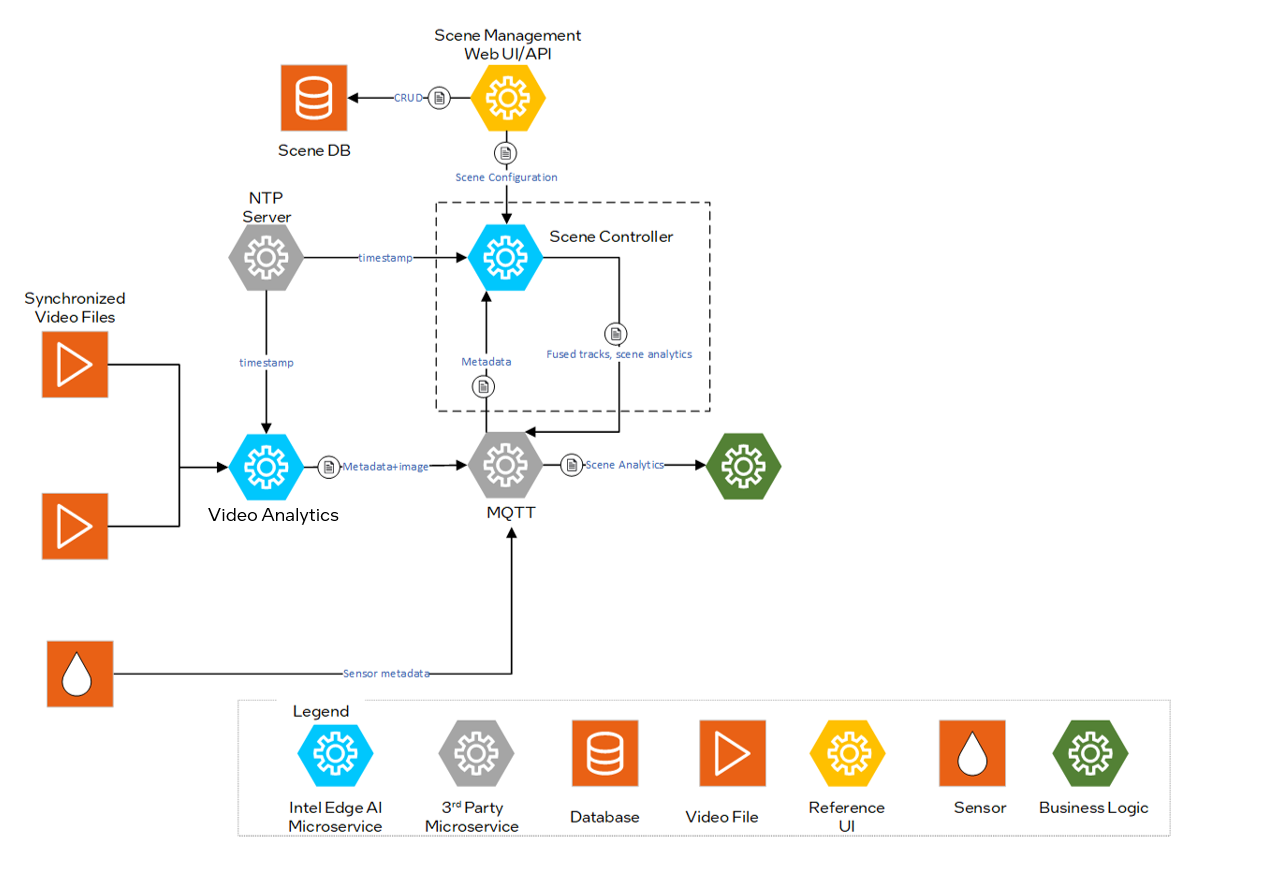
Figure 1: Architecture Diagram
Sequence Diagram: Scene Controller Workflow#
The Scene Controller Microservice receives detections from the camera and processes them to track moving objects, then publishes unregulated (raw) scene detections through MQTT. The Analytics microservice consumes this output to add regulated (filtered and formatted) detections, region/tripwire events, and sensor correlation. A Multi Object Tracker Loop is involved in managing detections within MQTT.
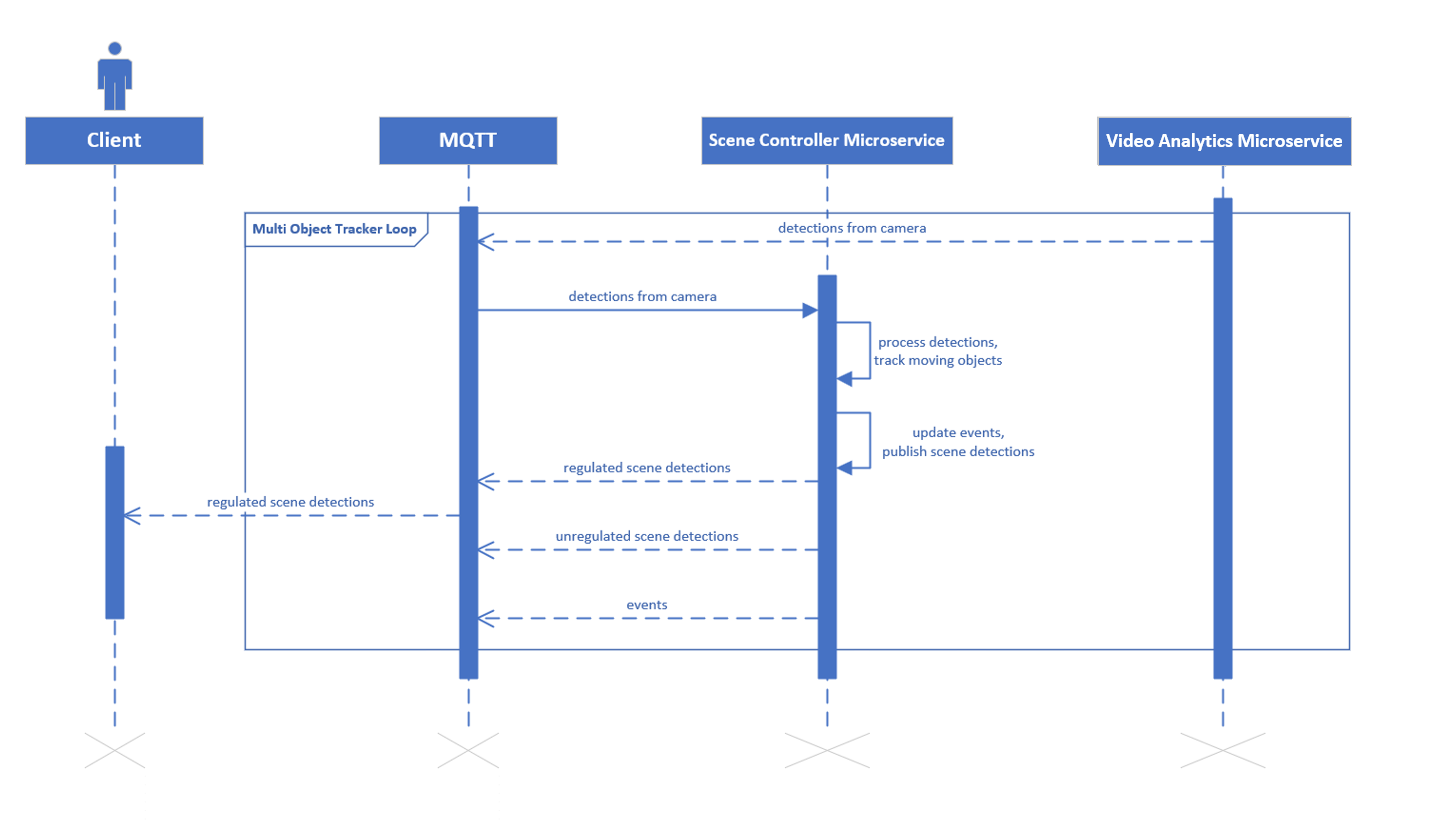
Figure 2: Scene Controller Sequence diagram