How It Works#
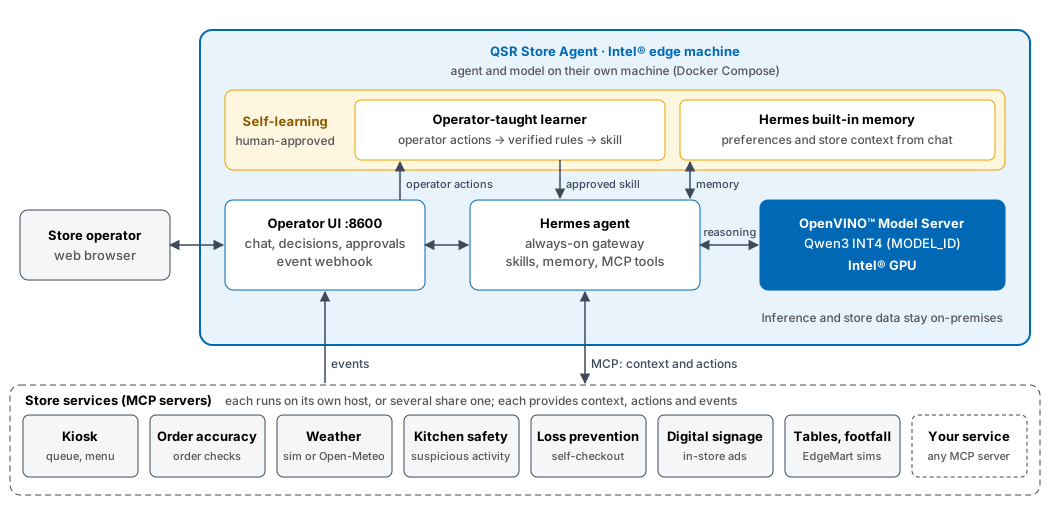
Components#
Component |
Role |
|---|---|
Operator UI |
Web interface for chat, connected-service status, decisions, approvals, and learning. Also receives events from store systems. |
Agent runtime (Hermes) |
Understands the request, picks the relevant store skills, calls store services, and composes the answer. Keeps operator preferences in memory. |
OpenVINO™ Model Server |
Serves the Qwen3 INT4 language model set by |
Skills |
Short procedures, one per store domain, that tell the agent which service and fields answer which question. |
Learner |
Turns recorded operator actions into a learned skill per service. Each rule is checked against the records, and an operator approves the skill. |
Store services (MCP) |
Own the store data and actions, and send the store events, for example kiosk queue changes or weather changes. Each service validates its own actions and enforces its own policy. Services run on their own hosts or share one; the agent and its model run on a separate machine. |
The agent never holds store data itself. It reads data from the services at the moment of the question, so answers reflect the current state of the store.
Answering a Question#
The operator asks a question in the UI.
A scope check declines questions that are unrelated to the store.
The agent loads the matching skill, for example
kiosk-operationsfor a queue question.The language model chooses which service tools to call.
The services return live data.
The model writes the answer using only the returned data. If a service is unavailable, the answer says so instead of guessing.
Responding to an Event#
Store event -> queue -> agent gathers context -> no action  (reason shown)
                                              -> proposal   -> operator approves -> service applies it
                                                                                 -> operator rejects
A store system posts an event, such as
weather_changed,queue_count_changed, ororder_mismatch_detected.The event is saved and queued. Events are processed one at a time in arrival order, and they survive restarts. Duplicate event IDs are ignored.
The agent selects relevant skills and reads live context from the services, such as queue, staffing, menu, and weather.
The agent either explains why no action is needed, or proposes a specific action, such as hiding a slow-to-prepare menu item while the queue is long.
The proposal appears in Autonomy Decisions. It expires after five minutes if nobody acts on it.
On approval, the owning service validates and applies the action.
There is no fixed rule such as “rain means add hot drinks”. The agent decides from the current context, and the operator stays in control.
A service’s skill opts into event handling by declaring, in its SKILL.md
frontmatter under metadata.qsr, the event types it responds to and the
service’s own tools it may use; the skill text carries the decision rules. An
event that no registered skill covers ends as “no action” without a model run.
Learning From Operators#
When an event is shown, the operator can approve or reject the proposal, give a reason, or tell the agent in chat what to do instead. These responses are recorded. After enough responses for a service, the operator can start learning. The agent drafts new guidance for that kind of event, the guidance is checked against the recorded history, and the operator reviews it before it takes effect. Approved guidance is used for future events from that service.
All services share one learning journal. Each record holds the event (with its service), the live context the agent read, what the agent proposed, and what the operator did. Records are added live from:
Chat: an instruction typed while the event banner is shown, with the action tools Hermes called (local or remote services).
Approvals and rejections in the console, with the optional reason.
Silence: events nobody responded to within the link window.
The service itself:
POST /learning/responses, for actions taken on the service’s own screen.
Events without a service field are assigned one from their event type. Add
mappings with QSR_EVENT_SERVICES=<event_type>=<service>.
For example, if operators switch the kiosks to express mode whenever a
queue_count_changed event reports a long queue, learning proposes a rule such
as “queue count of 8 or more in standard mode: switch to express mode”. Each
rule is checked against the recorded events and kept only if the records
support it: taught at least twice, in at least 60% of matching events, and
rejected less often than taught.
A learned skill lists when to act. It cannot forbid an action, so the base skill may still propose one the operator usually rejects; reject it with a reason so the next learning run sees it.
Adding a Service (Plug and Play)#
Any MCP server in the Hermes mcp_servers configuration is picked up
without agent code changes. Servers that are offline are retried about once
a minute, so a service can start before or after the agent.
Journal, right away: chat action calls on the server, and
POST /learning/responsescalls naming<service>.<tool>, are recorded. The service name is the server name (lowercase,-for other characters).Event decisions and learning: the server’s tools join the autonomy catalog. Tools with the MCP
readOnlyHintannotation, or namedget_,list_,read_,search_and similar, are reads. Others are actions. Actions are only proposed when the server has a read with no required arguments, which the agent reads as live context first. Every proposal is checked against the tool’s input schema and needs operator approval.
The service should send its events with "service": "<server name>" (or map
the event type with QSR_EVENT_SERVICES). Tools listed in
QSR_AUTONOMY_DISABLED_TOOLS are not added.
Stored Data#
All state is kept in Docker volumes on the edge system:
Volume |
Contents |
|---|---|
|
Event queue, decisions, and approvals |
|
Operator response history, learned guidance, and agent memory |
|
Current simulated weather |
make down keeps the volumes. To remove all data as well, run
docker compose down -v.
The repository’s learning/ folder holds only the sample history. Learned
skills are written to learning/skills/learned-<service>/SKILL.md inside the
learning volume, next to the journal (learning/journal/) and learning runs
(learning/runs/). To read or back them up:
docker compose exec qsr-agent ls /opt/qsr/learning/skills
docker compose exec qsr-agent cat /opt/qsr/learning/skills/learned-<service>/SKILL.md
docker compose cp qsr-agent:/opt/qsr/learning ./learning-export
Trust and Safety#
Local inference: prompts and store data are processed on the edge system and are not sent to a cloud model.
Approval required: event-driven actions run only after an operator approves them.
Service-owned policy: each store service validates its own actions, independently of the agent.
Grounded answers: the agent is instructed to answer only from service data and to report missing coverage.
Scope limits: off-topic questions are declined before a full model turn.