How It Works#
This page describes the end-to-end processing pipeline of the Digital Signage application, from video stream ingestion through product detection to advertisement delivery in the browser.
High-Level Architecture#
The application consists of four main microservices (PID, AIG, ASe, Web UI), plus supporting services (MediaMTX, Mosquitto, Qdrant, COTURN) that communicate via MQTT and REST APIs.
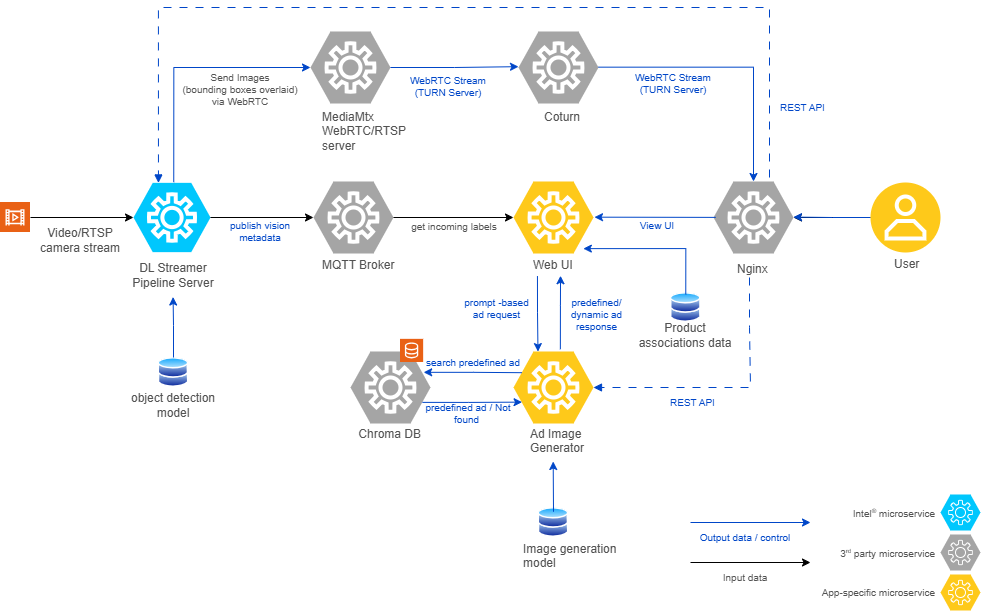
Video Stream → PID (Detection) → MQTT → Web UI (Selection) → AIG or ASe (Ad) → Browser
Processing Flow#
1. Detection Ingestion from PID#
PID runs DL Streamer Pipeline Server with a YOLO model to identify products in each video frame.
Detection results (labels + confidence scores) are published to an MQTT topic.
The Web UI subscribes to this MQTT topic and ingests the incoming labels.
Incoming labels are normalized to lowercase before any further processing.
2. Temporal Filtering and Confidence Gating#
The Web UI maintains a short rolling history of recent detection frames.
A label is considered eligible only if it appears in at least N recent frames, where N is configured by
OBJECT_RECENCY_FRAME_COUNT.The label must also exceed the configured confidence threshold (
OBJECT_CONFIDENCE_THRESHOLD).
This prevents one-off false positives from triggering unwanted ad generation.
3. Mapping Labels to Provisioned Products#
Eligible labels are matched against
web-ui/ProductAssociations.csv.Labels that do not appear in the CSV are discarded.
Duplicates are removed so each product appears once in the candidate set.
4. Product Selection Strategy#
When multiple products are eligible, the following prioritization applies:
Scenario |
Strategy |
|---|---|
First-time products |
Prioritize products never shown before, ordered by highest configured price. |
Rotation mode |
Prefer products shown less frequently across candidates. |
Repeat prevention |
Avoid the most recently selected product when alternatives exist. |
5. Ad Variant Selection per Product#
A product can have multiple rows in
ProductAssociations.csv, each representing a different ad variant.For repeated appearances of the same product, the Web UI avoids reusing the same variant index consecutively when alternatives are available.
6. Predefined Ad First, Dynamic Ad Fallback#
For each selected product:
The Web UI queries ASe (
POST /ase/predef/query/ad) for a matching predefined advertisement.If a predefined ad is found in Qdrant, it is displayed immediately.
If no predefined ad is found, the Web UI calls AIG (
POST /aig/minf/) to generate a dynamic advertisement using the configured text, promo, price, and slogan payload.
7. Delivery to Browser Clients#
The current ad is served through the Web UI endpoint
GET /get_current_advertisement.Client IDs are tracked so each browser client receives a new ad once per generation cycle.
The
TIME_TO_DISPLAY_AD_SECONDSenvironment variable controls how frequently new ads are generated.
Inputs Affecting Behavior#
Input |
Purpose |
|---|---|
|
Defines products, pricing, promo text, slogans, cross-sell targets, dynamic prompts, and optional predefined image filenames. |
|
Optional JPEG/JPG assets for predefined advertisements. |
|
Minimum detection confidence for a label to be eligible. |
|
Minimum number of recent frames in which a label must appear. |
|
Interval in seconds between ad generation cycles. |