Get Started#
This guide walks you through setting up four machines and a Moxa Time-Sensitive Networking (TSN) switch. Once they are ready, you can start both use cases with a single command.
Prerequisites#
Four machines and a Moxa TSN-G5000 switch as listed in System requirements.
Machine-1 is the machine you work on. It has
git,make, and Docker, and passwordless SSH works from it to machines 2, 3, and 4 (ssh-copy-id <user>@<machine>). Your user is in thedockergroup on all four machines. For more details, see First-time setup.
Clone the Project#
git clone https://github.com/open-edge-platform/federal-and-aerospace-ai-suite.git
cd federal-and-aerospace-ai-suite/deterministic-threat-detection
Clone it on machine-1 only: make up copies what the other machines need. The one-time setup scripts are
the exception. The First-time setup guide explains how to copy them manually.
First-Time Setup#
The one-time steps per machine and for the switch are described in
First-time setup. They cover SSH and Docker, NIC and VLANs,
Precision Time Protocol (PTP), switch configuration, and lab.env. Skip this step once the
setup is complete.
Architecture Diagram#
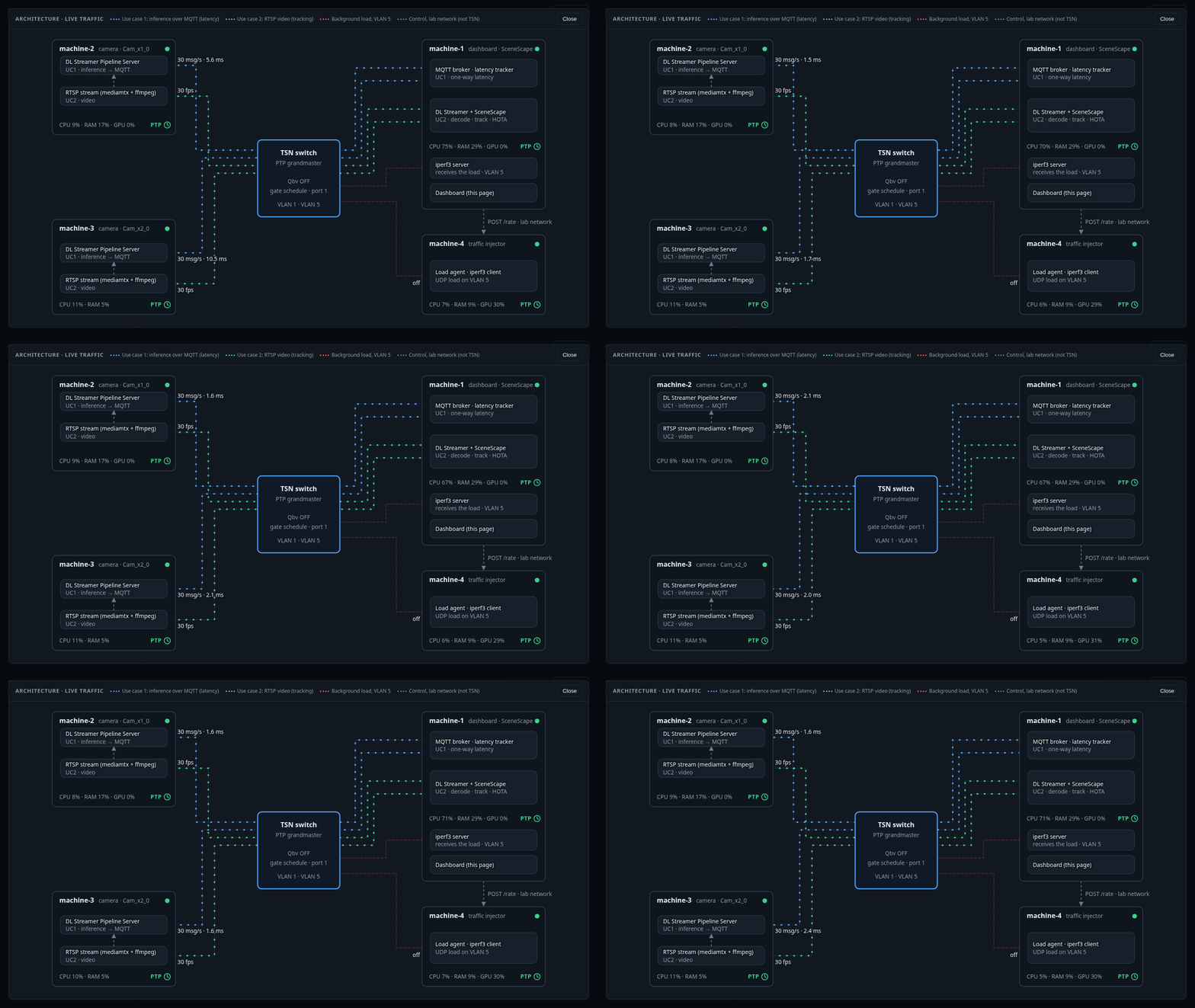

machine-2 / machine-3: replay a test video as an RTSP camera and run the use case 1 inference pipeline, which publishes its results over MQTT.
machine-1: receives the MQTT results (use case 1), pulls both RTSP streams once, decodes and tracks them with Deep Learning Streamer (DL Streamer) and Scenescape (use case 2), and serves the dashboard.
machine-4: generates the background load on VLAN 5.
Switch: PTP grandmaster; with the IEEE 802.1Qbv Time-Aware Shaper (Qbv) on, VLAN 5 is confined to its own time slot.
Lab network (grey): SSH, load control, and switch commands; never shaped.
The same diagram is live in the dashboard (Architecture button).
Application Deployment#
make up
make up starts the test-video streams, the dashboard, the load agent, the camera pipelines, and
Scenescape.
The first run pulls the Docker images (several GB; the DL Streamer image alone is about 5 GB) and downloads the detection model, so it takes several minutes.
Before the first model download,
make upasks you to accept the model license (Open Model Zoo, Apache-2.0). Answering anything other thanyesaborts the setup. The answer is remembered insrc/data/models/.terms-accepted. For non-interactive runs, setACCEPT_MODEL_TERMS=yes.
When make up finishes, it prints:
Dashboard:
https://<machine-1 lab address>/dashboard/Scenescape:
https://<machine-1 lab address>/(useradmin, password insrc/scene/secrets/supass)
The certificate is self-signed, so accept the browser warning.
Try it:
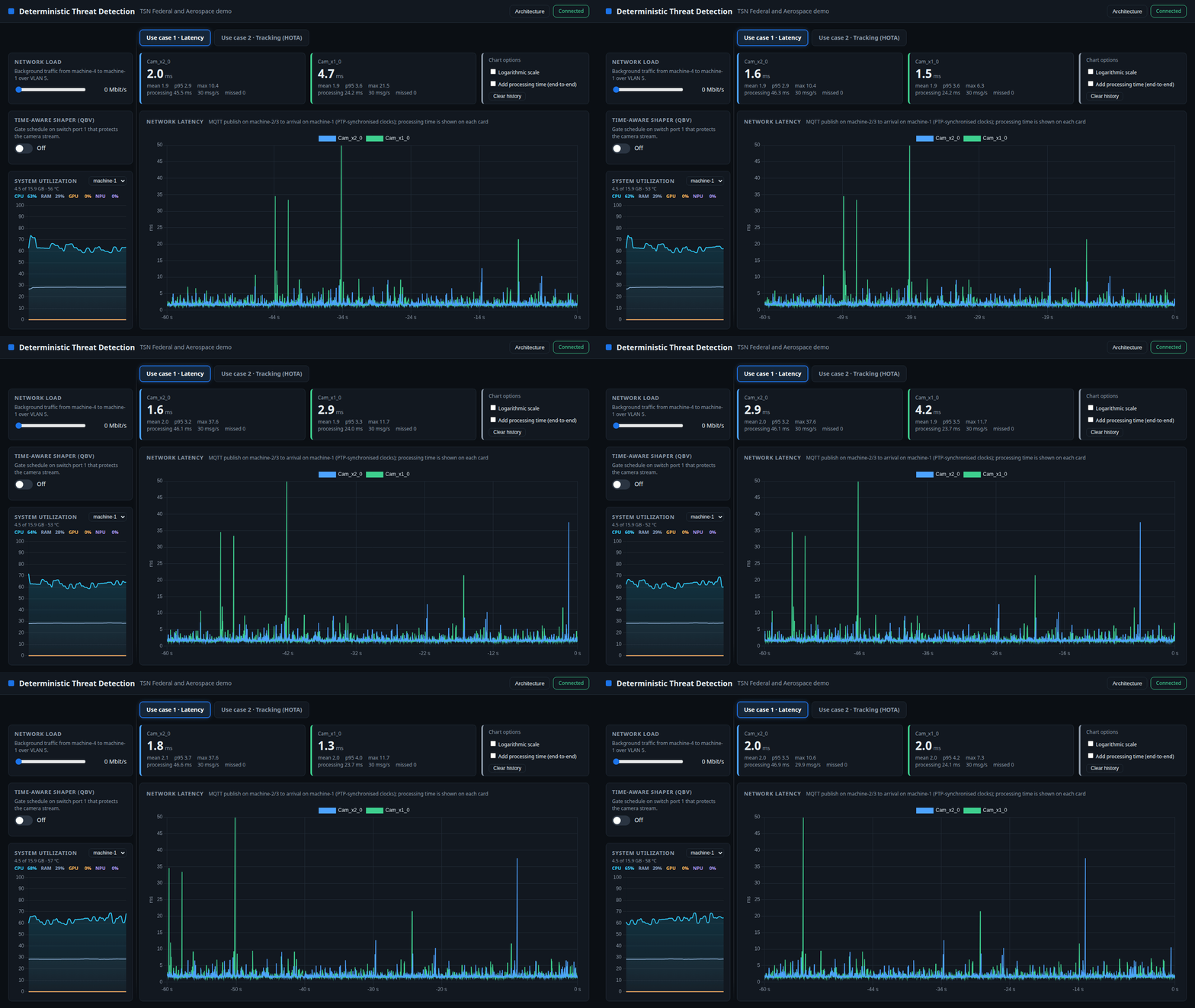
Use case 1 shows the latency per camera (about 2 ms when idle).
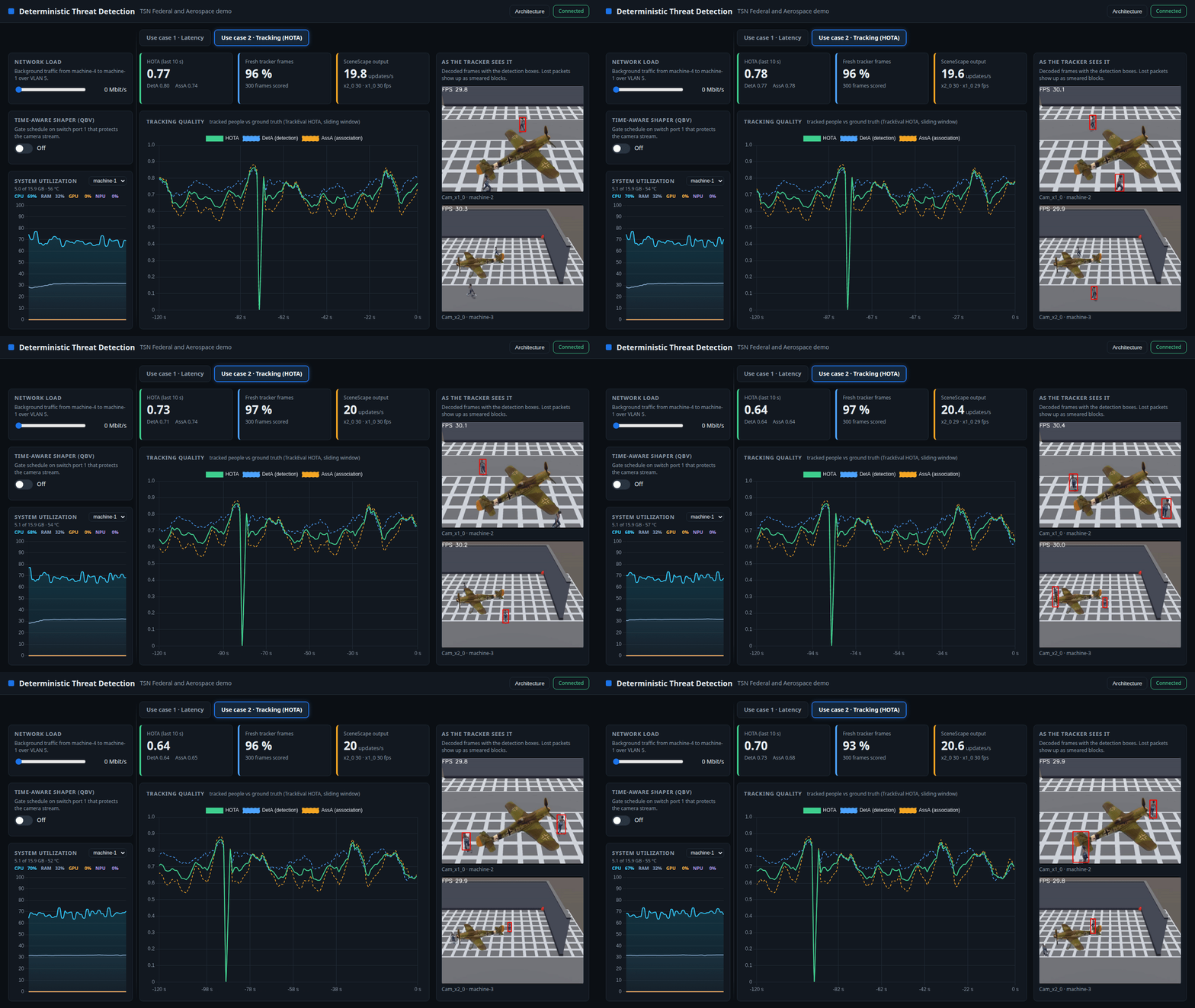
Use case 2 shows the live tracking quality, Higher Order Tracking Accuracy (HOTA), and the frames the tracker sees. The dip to about 0 once per minute occurs when the 62 s test video restarts.
Switch off Qbv and move Network load to 1000 Mbit/s. The toggle works only after you set
SWITCH_ALLOW_WRITE=1; see First-time setup. The latency climbs from milliseconds to seconds, and the tracker rate and HOTA (use case 2) collapse. The Architecture view shows the streams stalling and frames being lost.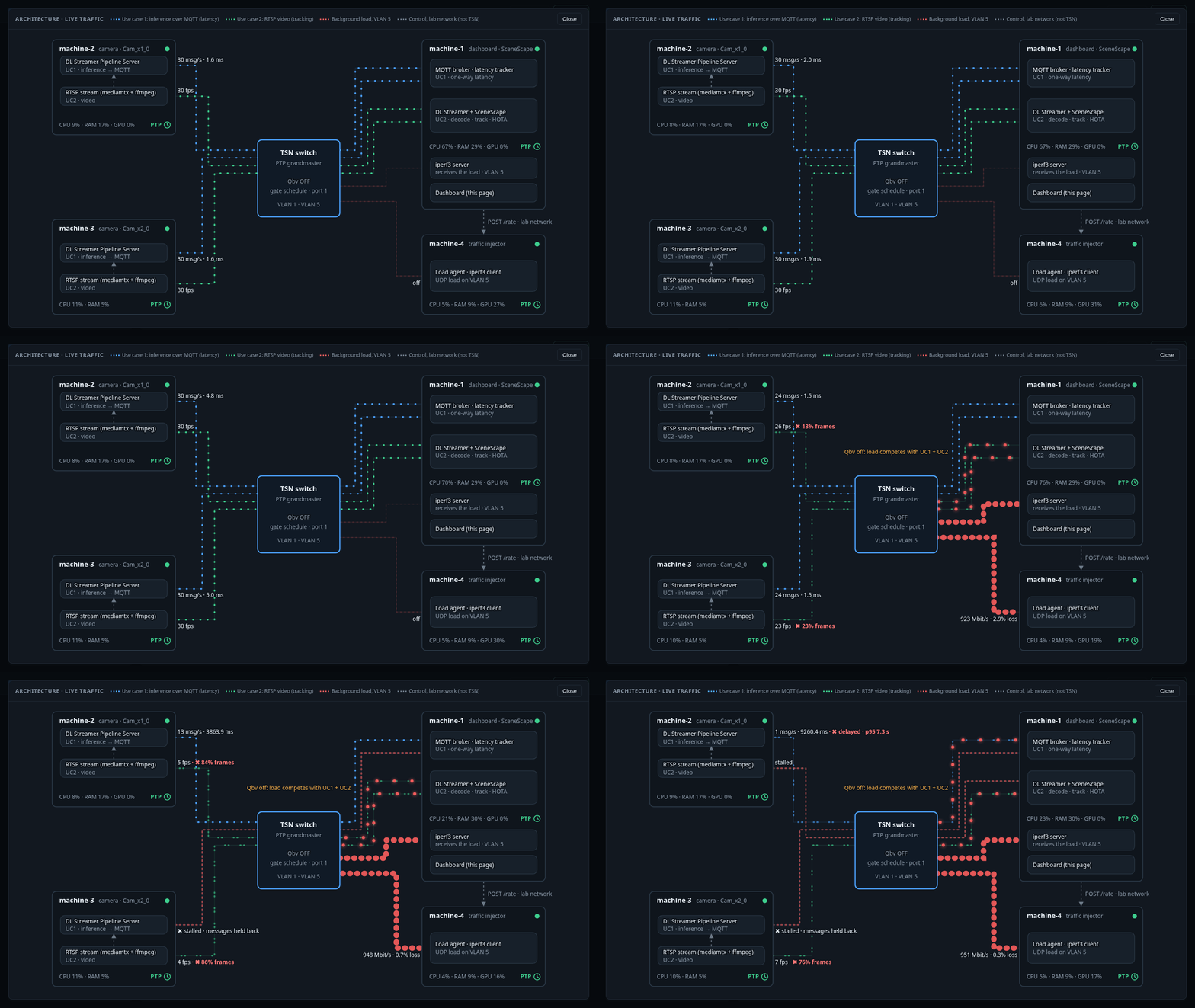
Switch Qbv on. The load is confined to its slot (about 95 Mbit/s gets through), and both use cases recover.
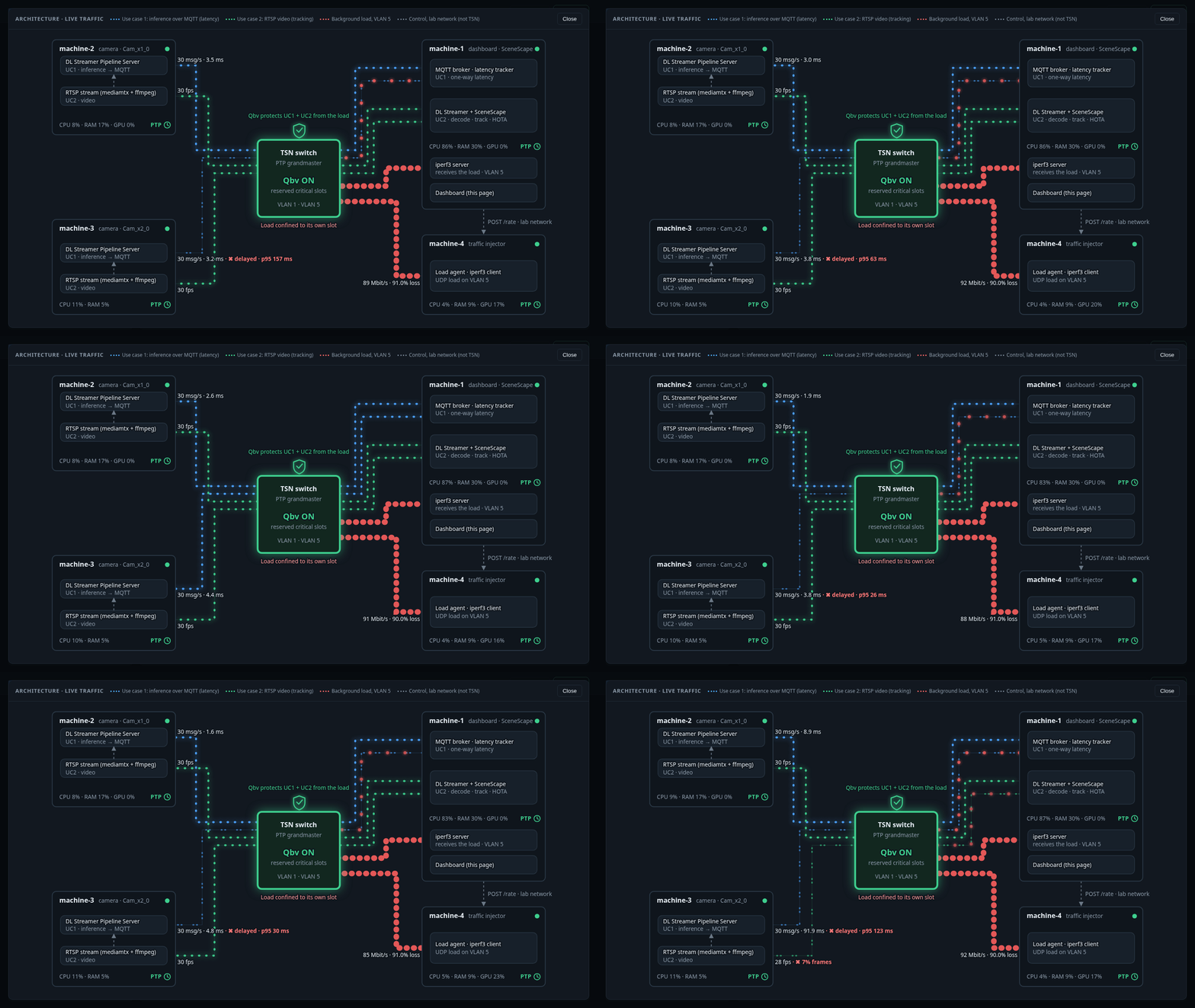
Qbv takes about 10 s to turn on and up to 30 s to turn off. The toggle shows the actual switch state.
make status
make down
Basler Testing#
Use two Basler GigE cameras instead of the test videos for use case 2. Prepare them first by following these guides: Configure Basler PTP timestamps and Integrate Basler cameras with Scenescape. The second guide also explains how to build the pipeline server image with the Basler SDK yourself, because the project does not ship it.
make up SOURCE=basler
make down
The test-video streams still start because use case 1 needs them on machines 2 and 3, so do
not pass STREAMS=0. Always pass SOURCE=basler on the command line. The default is video.
HOTA is not shown for Basler cameras because there is no ground truth. The tracker rate is
shown instead.
Troubleshooting#
Symptom |
Fix |
|---|---|
Browser shows |
The host in the URL is not allowed; use the lab address printed by |
Qbv toggle disabled with a banner |
Turn on Schedule Gate for port 1 in the switch web interface |
Qbv toggle disabled, read-only |
Set |
Latency stays high with Qbv on |
Check the VLAN priority maps ( |
Basler |
Another process holds the camera. Stop the pipeline container with |
A start failed halfway |
Run |