Handheld (Soldier System) Blueprint#
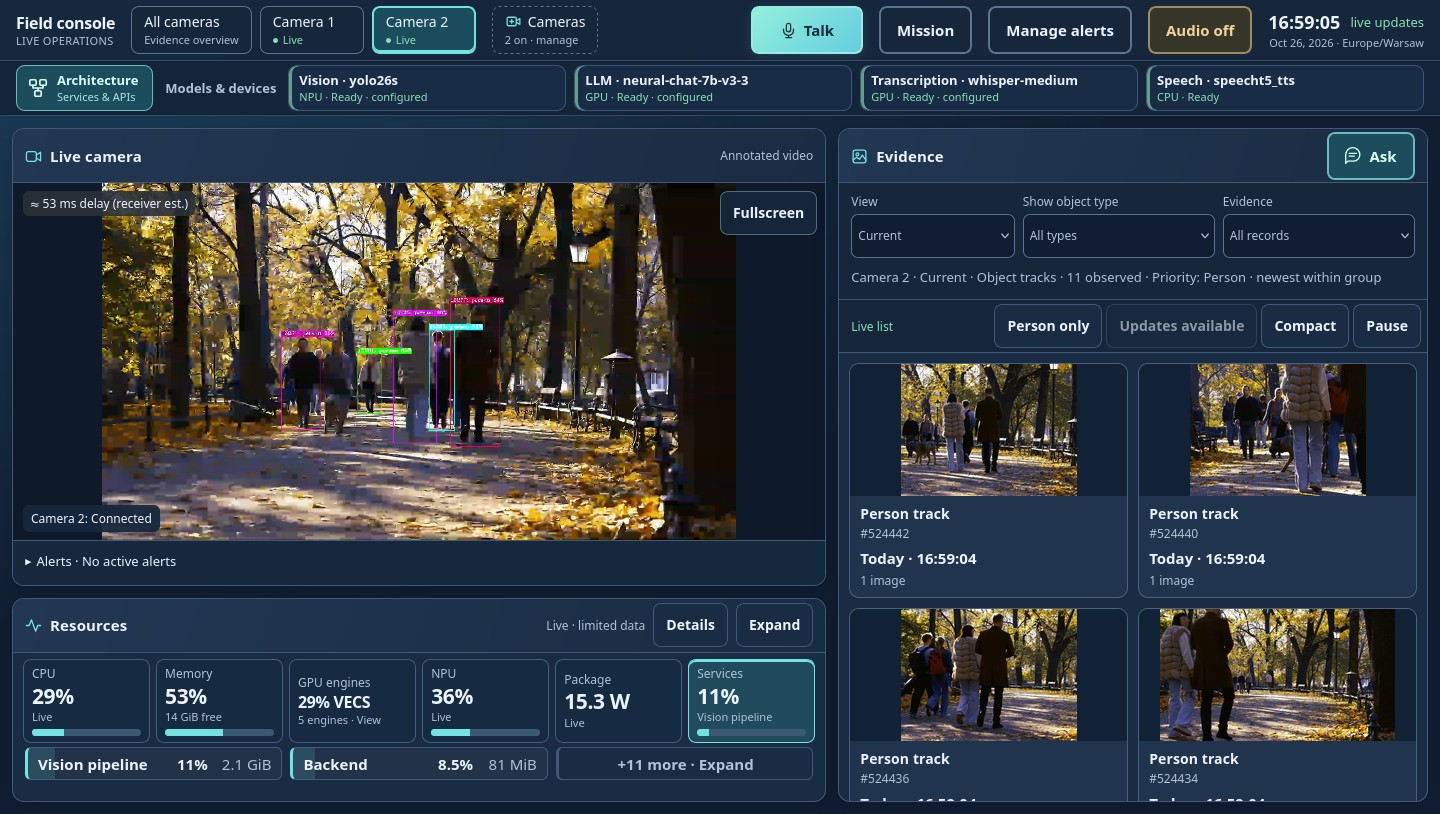
The Handheld Blueprint is a multi-modal AI operator console for handheld deployment scenarios, optimized for Intel® edge hardware. It combines live camera analytics, evidence search, mission documents, rule-based alerts, and voice interaction in a single browser UI that runs entirely on the device.
The Handheld Multi-Modal application is built from unmodified Open Edge Platform
release-2026.2.0 microservices, open source media and messaging components, and an
application Backend with a browser UI. Video analytics run on the NPU, the language and
speech-to-text models run on the GPU, and text-to-speech runs on the CPU. Models and
dependencies are downloaded from the Internet on the first start. After that, all
inference runs locally and data does not leave the device.
The Handheld Multi-Modal application is deployed on top of the Edge Node Infrastructure software - an edge computing platform, which enables hardware acceleration capabilities. See Infrastructure Setup for build and provisioning steps.
Deployment and Usage#
Follow these steps to deploy the Handheld (Soldier System) Blueprint:
Infrastructure Setup — Build the OS image, flash it to a bootable USB, and validate the provisioned platform.
Install OEP SDKs — Verify hardware accelerators and install the OEP Vision AI SDK on the provisioned target.
Install Handheld Multi-Modal Application — Download and deploy the application stack.
Access Application User Interface — Open the operator console locally or through an SSH tunnel.
Operator Guide — Use cameras, evidence, the assistant, mission documents, alerts, and voice.
Application Operations — Lifecycle commands, offline copy to other devices, and model changes.
Benchmarks — Benchmark AI workloads across the available hardware.
Features#
Live cameras — YOLO26s INT8 object detection (NPU) and tracking, annotated WebRTC video, and cropped evidence images per tracked object. Cameras are added, renamed, and removed from the console.
History — browse recorded tracks and ask questions such as “how many people on camera 2 in the last ten minutes?”.
Mission — upload PDF or DOCX orders; the Mission Brief and answers are produced by
Intel/neural-chat-7b-v3-3(GPU) through the Chat Q&A microservice.Alerts — operator rules (“appears”, “stays too long”, optional zones) dispatched by the Alert Agent and spoken by SpeechT5.
Voice — push-to-talk questions transcribed by Whisper-medium (GPU) and spoken answers.
Resources — CPU, memory, GPU, NPU, power, and per-service telemetry.
Architecture#

The Backend is never in the video path: MediaMTX relays camera RTSP to the DL Streamer
Pipeline Server, which publishes annotated video back over WebRTC (WHIP) and detection
events over MQTT. The browser plays video directly from MediaMTX (WHEP) and talks to the
Backend over HTTPS, Server-Sent Events, and WebSocket. The running application also serves
an interactive architecture page at /architecture.html.
Components#
Service |
Image |
Role |
|---|---|---|
DL Streamer Pipeline Server |
|
Detection, tracking, annotated WebRTC, MQTT events, evidence crops |
Chat Q&A Core |
|
Mission documents and assistant answers |
Audio Analyzer |
|
Speech-to-text (Whisper-medium, GPU) |
Text To Speech |
|
Spoken alerts and answers (SpeechT5) |
Alert Agent |
|
Rule-mode alert dispatch, no LLM in the alert path |
Metrics Manager |
|
Hardware telemetry |
Model Download |
|
Prepares the YOLO26s OpenVINO™ IR on the first start |
MediaMTX |
|
RTSP input, WHIP/WHEP relay |
Coturn |
|
Loopback-only TURN relay for tunnelled browsers |
Mosquitto |
|
MQTT between the pipeline server and the Backend |
NGINX |
|
TLS reverse proxy on |
FFmpeg |
|
Demo camera publishers only |
Backend and UI |
|
Application logic; calls stock microservice APIs only |
Model sources and licenses are listed in third-party-components.spdx.
AI Playground#
AI Playground is an optional open source generative AI application suite for offline AI chat, code assistance, document search, image analysis, and image and video generation, running on the same Edge Node Infrastructure software platform. See the AI Playground — FedAero Setup Guide for installation and setup steps.
AI Agent SKILLs#
The Handheld Blueprint supports AI agent skills for GitHub Copilot and Claude Code, covering both platform-level automation (image build, provisioning, power and thermal tuning) and application-level pipeline generation with Intel DL Streamer. See AI Agent SKILLs for the available skills and how to use them.