Get Started#
This guide walks through deploying uav-ground-station end to end: the UAV side it
connects to, the base viewer, the optional VSS search overlay, multi-UAV use,
and the Flight Summary report. See Configuration for the
full .env variable reference.
Deploy the UAV Side First#
uav-ground-station is a remote viewer — it has nothing to show until a
UAV host is already running pipelines it can connect to. Deploy one of these
first, on a different machine than this one:
For standalone (pymavlink) mode: deploy
uav-vision-analyticsfollowing its Standalone Get Started guide.For SDK mode: deploy
uav-mission-compute-sdkfirst, thenuav-vision-analyticson top of it following SDK-mode Get Started – the Mission Compute SDK alone has no camera pipelines or/pipelines/statusAPI for this viewer to connect to;uav-vision-analyticsis what actually provides those in both modes.
Either way, come back here once at least one camera pipeline is RUNNING.
You will need that host’s IP address in the next section.
Get the Ground-Station Source#
There are two options to get the application source first:
Option A — Download the ZIP (Recommended)#
curl -OjL https://github.com/open-edge-platform/federal-and-aerospace-ai-suite/releases/download/fedaero-latest/uav-mission-apps.zip
unzip uav-mission-apps.zip
cd uav-ground-station
Option B — Clone the Whole Repository#
git clone https://github.com/open-edge-platform/federal-and-aerospace-ai-suite.git --branch main
cd federal-and-aerospace-ai-suite/uav-ground-station
Then, for either option:
make up # creates .env from template (host IP and devices auto-detected), builds, and starts the container
make up runs make init, which sets VIZ_HOST_IP and VIZ_PUBLIC_HOST to this
machine’s LAN IP and detects the GPU/NPU devices; edit .env only to override them
(for example 127.0.0.1 for loopback-only access).
Note
make up starts only the viewer + mediamtx relay (video, captions, metrics,
Flight Summary) — the Search Videos button and /api/search* stay
hidden/404 until the separate VSS overlay is started with make up-vss
instead of make up (it is not a flag to make up). See
VSS Search below for the extra .env variables it needs
and exactly what make up-vss adds.
make up-vss always includes everything make up does (viewer + mediamtx
the 8 VSS containers), so you only ever run one or the other, not both.
Started with plainmake upand want Search later? Just runmake up-vss— it brings up the same viewer/mediamtx containers (unchanged, so this is fast) plus the missing VSS ones, in place.
Dashboard, video, captions, Flight Summary, and per-host metrics work the same either way — only Search Videos depends on which one you ran. Tear down with the matching command:make downaftermake up,make down-vssaftermake up-vss(see the [!IMPORTANT] note belowmake down).
Note
make up and make up-vss check the ports this stack publishes (VIZ_PORT,
MEDIAMTX_WEBRTC_PORT, the WebRTC ICE ports, and VSS_MANAGER_PORT) and move any
that another process on this machine already uses to the next free port, saved
in .env; the dashboard URL printed at the end uses the result. The UAV Mission
Compute SDK publishes 8080 (REST), 8554 (RTSP), 8888 (HLS), and 8889
(WebRTC), so on a machine with the SDK installed the ground station takes
8081 and 8890 instead, and never one of those four, even while the SDK is
stopped. Running the SDK and the ground station on separate machines is the
intended setup; if you start the ground station first and install the SDK
afterwards, the SDK’s own make fails on the ports the ground station holds, so
start the SDK first or set different ports in .env yourself.
Then open http://<VIZ_HOST_IP>:<VIZ_PORT> (default port 8080; http://localhost:<VIZ_PORT> when VIZ_HOST_IP is 127.0.0.1), enter the
UAV host’s IP from
Deploy the UAV Side First (defaults to
VIZ_COMPANION_HOST, 127.0.0.1), and press Connect. Device cards
(cpu/gpu/npu) are detected automatically from whichever pipelines are
currently running on the remote host.
make down    # stop and remove the stack started with make up
make logs    # tail the container's logs
Important
If you started with make up-vss, tear down with make down-vss (or
make clean-vss-index / make delete-vss-volumes — see
VSS Search), not plain make down: make down only
targets docker-compose.yml + docker-compose-mediamtx.yml and leaves
the 8 uav-gs-vss-* containers from docker-compose-vss.yml running.
VSS Search#
The Live Natural Language Search panel and Search Videos popup appear
only when the VSS overlay is used. It is a separate compose file,
docker-compose-vss.yml, that adds just the 8 containers VSS search needs
(pipeline-manager, video-search, multimodal-dataprep,
multimodal-embedding-serving, vector-retriever, vdms-vector-db, postgres,
minio; container names uav-gs-vss-*). With the default make up the search UI is hidden
and the search routes return 404.
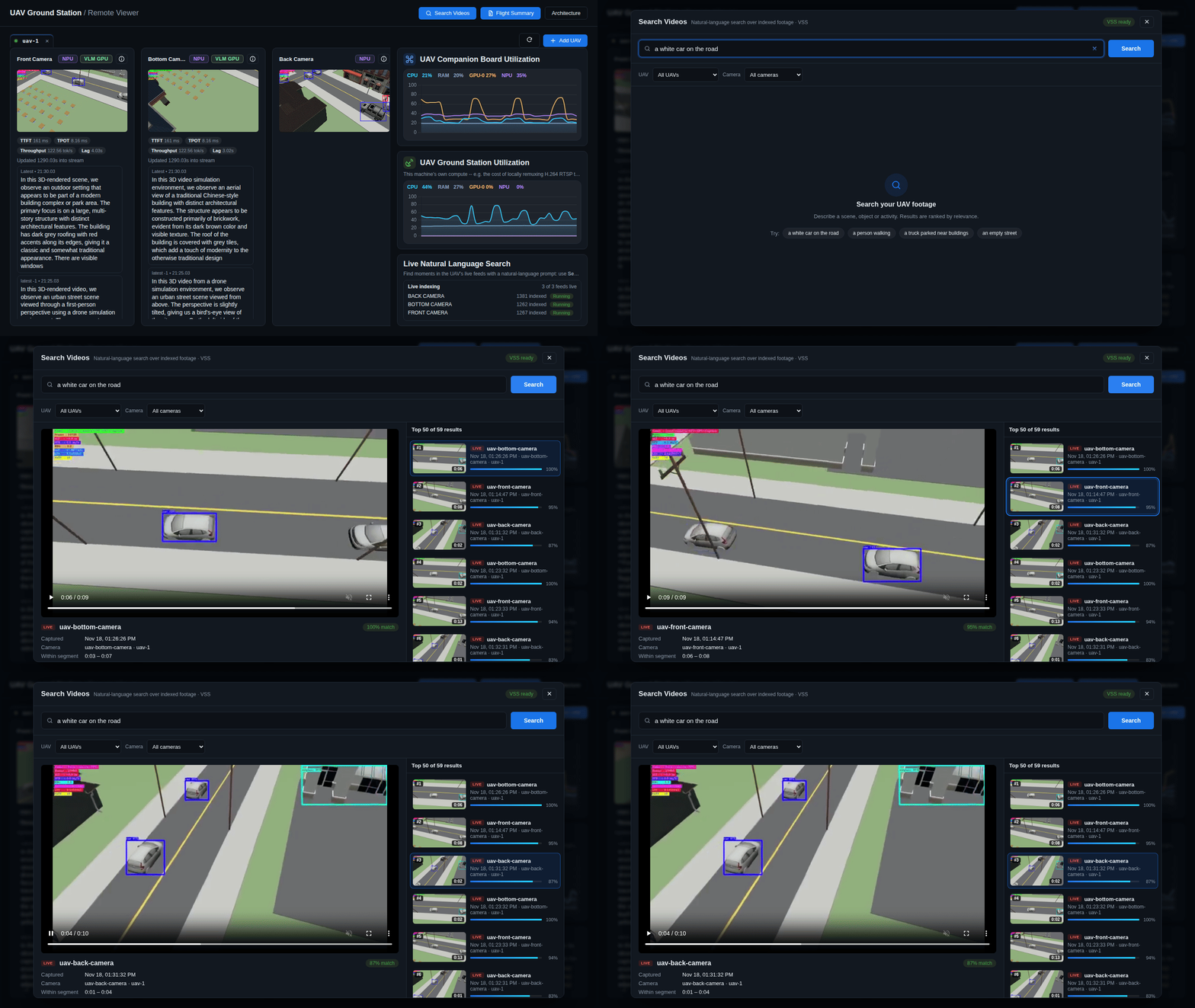
make init(run once, on first setup) already takes care of auto-generating theVSS_MINIO_*/VSS_POSTGRES_*credentials (a fixed username and a random password — these are internal to this stack’s own MinIO/Postgres containers only, never exposed outside the docker network). ForVSS_EMBEDDING_MODEL/DATAPREP_DETECTION_MODELit shows the two Hugging Face models that would be downloaded (and their license pages) and asks for confirmation — nothing is downloaded or pre-filled into.envwithout saying yes.Only edit
.envby yourself if you want different credentials or declined the model prompt — see.env.examplefor the full set of VSS variables (optional devices included):VSS_MINIO_USER=vss-admin VSS_MINIO_PASSWORD=<random characters> VSS_POSTGRES_USER=vss VSS_POSTGRES_PASSWORD=<random characters> VSS_EMBEDDING_MODEL=CLIP/clip-vit-b-32 DATAPREP_DETECTION_MODEL=OpenVINO/yolox_s-int8-ov
Important
DATAPREP_DETECTION_MODELmust be a Hugging Face OpenVINO™ Model API repository under theOpenVINO/namespace (OpenVINO/yolox_s-int8-ovabove). If.envwas created by hand instead of viamake initand any of the sixVSS_MINIO_*/VSS_POSTGRES_*/VSS_EMBEDDING_MODEL/DATAPREP_DETECTION_MODELvariables are left blank,make up-vssfails fast with one message listing everything missing (MinIO also needs a user of at least 3 and a password of at least 8 characters, or its container keeps restarting).make up-vss(base + mediamtx + VSS overlay; use this instead of plainmake upwhenever Live Natural Language Search is wanted —make upalone never starts the 8 VSS containers or exposes the Search UI). The first start downloads the CLIP embedding model (and the YOLOX detection model, for object crops) into Docker volumes.By default every VSS device (
VSS_INGEST_EMBEDDING_DEVICE,VSS_DETECTION_DEVICE,VSS_QUERY_EMBEDDING_DEVICE) runs onCPU. Pick a different device for all three at once, at deploy time, without hand-editing.env:make up-vss DEVICE=GPU # or NPU, CPU make up-vss DEVICE=all # auto-pick the best hardware 'make init' already detected
DEVICE=allprefers GPU, then NPU, then CPU, based on whateverGPU_DEVICE/NPU_DEVICEmake initalready found on this host. OmitDEVICEentirely to leave whatever is currently in.envuntouched. See Configuration if you want ingest, detection, and query embedding to each run on a different device instead of all three matching.Open the dashboard and Connect to the UAV. Every RUNNING pipeline (
uav-<camera>onVIZ_REMOTE_RTSP_PORT) is registered with VSS as a live stream and indexed continuously. A backend loop (VSS_LIVE_SYNC_INTERVAL_SECONDS) adds pipelines that start later and pauses ones that stop; Disconnect pauses all of them. Indexed footage is kept forVSS_LIVE_RETENTION_HOURS.
make down-vss stops everything but keeps the index; make clean-vss-index
also deletes the indexed footage, embeddings, and stream registrations but
keeps the downloaded models; make delete-vss-volumes (asks for confirmation;
FORCE=1 skips it) deletes all VSS volumes, including the models
(re-downloaded on the next start). The pipeline-manager API is published on
VIZ_HOST_IP:VSS_MANAGER_PORT (default 3001) for uploading videos
(POST /videos, then POST /videos/search-embeddings/<videoId>).
Live RTSP ingestion needs the intel/*:2026.3.0-rc1 (or newer) VSS images
(VSS_REGISTRY / VSS_TAG). To use a VSS
deployed separately with its own setup.sh --search instead, set
VSS_ENABLED=true and VSS_MANAGER_URL / VSS_DATASTORE_URL in .env.
Note
Stale or orphaned VSS streams (for example from a UAV host that was
redeployed under a new IP, or test footage that is no longer connected)
keep their already-indexed data searchable even after the dashboard stops
tracking them. Because VSS returns its global best matches before any
per-UAV/per-camera filtering is applied, a large stale index can dominate
search results for UAVs/cameras that are actually connected right now. Run
make clean-vss-index (keeps downloaded models, re-indexes from scratch on
next connect) if you want to clear that out, or see
Configuration’s VSS_MAX_RESULTS entry for how result
counts are capped per query.
See Configuration for the full proxy route
reference, including a quick curl check.
Multiple UAVs at Once#
The dashboard supports connecting to more than one UAV companion board in the same browser session: a tab bar appears above the connect field once a second host is connected, and switching tabs swaps which host’s camera cards and metrics are shown. Disconnecting (closing a tab’s ×) stops that host’s VSS live-sync indexing; switching tabs does not — a host keeps being indexed in the background for as long as its tab stays open, even while another tab is active.
Because camera names are operator-chosen (configs/cameras-*.yaml), two UAVs
could configure the same camera name (for example, both have a uav-front-camera);
each host’s streams are registered with VSS under a host-qualified name
(uav-<host>--<camera>) so they never collide.
Each search result’s camera/host fields are resolved in order from: the
embedding’s own sensor_id metadata; failing that, the stream’s
registration-time tags (["uav", "<host>", "<camera>"], also visible in
each result’s own “Tags” detail); and failing that, looking the result’s
video_id up in VSS’s current stream list as a last resort. A result VSS
still has indexed from a UAV that has since disconnected may still show
“Unknown camera” if none of these resolve.
The dashboard’s search popup puts two filter controls: UAV and Camera dropdowns. The full, unfiltered result set is fetched once when the search runs, and every subsequent filter toggle — whether switching UAVs, changing cameras, or resetting selections — simply reshapes that same in-memory dataset without firing any additional network request.
Clips whose codec the browser cannot decode (for example some stored
live-stream segments) fall back to VSS’s
server-decoded best-matching frame plus a download link. Live segments older
than VSS’s LIVE_RETENTION_HOURS may no longer be available.
Flight Summary#
The Flight Summary button (top bar) opens a report built from the MQTT
scene-caption stream (uav/caption/<camera>) — the same captions shown live
under each camera’s video. It works independently of VSS: no extra containers,
no LLM call, always available once a camera’s pipeline is running with
captioning on.
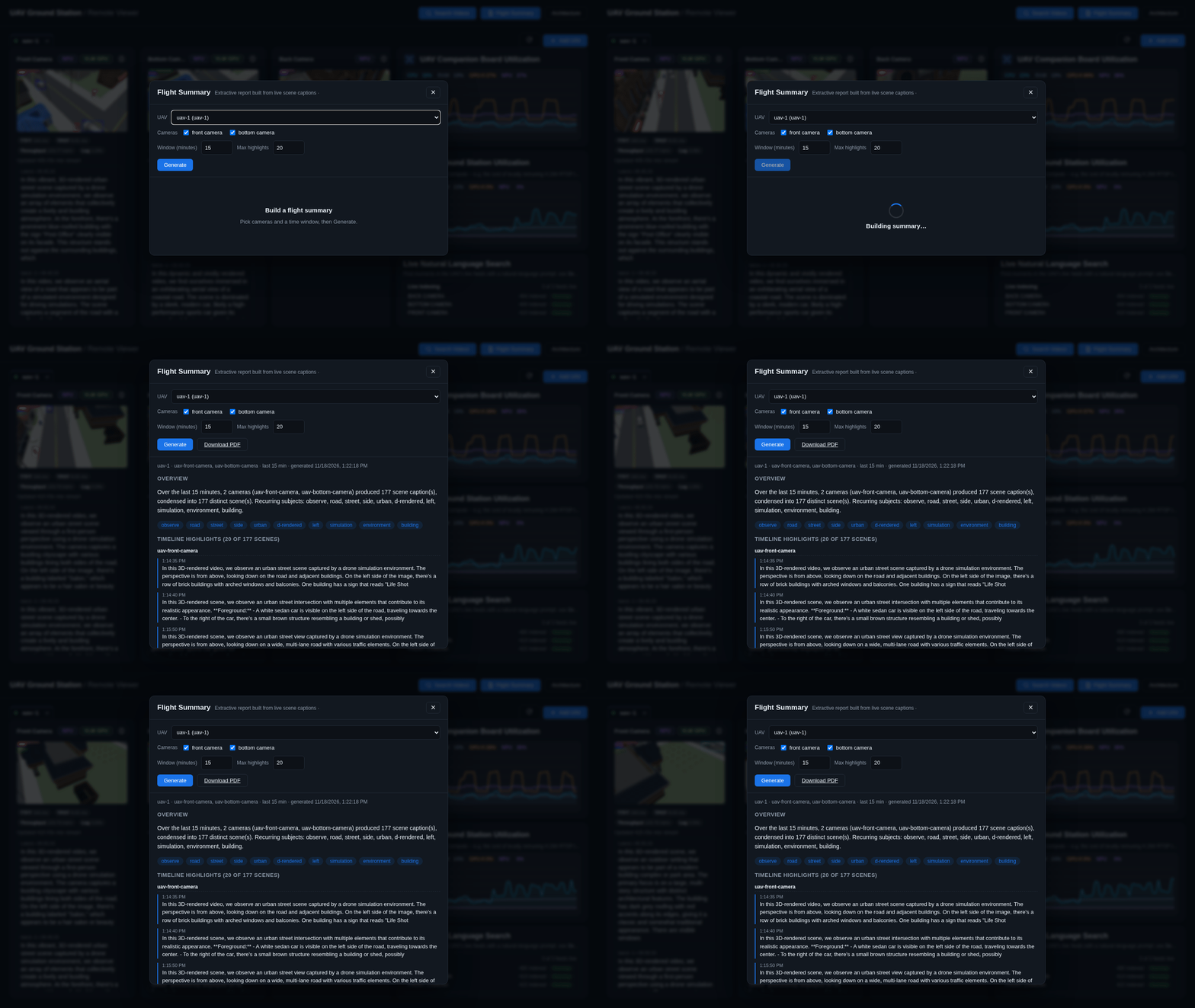
uav-gs-backendkeeps a small ring buffer of recent captions per(host, camera)(caption_log.py), kept warm only while the dashboard’s normal pipeline-info polling has observed that camera captioning; an idle(host, camera)pair is dropped afterCAPTION_LOG_IDLE_TTL_SECONDS.Open Flight Summary, confirm the host (defaults to the connected UAV), pick one or more cameras from the list (populated from whichever cameras are currently captioning) and a time window, then Generate.
vss_summary.pyruns an extractive map-reduce over that camera’s buffered captions: consecutive near-identical captions are folded into one “scene” (with an occurrence count), a keyword tally feeds the overview paragraph, and a representative subset of scenes (favoring long-held/repeated ones, filled out with an even chronological spread of the rest) is kept per camera up to the requested highlight budget. With more than one camera selected, the timeline is grouped by camera — all of one camera’s highlights in order, then the next camera’s — rather than interleaved by arrival time, which is hard to follow once several cameras are captioning concurrently.Download PDF renders the same report via
pdf_writer.py(a small, dependency-free PDF writer — no extra system packages).
If a search was just run, the report also appends the query and its matched clips as an “appendix”, tying a natural-language search back to the raw caption evidence around the same time window.
See Configuration for the report’s route reference.