Configure PTP Time Synchronization (IEEE 1588v2)#
What is IEEE 1588v2 PTP?#
IEEE 1588v2 Precision Time Protocol (PTP) provides sub-microsecond time synchronization across Ethernet devices using standard UDP transport. It is used here instead of IEEE 802.1AS (gPTP) because the Basler GigE camera only supports IEEE 1588v2 over UDP IPv4.
The MOXA TSN switch acts as the PTP Grandmaster clock. The host machine running SceneScape synchronizes its system clock to the switch using the steps below.
Install PTP Tools#
sudo apt-get update
sudo apt-get install -y linuxptp
Configure the MOXA Switch for 1588v2#
By default on resetting the MOXA switch it will be using the 802.1AS (gPTP) profile, so the MOXA switch time-sync profile must be switched from 802.1AS (gPTP) to 1588v2. Apply the settings shown below:
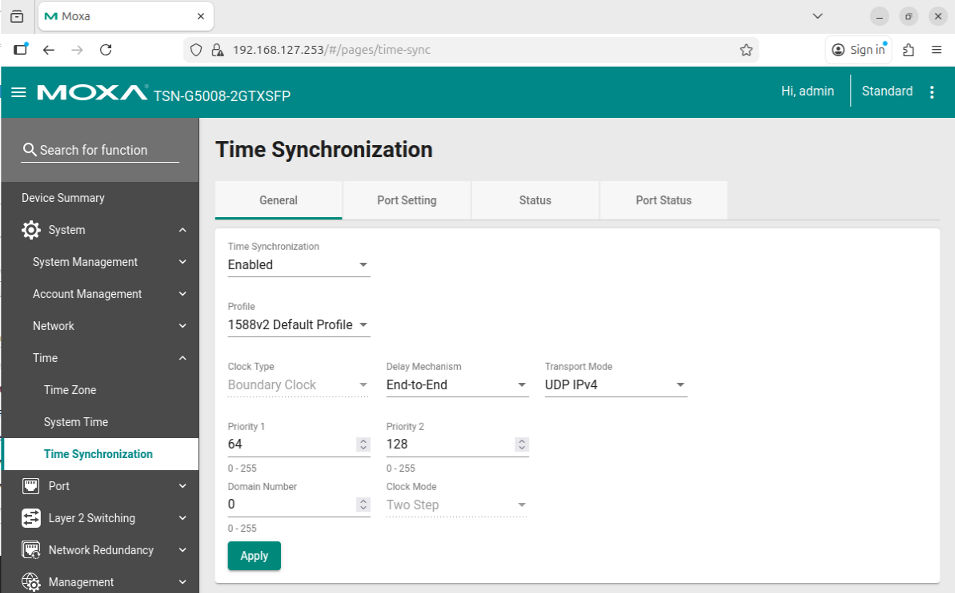
Key settings:
Profile: IEEE 1588v2 Default Profile
Transport Mode: UDP IPv4
PTP Role: Grandmaster (or Boundary Clock toward the camera port)
Synchronize the Host Clock#
Note: Replace
enp1s0with the actual network interface name of the Intel i226 TSN-capable NIC connected to the TSN switch. Also ensure the interface has an IP address assigned within the camera subnet before startingptp4l; the UDP transport requires a routable address to discover the Grandmaster.
Run the following two commands in separate terminals:
Start the PTP daemon (
ptp4l).ptp4lsynchronizes the NIC hardware clock (PHC) to the Grandmaster on the switch. The-4flag selects UDP IPv4 transport, and-Eselects End-to-End delay measurement, matching the camera’s 1588v2 Default Profile.sudo ptp4l -i enp1s0 -4 -E -s -m --priority1=255 --domain=0
Important Notes
IP Address on Host Interface: If you are using VLANs, ensure that your host’s network interface (e.g.,
enp1s0) has some IP address assigned before starting the PTP daemon (ptp4l). UDP multicast PTP requires a routable address to discover the Grandmaster.
Synchronize the System Clock (
phc2sys).phc2syskeeps the LinuxCLOCK_REALTIMEaligned to the PHC thatptp4lis disciplining.sudo phc2sys -s enp1s0 -c CLOCK_REALTIME --step_threshold=1 -w -m -O 0
Verify Synchronization.
Monitor the
phc2sysoutput. Once locked, the offset should be well below 1 µs. Example steady-state output:phc2sys[1234.567]: CLOCK_REALTIME phc offset 42 s2 freq -1234 delay 512
The
s2state indicates the clock is in continuous tracking mode. An offset below ~100 ns is typical on a well-configured TSN network.