Version 2025.2 Release Notes#
Version History/Revision History#
This is the Release Notes for Edge Manageability Framework version 2025.2, released Dec 11 2025.
Note
This document refers to Edge Manageability Framework as the “Product”.
Release Highlights#
Edge Manageability Framework enables you to securely onboard and provision remote edge devices to a central management plane, orchestrate Kubernetes clusters and applications across distributed edge, at scale. Edge Node software provides the profiles of infrastructure software configurations that get provisioned onto an onboarded node.
EMF release versioning has been changed to align with the year and release number.
Key highlights of the 2025.2 release include:
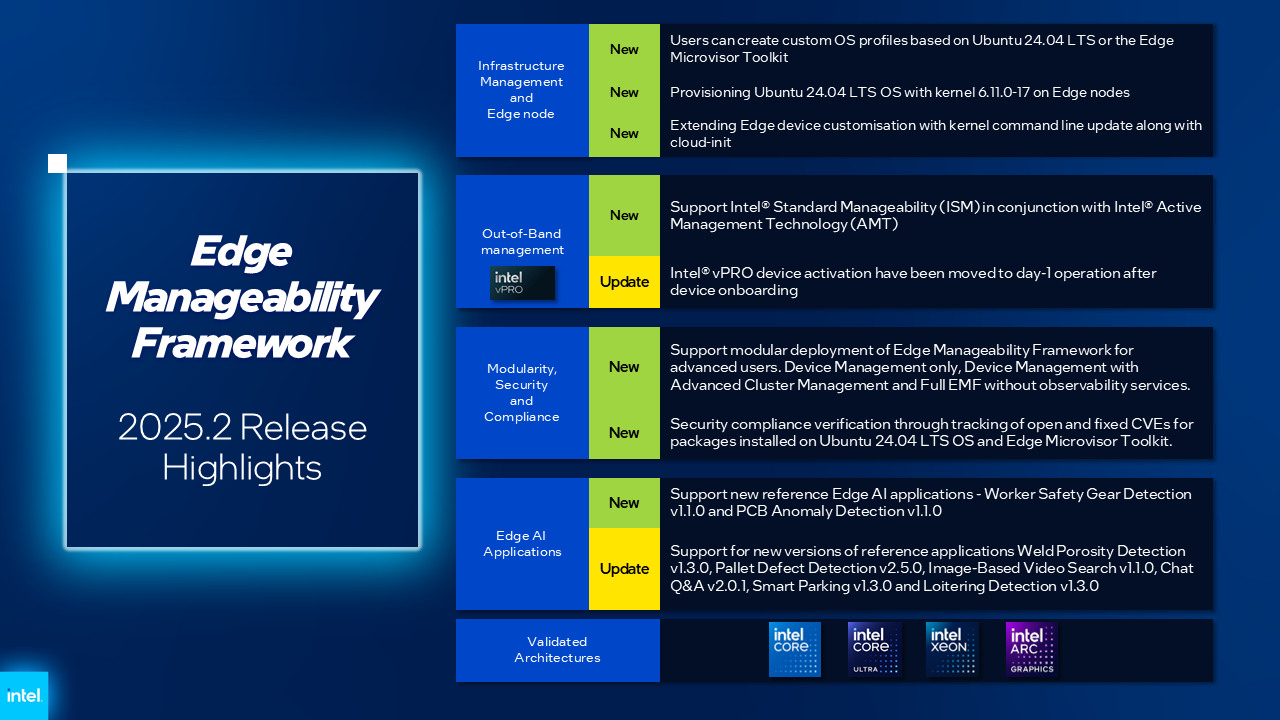
Infrastructure and Edge Node Software
New: Support for Ubuntu 24.04 LTS OS with kernel 6.11.0-17. Official support for Ubuntu 22.04 LTS OS continues.
New: Users can create custom OS profiles based on Ubuntu 24.04 LTS or the Edge Microvisor Toolkit.
New: You can now use Intel vPro® platform-based out-of-band management for Intel® Standard Manageability in conjunction with Intel® Active Management Technology (Intel® AMT) devices..
New: Expanding the device customization capabilities, you can now customize operating system kernel command-line parameters.
New: Security compliance verification through tracking of open and fixed CVEs for packages installed on Ubuntu 24.04 LTS OS and Edge Microvisor Toolkit.
Update: Architectural enhancements to improve the reliability of operations of out-of-band management using Intel® AMT and ISM.
Update: Users can activate Intel® AMT or Intel® Standard Manageability post device onboarding and provisioning.
Update: New implementation of In-Band Manageability (INBM) agents that provide OS and package update capabilities on edge nodes. For implementation details, see the INBM Architecture.
Advanced Cluster and Application Management
There are no new Application Management features for this release, though some internal improvements to the generative toolchain and the tenant controller were made.
Edge Manageability Framework Platform Enhancements
New: Support for modular deployment of Edge Manageability Framework for advanced users. EMF may now be deployed in the following configurations:
Device Management (only). This allows the onboarding, provisioning, and management of edge nodes. This is the minimum configuration of Edge Manageability Framework.
Device Management with Advanced Cluster Management. This adds the automatic creation and lifecycle management of clusters.
Device Management with Advanced Cluster Management and Advanced Application Management. This adds the automatic deployment and lifecycle management of applications. This is the default configuration of EMF.
New: For each supported configuration, the observability stack may be enabled or disabled. The default configuration is observability enabled.
New: Updates to mitigate reliance on the legacy Bitnami registry by utilizing alternative sources.
Update: Updates to the
orch-clitool to support all capabilities currently available in the EMF UI.- New:: Support for new reference applications in Edge Manageability Framework 2025.2
- Update:: Support for new versions of 3.1 reference applications
The codebase is Apache software version 2.0 licensed and available on the Github repository.
For a detailed list of features, see the Overview page and the Edge Manageability Framework README file.
Upgrades from Previous Releases#
Edge Manageability Framework version 2025.2 supports direct upgrades from version v3.1.3 to v2025.2 for both on-prem and AWS deployments.
Refer to the following guides for detailed upgrade steps:
Upgrade Behavior#
After the upgrade, all previously onboarded Edge Nodes and their associated configuration data are expected to persist without requiring re-onboarding or additional configuration.
On-Prem Upgrade – Known Issues#
During the on-prem upgrade process, the following stability issues are observed:
Some applications appear as OutOfSync, Degraded, or in a missing state after the upgrade. Refer to Issue#1 in the On-Prem Upgrade Guide troubleshooting section.
Gitea pod crashes result in the
onprem_upgrade.shscript failing. Refer to Issue#2 in the On-Prem Upgrade Guide troubleshooting section.Edge Node onboarding fails when an EN was partially installed before the upgrade. Refer to Issue#3 in the On-Prem Upgrade Guide troubleshooting section.
Known Issues#
The following are known issues in the release. While several known issues and limitations have been addressed during the 3.1 release cycle, some have been still carried over from past releases.
EMF deployment#
The default Elastic IP (EIP) Service Quota must be increased before installing the EMF on the cloud, to allow for 13 EIPs to be provisioned for the EMF on Cloud.
Current release still uses legacy Bitnami container image for Keycloak solution. This image is being deprecated by Bitnami. Intel is working to replace this image with alternatives in future releases.
For on-premises EMF deployment and upgrade issues and workarounds, see.
Device Provisioning#
If Out-of-Tree (OOT) driver installation with secure boot option enabled fails because of secure boot password request on the edge node hardware, reboot the edge node hardware.
If the edge node reboots during the full-disk encryption (FDE) stage, the edge node will try and boot to disk but will then fail because of partial encryption. The workaround is to delete the host from Edge Manageability Framework UI and CLI and then re-provision.
If there are network issues during initial provisioning of the edge node, see Recover from Edge Node Initialization or Provisioning Failed.
If an edge node fails to boot properly during initial provisioning, see Boot to Hard Disk OS after Edge Node Provision.
Occasionally, logging and metrics are not enabled during deployment. This might be because the Docker software pull limit is reached. First, delete the edge node (see Delete Host) and then re-provision it with a different IP address.
If several edge nodes are provisioned at the same time from a non-premium Docker account, there is a limit of 100 pulls per IP over a four-hour window. In this case, upgrade to the premium account or wait to provision more edge nodes.
Out-of-band device management#
For Intel® AMT or Intel® Standard Manageability issues see Intel® vPro® Power Management.
Cluster and Application Management#
When creating a cluster, you must select a region and a site but the region and site are not automatically added to the cluster’s deployment metadata. You must add them as deployment metadata manually if you desire.
Support for in-place upgrades of Edge Node Kubernetes cluster is currently not available. This is to be addressed in a future release. Currently in 2025.2, Cluster upgrade can done by deleting the cluster and recreating with a new cluster template version.
Multi-Node Cluster Provision is not supported in this release. This is to be addressed in future releases.
Any USB peripherals connected to the edge node can be connected to a VM-based application. However, although the USB peripheral(s) are detached from the edge node, the VM-based application will still have the USB peripherals connected. In this situation, when you run applications requiring USB peripherals, it will fail.
The same USB peripheral cannot be shared between the same type of applications, while the same USB peripheral can be simultaneously connected to the different types of applications.
If a targeted deployment is edited and one of the clusters is removed, then the deployment may not actually be removed from the clusters.
Deployment Instance Status Down alert is not automatically cleared after deletion of the deployed application instance, The alert will remain active.
After upgrading the orchestrator, if a newer version of a deployed application becomes available, then upon upgrading the deployed application, the application may fail to update and become stuck in an “Updating” state when using the upgrade functionality. As a workaround, delete the existing deployment and create a fresh deployment with the new version of the application.
User Experience#
Let’s Encrypt certificates and Certificate Authority (CA) are deployed by default. Let’s Encrypt poses an issue where if the Certificate Authority is changed, the edge nodes will not trust the Edge Manageability Framework anymore. In such a case, you must reinstall the edge nodes. Advanced users can use their different CAs, therefore avoiding this issue.
Telemetry Orchestrator services (OpenTelemetry and Mimir) do not have role-based access authorization enabled in the southbound interfaces towards the edge node.
If the Product and Keycloak solution are restarted separately or if there is a Keycloak signing key rotation, the Product returns error 403. The workaround is to log out, close the browser, and wait approximately 15 minutes and then log back in and retry; the request should succeed as soon as the Product refreshes the new signing keys from Keycloak solution, which happens periodically and automatically.
The querying capabilities of Mimir on orchestrator-observability and edgenode-observability may occasionally fail due to loss of communication between querier and query-frontend. The workaround is a restart of querier pod through Argo CD tool.
Occasionally, a reboot of the On-prem Edge Manageability Framework makes the Argo CD tool’s root-app and secret-config remain in the provisioning state, and prevents creation of application deployment. The workaround is to unseal the vault using the provided script.
Users created in Keycloak solution must have email address set up to properly perform authentication to Grafana Observability Dashboards. Users without email set won’t be able to access metrics and logs via Grafana UI.
Limitations#
The following are known issues in the release. While several known issues and limitations have been addressed during the 3.1 release cycle, some have been carried over from past releases.
Provisioning Limitations#
An edge node cannot be re-provisioned from scratch if it is not deleted first from the user interface. Follow the steps in Delete Host and then re-provision the edge node.
You cannot perform an initial boot behind a proxy server because the Original Equipment Manufacturer (OEM) BIOS does not support HTTPs booting behind a proxy server. After you have installed the OS, you can boot behind a proxy server. Alternatively, use USB boot.
The embedded JSON Web Token (JWT) in the EMT (Hook OS replacement) is programmed to expire after a maximum of 60 minutes. If there is a delay in supplying the login details, the OS provisioning process may fail, which is the expected behavior. In such cases, the user must initiate the re-provisioning of the edge node.
Hosts and Infrastructure Limitations#
GPU support: GPU metrics collection is not supported yet.
You can create two sites with the same name under two different regions, although this does not cause the nodes to be present when creating clusters. Intel recommends that sites have unique, non-overlapping names.
If Vpro Activation exceeds 2-3 minutes, the host will start displaying an error state. However, it will subsequently recover to a healthy status once activation completed. Refer to Intel® vPro® Power Management
Cluster and Application Management Limitations#
A deployment package cannot be created by including two applications with the same name but with different versions. Do not include two applications with the same name in a single deployment project. You can modify the name of one of the applications if required.
Multiple “-” (for example, 1.0.0-dev-test) characters are not allowed in an application’s chart or version during creation.
When you use “%GeneratedDockerCredential%” in the Application Profile, any updates made to the image registry in Catalog are not automatically applied to existing deployments. To update the image pull secret, you must recreate the existing deployments.
If an application containing CRDs is deployed and subsequently undeployed, it may leave behind orphaned CRDs and related cluster-level objects. This is a deliberate design choice made by the Helm tool. This can lead to an annotation validation error when attempting to redeploy on the cluster. See troubleshooting guide.
Multi-tenancy Limitations#
Users should be added to no more than 20 projects. If the observability features are not used, then this limit may be raised to 40 projects. Exceeding these limits may lead to errors with tokens or headers being too large. These limits may be mitigated by creating multiple users and partitioning the projects across them such that no user has more than 20 projects.
User Experience Limitations#
Cluster labels (metadata) for both names and values fields must follow Kubernetes label syntax requirements, including using lowercase alphanumeric characters, dashes, underscores, and dots only. For complete label syntax requirements, see the [Kubernetes documentation][1].
The Show All page size for hosts does not work for lists over 100. If you have a list of more than 100 hosts in a view, do not set the page size to larger than 100.
Accessing more than one edge web application at a time in a browser through the Service Link feature (Application Service Proxy) is not supported. The workaround is to open a second application in an incognito window or a different browser.
Scheduling a recurring maintenance to happen on the last day of the month before midnight in a timezone that is behind GMT/UTC, when the schedule is after midnight in GMT/UTC causes the maintenance to be scheduled on the 1st of the selected month instead of the next month. For example, if you schedule a maintenance to repeat every May 31st at 9 pm PDT, the maintenance will repeat on May 1st at 9 pm instead of on June 31st. When scheduling, be aware of the time zone.
The “Total Provisioning Time” metric is only available for approximately 15 days since a node was provisioned.
When adding/editing a deployment with the autoscaling option, the UI will show an error message when duplicate metadata keys are entered. However, it will still allow the user to proceed to the next step. Only the last duplicate key/value pair will be considered in the end.
Recommendations#
Users need to maintain fixed IP reservations for each edge node using address-to-MAC mapping in their DHCP server for stable functioning of the edge node cluster.
Intel advises against scheduling a major OS upgrade. Intel only supports the current Product version on Ubuntu OS 24.04 LTS.
Wait for some time after the initial Product installation or a full restart before provisioning nodes because there are a few components (for example, DKAM and Tinkerbell pods) that take about 15 minutes to get to the ready state.
Wait for some time after the initial Product installation or a complete system reboot before provisioning nodes. This is because certain components, such as DKAM and Tinkerbell pods, need approximately 15 minutes to reach the ready state.
Documentation#
The Product has complete online documentation.
You can find the online documentation at https://docs.openedgeplatform.intel.com/edge-manage-docs/main/index.html
System Requirements#
You can find the system requirements on the System Requirements page.
Where to Find the Release#
Each customer of the release will get a public web link to their Product deployment. Contact your System Integrator (SI) or Intel representative for access.
[1]: https://kubernetes.io/docs/concepts/overview/working-with-objects/labels/#syntax-and-character-set