QGroundControl#
Installation#
Follow the instructions in the QGroundControl documentation to install QGroundControl on your host machine where you are running the application.
Stable v5.1: Download and Install QGroundControl (Ubuntu)
Note
If you run into connection or video-stream issues with the stable release, see Troubleshooting: QGroundControl stable release fails to connect for a fallback install option.
Enabling video stream in QGroundControl#
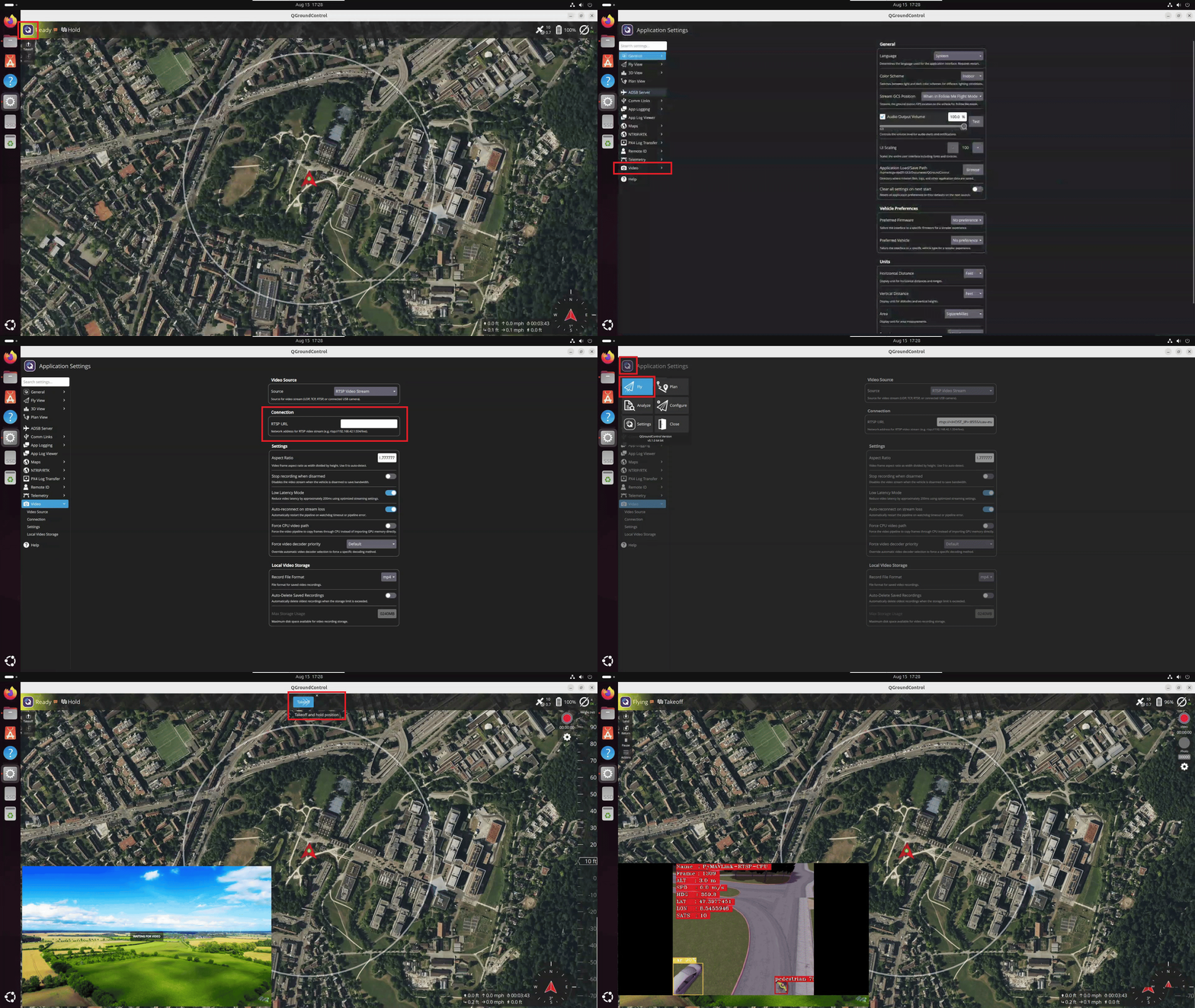
Steps to enable QGroundControl to connect to the UAV Vision Analytics application video stream.
RTSP Stream#
In QGroundControl, Click on Left top Q icon → Settings → Video → Source
→ select "RTSP Video Stream" in the dropdown. Then in RTSP URL enter the URL
for the desired pipeline.
URL for all three device pipelines (CPU/GPU/NPU):
rtsp://<HOST_IP>:8555/uav-mavlink-cpu   # CPU
rtsp://<HOST_IP>:8555/uav-mavlink-gpu   # GPU
rtsp://<HOST_IP>:8555/uav-mavlink-npu   # NPU
Note
Make sure make start-rtsp is running in the DLSPS container before
attempting to connect QGroundControl to the RTSP stream.