Ctrl+K

Open Edge Platform

    • Open Edge Platform Overview
    • Metro
    • Manufacturing
    • Retail
    • Robotics
    • Education
    • Health and Life Sciences
    • Federal and Aerospace
    • Libraries, Tools, Services
    • DL Streamer
    • Scenescape
    • ViPPET
    • Edge Microvisor Toolkit
    • Image Composer Tool
  • Open Edge Platform Overview
  • Metro
  • Manufacturing
  • Retail
  • Robotics
  • Education
  • Health and Life Sciences
  • Federal and Aerospace
  • Libraries, Tools, Services
  • DL Streamer
  • Scenescape
  • ViPPET
  • Edge Microvisor Toolkit
  • Image Composer Tool

Section Navigation

Tools

  • Scenescape
  • VIPPET
  • Geti
  • Geti Instant Learn

Libraries

  • DL Streamer
  • Anomalib
  • Datumaro
  • PLCopen Motion Control
    • RTmotion Library
      • Installation & Setup
        • System Requirements
        • OS Setup
        • Real-Time in Linux
      • RTmotion Concept and Application Interface
    • Notices and Disclaimers
  • EtherCAT Master Stack
  • Robot Motion Control Task
  • Video Chunking Utils
    • Release Notes
  • Adaptive Token Compressor
    • Lingua Server — Docker Compose Deployment
    • Tool Predictor — Bring Your Own vLLM Docker Compose
    • Adaptive Token Compressor — Guide
    • Release Notes

Microservices

  • Agent Quality Handler
    • Get Started
      • System Requirements
    • How It Works
    • Build From Source
    • How to Integrate
    • API Reference
    • Troubleshooting
    • Release Notes
  • Alert Agent Service
    • Get Started
      • System Requirements
    • How It Works
    • API Reference
    • Release Notes
  • Audio Analyzer
    • Get Started
      • System Requirements
      • Configuration
      • Build From Source
      • Run With Docker Compose
      • Run On the Host
    • How It Works
    • API Reference
    • Troubleshooting
    • Release Notes
  • DL Streamer Pipeline Server
    • Get Started
      • System Requirements
      • Environment Variables
      • Build from Source
      • Deploy with Helm
    • How-to Guides
      • Manage Pipeline
      • Autostart Pipelines
      • Change Deep Learning Streamer Pipeline
      • Run Configurable Pipelines
      • Run UDF Pipelines
      • Use CPU for Inference
      • Use GPU or NPU for Inference
      • Use Image File as Source over REST Payload
      • Use RTSP Camera as Source
      • Download and Run YOLO Models
      • Publish Frames to S3 Storage
      • Publish Data over MQTT
      • Publish Metadata to InfluxDB
      • Stream Frames over WebRTC
      • Publish Metadata over ROS2
      • Add System Timestamps to Metadata
    • Advanced User Guide
      • Basic Deep Learning Streamer Pipeline Server Configuration
      • REST API guide
        • REST Endpoints Reference Guide
        • Defining Media Analytics Pipelines
        • Customizing Pipeline Requests
      • Cameras
        • RTSP Cameras
      • File Ingestion
        • Image Ingestion
        • Video Ingestion
        • Multifilesrc Usage
      • User Defined Functions (UDF)
        • UDF Writing Guide
        • Configuring udfloader element
      • Publishers
        • MQTT Publishing via gvapython
        • MQTT Publishing
        • OPCUA Publishing post pipeline execution
        • S3 Frame Storage
      • How To Advanced
        • Object tracking with UDF
        • Enable HTTPS for DL Streamer Pipeline Server (Optional)
        • Performance Analysis (Latency)
        • Pinning the DL Streamer Pipeline Sever to CPU cores
        • Get Tensor Vector Data
        • Run Multistream Pipelines with Shared Model Instance
        • Cross Stream Batching
        • Enable Open Telemetry
        • Working with other services
    • API Reference
    • Troubleshooting
    • Release Notes
      • Release Notes 2025
      • Release Notes 2024
  • Document Ingestion - PGVector
    • Get Started
      • System Requirements
    • Build and customize options
    • API Reference
    • Release Notes
  • Inference Router
    • Quick Start Guide
    • Policy Based Router Usage
    • Plugins
    • API Reference
    • Release Notes
  • Metrics Manager
    • Get Started
      • System Requirements
      • Building from Source
      • Helm Deployment
      • Environment Variables
      • Custom Metrics Scripts
      • Testing Guide
    • How It Works
    • API Reference
    • Troubleshooting
    • Release Notes
  • Model Download
    • Get Started
      • Migrate from Model Registry
      • System Requirements
      • Startup
      • Ephemeral Container
      • Build from Source
      • Deploy with Helm Chart
    • Run Unit Tests
    • API Reference
    • Release Notes
      • Release Notes 2025
  • Multimodal Embedding Serving
    • Get Started
      • System Requirements
      • Build from Source
    • SDK Usage Guide
    • Wheel-Based Installation Guide
    • Supported Models
    • API Reference
    • Release Notes
      • Release Notes 2025
  • Semantic Search Agent
    • Get Started
      • System Requirements
      • Configuration Guide
      • Build From Source
      • Run With Docker Compose
      • Run On the Host
    • How It Works
    • API Reference
    • Troubleshooting
    • Release Notes
  • Text To Speech
    • Get Started
      • System Requirements
      • Configuration
      • Run With Docker Compose
    • How-to Guides
      • Run On the Host
      • Build From Source
    • How It Works
    • API Reference
    • Troubleshooting
    • Release Notes
  • Time Series Analytics
    • Get Started
      • System Requirements
      • Deploy with Helm
    • How It Works
    • Access Microservice API
    • Configure Microservice
    • API Reference
    • Release Notes
      • Release Notes 2025
  • Vector Retriever
    • Get Started
      • System Requirements
      • Build from Source
    • How It Works
    • How To Add New Backend
    • API Reference
    • Filter Grammar Reference
    • Release Notes
  • Vector Retriever - milvus
    • Get Started Guide
      • System Requirements
    • API Reference
    • Release Notes
      • Release Notes 2025
  • Multimodal Data Preparation for Retrieval
    • Get Started
      • System Requirements
      • Build from Source
    • Pluggable Backends
    • How It Works: Architecture
    • How It Works: Ingestion Flow
    • Telemetry Metrics
    • API Reference
    • Troubleshooting
    • Release Notes
  • Visual Data Preparation For Retrieval - Milvus
    • Get Started Guide
      • System Requirements
    • API Reference
    • Release Notes
  • Multi-level Video Understanding
    • Get Started
      • System Requirements
      • Build from Source
      • Adding Swap Space
    • API Reference
    • Release Notes
      • Release Notes 2025
  • Behavioral Analysis
    • Get Started
      • Build from Source
      • Configuration
      • Run with Docker Compose
      • Run Standalone
      • System Requirements
    • How It Works
    • Integration Guide
    • API Reference
    • Troubleshooting
    • Release Notes
  • Scene Understanding Service
    • Get Started
      • System Requirements
      • Configuration
      • Build From Source
      • Run With Docker Compose
      • Run On the Host
    • How It Works
    • Integration Contract
    • API Reference
    • Troubleshooting
    • Release Notes

Sample Applications

  • Chat Q&A Core
    • Get Started
      • System Requirements
    • How to Build from Source
    • How to deploy with Helm
    • Benchmarks
    • API Reference
    • Release Notes
      • Release Notes 2025
  • Document Summarization
    • Get Started
      • System Requirements
    • Architecture
    • How to Build from Source
    • How to deploy with Helm
    • How to Test Performance
    • API Reference
    • Troubleshooting
    • Release Notes
      • Release Notes 2025
  • Video Search and Summarization
    • Get Started
      • System Requirements
    • How It Works
      • Video Search
      • Video Summarization
      • Video Search and Summarization
    • How to Build from Source
    • How to Deploy with Helm* Chart
    • Deploy VSS with vLLM
    • Directory Watcher Service Guide
    • API Reference
    • MCP Server for VSS
    • Troubleshooting
    • Release Notes
      • Release Notes 2025

Frameworks

  • Edge Device Enablement Framework
    • Get Started
    • Release Notes
    • Acronyms

Model Deployment

  • OpenVINO
  • OpenVINO Model Server

---------------

  • Intel® Edge System Qualification
  • Get Help or Contribute
  • Edge AI Libraries
  • Video Search and Summarization
  • How It Works
  • Video Search

Video Search#

The application is built on a modular microservices approach using the LangChain framework.

System architecture
*Figure 1: Video Search mode system architecture

Pipeline Components#

The following are the Video Search pipeline’s components:

  • Video Search UI: You can use the reference UI to interact with and raise queries to the Video Search sample application. You can mark a query to run in the background for the current video corpus or all incoming videos.

  • Visual Data Prep. microservice: The sample Visual Data Prep. microservice allows ingestion of video from the object store. The ingestion process creates embeddings of the videos and stores them in the preferred vector database. The modular architecture allows you to customize the vector database; the sample application supports both Visual Data Management System (VDMS) and Milvus. The raw videos are stored in the MinIO object store, which is also customizable.

  • Video Search backend microservice: The Video Search backend microservice orchestrates a query. It delegates the vector similarity search to the Vector Retriever microservice and then aggregates the returned frame matches into ranked video segments for the response.

  • Vector Retriever microservice: The Vector Retriever microservice owns all vector similarity search for the search path. It embeds the user query, retrieves the best-matching frames from the active vector database, and returns them to the Video Search backend. It is vector-database agnostic — the same interface serves both the VDMS and Milvus backends (one backend-flavored image per database), so the Video Search backend holds no vector-database client of its own.

  • Embedding inference microservice: The OpenVINO™ toolkit-based microservice runs embedding models on the target Intel® hardware.

  • Reranking inference microservice: Though an option, the reranker is currently not used in the pipeline. The OpenVINO™ model server runs the reranker models.

Note: Although the reranker is shown in the figure, support for the reranker depends on the vector database used. The default Video Search pipeline uses the VDMS vector database, where there is no support for the reranker. See details on the system architecture below.

Detailed Architecture#

The Video Search pipeline combines core LangChain application logic and a set of microservices. The following figures show the architecture.

Video Ingestion Architecture#

Video ingestion technical architecture

Video Query Architecture#

Video query technical architecture

The Video Search UI communicates with the Video Search backend microservice. The Embedding microservice is provided as part of Intel’s Edge AI inference microservices catalog, supporting open-source models that can be downloaded from model hubs, for example Hugging Face Hub models that integrate with OpenVINO™ toolkit.

The Visual Data Prep. microservice ingests common video formats, converts them into embedding space, and store them in the vector database. You can also save a copy of the video to the object store.

Application Flow#

  1. Input Sources:

    • Videos: The Visual Data Prep. microservice ingests common video formats. Currently, the ingestion only supports video files; it does not support live-streaming inputs.

  2. Create Context

    • Upload input videos: The UI microservice allows you to interact with the application through the defined application API, and provides an interface for you to upload videos. The application stores the videos in the MinIO database. Videos can be ingested continuously from pre-configured folder locations, for surveillance scenarios.

    • Convert to embeddings space: The Video Ingestion microservice creates the embeddings from the uploaded videos using the embedded microservice. The application stores the embeddings in Visual Data Management System (VDMS).

  3. Query Flow

    • Input a query: The UI microservice provides a prompt window for user queries that can be saved. You can enable up to eight queries to run in the background continuously on any new video being ingested. This is a critical capability for agentic reasoning.

    • Execute the Video Search pipeline: The Video Search backend microservice does the following to generate the output response:

      • Delegates the query to the Vector Retriever microservice, which converts the query into an embedding space using the Embeddings microservice.

      • The Vector Retriever does a semantic retrieval to fetch the relevant frames from the vector database (top-k, with k being configurable) and returns them to the Video Search backend, which aggregates them into ranked video segments. Does not use a reranker microservice currently.

  4. Generate the Output:

    • Response: The application sends the search results, including the retrieved video from object store, to the UI.

    • Observability dashboard: If set up, the dashboard displays real-time logs, metrics, and traces, which shows the application’s performance, accuracy, and resource consumption.

The following figure shows the application flow, including the APIs and data sharing protocols: Data flow figure
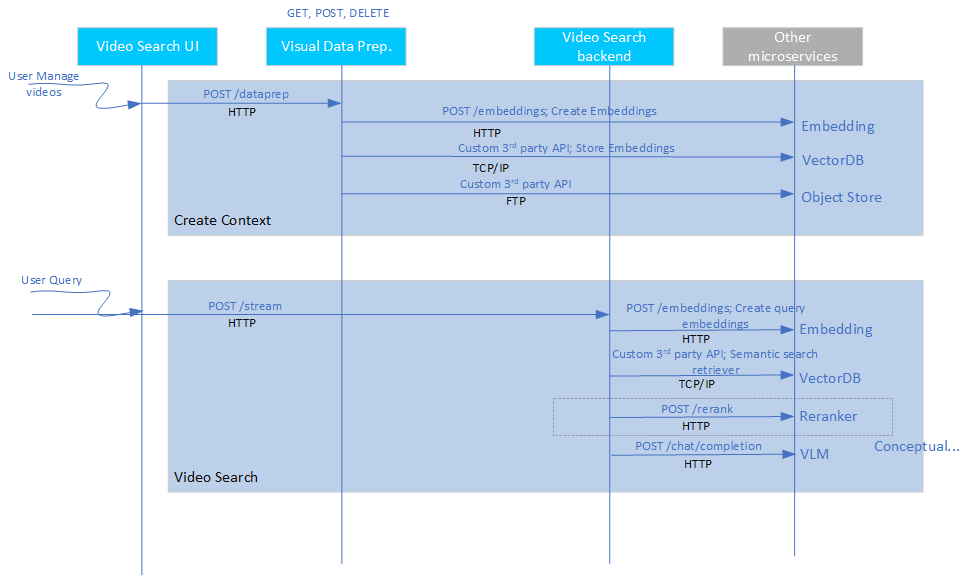
*Data flow for Video Search mode

Key Components and Their Roles#

The key components of the Video Search mode are as follows:

  1. Intel’s Edge AI Inference microservices:

    • What it is: Inference microservices are the embeddings and reranker microservices that run the chosen models on the hardware, optimally.

    • How it is used: Each microservice uses OpenAI APIs to support their functionality. The microservices are configured to use the required models and are ready. The Video Search backend accesses these microservices in the LangChain application, which creates a chain out of these microservices.

    • Benefits: Intel guarantees that the sample application’s default microservices configuration is optimal for the chosen models and the target deployment hardware. Standard OpenAI APIs ensure easy portability of different inference microservices.

  2. Visual Data Prep. microservice:

    • What it is: This microservice ingests videos, creates the necessary context, and retrieves the right context based on user query.

    • How it is used: Video ingestion microservice provides a REST API endpoint that can be used to manage the contents. The Video Search backend uses this API to access its capabilities.

    • Benefits: The core part of the video ingestion functionality is the vector handling capability that is optimized for the target deployment hardware. You can select the vector database based on performance considerations. You can treat this microservice as a reference implementation.

  3. Video Search backend microservice:

    • What it is: Video Search backend microservice orchestrates Video Search’s Retrieval-Augmented Generation (RAG) pipeline, which handles user queries. It delegates vector similarity search to the Vector Retriever microservice and aggregates the returned frame matches into ranked video segments.

    • How it is used: The UI frontend uses a REST API endpoint to send user queries and trigger the Video Search pipeline.

    • Benefits: This microservice provides a reference query-orchestration and aggregation layer that stays vector-database agnostic by delegating retrieval.

  4. Vector Retriever microservice:

    • What it is: A standalone, vector-database-agnostic retrieval microservice that embeds the query and performs the vector similarity search against the active vector database (VDMS or Milvus).

    • How it is used: The Video Search backend calls its REST /query endpoint for every search; the retriever is part of the search stack for every backend. The backend flavor is selected at build time (one image per database), so switching databases needs no change to the Video Search backend.

    • Benefits: Centralizes all vector-database coupling in one reusable microservice, making it easy to add new vector databases without touching the search backend.

  5. Video Search UI:

    • What it is: A reference frontend interface for you to interact with the Video Search pipeline.

    • How it is used: The UI microservice runs on the deployed platform on a certain configured port. You can access the specific URL to use the UI.

    • Benefits: You can treat this microservice as a reference implementation.

Extensibility#

The Video Search mode is modular and allows you to:

  1. Change inference microservices:

    • The default option is OpenVINO™ model server. You can use other model servers, for example the Virtual Large Language Model (vLLM) with OpenVINO model server as backend, and the Text Generation Inference (TGI) toolkit to host Embedding and Vision-Language Models (VLMs) but Intel has not validated this method.

    • The compulsory requirement is OpenAI API compliance. Intel does not guarantee that other model servers can provide the same performance compared to the default options.

  2. Load different embedding and reranker models:

    • Use models from Hugging Face Hub that integrate with OpenVINO toolkit, or from vLLM model hub. The models are passed as parameters to the corresponding model servers.

  3. Use other generative AI frameworks like the Haystack framework and LlamaIndex tool:

    • Integrate the inference microservices into an application backend developed on other frameworks similar to the LangChain framework integration provided in this sample application.

  4. Deploy on diverse target Intel® hardware and deployment scenarios:

    • Follow the system requirements guidelines on the options available.

Next Steps#

  • System requirements

  • Get Started

On this page
  • Pipeline Components
  • Detailed Architecture
    • Video Ingestion Architecture
    • Video Query Architecture
    • Application Flow
  • Key Components and Their Roles
  • Extensibility
  • Next Steps

This Page

  • Show Source
Enable cookies to use AI chat
Chat is locked. Click the blue chat button, then enable Functional cookies to unlock it.