How It Works: Architecture Overview#
Multimodal DataPrep turns raw media — videos and images — plus associated text summaries into searchable embeddings that conform to the requirements of the VSS Search microservice. The architecture is intentionally modular so that each stage can scale independently or be swapped out without changing the API surface. The service is vector-database agnostic and storage agnostic: the vector store and the object storage are each selected at startup behind a factory (see Pluggable Backends).
Architecture Overview#
High-Level Architecture Diagram#
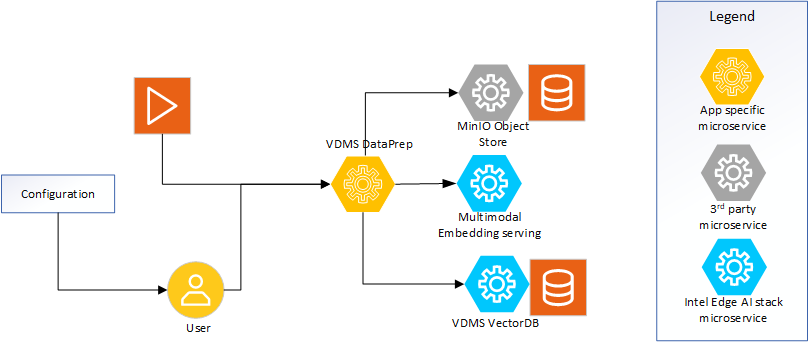
Figure 1: High-level system view demonstrating the microservice.
Core Components#
Multimodal DataPrep (this service) – A FastAPI application mounted at
/v1/dataprep. It orchestrates media intake, frame extraction (video), object detection, in-process embedding generation, manifest storage, and metadata management.Multimodal Embedding package – The local package dependency (
multimodal-embedding-serving) is imported directly so CLIP-style models are loaded in-process by DataPrep and used to embed both video frames and images.Vector database (pluggable) – The central vector store persists frame, image, crop, and summary embeddings along with metadata (
video_url, tags, timestamps, and acontent_typeofvideo/image/text). Backend is chosen withMM_DATAPREP_VECTORDB_BACKEND(vdmsdefault, ormilvus) via LangChain integrations. The collection name defaults tovideo-rag-testand can be overridden viaMM_DATAPREP_DB_COLLECTION.Object storage (pluggable) – Persistent storage for the raw media assets and temporary caches. Backend is chosen with
MM_DATAPREP_STORAGE_BACKEND(miniodefault, orlocalfilesystem). Buckets are validated/created on demand through the storage factory.
Inputs#
Direct media uploads through
POST /v1/dataprep/media/upload— a multipart binary upload of a video (MP4) or an image (JPG/PNG/WEBP/BMP/GIF). The service streams the bytes into storage and keeps them in memory for processing.Image JSON ingestion through
POST /v1/dataprep/media/ingest— a typed JSON body that carries an image as inline base64 (type=image_base64) or a remote URL (type=image_url) that the service downloads. This mirrors the multimodal-embedding-serving typed-input discriminator.Stored-media references through
POST /v1/dataprep/media/processfor content already present in object storage. The request only needs the bucket name and directory (video_id).Batch ingestion through the async job engine:
POST /media/upload/batch(many files),POST /media/ingest/batch(many JSON image sources),POST /media/process/batch(many already-stored items), andPOST /media/ingest-dir(a mounted directory). Each returns202 Acceptedwith ajob_idpolled atGET /media/jobs/{job_id}.Text summaries through
POST /v1/dataprep/summary. These requests reference an existing video and enrich it with timestamp-aligned text metadata and tags.RTSP streams through
POST /v1/dataprep/media/rtsp(video only).
Processing Pipeline#
Request validation & sanitation – All payloads are validated using the Pydantic models in
src/common/schema.py. Optional request overrides (frame_interval,enable_object_detection,detection_confidence,tags) are normalized at this stage. For base64/URL images, the decoded bytes are the trust boundary: the real format is sniffed to derive the stored extension (client-declared type is never trusted) and size is capped.Deduplication (optional) – When
MM_DATAPREP_ALLOW_DUPLICATE_UPLOADS=false, a content SHA-256 is computed and matched against a per-bucket hash marker; identical content is rejected with409 Conflict.Media-kind dispatch – The media type is detected from the file. Videos go through frame extraction; images skip extraction and are embedded directly.
Video – frame extraction:
src/core/utils/video_utils.pyreads the video via decord, sampling every Nth frame and saving crops when object detection is enabled.Image – direct embed: the whole image is embedded once (
frame_type=full_frame); when object detection is enabled, each detected crop is embedded separately — mirroring the per-frame crop contract used for video.
Object detection – YOLOX models are loaded once per worker and reused. Detection can be toggled per request or globally via
MM_DATAPREP_ENABLE_OBJECT_DETECTION, and applies to both video frames and images.Embedding generation – The service runs the in-process embedding pipeline, fans out work across multiple threads (
MM_DATAPREP_MAX_PARALLEL_WORKERS), and stores embeddings in bulk. All embeddings are stamped with download URLs, timestamps,content_type, and detector metadata.Metadata persistence –
metadata_utilswrites manifests and per-record metadata, then hands them to the embedding client (EmbeddingClient) for storage via the selected vector-store backend.
Outputs#
Embeddings & metadata persisted in the vector database with references back to the originating media (
video_id,video_name), frame numbers (video), crop details,content_type, and optional tags.Raw media stored under
{video_id}/{filename}with download links exposed viaGET /v1/dataprep/media/download(HTTP Range/seek supported).Operational responses that report the number of embeddings stored and success/error status for clients. Batch surfaces additionally report per-item results.
Supporting Resources#
Pluggable Backends - Vector-database and storage backend selection
How It Works: Media Ingestion Flow - Detailed flow diagrams of the video and image processing pipelines