Get Started with Edge Orchestrator#
Set up the following system and hardware configuration before installing Edge Orchestrator:
System Requirements#
Domain#
A domain name is required for Edge Orchestrator installation.
For typical on-premises deployments, where both EMF and edge nodes are on a local network, an internal private domain is sufficient.
If EMF is hosted by a third party for multiple tenants, and access between the end customer, EMF, and edge nodes occurs over the internet, an external public domain is required.
The domain name must be unique and not used by any other service in the network. The domain name must be a fully qualified domain name (FQDN) and not an IP address.
Edge Orchestrator Network Topology#
Warning
Ensure that there are no incorrect configurations while setting up your DNS server for Edge Orchestrator. Incorrect configurations can lead to deployment failures. Specifically, the RKE2 (the kubernetes distribution used for EMF on-prem cluster) might start using the 8.8.8.8 server for DNS resolution, if no other DNS server is configured correctly.
Avoid configuring /etc/resolv.conf and /run/systemd/resolve/resolv.conf to point exclusively to loopback or multicast nameservers. This can cause issues during deployment.
Ensure that the service_cidr subnet specified in the installation guide does not overlap with any existing subnets in your infrastructure. For example, if the k8s service_cidr includes the IP 10.43.0.10, ensure this IP is not used as a DNS server in the OS or for any critical network communications in your environment.
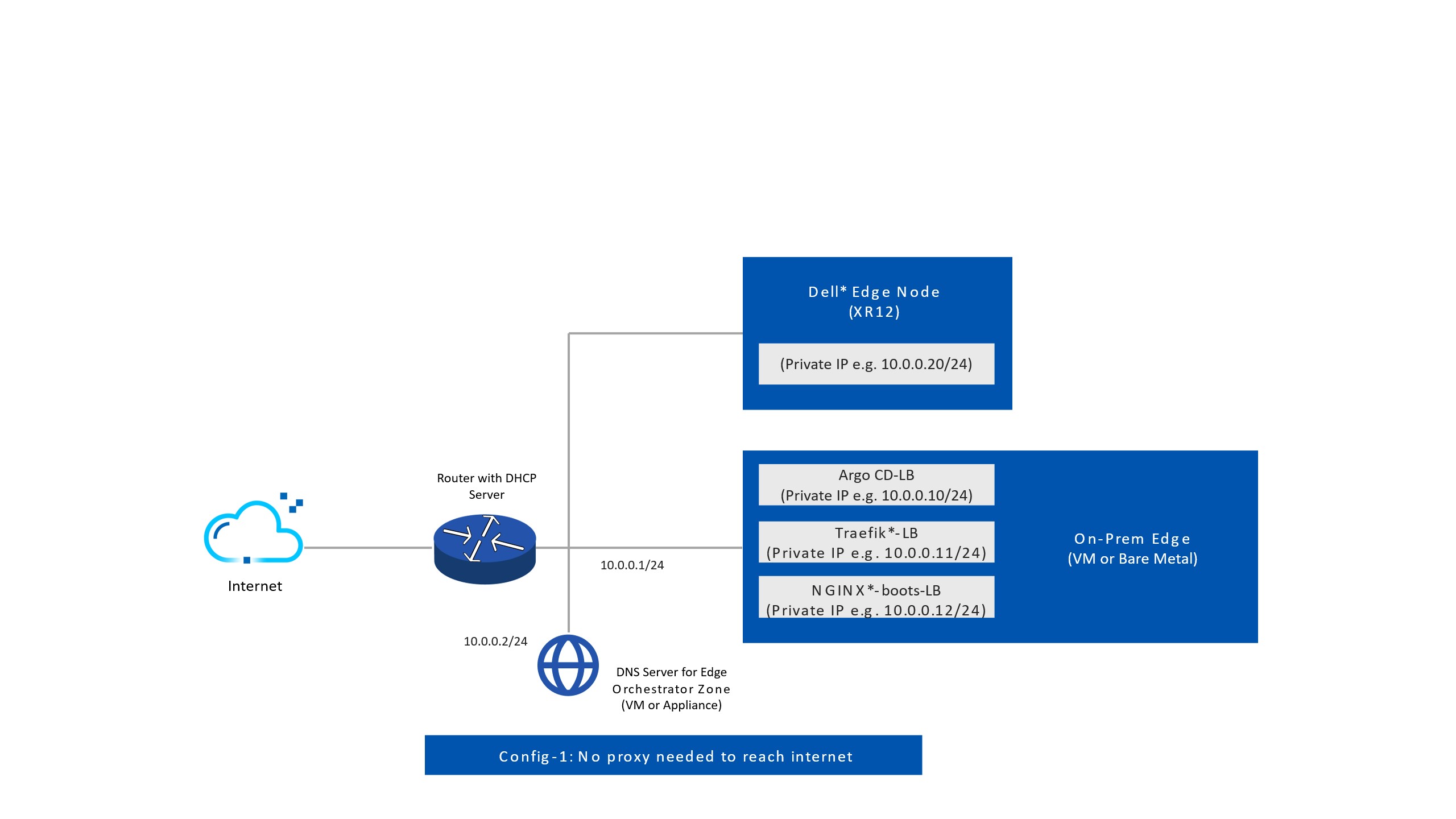
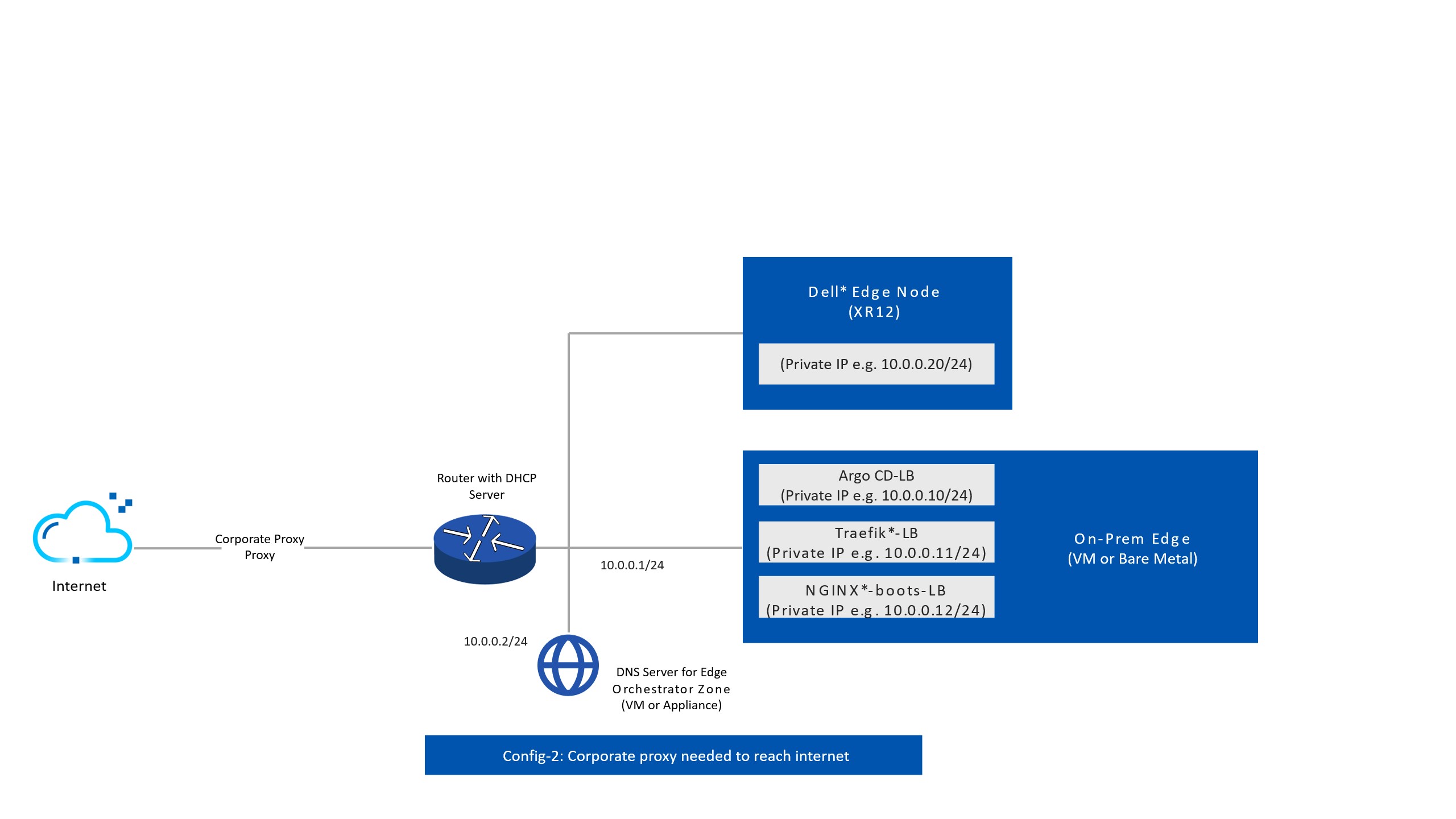
Edge Orchestrator Network Topology with Corporate Proxy#
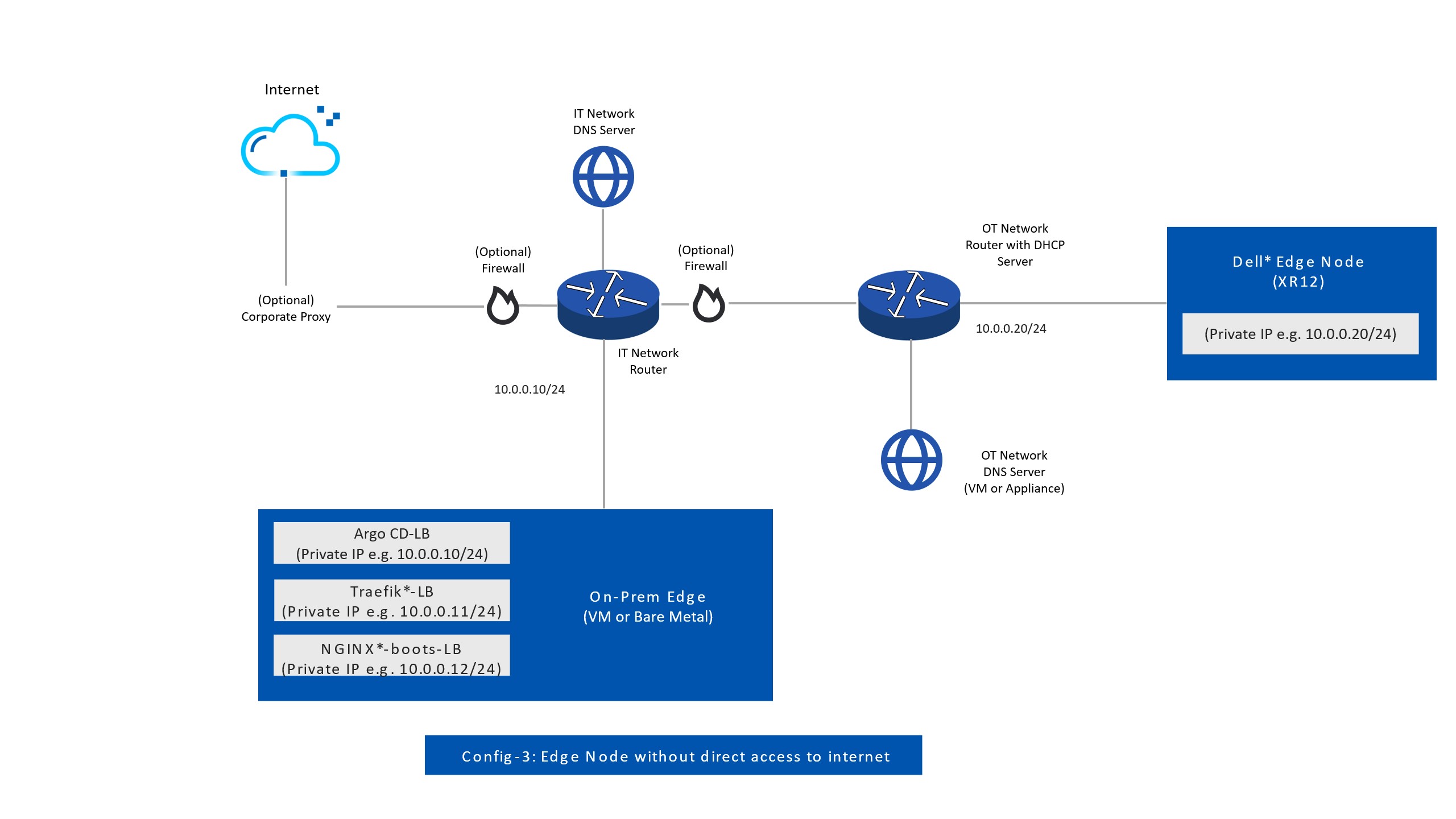
Edge Orchestrator for Edge Nodes without Direct Internet Access#
Firewall Configuration#
The following table lists the network endpoints for Edge Orchestrator and edge nodes, which you can use to configure firewall rules tailored to your network environment.
BIOS Onboarding accesses
tinkerbell-haproxy.{domain}.You can access all other services from edge nodes agents, UI, and APIs of Edge Orchestrator.
Source |
Destination |
Protocol |
Port number |
Description |
|---|---|---|---|---|
Edge Orchestrator UI and API |
{domain} |
TCP |
443 |
Web UI |
Edge Orchestrator UI and API |
web-ui.{domain} |
TCP |
443 |
Web UI |
Edge Orchestrator API |
api.{domain} |
TCP |
443 |
Tenancy API |
Edge Orchestrator UI and API |
metadata.{domain} |
TCP |
443 |
Web UI |
Edge Orchestrator UI and API |
iaas.{domain} |
TCP |
443 |
Edge infrastructure management |
Edge Orchestrator UI and API |
infra.{domain} |
TCP |
443 |
Edge infrastructure management |
Edge Orchestrator UI and API |
onboarding.{domain} |
TCP |
443 |
Edge infrastructure management |
Edge Orchestrator UI and API |
update.{domain} |
TCP |
443 |
Edge infrastructure management |
Edge Orchestrator UI and API |
keycloak.{domain} |
TCP |
443 |
Identity and Access Management |
Edge Orchestrator UI and API |
vault.{domain} |
TCP |
443 |
Vault* UI |
Edge node |
infra-node.{domain} |
TCP |
443 |
Edge infrastructure management |
Edge node |
onboarding-node.{domain} |
TCP |
443 |
Edge infrastructure management |
Edge node |
release.{domain} |
TCP |
443 |
Release service token |
Edge node |
tinkerbell-server.{domain} |
TCP |
443 |
Onboarding |
Edge node |
update-node.{domain} |
TCP |
443 |
Edge infrastructure management |
Edge node |
tinkerbell-haproxy.{domain} |
TCP |
443 |
BIOS onboarding |
Firewall Configuration for Edge Orchestrator and Edge Node#
To install Edge Orchestrator and Edge Node, the following Egress rules are required:
Source |
Destination |
Description |
|---|---|---|
Edge Orchestrator |
Container images |
|
Edge Orchestrator |
Container images |
|
Edge Orchestrator |
Container images |
|
Edge Orchestrator |
Container images |
|
Edge Orchestrator |
Container images |
|
Edge Orchestrator |
Container images |
|
Edge Orchestrator |
Container images |
|
Edge Orchestrator |
Helm Chart |
|
Edge Orchestrator |
Helm Chart |
|
Edge Orchestrator |
Helm Chart |
|
Edge Orchestrator |
Helm Chart |
|
Edge Orchestrator |
Helm Chart |
|
Edge Orchestrator |
Helm Chart |
|
Edge Orchestrator |
Helm Chart |
|
Edge Orchestrator |
Helm Chart |
|
Edge Orchestrator |
Helm Chart |
|
Edge Orchestrator |
Helm Chart |
|
Edge Orchestrator |
Helm Chart |
|
Edge Node |
Onboarding |
|
Edge Node |
Onboarding |
|
Edge Node |
Onboarding |
|
Edge Node |
Onboarding |
|
Edge Node |
Onboarding |
|
Edge Node |
Onboarding |
|
Edge Node |
Onboarding |
|
Edge Node |
Onboarding |
|
Edge Node |
Onboarding |
|
Edge Node |
Onboarding |
|
Edge Node |
Onboarding |
|
Edge Node |
Onboarding |
|
Edge Node |
Onboarding |
|
Edge Node |
Onboarding |
|
Edge Node |
Onboarding |
|
Edge Node |
Onboarding |
|
Edge Node |
Onboarding |
|
Edge Node |
Onboarding |
|
Edge Node |
Onboarding |
|
Edge Node |
Onboarding |
|
Edge Node |
Onboarding |
|
Edge Node |
Onboarding |
|
Edge Node |
Onboarding |
|
Edge Node |
Onboarding |
|
Edge Node |
Onboarding |
|
Edge Node |
Onboarding |
|
Edge Node |
Onboarding |
|
Edge Node |
Onboarding |
|
Edge Node |
Onboarding |
|
Edge Node |
Onboarding |
Squid Proxy Firewall Configuration (Optional)#
When deploying Edge Orchestrator with Squid proxy, you will need an additional firewall entry to allow the edge node to reach the Squid proxy. Intel recommends that only the edge node subnet is allowed to access the Squid proxy endpoint.
Source |
Destination |
Protocol |
Port Number |
Description |
|---|---|---|---|---|
Edge node |
{IP of Traefik endpoint in Edge Orchestrator} |
TCP |
8080 |
Squid proxy |