Adaptive Token Compressor — Guide#
This guide covers installation, a quick start, configuration reference, compressor principles and workflow, available metrics, single- and multi-compressor metrics collection, testing, and resources.
Table of Contents#
Prerequisites#
This library requires the following services:
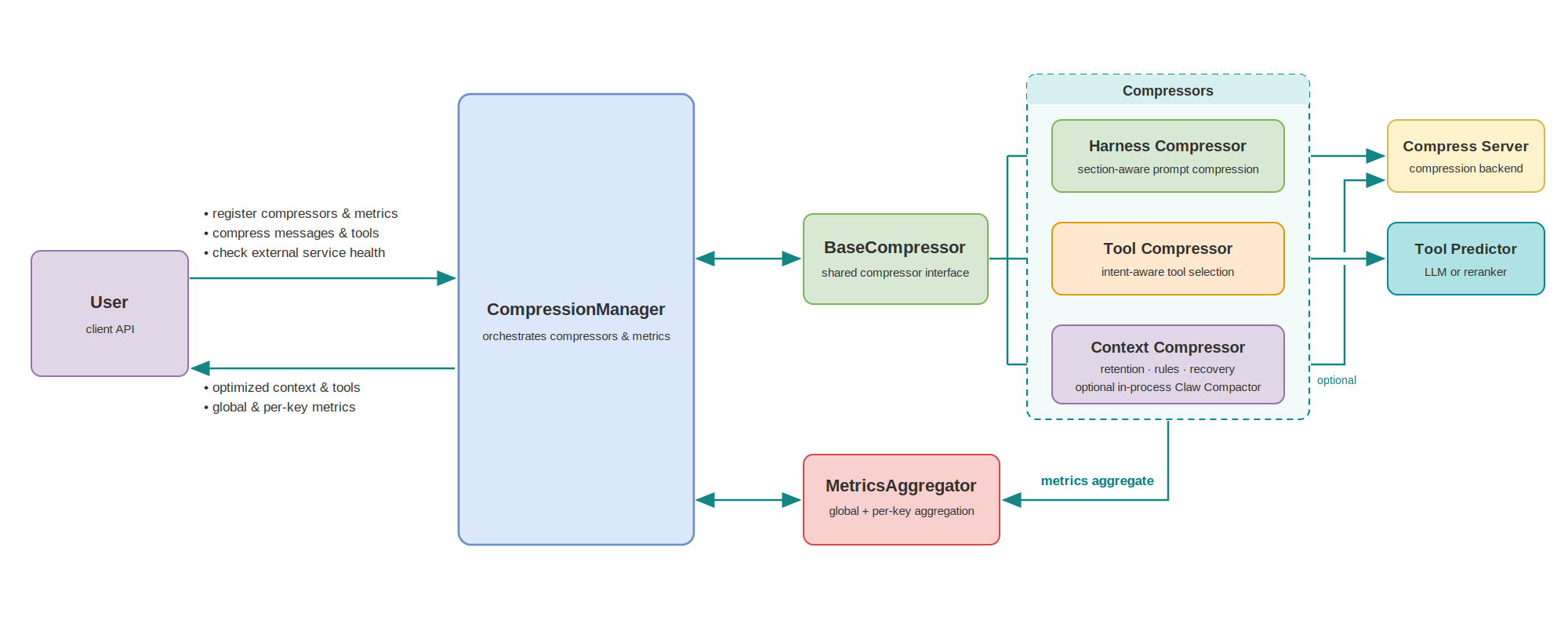
Compress Server - Required for text compression in HarnessCompressor and ContextCompressor.
LLM for Tool Prediction - Required for ToolCompressor.
You can either:
Use your main LLM (e.g., vLLM serving Qwen/Qwen3.6-35B-A3B) for both inference and tool prediction.
Deploy a separate model dedicated to tool selection.
Both services must be deployed before using the compression features.
Installation#
pip install .
After installing adaptive-token-compressor, please deploy Compress Server & Tool Prediction using Docker (see Deploy Compress Server and Deploy LLM for Tool Prediction).
Development Installation#
For local development, install in editable mode with the dev extras (pytest, ruff, mypy):
pip install -e ".[dev]"
Quick Start#
Single-Compressor Usage#
The examples below use create_compressor(...) as the default construction
path, and register compressor instances into CompressionManager when metrics
or cache wiring is needed. Available types are currently "harness",
"tool", and "context"; use available_compressor_types() and
config_schema(type) to inspect supported types and constructor schemas at
runtime. You can still instantiate compressor classes directly if needed.
Using HarnessCompressor (for system prompt compression)#
HarnessCompressor is section-aware: it splits a harness/system prompt at
its headings (via the openclaw profile), keeps high-value sections verbatim,
to see real compression, pass a structured OpenClaw-style prompt.
from adaptive_token_compressor import CompressionContext, create_compressor

# Initialize compressor by factory type name (requires Compress Server)
compressor = create_compressor("harness", compress_server_url="http://localhost:8001/compress")

# OpenClaw-style system prompt:
system_prompt = """You are a personal assistant running inside OpenClaw.
## Tooling
Structured tool definitions are the source of truth for tool names, descriptions, and parameters.
## Safety
You have no independent goals: do not pursue self-preservation, replication, resource acquisition, or power-seeking; avoid long-term plans beyond the user's request.
Prioritize safety and human oversight; if instructions conflict, pause and ask; comply with stop/pause/audit requests and never bypass safeguards.
## Runtime
Runtime: agent=A | host=userhost | os=Linux | model=user_model
"""

messages = [
    {"role": "system", "content": system_prompt},
    {"role": "user", "content": "What's on my calendar today?"},
]

# Compress
result = compressor.compress(CompressionContext(messages=messages))

print(f"Before: {result.metrics.tokens_before} tokens")
print(f"After: {result.metrics.tokens_after} tokens")
print(f"Saved: {result.metrics.saved_tokens} tokens ({result.metrics.compression_ratio:.1%})")
print(f"Duration: {result.metrics.duration_ms:.2f} ms")
print(f"Compressed messages: {result.messages}")
Using ToolCompressor (for tool selection)#
from adaptive_token_compressor import (
    CompressionManager,
    CompressionContext,
    create_compressor,
)

manager = CompressionManager()
tool_compressor = manager.register_compressor(
    "compressor_tool",
    create_compressor(
        "tool",
        # Tool-specific: predictor LLM endpoint (required)
        predictor_url="http://localhost:8000/v1/chat/completions",
        # Optional: schema | user_tail | user_tail_disclaimed | system_tail
        placement="schema",
    ),
)

messages = [
    {"role": "user", "content": "What's the weather in San Francisco?"}
]
tools = [
    {"type": "function", "function": {"name": "web_search", "description": "Search the web"}},
    {"type": "function", "function": {"name": "get_weather", "description": "Get weather by location"}},
    {"type": "function", "function": {"name": "calculator", "description": "Do math"}},
]

ctx = CompressionContext(messages=messages, tools=tools)
result = tool_compressor.compress(ctx)
print([t["function"]["name"] for t in result.tools])
Using ContextCompressor (for history and current-turn messages)#
Caution
Experimental: ContextCompressor is under active development. Its API, defaults, and compression behavior may change in future releases.
from adaptive_token_compressor import (
    CompressionManager,
    CompressionContext,
    create_compressor,
)

manager = CompressionManager()
context_compressor = manager.register_compressor(
    "compressor_context",
    create_compressor(
        "context",
        compression_mode="backend_only",
        compress_server_url="http://localhost:8001/compress",
    ),
)
messages = [
    {"role": "system", "content": "Very long retrieved context ..."},
    {"role": "user", "content": "Summarize the key points"}
]

ctx = CompressionContext(messages=messages)
result = context_compressor.compress(ctx, req_id="req-001")
print(result.messages[0]["content"])
More Usage#
The examples above run one compressor at a time. For more complete usage, see:
Single-Compressor Metrics Collection with CompressionManager — register metrics on one compressor and read the aggregated snapshot.
Multi-Compressor Metrics Collection with CompressionManager — chain the tool, context, and harness compressors in one request and aggregate metrics across them.
Keyed Metrics Collection with CompressionManager — aggregate the same metrics per key, for example per provider.
Available Metrics — all 15 metric types and their formulas.
Configuration#
Compress Server Configuration#
Compress Server supports the llmlingua2 mode only. COMPRESS_SERVER_MODE
and the request payload mode field are kept for compatibility and accept
llmlingua2 only.
Docker Compose Environment Variables#
Parameter |
Default |
Allowed / Notes |
|---|---|---|
|
|
|
|
|
Lowercase, shared by both services. PyTorch: |
|
|
Index within the device class. PyTorch |
|
|
Compression mode: |
|
empty |
Optional fixed model id. Empty -> |
|
|
Host port mapping for |
|
|
Host port mapping for |
|
|
Bind address for the container service |
HarnessCompressor Configuration#
Parameter |
Type |
Default |
Description |
|---|---|---|---|
|
str |
|
Registered compression profile: |
|
str |
|
Compress Server URL |
|
float |
|
Target compression rate (0.0-1.0) |
|
int |
|
Minimum chars to trigger compression; must be >= 0 |
|
float |
|
Backend request timeout (seconds); must be > 0 |
|
bool |
|
Enable Claw Compactor QuantumLock stabilization |
The constructor checks the profile, rate and numeric lower bounds, including
when called through the factory. The inclusive rate boundaries 0.0 and 1.0
remain supported. Type annotations do not enable universal runtime validation.
Example:
from adaptive_token_compressor.harness import HarnessCompressor

compressor = HarnessCompressor(
    profile="openclaw",
    compress_server_url="http://localhost:8001/compress",
    compress_rate=0.5,
    compress_min_chars=500,
    timeout=60.0
)
ToolCompressor Configuration#
Predictor Configurations#
Pick a column by how many tools a request carries and how much predictor compute you can spend. The large model saves more tool tokens; the small model is 5-15x faster but keeps more tools.
Parameter |
~20 tools, large model |
~20 tools, small model |
~30 tools, large model |
~30 tools, small model |
|---|---|---|---|---|
|
|
|
|
|
|
|
|
|
|
|
|
|
|
|
|
|
not set |
|
not set |
|
not set |
|
not set |
|
|
|
|
|
|
|
|
not used |
|
not used |
Important
Set predictor_max_output_tokens=512 whenever tool_count_level is
"medium" or "high": with the default 256 the prediction is cut off and
the tools at the end of it are dropped.
Measured results:
Configuration |
Dataset |
All needed tools kept |
Tools kept |
Tasks solved: filtered vs. all tools |
Predictor latency |
|---|---|---|---|---|---|
~20 tools, large |
PinchBench (25 tasks, 22 tools) |
97% of requests |
4.0 of 22 |
94.57% vs. 93.7% |
~2.1 s |
~20 tools, small |
PinchBench (25 tasks, 22 tools) |
97% of requests |
11.1 of 22 |
89.6% vs. 93.7% |
~0.4 s |
~30 tools, large |
BFCL v4 multi-turn (200 tasks, ~28 tools) |
91% of turns |
12.8 of 27.6 |
58.5% vs. 64.0% |
~4.4 s |
~30 tools, small |
BFCL v4 multi-turn (200 tasks, ~28 tools) |
93% of turns |
21.9 of 27.6 |
59.5% vs. 64.0% |
~0.3 s |
Large model config example (~20 tools):
from adaptive_token_compressor.tool import ToolCompressor

compressor = ToolCompressor(
    predictor_url="http://localhost:8000/v1/chat/completions",
    predictor_model="Qwen/Qwen3.6-35B-A3B",
    predictor_backend="generative",
    score_threshold=2.0,
    tool_count_level="small",          # "medium" for ~30 tools
    predictor_max_output_tokens=256,   # must be 512 with "medium"/"high"
    placement="schema",
    accumulate=True,
)
Small model config example (~20 tools):
from adaptive_token_compressor.tool import ToolCompressor

compressor = ToolCompressor(
    predictor_url="http://localhost:8001/v1/rerank",
    predictor_model="Qwen/Qwen3-Reranker-0.6B",
    predictor_backend="reranker",
    top_k=10,                          # 20 for ~30 tools
    placement="schema",
    accumulate=True,
)
All Parameters#
Parameter |
Type |
Default |
Description |
|---|---|---|---|
|
str |
Required |
Tool predictor endpoint: |
|
str |
|
Model used by predictor |
|
Literal |
|
|
|
float | None |
|
Minimum score for tool selection, in [1.0, 5.0]. Ignored when |
|
int | None |
|
Positive integer: keep the K highest-scoring tools per request instead of thresholding. If neither is set: |
|
Literal |
|
Tool-count rule in the dynamic prompt: |
|
int |
|
|
|
int | None |
|
|
|
int |
|
Predictor request timeout (seconds); must be > 0 |
|
Literal |
|
|
|
Literal |
|
|
|
Literal |
|
Where the predicted tool schema is placed. See Placement modes below. |
|
bool |
|
Union the predicted tool set per conversation (append-only, never removed/reordered) so each turn’s tool block is a strict prefix-extension of the previous turn’s — keeping the prefix cache stable while still admitting tools that only emerge in later turns. Required by |
|
int |
|
Per-conversation LRU capacity for accumulated predictions, automatic resident bindings and inline-carrier state; converted to an integer and clamped to at least 1 |
|
list[str] | Literal[“auto”] | None |
|
Only used by |
The constructor checks supported modes, score range, positive top_k and timeout,
and incompatible parameter combinations with ConfigError.
The factory delegates these checks to the constructor; it does not add a
general type or URL validator.
Placement modes:
"schema"(default, production): predicted subset returned inresult.tools, rendered inside the system message’s<tools>block by the chat template."user_inline_delta": tools appended as a trailing synthetic user message. The carrier is persisted per-conversation and re-spliced at a fixed offset each turn (prefix-cache stable), but delta-only — appends a carrier only when new tools appear, carrying just the delta over the running union. Requiresaccumulate=True.
Placement trade-offs (token saving vs. prefix cache):
schema+accumulate=True: reduces tool-schema tokens while keeping the prefix-cache hit rate from dropping significantly.user_inline_delta+accumulate=True: reduces tokens while further improving the prefix-cache hit rate (still lower than baseline). This depends on the tool-predictor model’s own capability; verified to run stably on Qwen3.5-35B.
ContextCompressor Configuration#
Caution
Experimental: Configuration options and defaults may change in future releases.
Parameter |
Type |
Default |
Description |
|---|---|---|---|
|
bool |
|
Independent assistant tool-call argument summaries |
|
int |
|
>= 0; shared by argument summaries and ordinary result processing |
|
int |
|
>= 1; advance the window boundary in batches |
|
bool |
|
Master switch: false preserves every tool result |
|
list / tuple |
|
Exact, case-sensitive tool names. Matching tool results bypass all ContextCompressor tool-result transforms |
|
bool |
|
Switch for all deterministic rules |
|
bool |
|
Status result handling |
|
bool |
|
Error simplification |
|
bool |
|
Structured search-result stripping |
|
bool |
|
Enable historical large-result replacement |
|
str |
|
|
|
int |
|
>= 1; original-size threshold |
|
int |
|
>= 1; large tool result keep window size |
|
bool |
|
Preserve reads of files targeted by write/edit anywhere in history |
|
str |
|
Routing mode from the table below |
|
int |
|
>= 0; Compress Server minimize compress chars |
|
str |
|
Compress Server URL |
|
float |
|
(0, 1]; Compress Server compress rate |
|
float |
|
> 0; request timeout in seconds |
Compression mode |
Description |
|---|---|
|
Disable Compress Server and claw-compactor compression. |
|
Use Compress Server only. |
|
Use claw-compactor only; skip compression for unsupported content. |
|
Prefer claw-compactor; use Compress Server when content is unsupported or claw-compactor compression fails. |
These modes select the compression method. Deterministic rules and large-result stubs are controlled separately.
Example:
from adaptive_token_compressor.context import ContextCompressor

compressor = ContextCompressor(
    excluded_tools=["read", "exec", "edit"],
    compression_mode="claw_with_backend",  # Explicit opt-in; requires claw-compactor
    compress_min_chars=200,
    compress_server_url="http://localhost:8001/compress",
    compress_rate=0.6,
    timeout=30.0,
)
Compressor Principles#
This section explains how each compressor works conceptually and what the runtime pipeline looks like.
HarnessCompressor#
Principle:
HarnessCompressor focuses on conversation-message compression for the prompt assembly stage. It combines lightweight rules (message slicing / role-aware handling) with model-based lossy compression for long text blocks, reducing token cost while preserving instruction-critical content.
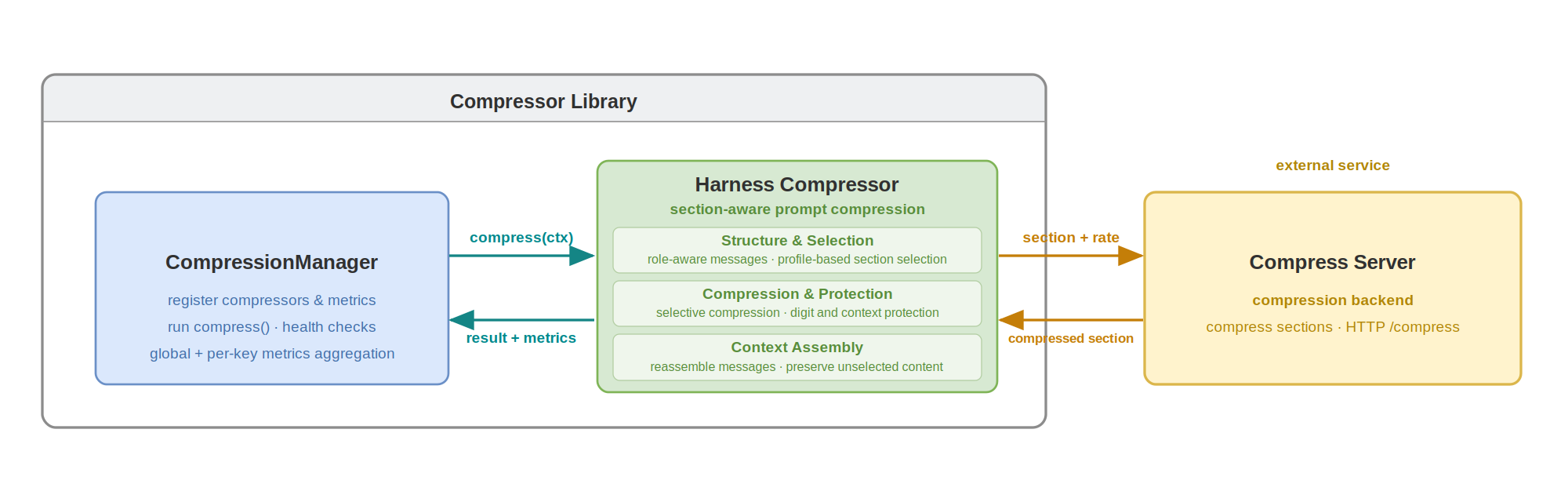
Workflow:
Input: chat messages (
system,developer,user,assistant,tool).Role-aware preprocessing: split and normalize message segments according to profile strategy.
Routing decision: short or sensitive spans are kept; compressible spans are sent to backend compression.
Backend compression:
token_prune(default, served by compress-server) applies token-budget reduction with digit-preservation controls.Merge and output: reassemble compressed messages + emit metrics.
ToolCompressor#
Principle:
ToolCompressor reduces tool-schema prompt cost by selecting only likely-needed tools for the current request. It uses an external predictor LLM to score tool relevance from conversation context, then keeps high-value tools only. The ToolCompressor supports configurable tool-injection placements to flexibly trade off token savings against prefix-cache hit rate.
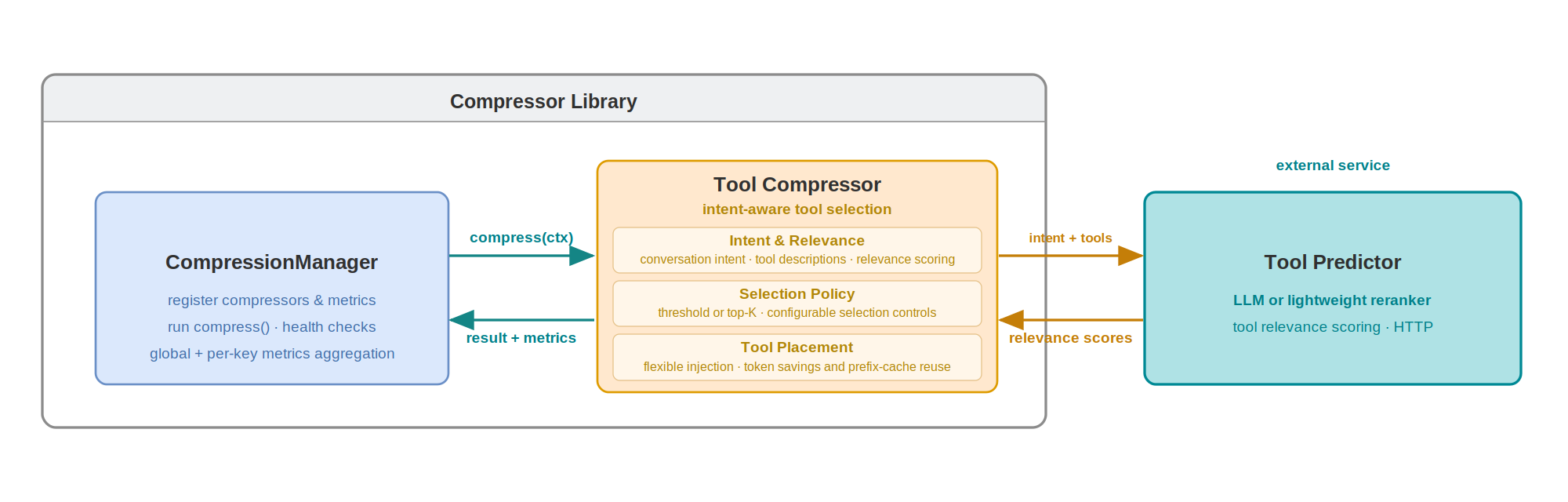
Workflow:
Input: current messages + full candidate tool list.
Prompt construction: build predictor prompt from user intent and tool descriptions.
Relevance scoring: predictor model returns per-tool likelihood/importance.
Selection: apply threshold/ranking policy to keep top tools.
Metrics: record token savings, call count, and latency.
ContextCompressor#
Caution
Experimental: Validate compression quality on your workload before adopting ContextCompressor in production.
Principle:
ContextCompressor provides turn-aware compression for long, tool-heavy conversations. It organizes messages around tool-interaction turns, keeping tool calls and their results connected rather than treating messages in isolation. Turn boundaries guide retention and compression eligibility, while selective processing of message content helps maintain continuity as the conversation evolves. For oversized historical results, configurable keep-turn protection and large-result stubs retain a recovery path instead of carrying the full output forward. The stubs explain how to retrieve omitted content, and an optional edit-aware safeguard preserves reads of files later changed in the conversation. Eligible content can also be routed to Claw Compactor or Compress Server.
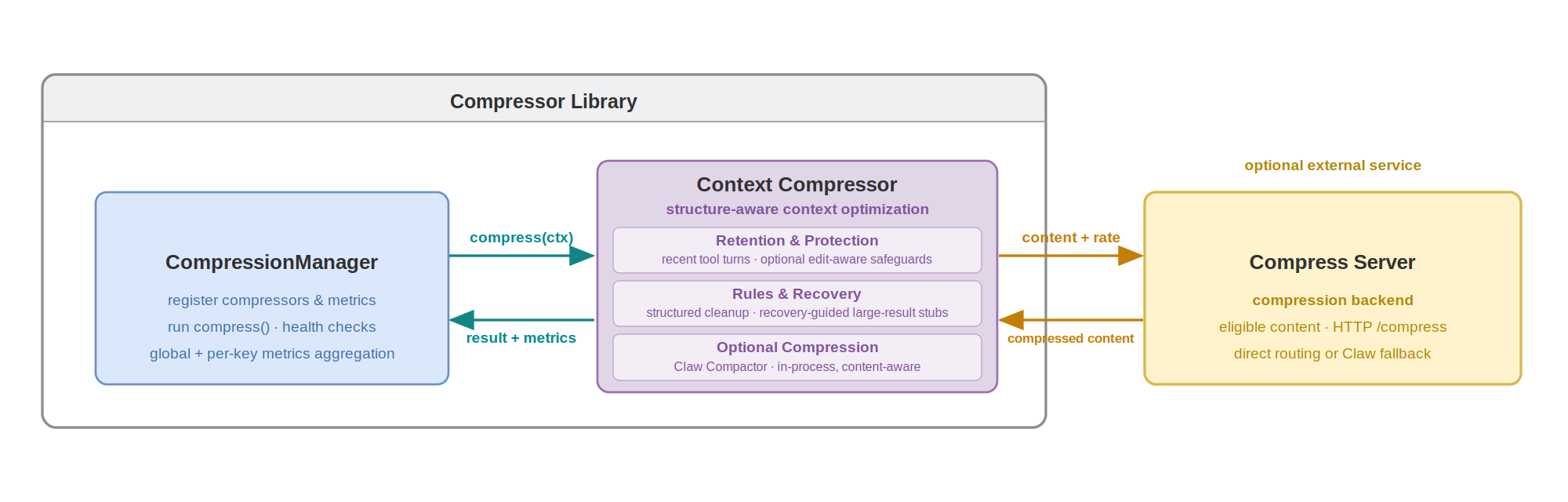
Workflow:
Identify tool-interaction turns and use their boundaries to apply configured retention and tool-result policies while preserving call-result associations.
Replace eligible oversized historical results with recovery-aware stubs, while honoring recent-turn protection and optional edit-aware safeguards.
Route remaining eligible content to the configured compression backend, then return the optimized context with structured metrics.
Available Metrics#
The library provides 15 metric types for tracking compression performance.
Most metrics require a sources parameter specifying which compressor(s) to
track by their registered names — the first argument of
register_compressor() — for example "compressor_harness" or
["compressor_harness", "compressor_tool"]. A registered name is not the
compressor type ("harness", "tool", or "context"), so several
compressors of the same type can be registered and tracked separately. The
exception is RequestCount, which is source-agnostic.
First-Order Metrics (Direct Aggregation)#
Metric |
Description |
Formula |
|---|---|---|
|
Total number of compression calls |
Sum of all calls |
|
Total input tokens |
Sum of |
|
Total output tokens |
Sum of |
|
Total tokens saved |
Sum of |
|
Total compression time |
Sum of |
Example:
manager.register_metric("total_calls", CallCount(sources="compressor_harness"))
manager.register_metric("total_saved", TotalSaved(sources=["compressor_harness", "compressor_tool"]))
Second-Order Metrics (Per-Call Averages)#
Metric |
Description |
Formula |
|---|---|---|
|
Compression ratio (lower = better) |
|
|
Average tokens saved per call |
|
|
Average duration per call |
|
|
Average input tokens per call |
|
|
Average output tokens per call |
|
Example:
manager.register_metric("ratio", CompressionRatio(sources="compressor_harness"))
manager.register_metric("avg_saved", AvgSavedPerCall(sources="compressor_tool"))
Third-Order Metrics (Per-Request Averages)#
These require passing req_id to compress(), or calling
manager.set_per_anchor("<name>") to use one compressor’s call count as the
request denominator when a metric’s sources received no req_id. Without
either, manager.snapshot() raises a RuntimeError (the denominator is
checked at snapshot time, not at registration).
req_id identifies the request a call belongs to. Calls sharing a req_id
count as one request. RequestCount reports the number of unique requests.
Each Avg*PerRequest metric divides by the unique requests that went through
its own sources only: requests that did not call any of its compressors are
not counted. For example, if request r1 calls only compressor a and r2
calls only b, each saving 40 tokens, AvgSavedPerRequest(sources="a"),
AvgSavedPerRequest(sources="b") and AvgSavedPerRequest(sources=["a", "b"])
are all 40. req_id does not split metrics per request — to group metrics by
a dimension such as provider, see
Keyed Metrics Collection.
Metric |
Description |
Formula |
|---|---|---|
|
Average tokens saved per request |
|
|
Average duration per request |
|
|
Average input tokens per request |
|
|
Average output tokens per request |
|
|
Number of unique requests (source-agnostic) |
|
Note
RequestCount is the only metric without a sources parameter — it counts unique requests, not per-compressor calls: across the whole manager in the global snapshot, and within one bucket in a keyed snapshot (see Keyed Metrics Collection). Construct it with no arguments: RequestCount().
Example:
manager.register_metric("avg_per_req", AvgSavedPerRequest(sources="compressor_harness"))
manager.register_metric("request_count", RequestCount())  # no sources arg

# Option 1: Pass req_id explicitly
harness_compressor.compress(ctx, req_id="request-123")

# Option 2: Use anchor fallback
manager.set_per_anchor("compressor_harness")
Single-Compressor Metrics Collection with CompressionManager#
Metrics collection requires using CompressionManager. Register a single
compressor, attach metrics, and read the aggregated snapshot:
from adaptive_token_compressor import (
    CompressionManager,
    CompressionContext,
    create_compressor,
    CompressionRatio,
    TotalSaved
)

# Metrics collection requires using CompressionManager
manager = CompressionManager()

# Register compressor first
harness_compressor = manager.register_compressor(
    "compressor_harness",
    create_compressor("harness", compress_server_url="http://localhost:8001/compress"),
)

# Then register metrics with names
manager.register_metric("compression_ratio", CompressionRatio(sources="compressor_harness"))
manager.register_metric("total_saved", TotalSaved(sources="compressor_harness"))

# Compress multiple requests
for i in range(5):
    messages = [...]  # Different messages each time
    ctx = CompressionContext(messages=messages)
    result = harness_compressor.compress(ctx)

# View aggregated metrics (returns dict with all registered metric names)
stats = manager.snapshot()
print(f"Compression ratio: {stats['compression_ratio']:.2%}")
print(f"Total saved: {stats['total_saved']} tokens")
Multi-Compressor Metrics Collection with CompressionManager#
Metrics support both per-source tracking (single source string) and cross-compressor aggregation (list of sources). Cross-compressor metrics let you track combined statistics — e.g. average duration per request across the harness, tool, and context compressors together.
from adaptive_token_compressor import (
    CompressionManager,
    CompressionContext,
    create_compressor,
    TotalSaved,
    AvgDurationPerRequest,
)

# Initialize manager
manager = CompressionManager()

# Register compressors first
harness_compressor = manager.register_compressor(
    "compressor_harness",
    create_compressor("harness", compress_server_url="http://localhost:8001/compress"),
)
tool_compressor = manager.register_compressor(
    "compressor_tool",
    create_compressor(
        "tool",
        predictor_url="http://localhost:8000/v1/chat/completions",
    ),
)
context_compressor = manager.register_compressor(
    "compressor_context",
    create_compressor(
        "context",
        compression_mode="backend_only",
        compress_server_url="http://localhost:8001/compress",
    ),
)

# Register one per-source metric plus two aggregate metrics
manager.register_metric(
    "compressor_harness_saved",
    TotalSaved(sources="compressor_harness")
)
manager.register_metric(
    "total_saved_all",
    TotalSaved(sources=["compressor_harness", "compressor_tool", "compressor_context"])
)
manager.register_metric(
    "avg_dur_per_request_all",
    AvgDurationPerRequest(sources=["compressor_harness", "compressor_tool", "compressor_context"])
)

# Process multiple requests
for i in range(10):
    messages = [...]  # Different messages each time
    tools = [...]     # Full tool list

    # IMPORTANT: use the SAME req_id for all compressors in one request so
    # request_count() counts unique requests, not per-compressor calls. This
    # makes avg_dur_per_request_all = total duration / number of requests.
    req_id = f"req-{i}"

    ctx = CompressionContext(messages=messages, tools=tools)

    # Compress tools
    result = tool_compressor.compress(ctx, req_id=req_id)
    ctx = CompressionContext(messages=result.messages, tools=result.tools)

    # Compress context
    result = context_compressor.compress(ctx, req_id=req_id)
    ctx = CompressionContext(messages=result.messages, tools=result.tools)

    # Compress messages
    result = harness_compressor.compress(ctx, req_id=req_id)

    # Use result.messages and result.tools for LLM inference

# View aggregated metrics (snapshot returns all registered metrics)
stats = manager.snapshot()

print(f"  Harness saved: {stats['compressor_harness_saved']} tokens")
print(f"  Total saved (all): {stats['total_saved_all']} tokens")
print(f"  Avg duration per request (all): {stats['avg_dur_per_request_all']:.1f} ms")
Reading Metrics of One Compressor#
snapshot(source="<name>") returns only the metrics of one compressor: the
metrics registered with sources set to that compressor’s registered name.
Their values are computed from that compressor’s calls only. Metric names are
free-form; the <name>.<metric> names below are only a readability
convention.
manager.register_metric("compressor_harness.total_saved", TotalSaved(sources="compressor_harness"))
manager.register_metric("compressor_harness.compression_ratio", CompressionRatio(sources="compressor_harness"))
manager.register_metric("compressor_context.total_saved", TotalSaved(sources="compressor_context"))
manager.register_metric("total_saved_all", TotalSaved(sources=["compressor_harness", "compressor_context"]))

# ... compress requests ...

manager.snapshot(source="compressor_harness")
# {"compressor_harness.total_saved": ..., "compressor_harness.compression_ratio": ...}

manager.snapshot()
# all four metrics, including "compressor_context.total_saved" and "total_saved_all"
Metrics that track several compressors, such as total_saved_all, and
RequestCount metrics, which track no compressor, are not returned with a
source; read them with snapshot().
reset(source="<name>") does not depend on metric names: it removes the
calls of that compressor from all metrics, including cross-compressor metrics
such as total_saved_all, and clears that compressor’s content cache.
Keyed Metrics Collection with CompressionManager#
CompressionManager can also split the registered metrics by keys. Declare the keys with metrics_keys when
registering a compressor, and pass each call’s values with metrics_values.
Each call is recorded in the global metrics and in one (key, value) bucket
per declared key.
manager = CompressionManager()
context_compressor = manager.register_compressor(
    "compressor_context",
    create_compressor("context"),
    metrics_keys=["provider", "user"],
)
manager.register_metric("total_saved", TotalSaved(sources="compressor_context"))
manager.register_metric("request_count", RequestCount())

context_compressor.compress(ctx, req_id="r1", metrics_values={"provider": "vllm", "user": "alice"})
context_compressor.compress(ctx, req_id="r2", metrics_values={"provider": "ovms", "user": "alice"})

manager.snapshot()                               # global: both requests
manager.snapshot(key="provider", value="vllm")   # bucket provider=vllm: r1 only
manager.snapshot_by_keys()
# {"provider": {"vllm": {...}, "ovms": {...}}, "user": {"alice": {...}}}
Keys not declared in
metrics_keysare ignored. A declared key whose value is missing,None, or""is skipped for that call.A compressor registered without
metrics_keyscounts toward the global metrics only.req_idstill identifies the request;RequestCountandAvg*PerRequestin a bucket count only that bucket’s requests.
Call |
Effect |
|---|---|
|
Metrics of bucket |
|
|
|
Clears those buckets only; global metrics and caches are kept |
|
Also clears every bucket (or compressor |
All of these also accept source="s" to cover only compressor s.
Note
Only metrics are split. Compressors, caches, and session state are shared by all buckets.
Within one key, sum metrics (
Total*,CallCount) add up across values; ratios and averages do not. Do not add buckets of different keys.Each key holds at most
CompressionManager(max_metric_values=64)values; further values are counted under"other".
Testing#
# Run all tests
pytest

# Specific module
pytest tests/core/test_metrics.py

# With coverage
pytest --cov=adaptive_token_compressor