Migrate to the OpenVINO Toolkit#
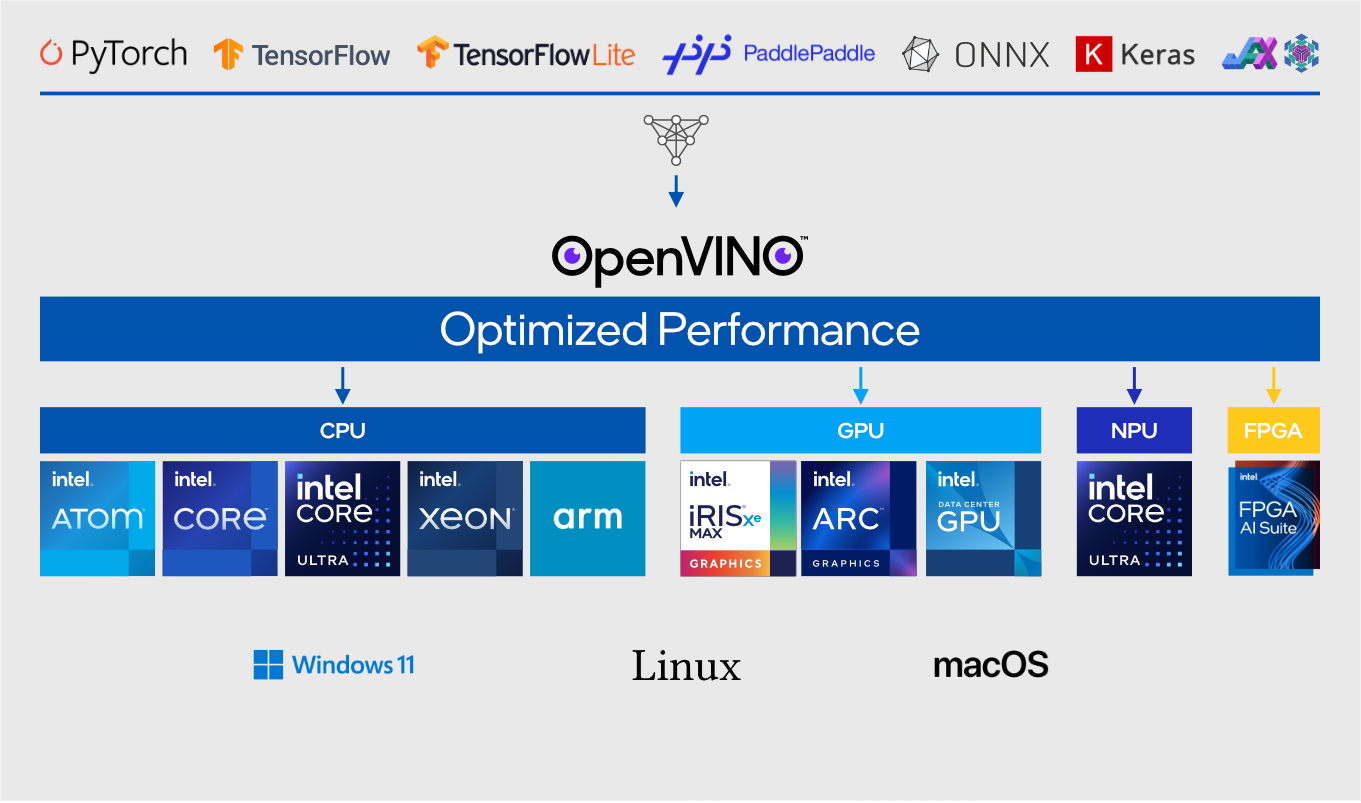
The OpenVINO toolkit is an Intel®-optimized AI inference and deployment toolkit. Implementing it into your pipeline does not require a massive redesign. You can do it with just a few lines of code and the model you already use because the OpenVINO toolkit works with most mainstream model frameworks.
Many models can be used with the OpenVINO toolkit directly, without requiring model retraining. For the best performance results, the toolkit enables you to easily convert your model to OpenVINO Intermediate Representation (IR) format. OpenVINO IR is the optimized model format used by OpenVINO deployments.
You can also get pre-converted models from OpenVINO organization on the Hugging Face platform.
For detailed guidance on deploying OpenVINO Runtime and other OpenVINO toolkit components, see the OpenVINO toolkit documentation.
Migration Overview#
The following table summarizes common migration paths from TensorRT-based deployments to OpenVINO Runtime deployments.
TensorRT Deployment |
OpenVINO Migration Path |
|---|---|
TensorRT engine ( |
Original model or ONNX model deployed with OpenVINO Runtime |
TensorRT runtime |
OpenVINO Runtime |
TensorRT-optimized inference pipeline |
OpenVINO Runtime application |
Triton Inference Server with TensorRT backend |
Triton Inference Server with OpenVINO backend |
ONNX model → TensorRT engine workflow |
ONNX model → OpenVINO Runtime or ONNX model → OpenVINO IR format |
OpenVINO Runtime supports importing and deploying models originating from popular frameworks including ONNX, TensorFlow, PyTorch, TensorFlow Lite, and PaddlePaddle. For details, see Model Preparation and Conversion.
TensorRT Engine-Specific Migration Guidance#
If your application currently uses the NVIDIA TensorRT engine for inference acceleration, the migration path to the OpenVINO toolkit depends on how your model is deployed today.
Common migration paths include:
Open Neural Network Exchange (ONNX) model (
.onnx) → OpenVINO RuntimeTensorFlow model → OpenVINO Runtime
PyTorch model → OpenVINO Runtime
OpenVINO Runtime does not consume TensorRT engine files directly. If your deployment uses precompiled TensorRT engines, you must start from the original model or an ONNX export and then load or convert the model for OpenVINO Runtime deployment. OpenVINO Runtime can load ONNX models directly and also supports conversion to OpenVINO IR format for additional deployment optimization.
What Can Be Reused?#
If your application already has an ONNX model, you can typically migrate a TensorRT-based deployment to OpenVINO Runtime without retraining the model.
In many TensorRT deployments, the original ONNX model remains available. In these cases, the ONNX model can be loaded directly by OpenVINO Runtime or converted to OpenVINO IR format for deployment.
Workflow Comparisons#
This table shows a side-by-side comparison of the typical workflows for TensorRT and OpenVINO.
TensorRT Engine Workflow |
OpenVINO Runtime Workflow |
|---|---|
Training Framework |
Training Framework |
ONNX |
ONNX |
TensorRT Engine |
OpenVINO IR |
TensorRT Runtime |
OpenVINO Runtime |
Inference |
Inference |
API Path Options#
There are several API paths you can take:
OpenVINO Runtime (standard API)
Delivers optimal performance, custom pipeline development, and full application control.
Enables device- and core-level tuning and load balancing.
Supports AI pipeline development using OpenVINO Runtime directly or through the OpenVINO GenAI library.
Provides Python, C++, and JavaScript APIs.
OpenVINO Runtime can load ONNX models directly. Converting a model to OpenVINO IR format is optional and is typically used to optimize deployment, model-loading time, and runtime performance.
OpenVINO GenAI library
Creates GenAI pipelines with just two to three lines of code in Python and C++ programming languages.
Supports GenAI use cases, including text generation, image generation, speech transcription, vision-language processing, text-to-speech, and text embedding pipelines.
Includes integrated tokenization and Low-Rank Adaptation (LoRA) support.
OpenVINO Model Server
Integrates OpenVINO Runtime with no application code changes.
Scales AI workloads across high-bandwidth networks and multiple processing devices.
Operates seamlessly across both traditional AI and GenAI workflows.
Existing APIs and Frameworks
Continue using your preferred APIs.
Supports straightforward cross-platform migration.
Enables Intel hardware optimizations with only a few lines of code.
API Migration Considerations#
Applications written directly against TensorRT APIs typically require code changes because TensorRT Runtime and OpenVINO Runtime use different runtime APIs.
However, if your application uses a higher-level framework (such as PyTorch, ONNX Runtime, Hugging Face Optimum, or Triton Inference Server), you may be able to retain much of your existing application structure while replacing the inference backend with OpenVINO Runtime.
The examples below demonstrate several supported integration paths.
Implementation Examples#
Run the Standard API#
You can run your model with just a few lines of code:
import openvino as ov
img = load_img()
core = ov.Core()
model = core.read_model(model="model.xml")
compiled_model = core.compile_model(model=model, device_name="CPU")
output_layer = compiled_model.outputs[0]
result = compiled_model(img)[output_layer]
Run the GenAI Pipeline#
The OpenVINO GenAI library provides a production-grade abstraction layer that simplifies generative AI development while preserving advanced performance optimizations.
import openvino_genai as ov_genai

pipe = ov_genai.LLMPipeline(model_path, "GPU")
print(pipe.generate("What is OpenVINO?", max_length=200))
Enable Intel® Hardware Acceleration#
OpenVINO toolkit integrates with a wide range of popular AI inference libraries and frameworks. As an inference backend, it allows you to continue using your existing APIs and workflows while benefiting from Intel® hardware acceleration and OpenVINO toolkit performance optimizations.
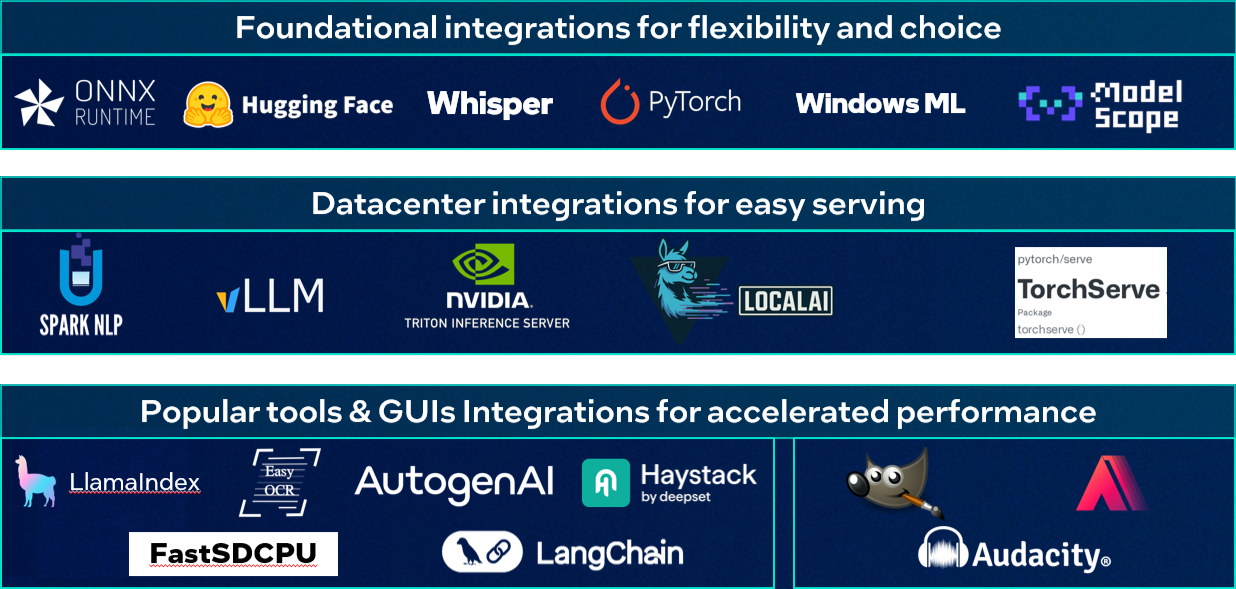
Integrating the OpenVINO toolkit into an existing application is straightforward:
import openvino.torch
#compile PyTorch model as usual with PyTorch
compiled_model = torch.compile(model, backend="openvino", options = {"device" : "CPU"})
from optimum.intel import OVModelForCausalLM
#define model_id, use transformers tokenizer & pipeline
model = OVModelForCausalLM.from_pretrained(model_id)
pipe = pipeline("text-generation", model=model, tokenizer=tokenizer)
onnx_model = onnx.load("model.onnx")
onnx.save_model(onnx_model, "saved_model.onnx")
sess.set_providers(["OpenVINOExecutionProvider"])
$ docker run --rm -p 8000:8000 -p 8001:8001 -p 8002:8002 -v /path/to/model_repository:/models nvcr.io/nvidia/tritonserver:<xx.yy>
py3 tritonserver --model-repository=/models
Config File:
name: "model_a"
backend: "openvino"
Triton Inference Server Migration#
If you currently serve models through NVIDIA Triton Inference Server, you can use the OpenVINO backend for Triton Inference Server.
For ONNX deployments, the model repository structure remains the same, while the backend configuration changes to:
backend: "openvino"
The OpenVINO backend supports deployment of ONNX, TensorFlow, and OpenVINO models through Triton Inference Server.
Porting Guide#
For more information on this topic, see the OpenVINO Porting Guide (downloadable playbook in the PowerPoint format).