ADR: Web UI and API Tech Stack#
Status: Proposed
Date: 2026-06-26
Updated: 2026-06-28
Authors: ICT Team
Technical Area: Web Frontend, REST API, Developer Tooling
Related: OpenAPI Spec, UI Prototype
Summary#
This ADR defines the technology stack for the ICT web-based template builder UI and its backing REST API. The interactive prototype at web/prototype/template-builder.html serves as the design reference — the production implementation will replicate its three-tab layout (Basic, Advanced, Build Image) using the stack defined here.
Context#
Problem Statement#
ICT needs a web interface that lets users compose image templates for different industry verticals and custom configurations. The UI must:
Provide a guided Basic flow where users pick a targeted vertical (Robotics, Physical AI, Agentic AI, Health, Fed Aero, Industrial IoT, Retail Edge, or Generic), SKU, platform (PTL/WCL/ARL/NVL), and OS — with vertical-specific defaults auto-applied
Provide an Advanced tab for power users to customize image type (RAW/ISO/QCOW), package repositories, packages, and disk/partition layout — with a live YAML preview
Provide a Build Image tab that streams build logs via SSE and lists output artifacts (Image + SBOM)
Be served from a single Go binary (one deployment artifact)
Architecture Principles#
Separate UI intent from ICT execution — UI captures user intent in product language; backend translates to ICT templates
No YAML in Basic — Basic tab uses product-level concepts only (verticals, SKUs, platforms)
YAML in Advanced — power users get live YAML preview and export capability
Basic → Advanced sync — switching from Basic to Advanced pre-populates all selections automatically
Reference Prototype#
The file web/prototype/template-builder.html demonstrates the exact views and interactions:
Tab |
Production Component |
Key Interactions |
|---|---|---|
Basic |
|
Targeted Vertical dropdown (Generic + 7 verticals), SKU dropdown (vertical-specific), Platform dropdown (PTL/WCL/ARL/NVL), OS dropdown with “– Select Operating System –” placeholder, “Review Image Configuration” checkbox expanding summary table (Image, Vertical, SKU, Platform, OS, Image Type, Disk, Packages). Any config change auto-unchecks review. |
Advanced |
|
Step wizard. MVP-1 steps: Target (same as Basic + Image Type/Name), Packages (repos + search/add), Disk (size/partitions), Review (summary + Validate + Export YAML + Build). Live YAML preview panel on right. More steps may be added later. |
Build Image |
|
Streaming log viewer (SSE) with “Build Status” title, artifacts table (Image + SBOM with copy-path icon) |
Constraints#
Single binary deployment: The compiled React frontend (static HTML/JS/CSS from
web/dist/) is embedded into the Go binary viaembed.FSand served by the same process that serves the API. Shipping and running ICT means shipping and running one executable — no separate web server, container, or Node.js runtime is required at deploy time.Existing Go stack: reuse what ICT already depends on —
net/http,cobra,jsonschema/v5,zap,yaml.v3.Team expertise: Go-primary team, moderate frontend experience.
Corporate proxy: SSE (not WebSocket) for real-time streaming.
Decision#
Architecture Diagram#
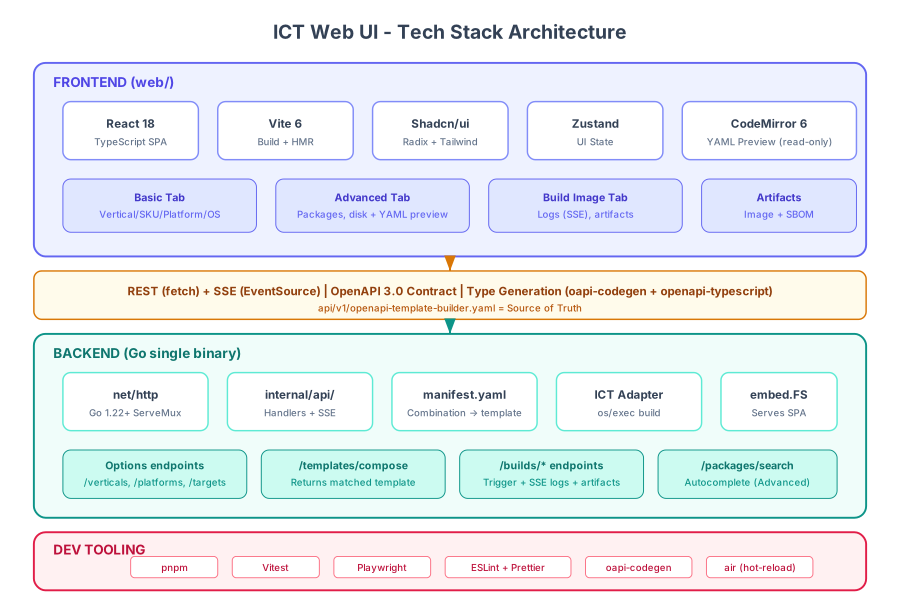
Data Flow Diagram#
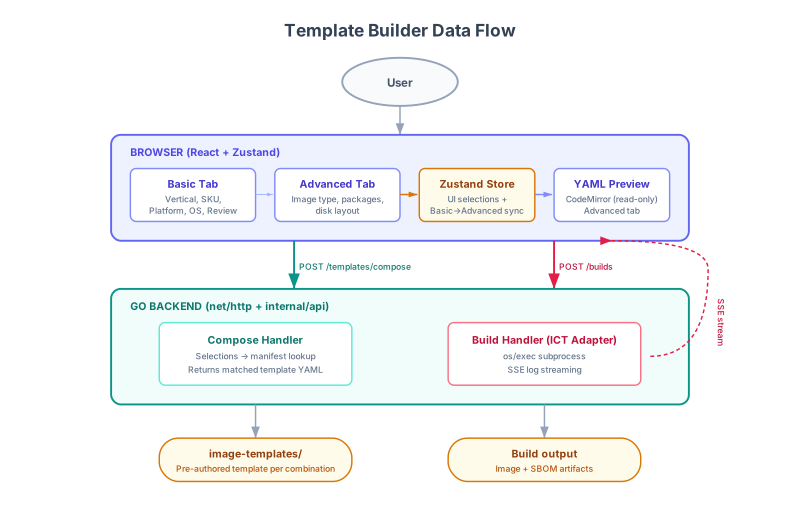
Sequence Diagram — Basic flow#
Basic is a pure lookup: selections → matched template → build. No YAML editing, no client-side template model.
        sequenceDiagram
    autonumber
    actor U as User (Browser)
    participant SPA as React SPA
    participant API as API (internal/api)
    participant M as manifest + image-templates/
    participant ICT as ICT binary (os/exec)

    Note over U,ICT: Load options
    SPA->>API: GET /manifest
    API->>M: load manifest (all combinations + labels)
    M-->>API: full manifest
    API-->>SPA: JSON → populate dropdowns (cascade locally)
    U->>SPA: select vertical / SKU / platform / OS

    Note over U,ICT: Review (optional)
    U->>SPA: check "Review Image Configuration"
    SPA->>API: POST /templates/compose {selections}
    API->>M: lookup template by combination
    M-->>API: matched template YAML
    API-->>SPA: summary (image, packages, disk, …)

    Note over U,ICT: Build
    U->>SPA: clicks Build Image
    SPA->>API: POST /builds {compose}
    API->>M: resolve matched template file
    API->>ICT: os/exec image-composer-tool build <template>
    API-->>SPA: 202 {buildId, logsUrl}
    SPA->>API: GET /builds/{id}/logs (SSE)
    loop while build running
        ICT-->>API: stdout/stderr line
        API-->>SPA: event: log {message} → append to viewer
    end
    ICT-->>API: exit code 0 (complete)
    API-->>SPA: event: complete {status, artifacts[]}
    SPA->>API: GET /builds/{id}/artifacts
    API-->>SPA: Image + SBOM (name, type, path) → table
Sequence Diagram — Advanced flow#
Advanced fetches the base template once, then all editing, preview re-rendering, and Export YAML happen client-side. Validate and Build send the complete YAML.
        sequenceDiagram
    autonumber
    actor U as User (Browser)
    participant SPA as React SPA
    participant API as API (internal/api)
    participant M as manifest + image-templates/
    participant ICT as ICT binary (os/exec)

    Note over U,ICT: Seed editor (once)
    U->>SPA: open Advanced (selections carried from Basic)
    SPA->>API: POST /templates/compose {selections}
    API->>M: lookup template by combination
    M-->>API: matched template YAML
    API-->>SPA: base template → load into editor + preview

    Note over U,SPA: Edit — client-side only, no backend calls
    loop each edit (packages / repos / disk)
        U->>SPA: modify configuration
        SPA->>SPA: mutate model, re-render YAML preview locally
    end
    opt package autocomplete
        SPA->>API: GET /packages/search?q=…
        API-->>SPA: matching packages
    end
    opt Export YAML
        U->>SPA: clicks Export YAML
        SPA->>SPA: download current YAML (Blob, client-side — no backend)
    end

    Note over U,ICT: Validate (optional)
    U->>SPA: clicks Validate
    SPA->>API: POST /templates/validate {yaml}
    API-->>SPA: {valid, errors[], warnings[]} → inline status

    Note over U,ICT: Build
    U->>SPA: clicks Build Image
    SPA->>API: POST /builds {yaml}  (complete edited template)
    API->>ICT: os/exec image-composer-tool build <template>
    API-->>SPA: 202 {buildId, logsUrl}
    SPA->>API: GET /builds/{id}/logs (SSE)
    loop while build running
        ICT-->>API: stdout/stderr line
        API-->>SPA: event: log {message} → append to viewer
    end
    ICT-->>API: exit code 0 (complete)
    API-->>SPA: event: complete {status, artifacts[]}
    SPA->>API: GET /builds/{id}/artifacts
    API-->>SPA: Image + SBOM (name, type, path) → table
Frontend Stack#
Layer |
Choice |
Maps to Prototype |
|---|---|---|
Framework |
React 18 + TypeScript |
Replaces vanilla DOM manipulation |
Build Tool |
Vite 6 |
Builds |
Component Library |
Shadcn/ui (Radix + Tailwind) |
Replaces inline CSS controls (dropdowns, chips, cards) |
CSS |
Tailwind CSS 4 |
Replaces CSS custom properties |
State Management |
Zustand |
Replaces prototype’s |
Form Validation |
Zod |
Client-side mirror of backend JSON Schema |
HTTP Client |
Native |
Replaces local logic with real API calls |
Icons |
Lucide React |
Replaces HTML entities |
Backend Stack (API Layer — Thin RESTful Service)#
Layer |
Choice |
Purpose |
|---|---|---|
HTTP Router |
Go stdlib |
Method + pattern routing, zero dependencies |
Middleware |
Custom (CORS, logging, request-id) |
Thin wrappers around stdlib |
Serialization |
|
Request/response marshalling |
Validation |
|
Template validation (already in deps) |
YAML |
|
Read/serve the matched template; parse the complete YAML sent by Advanced builds |
SSE Streaming |
Custom |
Build log streaming to UI |
ICT Adapter |
|
Translates intent to ICT calls, invokes |
Logging |
|
Structured logs |
Static Serving |
|
Embeds frontend assets |
API Docs |
OpenAPI spec in repo ( |
Viewable on GitHub, rendered by GitHub’s YAML viewer |
Developer Tooling#
Tool |
Purpose |
|---|---|
pnpm |
Package manager |
Vitest |
Unit tests |
Playwright |
E2E tests |
ESLint + Prettier |
Lint + format |
oapi-codegen |
Go types from OpenAPI spec |
openapi-typescript |
TypeScript types from OpenAPI spec |
air |
Go hot-reload in development |
Prototype-to-Production Mapping#
Basic Tab#
Prototype Feature |
Production Implementation |
|---|---|
Targeted Vertical dropdown with optgroup |
|
SKU dropdown (vertical-specific) |
|
Platform dropdown (PTL/WCL/ARL/NVL) |
|
OS dropdown (per-vertical) |
|
“Review Image Configuration” checkbox |
|
Review summary table |
|
Auto-uncheck on config change |
Zustand subscription resets review state on any selection change |
“Build Image” button |
Navigates to Build Image tab, triggers |
“Edit in Advanced” button |
Navigates to Advanced tab, syncs Basic state into Advanced store |
Advanced Tab#
Prototype Feature |
Production Implementation |
|---|---|
Step wizard with progress dots |
|
Target step (mirrors Basic + Image Type/Name) |
Same |
Packages step: repositories |
|
Packages step: search with autocomplete |
|
Packages step: selected packages tags |
|
Disk step: size + unit selector |
|
Disk step: partition table type |
|
Disk step: partition layout |
|
Review step: summary table |
|
Review step: Validate |
|
Review step: Export YAML |
|
Review step: Build Image |
Navigates to Build Image tab, triggers |
Live YAML preview (right panel) |
|
Basic → Advanced sync |
|
Build Image Tab#
Prototype Feature |
Production Implementation |
|---|---|
“Build Status” log viewer |
|
Build result indicator (Pass/Fail) |
Status badge driven by SSE |
Artifacts table (Image + SBOM) |
|
Copy path icon |
|
Copy logs / Download logs |
|
Key Technical Decisions#
Why stdlib net/http over chi/gin/echo?#
Go 1.22 added method + pattern routing. ICT has 9 endpoints — stdlib is sufficient and avoids external router dependencies.
Why React over HTMX?#
While the Basic tab could work with HTMX, the Advanced tab requires rich client-side state (step wizard, package tag inputs, live YAML preview, Basic→Advanced sync). Consistency across tabs and future extensibility favor a single SPA approach.
Why Shadcn/ui?#
Not a dependency (copy-paste) — no version lock-in
Accessible by default (Radix WAI-ARIA)
Tailwind-native — matches the prototype’s utility-style CSS
Small bundle — only ship what you use
Why Zustand?#
The template state (vertical selection + overrides from Advanced) maps cleanly to a single store. Zustand’s 1.1 kB footprint and zero-boilerplate API match the prototype’s simple state object pattern.
Why SSE over WebSocket?#
Build log streaming is unidirectional (server → client). SSE works through corporate proxies, has built-in auto-reconnect, and needs ~50 lines of Go.
Why import internal/config for validation instead of shelling out?#
The validate CLI command (image-composer-tool validate) internally calls config.LoadAndMergeTemplate(). Since the API server lives in the same Go module, it imports this function directly — no process spawn, structured errors without CLI text parsing, and the same validation logic the CLI uses. Reserve os/exec for the build (which needs process isolation for chroot operations).
State persistence across tabs and refresh#
User selections live in-memory only (Zustand store, no localStorage, no server sessions):
Scenario |
Behavior |
|---|---|
Switching between Basic / Advanced / Build Image tabs |
State preserved — Zustand store stays in memory. |
Page refresh or browser close |
Selections are lost — user starts fresh. |
Opening a new browser tab |
Independent session, starts fresh. |
This is the simplest correct approach for MVP-1:
No stale-state bugs when the manifest changes (a refresh always picks up the latest).
No backend session/auth infrastructure required.
A typical workflow (select → optional review → build) completes in one sitting.
Post-MVP — if users report friction from losing work on accidental refresh, add Zustand’s persist middleware with localStorage (one-line configuration change, no backend work). Server-side sessions are out of scope unless multi-device continuity is explicitly required.
Project Structure#
Frontend (web/)#
Key files only — the full component/handler breakdown will evolve during implementation.
web/
├── prototype/template-builder.html   # Design reference (open in browser)
├── src/
│   ├── api/            # Generated types (from OpenAPI) + typed client
│   ├── components/     # basic/ · advanced/ · build/ views + Shadcn ui/ primitives
│   ├── stores/         # Zustand state (Basic + Advanced)
│   └── pages/          # BasicPage · AdvancedPage · BuildImagePage
├── package.json
└── vite.config.ts      # dist/ output is embedded into the Go binary
Backend (internal/api/)#
Key files only — handlers are grouped by resource and may be split/renamed as the implementation matures.
internal/api/
├── server.go / router.go       # HTTP server + route registration
├── manifest.go + data/manifest.yaml  # Maps UI combination → template file + labels
├── handlers_*.go               # Verticals, platforms, targets, packages, compose, builds
└── sse.go                      # Build-log streaming
Implementation Data Model & Maintenance#
The backend follows ICT’s existing model: one complete, tested template file per
combination of Basic-UI selections. There is no runtime merging or overlay logic —
each combination resolves to a single pre-authored template in the image-templates/
directory. The ICT engineering team owns these templates and updates them only after
thorough testing; the API never synthesizes a template from scratch.
This keeps the backend trivially simple (a lookup, not a compositor) and guarantees that every image the UI can produce corresponds to a template that has been validated by engineering.
How selections map to a template#
The Basic UI collects five selections — OS, vertical, SKU, platform, image type — which together identify one template. A small manifest maps each valid combination to a template file by explicit reference, so filenames are not derived from the selections:
Selection |
Mapped template ( |
|---|---|
Ubuntu 24.04 · Robotics · AMR · PTL · ISO |
|
Ubuntu 24.04 · Generic · Non-Realtime · PTL · RAW |
|
No renaming required. Existing templates in
image-templates/keep their current filenames. The manifest’stemplate:field points at whatever the file is already called, so the UI mapping and the on-disk names stay fully decoupled — any naming scheme (existing or future) works without touching the UI or API code.
The manifest maps each combination to its template file plus the display metadata the UI needs (vertical/SKU/platform/OS labels, image type). It is the only new data artifact; the templates themselves already exist.
Data layout#
image-templates/                     # Existing — one tested template per combination
├── ubuntu24-x86_64-robotics-jazzy-iso.yml
├── ubuntu24-x86_64-minimal-ptl-pv-raw.yml
└── ...

internal/api/data/
└── manifest.yaml                    # New — maps UI combinations → template file + labels
Example manifest.yaml entry:
combinations:
  - vertical: robotics
    sku: amr
    platform: ptl
    os: ubuntu24
    imageType: iso
    template: ubuntu24-x86_64-robotics-jazzy-ptl-iso.yml
What each endpoint returns#
Endpoint |
Source |
|---|---|
|
Serves the full manifest in one call — all valid combinations + vertical/platform/target display labels. The UI derives dropdown cascading locally. |
|
Returns the matched template’s YAML verbatim — Basic uses it for the Review summary; Advanced fetches it once to seed the editor |
|
Validates the Advanced tab’s edited YAML against the ICT schema; returns |
|
Basic: |
Maintenance (owned by ICT engineering)#
Change |
Action |
|---|---|
Add/adjust a combination’s image content |
Edit the corresponding |
Add a new combination |
Author + test a new template, add one |
Add an OS/SKU/platform to a vertical |
Author the template(s) for the new combination, add manifest entries |
Because the dropdown options are derived from the manifest, the UI can only ever offer combinations that have a tested template behind them — invalid selections are impossible to construct.
Advanced tab#
The Advanced tab starts from the matched template (via Basic → Advanced sync) and lets power users adjust packages, repositories, and disk layout on top of it.
Editing is entirely client-side. The base template is fetched once (POST /templates/compose) when the user enters Advanced. Every subsequent edit mutates the
in-browser Zustand model, and the live YAML preview re-renders locally — there are no
per-change backend round-trips. At build time the browser sends the complete edited
YAML to POST /builds { yaml } (not a diff), so the preview the user sees is exactly
what gets built.
These edits produce a modified YAML for that build only; they do not alter the stored templates. Changing a default template remains an engineering-team action.
Build tracking (MVP-1)#
Builds are tracked in-memory by the API server — no database.
On
POST /builds, the server generates a UUID and creates a work directory (workspace/builds/{buildId}/)ICT writes artifacts (image + SBOM) into that directory
Build metadata (id, status, startedAt, completedAt, artifacts[]) is held in a
map[string]*BuildGET /builds/{id}/artifactsreads from this map (paths point toworkspace/builds/{buildId}/)The SSE connection keeps the entry alive; after completion, entries are retained for a configurable TTL (e.g. 30 min)
On server restart, build history is lost (acceptable for MVP-1)
Post-MVP: Persist build metadata to workspace/builds/{buildId}/metadata.json so the server can rehydrate on restart. No database needed — the filesystem is the store.
Package search strategy#
The Advanced tab’s package search (GET /packages/search) is debounced server-side search over a live package index, not a bulk client-side download.
Client debounces input (300ms) and sends
GET /packages/search?q=...&os=...&limit=10Server builds an in-memory index of package metadata per enabled repository by reusing ICT’s existing repo-metadata parsers:
Debian/apt:
internal/ospackage/debutilslocates and parsesPackages.gz/Packages.xzRPM/dnf:
internal/ospackage/rpmutils.ParseRepositoryMetadata()parsesprimary.xmland already returns[]ospackage.PackageInfo(name + version), with a built-in name-prefix filter
The index is populated lazily per repo (on first search touching that repo) and cached; ICT’s parsers already persist metadata to the cache directory, so re-parsing is avoided across restarts
Results include package name, latest version, description, and source repository — version comes free from
PackageInfoMinimum query length: 2 characters
Why this is affordable: no new metadata parsing is written — the search handler wires up functions ICT already uses during builds.
Scale note: a full apt suite’s
Packages.gzis large (tens of thousands of entries). Mitigations: index only enabled repos, load lazily per repo, and rely on the existing on-disk metadata cache. A refresh TTL keeps the index current.
Build & Development Workflow#
Development#
# Terminal 1: Go API with hot-reload
air

# Terminal 2: Vite dev server (proxies /api/* to Go)
cd web && pnpm dev
Production Build#
cd web && pnpm build
go build -o image-composer-tool ./cmd/image-composer-tool
Type Generation#
Each endpoint declares an operationId (e.g. listVerticals, composeTemplate, startBuild), so generated Go and TypeScript client functions get stable, readable names.
oapi-codegen -generate types,client -o internal/api/types.gen.go api/v1/openapi-template-builder.yaml
npx openapi-typescript api/v1/openapi-template-builder.yaml -o web/src/api/types.ts
Alternatives Considered#
Alternative |
Reason Rejected |
|---|---|
HTMX + Go templates |
Advanced tab needs client-side state (step wizard, tag inputs, live YAML preview) |
Vue 3 + Vuetify |
Smaller ecosystem, opinionated Material styling |
chi/gin router |
stdlib Go 1.22+ mux sufficient for 9 endpoints |
WebSocket for streaming |
Blocked by corporate proxies, bidirectional not needed |
Separate nginx for static |
embed.FS gives single-binary deployment |
Consequences#
Benefits#
Single binary:
go buildproduces one artifact with UI + APIType-safe end-to-end: OpenAPI generates both Go and TypeScript types
Proven UX: Production mirrors the validated prototype exactly
Vertical-first UX: Non-expert users pick a vertical and get working defaults — 4 dropdowns + Build
Seamless escalation: Basic → Advanced carries all selections forward, no re-entry
SBOM output: Every build produces both an image and a software bill of materials
Trade-offs#
Two build steps (Vite + Go) — mitigated by
make buildNode.js in CI — common in modern pipelines
embed.FS adds ~2-5 MB to binary — acceptable
Risks#
Frontend skill gap — mitigated by React + Shadcn (copy-paste, good docs) + prototype as reference
Manifest/template drift — each UI combination maps to a tested template in
image-templates/viamanifest.yaml; CI validates that every manifest entry points to an existing template file. Templates change only through engineering review. See Implementation Data Model & Maintenance.YAML preview fidelity — client-side YAML generation must match ICT template schema exactly
References#
Revision History#
Date |
Author |
Change |
|---|---|---|
2026-06-26 |
ICT Team |
Initial proposal — Basic/Advanced/Build MVP |
2026-06-28 |
ICT Team |
Updated to match prototype: renamed Build→Build Image, IMG→QCOW, removed kernel/users/policies/unattended steps, removed info cards/progress bar/build history, added Review Image Configuration checkbox, added artifacts table (Image+SBOM), added Basic→Advanced sync, reordered steps (Target→Packages→Disk→Review), updated API endpoints and project structure |
2026-06-28 |
ICT Team |
Editorial cleanup; OpenAPI spec rewritten with |
2026-06-28 |
ICT Team |
Basic tab OS dropdown now per-vertical ( |
2026-06-28 |
ICT Team |
Replaced catalog/overlay data model with ICT’s template-per-combination model: each UI selection maps via |
2026-07-01 |
ICT Team |
Refreshed both architecture diagrams to match current model (removed Swagger/validate/CRUD/policies/history; added manifest + artifacts); noted Advanced wizard steps are MVP-1 scope; clarified single-binary constraint; trimmed Project Structure to key files |
2026-07-01 |
ICT Team |
Renamed “Backend Data Model & Maintenance” → “Implementation Data Model & Maintenance”; added sequence diagram (API calls & ICT binary invocation over |
2026-07-01 |
ICT Team |
Converted sequence diagram to Mermaid (repo convention for sequence diagrams); recolored block diagrams with a softer palette; renamed hand-authored SVGs from |
2026-07-01 |
ICT Team |
Clarified build payload & Advanced preview: |
2026-07-01 |
ICT Team |
Enforced exactly-one |
2026-07-02 |
ICT Team |
Documented team decisions: single manifest endpoint, in-memory build tracking, debounced server-side package search, Go library for validation (not binary), package repo priority support |
2026-07-02 |
ICT Team |
Documented in-memory session state (preserved across tabs, lost on refresh; no localStorage/server sessions for MVP-1); required |
2026-07-04 |
ICT Team |
Package search adopts a live index reusing ICT’s existing |